
This Aosu indoor cam P1 Pro review started with fairly low expectations, since indoor pan and tilt cameras in this price range often cut corners somewhere. In this case, however, the P1 Pro delivered more than expected across nearly every category we tested. From accurate people detection to fast video retrieval, this camera earned its place as a strong addition to the Aosu lineup we already cover on the site. Additionally, it addresses a few of the pain points we ran into with earlier Aosu hardware, which made it a more interesting test than we initially anticipated.
What Is the Aosu Indoor Cam P1 Pro
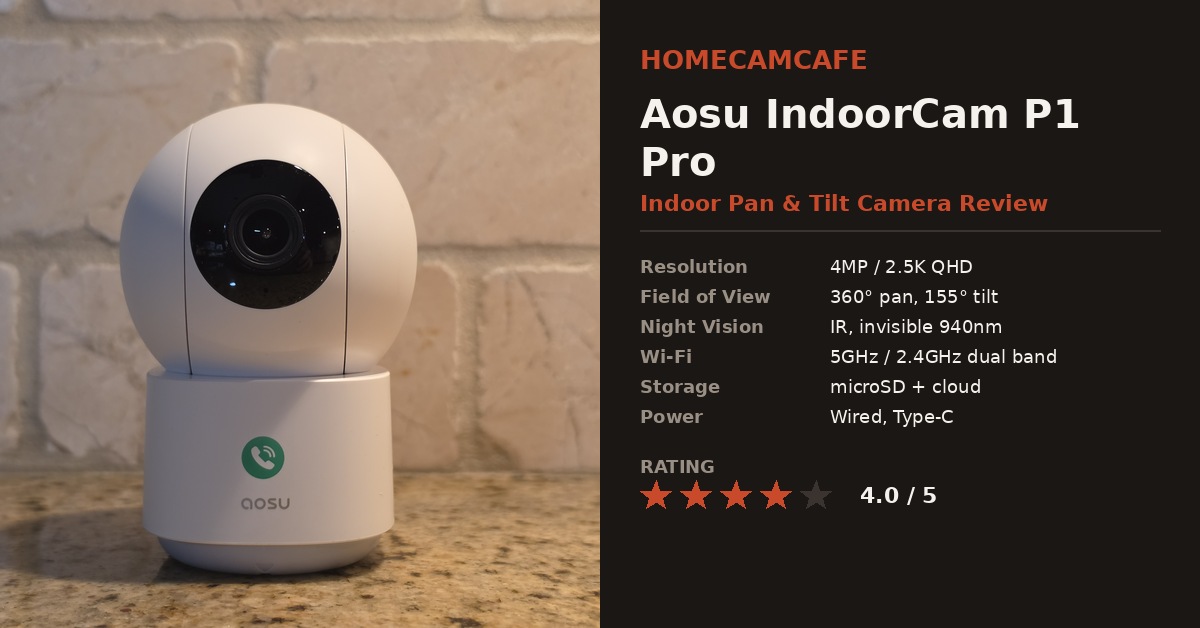
The Aosu IndoorCam P1 Pro is a 4MP, 2.5K indoor pan and tilt camera built for general home monitoring, pet watching, and baby room duty. It is the upgraded follow up to the original 2K IndoorCam P1, and it keeps the same 360 degree horizontal rotation and 155 degree vertical tilt that made the first version popular. In addition, Aosu positions it as a plug in indoor camera rather than a battery model, which lines up with what we found during setup. As a result, this is best suited for a fixed spot near an outlet rather than a room where you plan to move the camera around often.
Setup and First Impressions
Setup was easy from start to finish. The app walked through Wi-Fi pairing without any of the dropped connections we have run into with other budget indoor cameras, and the camera supports both 5GHz and 2.4GHz networks, which is a nice bit of flexibility that not every camera at this price offers. That said, Aosu pushes its paid cloud service fairly hard during onboarding. The prompts are not aggressive enough to call a dealbreaker, but new owners should expect a few upsell screens before reaching the live view. Overall, the process took under ten minutes from unboxing to a working live feed, which is faster than several other indoor cameras we have tested on this site.
Placement and Mounting
Because the P1 Pro requires constant power, placement mostly comes down to finding a nearby outlet with a clear line of sight to the area you want to monitor. The included base sits flat on a shelf or dresser, which works well for a living room or nursery corner. However, if you want a ceiling or wall mounted angle instead, you will need to route the Type-C cable along the wall yourself, since Aosu does not include a dedicated mounting bracket in the box. For most households, tabletop placement is the simpler route, and it is the setup we tested throughout this review.
Intelligent Detection and Motion Tracking
The intelligent detection feature is one of the strongest parts of this camera. It correctly identifies people rather than triggering on every shadow or passing pet, which is exactly what you want from a camera watching a living room or nursery. Furthermore, false alerts were rare during our testing window, which is not something we can say about every budget camera in this category. Smart motion tracking is also on board, and it does follow a moving subject around the room as advertised.
In practice, though, the tracking tends to angle downward while following motion, which can crop the top of a subject’s head out of frame. It is a minor quirk rather than a dealbreaker, but it is worth knowing about before you rely on tracking for full body framing. In contrast, static detection zone alerts did not show this issue at all, since the camera is not actively repositioning itself for those events.
Detection zones are also supported, which lets you limit alerts to specific parts of the room instead of the entire field of view. This is a feature we like to see on any indoor camera, since it cuts down on notifications triggered by a TV screen, a window, or a doorway that sees constant foot traffic. Most importantly, this level of control is not always available on cameras in this price range, which makes it one of the more valuable features here.
Video Retrieval and App Performance
Video retrieval was fast and worked well throughout testing, which stood in clear contrast to the Aosu SolarCam D1 Classic we reviewed previously, where pulling recorded clips was a slower and occasionally frustrating process. The P1 Pro’s app loads recorded events quickly, and scrubbing through the timeline felt responsive rather than laggy. As a result, this camera is much easier to trust for after the fact review, which matters just as much as live viewing for most households. Likewise, live view loaded consistently within a second or two on a home Wi-Fi connection, with no noticeable lag between rooms.
Local Storage
The Aosu IndoorCam P1 Pro takes a microSD card in a slot located under the lens housing, and we tested it with a 128GB card with no issues formatting or recording. Local storage remains one of the more reliable ways to avoid a subscription entirely, and this camera does not lock any core recording features behind the cloud plan. Therefore, budget conscious buyers can skip the subscription altogether and still get full event recording through the card alone.
Two Way Audio and One Touch Call
Two way audio is included, and Aosu adds a one touch call button on the base of the camera itself. Pressing it triggers a call straight to the paired phone without opening the app first, which is clearly aimed at households checking in on kids or elderly family members. It is a purely situational feature. Some owners will use it constantly, while others, ourselves included so far, may rarely touch it. Either way, it costs nothing to have available, and it is a thoughtful addition rather than a gimmick.
Features Worth Knowing About
Beyond the core functions, the P1 Pro includes a few additional details that are easy to overlook on the spec sheet. For example, several of these are the kind of small conveniences that only become obvious after living with the camera for a few weeks:
- Night vision uses 8 separate infrared LEDs, including invisible 940nm IR, which avoids the visible red glow that can disturb a sleeping baby.
- Up to 5 people can view the live feed at the same time through the app, which is useful for larger households.
- Event filtering lets you sort recorded clips by type, in addition to fast forward and rewind controls for quickly scanning through footage.
- Quick reply presets are available for the call feature, so a message can be sent instantly without typing when you are busy.
- The camera is powered through a Type-C cable and USB adapter rather than a battery, so it is meant for continuous plugged in operation.
How It Compares to the Original IndoorCam P1
Compared to the original 2K IndoorCam P1, the P1 Pro’s biggest upgrade is resolution, moving from 2K up to 4MP, or roughly 2.5K. In addition, the Pro model adds 5GHz Wi-Fi support, while the original was limited to 2.4GHz only. Otherwise, the two cameras share most of the same core feature set, including one touch calling, smart motion tracking, and the same 360 degree by 155 degree range of motion. Consequently, anyone deciding between the two should base the choice mainly on video clarity and Wi-Fi flexibility rather than expecting a dramatically different feature list.
Pros: Accurate people detection, fast video retrieval, detection zones included, dual band Wi-Fi, invisible IR night vision, easy setup
Cons: Motion tracking angles downward and can crop the top of the frame, cloud service upsells appear during setup, requires constant power rather than battery operation
Verdict
Rating: 4.0 / 5
The Aosu IndoorCam P1 Pro outperformed our expectations for an indoor pan and tilt camera in this class. Detection accuracy and video retrieval speed are the standout strengths, and detection zones add a level of control that budget indoor cameras often skip. Meanwhile, the downward tilt during motion tracking and the cloud service push during setup are the two things to be aware of, but neither one changes our overall recommendation. For anyone shopping the Aosu indoor lineup, this is currently the pick to consider. Check the Aosu IndoorCam P1 Pro on Amazon for current availability.
Frequently Asked Questions
Does the Aosu IndoorCam P1 Pro need a subscription?
No. Local recording works through a microSD card in the slot under the lens, and no core feature is locked behind the cloud plan. That said, the app does promote the paid cloud service fairly heavily during setup, so expect a few upsell prompts along the way.
Does the Aosu IndoorCam P1 Pro work on battery power?
No. It is powered through a Type-C cable and USB adapter, so it needs to stay plugged in near an outlet. There is no battery option on this model, which is worth planning around before choosing a spot for it.
Does the smart motion tracking follow people accurately?
For the most part, yes. It reliably follows a moving subject around the room, but it tends to angle downward while tracking, which can crop the top of a subject’s head out of frame. Static detection zone alerts do not have this issue, since the camera is not repositioning itself for those events.
What size microSD card does the P1 Pro support?
We tested it with a 128GB card, and it formatted and recorded without any issues. The card slot sits under the lens housing on the camera’s front face.
How is the P1 Pro different from the original Aosu IndoorCam P1?
The Pro model upgrades resolution from 2K to 4MP, or roughly 2.5K, and adds 5GHz Wi-Fi support alongside the standard 2.4GHz band. Beyond that, the two cameras share the same one touch call, smart tracking, and 360 by 155 degree range of motion.
For more Aosu camera models see the Aosu SolarCam D1 Classic review. For brand-specific guides see the Aosu camera reviews hub.
