
The Kasa EC70, sold at retail as the Kasa Spot Pan Tilt, is TP-Link’s budget pan/tilt indoor camera. For this Kasa Spot Pan Tilt review, I tested it against my experience with Tapo, Wyze, and Reolink hardware and expected it to feel much like the visually similar Tapo C200. That comparison turned out to be more accurate than I expected, for better and for worse.
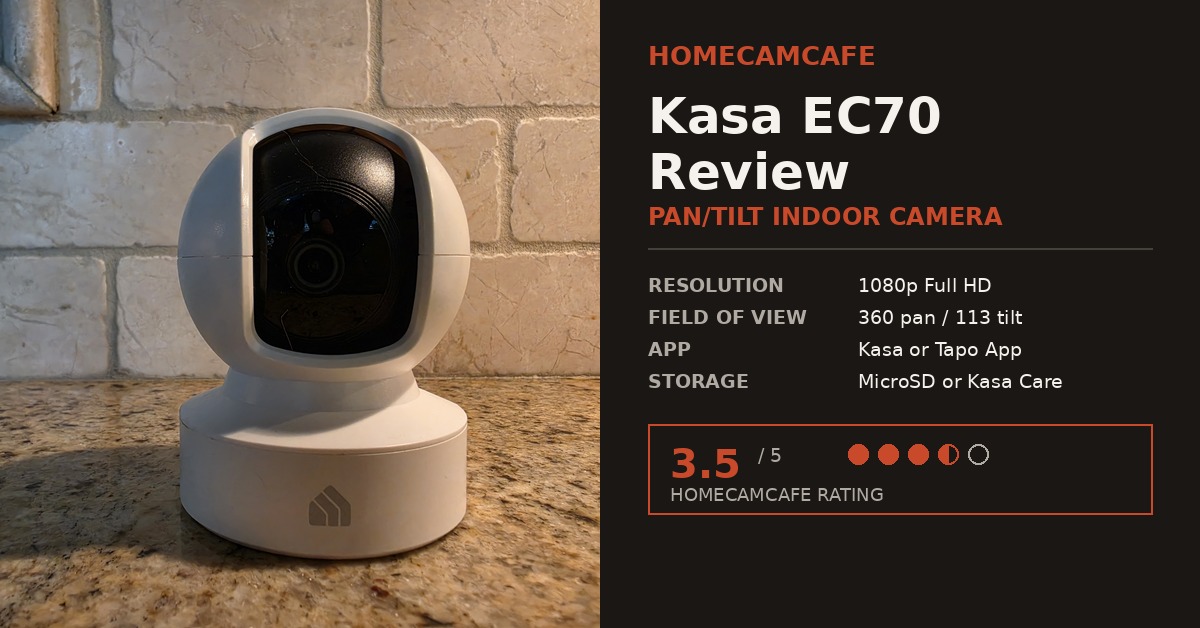
In addition to the standard Kasa app experience, the EC70 can also be controlled through the Tapo app, which is a detail that only becomes clear once you own one and start setting it up. That flexibility is a real advantage for anyone already invested in TP-Link’s ecosystem. However, it also comes with a limitation worth knowing about before you buy.
Design and Build Quality: Kasa Spot Pan Tilt Hardware
Physically, the EC70, or Kasa Spot Pan Tilt as it appears on the box and in the Kasa app, is unmistakably a sibling of the Tapo C200. It has the same spherical camera head mounted on a rotating base, finished in matte white plastic with a small house-shaped logo on the front of the base. Furthermore, the build feels solid on a countertop or shelf, with no creak or flex when the head pans through its full range. The lens housing sits slightly recessed, which helps cut down on glare from overhead lighting, and the base has enough weight to it that the camera does not wobble or shift during active tracking.
At 1080p, the Kasa Spot Pan Tilt Camera is a resolution step behind newer 2K cameras like the Tapo C210 or C220, as well as the 3K Tapo C230. That said, in my testing the image was crisp and well-detailed for the price point, with accurate color reproduction in daylight and a clean, well-exposed picture indoors under normal room lighting. Night vision performance was similarly solid, with the built-in infrared LEDs producing a clear black-and-white picture out to roughly the manufacturer’s stated 30-foot range. Beyond that distance, detail predictably softens, but faces and general movement remained easy to identify throughout my kitchen and living room testing.
In addition, the camera ships with the hardware you would expect at this price: a power adapter, a USB cable, mounting screws, and a mounting plate for wall or ceiling installation. As a result, setup on a shelf or countertop requires no tools at all, which makes the EC70 an easy camera to relocate later if your monitoring needs change.
Setup and the Tapo App Connection
To begin, setup follows the familiar TP-Link pattern: plug in the camera, wait for the audio prompt, and connect through the app on 2.4GHz Wi-Fi. Where it gets interesting is the app choice. The EC70 pairs with the Kasa Smart app as expected, but it can also be accessed and controlled directly through the Tapo app, which is unusual for a device carrying the Kasa name rather than the Tapo one.
The catch, at least as of this testing, is that the EC70 cannot be added to a Tapo Care cloud subscription. The Tapo app displays a message stating that Kasa cameras are not yet supported for that specific feature. Consequently, if cloud recording matters to you and you want it tied to a Tapo Care plan, the EC70 is not the camera to buy. Even so, local microSD storage and the separate Kasa Care plan remain fully functional either way.
Check the current price on Amazon
The Motor Noise Problem
This is the part of the review I did not expect to be writing. The EC70’s pan and tilt motor is loud, noticeably louder than any pan/tilt camera I have tested to date, including the visually similar Tapo C210. Every time the camera repositions, whether from a manual swipe in the app, a patrol mode cycle, or motion tracking kicking in, it produces an audible whirring sound that carries across a room. In a bedroom or nursery, that noise is likely to be disruptive.
To be fair, this does not affect video quality or detection accuracy in any way. Nevertheless, it is a real, everyday annoyance for a camera you may want to run on patrol mode throughout the day. If you plan to use active tracking or scheduled patrol sweeps frequently, test the noise level in person before committing to placement near a sleeping space.
Motion Tracking and Patrol Mode
Beyond the noise, the pan/tilt mechanics themselves work as intended. The EC70 covers a 360-degree horizontal range and a 113-degree vertical tilt, which is enough to monitor most single rooms without a blind spot. Motion tracking followed a subject smoothly across the frame in my tests, and patrol mode let me set several fixed viewpoints for the camera to rotate through automatically at set intervals. For anyone coming from a stationary camera, this is a genuine upgrade in coverage, provided the motor noise is not a dealbreaker.
Activity zones are also available at no extra cost, which lets you limit alerts to specific areas of the frame rather than triggering on every bit of movement. For example, you can set a zone around a doorway or crib while ignoring a window where curtains move in the breeze. In my testing, zone-based alerts were reliable and cut down significantly on false notifications compared to whole-frame detection.
Storage Options
The EC70 supports local recording to a microSD card, with no subscription required to view or export that footage. TP-Link also offers an optional Kasa Care cloud plan for extended history and smart alerts, similar in structure to Tapo Care but managed separately through the Kasa app. If you plan to record continuously rather than on motion events only, a high-endurance card built for constant read/write cycles will hold up far better over time than a standard consumer microSD card.
It is worth noting that local storage and cloud storage are not mutually exclusive here. In other words, you can run the EC70 entirely on a microSD card with zero ongoing cost, add a Kasa Care subscription later if you want smart alerts and extended history, or do both at once. This flexibility is one of the stronger points in the EC70’s favor, especially for anyone who wants to avoid a recurring subscription altogether.
For continuous recording, I would pair the Kasa Spot Pan Tilt with a high-endurance microSD card rated for security cameras rather than a standard card, since 24/7 recording puts far more wear on storage than typical smartphone use.
If you want the same subscription-free 24/7 recording in a fixed outdoor camera, see my hands-on Kasa KC420WS review. It is a better fit for a driveway, entrance, or side yard, while the EC70 is designed for indoor pan-and-tilt coverage.
Who Should Buy the Kasa Spot Pan Tilt
The Kasa Spot Pan Tilt makes the most sense for anyone who wants pan/tilt coverage of a single room without paying for 2K resolution or committing to a cloud subscription. It works well as a general-purpose indoor camera for watching a living room, a home office, or an entryway, since the wide pan range covers most of a room from a single mounting point. Similarly, it can serve as a basic pet camera thanks to two-way audio and motion tracking, though the motor noise means it is not the best fit for anyone who wants their pet undisturbed while the camera repositions.
On the other hand, I would steer away from this camera for nursery or bedroom use specifically because of the noise. A stationary camera, or one with a quieter motor, is a better match for spaces where silence matters. Most importantly, if you already run other TP-Link devices through Tapo Care and want everything centralized under one cloud plan, the current lack of Tapo Care support for Kasa devices is a real limitation to weigh before buying.
Kasa EC70 vs. Kasa 2K Pan/Tilt (KC410S): Is the Resolution Upgrade Worth It?
TP-Link also sells this same body style in 2K under the Kasa Spot Pan Tilt name, the KC410S. Similar to how Tapo splits this design across the 1080p C200 and the 2K C210, Kasa runs the same lineup structure internally. The KC410S adds a starlight sensor for color night vision along with the sharper overall image, which matters most if you plan to digitally zoom into footage or monitor a larger room where extra detail counts. For example, identifying a face clearly after cropping into a clip is meaningfully easier at 2K than at 1080p.
That said, the EC70 remains the better pick if budget is the priority, since the KC410S charges more for higher resolution and improved low-light hardware in an otherwise similar pan-and-tilt design. If image detail matters more than price, the KC410S is worth the upgrade. If you mainly need reliable coverage of a single room without zooming into footage later, the EC70 covered in this review is enough.
Kasa Spot Pan Tilt (EC70) vs. Tapo C210
Given how closely these two cameras resemble each other, the comparison is unavoidable. The Tapo C210 steps up to 2K resolution and integrates natively with Tapo Care cloud storage, which the EC70 currently cannot do. On the other hand, the EC70 is typically the more budget-friendly option and still delivers a sharp 1080p picture for anyone who does not need cloud subscription support. If native Tapo Care compatibility matters to you, the C210 is the safer choice. If you are comfortable with local storage or the separate Kasa Care plan, the EC70 holds its own.
Frequently Asked Questions
Why is my Kasa Spot Pan Tilt motor so loud?
The Kasa Spot Pan Tilt uses a mechanical motor to physically rotate the camera head, and this particular model runs louder than most pan/tilt cameras on the market. This is normal operation rather than a defect, though it is worth testing in person if the camera will be placed near a sleeping area.
What does a blinking red light on the Kasa Spot Pan Tilt mean?
A blinking red light means the EC70 is trying to connect to Wi-Fi. It is normal briefly during setup, but if it continues, confirm that the camera is within range of a stable 2.4GHz network and that the Wi-Fi password is correct. If it still cannot connect, restart the camera before resorting to a reset and setup from scratch.
Can the Kasa Spot Pan Tilt use the Tapo app?
Yes. The EC70 can be accessed and fully controlled through the Tapo app in addition to the Kasa Smart app. However, it cannot currently be added to a Tapo Care cloud subscription, since Tapo Care does not yet support Kasa-branded devices.
For more hands-on coverage, read my Kasa KC420WS outdoor camera review, visit the Tapo camera reviews hub, or browse the full home security camera reviews page.
Verdict: 3.5 / 5
The Kasa Spot Pan Tilt delivers a sharp, detailed 1080p picture and unexpected flexibility through Tapo app compatibility, making it a solid budget pan/tilt option. However, its pan and tilt motor is louder than any comparable camera I have tested, and it currently cannot connect to a Tapo Care cloud subscription. It earns a recommendation for anyone prioritizing image quality and app flexibility over silent operation.
