
In this Aosu SolarCam D1 Classic review, we take a close look at model C9C, a solar-powered, pan-tilt outdoor security camera that looks great on paper with 2K resolution, 360° coverage, auto-tracking, and no subscription required for local storage. In practice, however, the experience is more complicated. There is real potential here, and the hardware itself is well built, but several core issues hold it back from being an easy recommendation. Below, we break down design, app performance, motion detection, storage, installation, and how the single-camera version compares to Aosu’s multi-camera kits.
Check the current price on Amazon
| Specification | Aosu D1 Classic (C9C) |
|---|---|
| Resolution | 2K / 3MP (2304 × 1296) |
| Pan / Tilt | 360° pan / 90° tilt |
| Power | Solar panel (2 to 3 hrs sunlight/day) |
| Local Storage | microSD (8 to 128GB, not included) |
| Night Vision | Color + IR with LED spotlight |
| Weather Rating | IP65 |
| Wi-Fi | 2.4 GHz only |
| Smart Home | Amazon Alexa, Google Assistant |
| Model Number | C9C |
Design and Build Quality
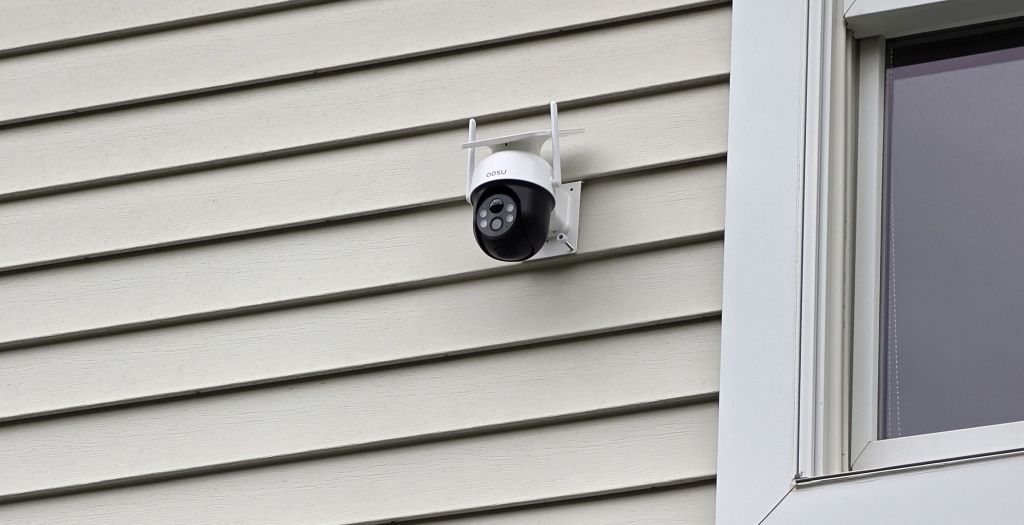
The D1 Classic has a clean, one-piece design that works well. The integrated solar panel sits atop a dome-style turret head, with two adjustable Wi-Fi antennas flanking the top. There are no dangling cables to a separate panel, which keeps the installation looking tidy on exterior siding or fascia. In addition, the pan-and-tilt mechanism feels sturdy, and the IP65 weather rating means rain and dust are not a concern. Overall, the hardware makes a solid first impression, even before the software enters the picture.
App Performance: A Persistent Problem
Unfortunately, the app is where the D1 Classic runs into serious trouble. The Aosu app is noticeably laggy, with sluggish response times, slow loading of live feeds, and delays when controlling the pan-tilt from your phone. Clearing the app cache did help somewhat, though it does not fully resolve the issue. Furthermore, this is not an occasional glitch; the lagginess is consistent enough to affect day-to-day usability in a meaningful way.
What makes this especially frustrating is that the app is the primary interface for everything, including live viewing, motion alerts, playback, and PTZ control. As a result, when it underperforms, the entire camera experience suffers. Additionally, the online product rating for the D1 Classic is notably strong, while the app store rating tells a very different story. That gap is worth paying attention to, since buyers who are impressed at unboxing may find themselves less satisfied a few weeks in after relying on the app daily.
Worth noting: The Aosu D1 Classic carries a strong online rating, however the app store rating tells a noticeably different story. If you plan to rely on the app heavily for daily monitoring, weigh both ratings before purchasing.
Motion Detection: Below Expectations
Motion detection on the D1 Classic is another weak point. The camera markets itself on AI-powered human detection and auto-tracking, but in real-world use the detection is inconsistent. Events are missed that should trigger alerts, and the lack of sensitivity options in the app cannot fully compensate for the underlying performance gap. For a camera whose primary job is to alert you when something is happening, this is a significant limitation.
To make matters worse, there are no motion zones available. Motion zones, or the ability to draw a defined area within the frame where detection should focus, are a standard feature on most cameras in this class. Without them, you have no way to reduce false alerts from trees or traffic while still catching activity near your door or driveway. That omission is hard to overlook, particularly for buyers who live on a busy street.
Local Storage: microSD Works, But Slowly
The D1 Classic supports a microSD card (8 to 128GB, not included) for local storage, which is a welcome option that many cameras drop in favor of cloud-only plans. In practice, however, the microSD performance is slow. Footage access and playback from the card are noticeably sluggish compared to what you would expect from a modern camera. It works, but it is not a smooth experience. Therefore, if you are considering this camera and plan to rely on local storage, factor that in accordingly.
Cloud Subscription: Expensive
AosuProtect+ is available as an optional add-on, but the pricing is steep. For a camera in this price range, the subscription cost feels disproportionate, especially when local microSD storage is already available, albeit slow, and the free tier through the aosuBase hub is functional for many users. If cloud backup is important to your setup, budget accordingly, because the cost will add up quickly.
Installation and Solar Placement
Getting the most out of the D1 Classic starts with where you mount it. Since the solar panel is built into the camera housing rather than wired separately, placement is a single decision instead of two. The camera needs roughly two to three hours of direct sunlight per day to keep the battery topped off. Accordingly, a south or west-facing eave, gable, or fascia board is typically the best target in most parts of the country. In contrast, a north-facing wall or a spot shaded by trees for most of the day will likely leave the battery struggling to keep pace, particularly through the shorter daylight hours of winter.
Because the D1 Classic runs on 2.4 GHz Wi-Fi only, signal strength is another factor worth checking before you commit to a mounting spot. Cameras placed far from the router, or behind brick and masonry, may see slower live-view loading on top of the app’s existing lag. A Wi-Fi extender or mesh node near the mounting location can help offset this, and it is worth testing signal strength with a phone at the exact spot before drilling anything in. Finally, since the camera is a one-piece unit, mounting hardware is minimal: a single bracket and a few screws are typically all that is needed, which keeps the physical setup itself fairly quick even though the app experience afterward is not.
What the D1 Classic Gets Right
Despite the frustrations, there are two areas where the D1 Classic shines. First, the panoramic snapshot feature is excellent. The camera can sweep a full panoramic view of the scene and then let you tap on any point within that panorama to direct the camera exactly there. It is an intuitive and practical way to navigate the field of view without hunting around with PTZ controls. In addition, that kind of point-to-focus interaction is especially useful for busy outdoor scenes where you want to quickly check a specific area.
Second, when the image quality is on, it looks great. Indeed, the 2K resolution produces crisp, clear footage with good color rendering. Night vision is solid, and the color night mode holds up well in low light. If the app were smoother and motion detection more reliable, the image quality alone would be a compelling reason to buy.
| ✓ Pros | ✗ Cons |
|---|---|
| Crisp 2K image quality when operating well | App is consistently laggy even after cache clearing |
| Panoramic snapshot with point-to-focus control | Motion detection misses events it should catch |
| Clean one-piece solar design, no cable clutter | No motion zones |
| Good color night vision with LED spotlight | microSD playback is noticeably slow |
| IP65 rated, solar-powered, works with Alexa and Google | Cloud subscription pricing is expensive |
Single Camera or the 2-Cam Kit?
The D1 Classic is also sold as a bundled system rather than only as a single unit. The Aosu D1 Classic 2-Cam Kit pairs two of the same solar PTZ cameras with the aosuBase hub, which adds 32GB of built-in local storage and lets you view multiple feeds and manage the cameras from one app instead of pairing each unit on its own. For a property with two entry points worth watching, such as a front door and a driveway or side gate, the 2-Cam Kit is a more efficient starting point than buying two single units separately, since the hub and setup process are handled together.
That said, the app limitations and motion detection gaps covered above apply just as much to the 2-Cam Kit as they do to the single camera, since both run on the same hardware and software. Consequently, the decision between the two comes down to coverage needs rather than any difference in day-to-day reliability. If one camera covers your main concern, the standalone unit is the simpler and less expensive route. If you need two vantage points from day one, the kit saves you from configuring a second camera and hub separately later.
How It Stacks Up Against Other Solar PTZ Cameras
Solar-powered pan-tilt cameras in this class typically compete on three things: image quality, app responsiveness, and how well motion detection filters out false alerts. The D1 Classic wins clearly on the first point and falls short on the other two. Most established competitors in this price bracket offer configurable motion zones and a noticeably snappier app, even if their image quality is comparable rather than better. As a result, buyers weighing the D1 Classic against other solar PTZ options should treat responsive app performance and motion zone support as the deciding factors, not resolution alone, since resolution is the one area where this camera already holds its own.
Who Should Buy the Aosu SolarCam D1 Classic?
The D1 Classic is best suited to buyers who primarily want a solar-powered PTZ camera for occasional monitoring and are not heavily dependent on real-time motion alerts. If you want a camera you can aim precisely at a specific area and check in on manually, the panoramic snapshot and image quality make it a reasonable choice. However, if reliable motion detection, a responsive app, and motion zones are priorities for you, and for most home security use cases they should be, there are better options available. See it on Amazon and read the recent reviews carefully, particularly on the app stores, before committing.
HomeCamCafe Verdict
Aosu SolarCam D1 Classic: 3.5 / 5
The D1 Classic has the hardware to compete: solid image quality, a smart panoramic control system, and clean solar design. In addition, the solar integration is well executed. However, a laggy app, inconsistent motion detection, missing motion zones, and slow microSD performance collectively drag the experience down. For buyers who want a set-it-and-check-it camera rather than a full-time alert system, it can work. For everyone else, the core reliability gaps are hard to ignore at this price point.
For other Aosu model reviews see the Aosu P1 Pro Review. For broader buying guidance see the best solar security cameras roundup. For the brand hub see the Aosu Security Camera Hub
