
The eufy Video Doorbell C30 is a battery-powered 2K doorbell camera that stores footage locally on a microSD card with no subscription required. On paper it checks nearly every box — good resolution, wide field of view, free AI detection, IP65 weather resistance, and easy wire-free installation. In practice, the video quality and live view experience hold up well. However, there’s one significant real-world limitation that the spec sheet doesn’t warn you about: retrieving recorded footage from the onboard storage is frustratingly slow. This review covers both what works and what doesn’t.
The eufy Video Doorbell C30 is available on Amazon.
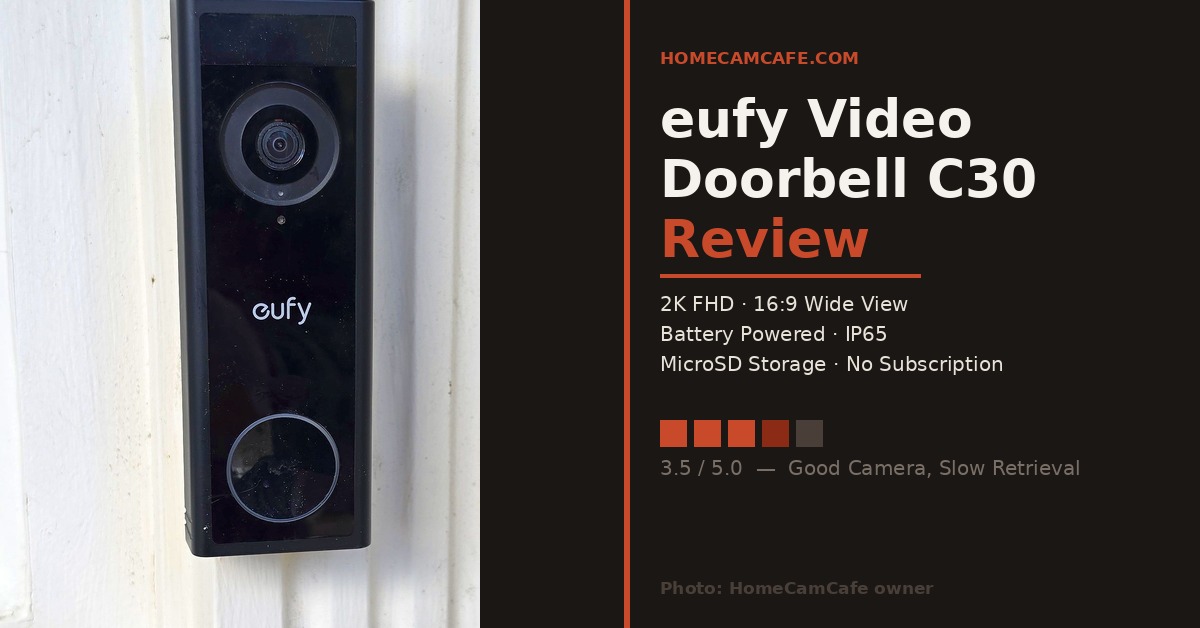
The eufy C30 installed on white siding — the sleek black design and circular button are distinctive.
Quick Specs
2K FHD (2176×1224)
165° ultra-wide (16:9)
Battery only (5,000mAh)
No
Infrared
Human and motion — free
MicroSD up to 128GB
IP65
2.4 GHz only
Not compatible
Alexa, Google Assistant
No
Design and Installation
The C30 has a clean, slim profile — glossy black with a large circular camera lens at the top and a circular doorbell button below. It’s one of the better-looking video doorbells in this price range, and the all-black design holds up well against most door frame and siding colors. The build quality feels solid, with no flex or cheap-feeling plastic.
Installation is wire-free and takes about 15 minutes. The mounting bracket attaches with screws or the included adhesive, the doorbell clicks onto the bracket, and setup completes through the eufy Security app. Because the C30 is battery-only, there’s no wiring to manage and no junction box required — you can mount it wherever the view is best without being constrained by existing wiring.
Chime note: The C30 does not work with existing doorbell chimes. For indoor chime functionality you’ll need to add a eufy MiniBase Chime ($20, sold separately), the eufy HomeBase S280 or S380, or use an Alexa or Google Assistant device to announce visitors.
Charging the battery requires removing the doorbell from its mount using the included pin tool and plugging in via USB-C. With the 5,000mAh battery, eufy claims extended battery life between charges — in practice, actual duration depends heavily on how much motion activity the camera sees.
Video Quality
The 2K FHD image is one of the C30’s genuine strengths. Daytime footage is sharp and detailed — facial features and clothing are clearly identifiable at typical doorstep distances, and the 165° ultra-wide 16:9 field of view captures a broad horizontal sweep that includes the full porch area and both sides of the door. Color balance is accurate and the image doesn’t suffer from the overexposed highlights that plague many budget cameras in bright conditions.
Night vision performs well at close range using infrared illumination. The image is clear and detailed up to about 20 feet. Beyond that range, IR illumination falls off and detail degrades, which is a common limitation for infrared-only night vision. The C30 does not have a color night vision spotlight — in complete darkness the image is black and white. If color night vision is a priority, the Tapo D225 is worth comparing as it includes a full-color spotlight for night footage.
Live view loads quickly and the video call feature — which delivers a pop-up video call to your phone when someone rings — works smoothly. Two-way audio is functional but the microphone pickup is slightly muffled at distance, which limits the usable range for conversation through the app.
The Storage Retrieval Problem
This is the C30’s most significant real-world limitation and it’s worth addressing directly. Retrieving recorded video clips from the onboard microSD card is slow — noticeably, frustratingly slow. When you open a past clip in the eufy app, the camera has to access the card and stream the footage back to your phone over Wi-Fi in real time. The result is long buffering waits before clips begin playing, and scrubbing through footage to find a specific moment is a poor experience.
This is partly an architectural limitation of how on-device microSD storage works — the app has to pull video from the card through the camera’s Wi-Fi connection rather than from a fast cloud server or a local hub. Using a faster microSD card (Class 10, U3 rated) helps somewhat, but doesn’t fully resolve the issue. The practical impact is that reviewing footage after an incident — which is often the main reason you want a doorbell camera — takes significantly longer than it should.
Pairing the C30 with a eufy HomeBase S380 (sold separately) routes storage through the hub rather than directly from the doorbell, which noticeably improves retrieval speeds. However, adding a HomeBase means additional cost and a hub device to manage. For a standalone camera experience, the slow retrieval is a persistent frustration. For a comparison of what the HomeBase adds, see our guide to local vs cloud storage.
AI Detection and App
Human and motion detection are free and work reliably. The C30 distinguishes between human activity and general motion, which cuts down on unnecessary alerts from passing cars or wind-blown foliage. Activity zones let you define specific areas of the frame to monitor, adding another layer of alert control. Notifications arrive promptly when motion is detected.
The eufy Security app is clean and consistent with other eufy products. If you already use eufy cameras, the C30 integrates into the same interface and device management system. Quick responses let you send a prerecorded message when you can’t answer in real time, and voice memo allows visitors to leave a message for you to review later.
Who Should Buy the eufy C30
The C30 suits buyers who primarily want reliable real-time doorbell functionality — live view, instant alerts when someone rings, and two-way communication — and who don’t frequently need to scroll back through recorded footage. For a front door where you mainly care about knowing when someone is there right now, it does that job well.
It’s a harder sell for anyone who regularly reviews footage after the fact — deliveries, incidents, or suspicious activity — because the retrieval experience will wear on you quickly. In that case, consider either adding a eufy HomeBase, opting for cloud storage, or choosing the Tapo D225 which handles local storage retrieval more smoothly. For a broader comparison, see our Best Video Doorbells of 2026 roundup.
The eufy Video Doorbell C30 is available on Amazon.
Verdict — 3.5 / 5.0
The eufy C30 delivers excellent 2K video quality, reliable motion detection, and subscription-free local storage in a clean, easy-to-install package. What holds it back is slow video retrieval from the onboard microSD card — a limitation that becomes genuinely frustrating if you regularly need to review past footage. For live view and real-time alerts it performs well, but the storage experience is a meaningful step behind competitors that use cloud or hub-based storage. It’s a capable doorbell with a notable caveat.
Pros: 2K FHD video · Wide 165° field of view · Free AI detection · No subscription required · IP65 · Easy wire-free installation
Cons: Slow video retrieval from microSD · No color night vision · No hardwired option · Not compatible with existing chimes · No HomeKit
eufy C30 vs C31: Which Should You Buy?
If you have existing doorbell wiring, the eufy Video Doorbell C31 is worth a close look before committing to the C30. The C31 adds hardwired power with 24/7 continuous recording, works with your existing chime, and uses a removable 6,500mAh battery — meaning you can swap in a spare rather than removing the doorbell to charge it. The aspect ratio also shifts from the C30’s 16:9 wide view to a 4:3 format that gives more vertical coverage from head to toe.
| Feature | C30 | C31 |
|---|---|---|
| Power | Battery only | Battery or hardwired |
| Battery | 5,000mAh (fixed) | 6,500mAh (removable) |
| 24/7 Recording | No | Yes (wired only) |
| Existing Chime | Not compatible | Compatible (bypass required for 24/7) |
| Aspect Ratio | 16:9 wide | 4:3 head-to-toe |
| Pre-Roll | No | 5 seconds (wired) |
| Resolution | 2K FHD | 2K FHD |
| Local Storage | MicroSD up to 128GB | MicroSD up to 128GB |
The bottom line: if you have doorbell wiring and want 24/7 recording, choose the C31. If you need a purely wire-free install with no wiring whatsoever, the C30 is the right call. Both cameras share the same 2K resolution, local storage approach, and free AI detection — the differences are entirely about power and recording capability.
Frequently Asked Questions
Does the eufy Video Doorbell C30 require a subscription?
No. The C30 stores footage locally on a microSD card (up to 128GB) with no subscription required. AI human detection and motion detection are also free. An optional eufy subscription adds cloud storage with video history, but it is not required for the doorbell to function.
Does the eufy C30 work with existing doorbell wiring?
No. The C30 is battery-only and does not support hardwired installation. It cannot connect to existing doorbell wiring or trigger an existing mechanical chime. For a wired eufy option, consider the eufy Video Doorbell E340 instead.
Why is video retrieval slow on the eufy C30?
The C30 stores footage on a microSD card inside the doorbell. Retrieving recorded clips requires the app to access and buffer video directly from the card over Wi-Fi, which is slower than cloud-based or hub-based retrieval. Using a faster microSD card (Class 10, U3) can help marginally, but pairing with a eufy HomeBase improves retrieval speeds more meaningfully.
Does the eufy C30 work with Apple HomeKit?
No. The eufy C30 works with Amazon Alexa and Google Assistant but does not support Apple HomeKit.
Can the eufy C30 use an existing chime?
No. The C30 is not compatible with existing doorbell chimes. For indoor chime functionality, it pairs with the eufy MiniBase Chime (sold separately), the eufy HomeBase S280 or S380, or can trigger alerts through Alexa or Google Assistant devices.
