
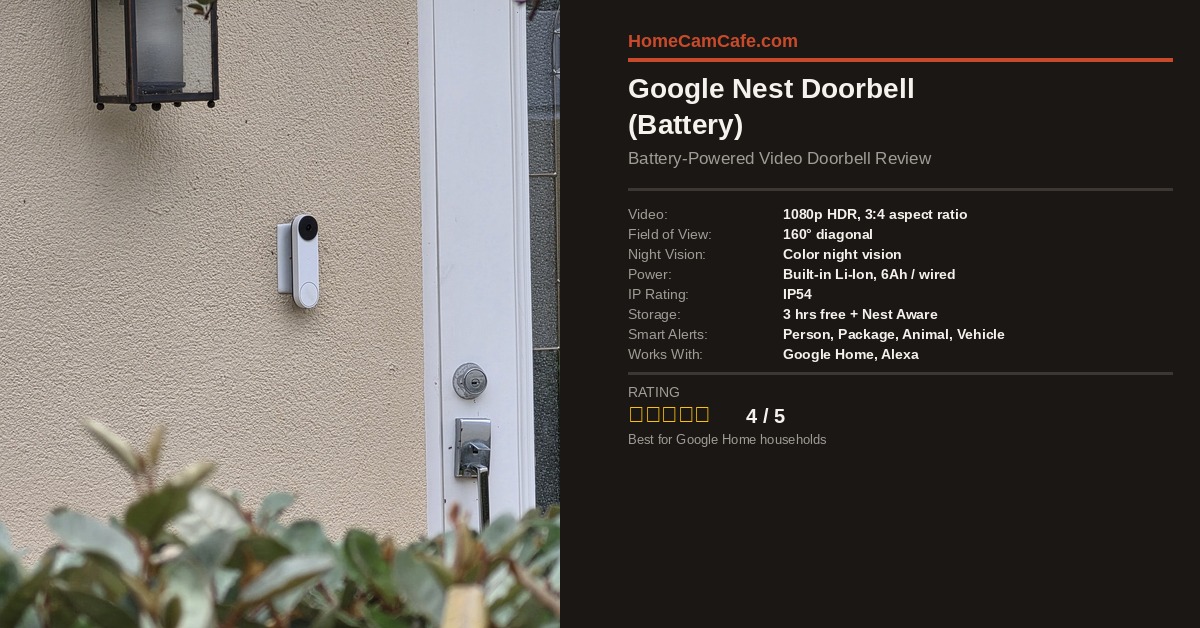
The Google Nest Doorbell (Battery) is one of the more interesting video doorbells on the market, and for a specific type of buyer it is hard to beat. If you already live in the Google Home ecosystem and you do not have existing doorbell wiring, this battery-powered model gives you intelligent alerts, solid HD video, and a respectable free tier without requiring a monthly subscription on day one. That said, the subscription picture gets complicated quickly, and there are real trade-offs worth understanding before you buy.
Quick Specs
| Spec | Details |
|---|---|
| Video Resolution | 1080p HDR (960 x 1280, 3:4 aspect ratio) |
| Field of View | 160° diagonal |
| Night Vision | Color night vision (HDR) |
| Power | Built-in rechargeable Li-Ion (6Ah, 3.65V); optional wired charging via existing doorbell wires (8-24 VAC) |
| IP Rating | IP54 (dust and water resistant) |
| Free Video History | 3 hours of event history |
| Smart Alerts | Person, package, animal, vehicle (no sub required) |
| Local Backup | Up to 1 hour if Wi-Fi goes down |
| Works With | Google Home, Amazon Alexa |
| Connectivity | Dual-band Wi-Fi (2.4GHz / 5GHz), Bluetooth LE |
Check the current price on Amazon
Design and Installation
The Nest Doorbell (Battery) has a clean, vertical profile that fits well on most door frames. In addition to the standard mounting plate, the box includes a 20-degree angled wedge for installations where you need to point the camera slightly to one side. The doorbell can go up on any exterior surface because it does not require wiring, which is one of its clearest practical advantages over a wired model.
For those who do have existing low-voltage doorbell wiring, you can connect those wires to the Nest Doorbell (Battery) as well. However, there is an important caveat: the wired connection will trickle-charge the battery rather than directly powering the unit. Furthermore, when temperatures drop below 32°F, the charging circuit disables automatically to protect the battery, which means the unit runs on battery power alone in cold weather regardless of the wired connection. In colder climates this is worth factoring in.
Installation is handled through the Google Home app, which walks you through the process step by step. Overall, setup is straightforward and most users can complete it without any technical background.
Video Quality
The video output is 1080p HDR with a 3:4 aspect ratio, which is a taller frame than the typical widescreen format most cameras use. In practice, this means you get a better view of the full person standing at your door, including their feet and any packages left on the ground. That tall field of view is one of the most useful design decisions Google made with this camera.
HDR performance is noticeably good, particularly in the kind of high-contrast conditions you often encounter at a front door, where sunlight behind a visitor can easily blow out lesser cameras. Night vision holds up well for a battery-powered doorbell, producing a reasonably clear image even in low-light conditions. Color rendering at night is solid rather than exceptional.
The aspect ratio and HDR combination make this one of the stronger-performing battery doorbells in terms of raw image usefulness, even if the 1080p resolution is technically lower than some competing cameras that now offer 1440p or 2K. For identifying faces and reading package labels at the door, the video quality is more than adequate.
Smart Alerts and Detection
One of the standout features of the Nest Doorbell (Battery) is that intelligent detection works without a subscription. Specifically, you get real-time alerts for people, packages, animals, and vehicles directly in the Google Home app, along with the ability to define Activity Zones to focus on specific areas of the frame. This puts it ahead of Ring, which limits event recording and some detection categories behind a paid plan.
On-device machine learning handles the detection, which contributes to fast, accurate notifications. In testing, person alerts consistently arrived within a few seconds of detection. False alerts from passing cars and shadows were infrequent compared with cameras that rely entirely on simple motion triggers.
With a Google Home Premium subscription (formerly Nest Aware), you additionally get Familiar Faces detection, which can identify people you have previously named. For households with regular visitors, this feature significantly improves the usefulness of the alert system. That said, the free tier alerts are genuinely useful on their own.
Battery Life and Charging
Battery life varies considerably depending on activity level at your front door. In a moderate-traffic environment, most users report getting somewhere between one and three months between charges. High-traffic locations with frequent detection events will drain the battery faster, as each alert wakes the camera and records a clip.
Charging requires removing the doorbell from its mount and plugging in the included USB-C cable. There is no hot-swappable battery option, which means your doorbell is offline during the recharge period. For most households this is a minor inconvenience, but it is worth noting if you have frequent visitors and cannot afford downtime. A fully depleted battery takes a few hours to reach full charge.
If battery management is a concern, connecting the doorbell to existing low-voltage wiring (where available) will extend the time between manual recharges significantly, assuming temperatures stay above freezing.
Video History and Subscription
Without any subscription, the Nest Doorbell (Battery) stores three hours of rolling event history in the Google Home app. Each event is saved as a short clip, and you can review two-second previews alongside the full recording for context. For a camera used primarily for live monitoring and real-time alerts, this free tier is functional. For a camera you are relying on to review footage after an incident, three hours is a tight window.
Google Home Premium (previously Nest Aware) extends event history to 30 days on the Standard plan or 60 days on the Advanced plan. The Advanced plan also unlocks Familiar Faces and, for wired cameras, 24/7 continuous recording. One subscription covers all Nest devices at a single location, which is good value if you have multiple cameras. As of 2025, Google raised pricing on both tiers, so it is worth reviewing the current plan breakdown in our Google Home Premium subscription guide before committing.
There is no local storage option on any Nest device, including this doorbell. No microSD card slot, no NAS integration. If ongoing cloud subscription costs are a dealbreaker for you, a camera from Reolink or Tapo with local microSD recording is a more practical choice.
Google Home and Smart Home Integration
As you would expect, the Nest Doorbell integrates tightly with the Google Home ecosystem. You can view the live feed on any Nest Hub or Nest Hub Max display, receive doorbell announcements through Google Nest speakers, and trigger automations based on doorbell activity. For households already running Google Home devices throughout the house, this level of integration is a genuine selling point.
Amazon Alexa compatibility is also supported, which is useful if you run a mixed ecosystem. You can view the live camera feed on an Echo Show and receive basic announcements. However, the deeper automation capabilities and Familiar Faces features remain exclusive to Google Home.
Additionally, the doorbell supports Matter, Google’s participation in the cross-platform smart home standard, though most of the advanced features still require the Google Home app specifically.
Nest Doorbell Battery vs. Wired Options
The battery model is the right choice when you do not have existing doorbell wiring or when installation flexibility matters more than continuous power. In contrast, the wired Nest Doorbell (2nd Gen) offers the same detection features and a similar image, but with always-on power and the ability to ring your existing in-wall chime directly. The newer Nest Doorbell Wired 3rd Gen (released late 2025) steps up to 2K resolution and Gemini AI integration, but requires wiring and a higher budget.
For a no-wiring installation, the battery model remains the only Nest doorbell option. Furthermore, the added flexibility of installing it anywhere, including on a door frame without any existing electrical work, makes it the practical default for renters or homes with older wiring setups.
Verdict
Our Verdict: 4 / 5
The Google Nest Doorbell (Battery) is the best battery-powered doorbell for Google Home households. The tall 3:4 video format, fast on-device detection, and no-subscription smart alerts put it ahead of most of the competition on the free tier. Battery management and cold-weather limitations are the main practical drawbacks, and the lack of local storage means a subscription is effectively required for real security use.
Best for: Google ecosystem users, renters, homes without doorbell wiring.
Consider alternatives if: You want 2K video, local storage, or live in a cold climate and rely on wired charging.
For more video doorbell comparisons, see our best video doorbells guide. For the full range of Nest camera and doorbell reviews, see the Google Nest hub page.
