
Mounting a security camera on a pool cage is trickier than it looks. The aluminum extrusions that make up a typical screen enclosure are hollow and thin-walled, so standard wall-mount screws give you almost nothing to bite into. The good news is that the right clamp mount solves the problem completely, with no drilling required and no damage to the enclosure. This guide covers the best mounting methods, how to position the camera for maximum coverage, and which cameras work particularly well in a pool cage environment.
Why Pool Cage Frames Are Difficult to Mount On
Most pool cage frames are built from hollow aluminum extrusions, typically around two inches wide on the main structural members. The wall thickness on these extrusions is less than an eighth of an inch in many cases. Driving a screw directly into that material gives you very little to hold against, and over time the fastener works loose, especially in a Florida climate where daily thermal expansion, high humidity, and afternoon thunderstorms put constant stress on any hardware you attach.
In addition, HOA restrictions and pool cage warranties often prohibit modifications to the structure. A clamp-based solution avoids all of those concerns. It grips the frame without penetrating it, and you can reposition or remove the camera entirely without leaving any trace behind.
The Best Mount for a Pool Cage: Super Clamp Style
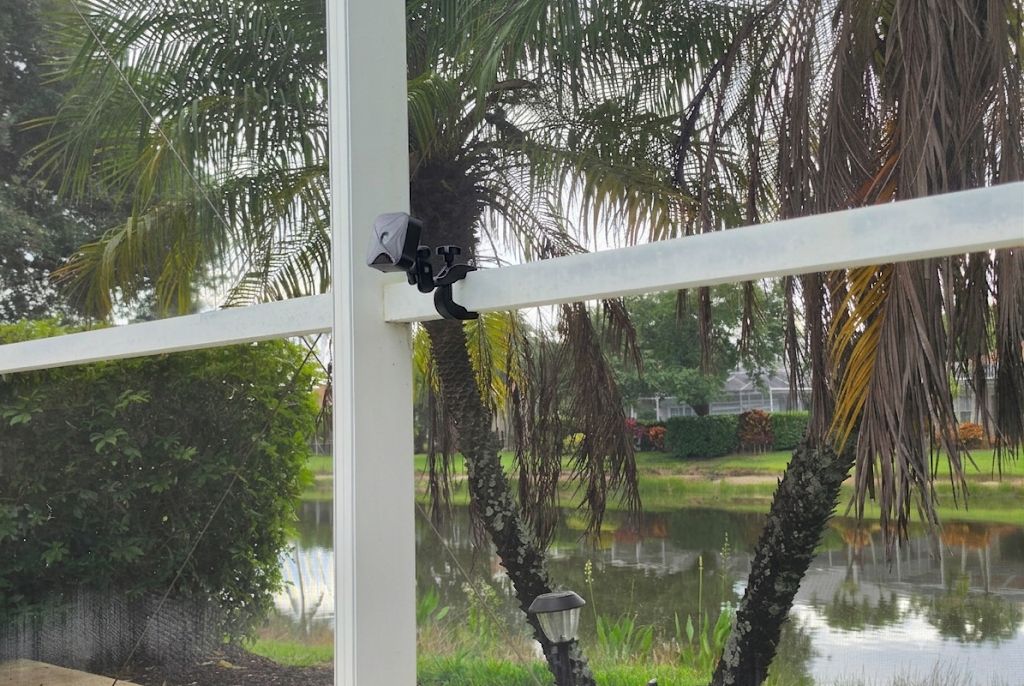
The most effective no-drill solution is a super clamp mount with a ball head, and the one shown in the photo above is the ULANZI R094 Super Clamp. Originally designed for photography studio use, this type of clamp happens to be a perfect fit for pool cage frames. The clamp jaw opens to 60mm, which covers the full range of standard pool cage extrusions, and the rubber-lined grip protects the aluminum finish from scratches. The double 360-degree ball head lets you dial in any angle after the clamp is locked down, and the 1/4-20 thread on the mount head is the standard size that fits virtually every home security camera on the market.
Furthermore, the ULANZI R094 is built from CNC-machined aluminum alloy, so it holds up to the outdoor humidity and UV exposure that would degrade a plastic mount within a season or two. The rated load is 1.5kg, which is well above the weight of any consumer security camera you are likely to install.
If you want a simpler, lower-profile alternative, the Arkon handlebar camera clamp mount is a solid budget option. It fits frames from 12mm to 40mm in diameter, includes a single 360-degree swivel ball head, and is designed specifically for cameras rather than studio gear. It is less adjustable than the ULANZI double ball head, but for a fixed corner post installation where you set the angle once and leave it, that is rarely an issue.
Installation tip: Clamp onto a main structural post, not a screen divider spline or thin cross-bar. The larger vertical and horizontal members give the clamp a much more stable grip and handle wind-driven vibration better.
Other Mounting Options Worth Considering
The super clamp is the go-to, but a couple of other approaches are worth knowing depending on your specific setup.
U-bolt pipe clamp with a mounting plate. If you want a heavier-duty anchor for a larger wired camera, combine a U-bolt pipe clamp with a short length of aluminum flat bar. Bolt the camera’s wall-mount bracket to the flat bar, then clamp the bar to the cage frame with the U-bolt. Hardware stores carry both pieces inexpensively. This approach is more permanent but still leaves the frame intact underneath.
Drilling with a backing plate. If you are willing to drill, the correct method is to use a small aluminum backing plate inside the hollow extrusion to distribute the load. Without it, a screw pulls through the thin wall under camera weight and vibration. Reserve this for corner posts and main beams only, and use stainless fasteners to resist corrosion in the humid outdoor environment.
Where to Position the Camera
Placement matters as much as the mount itself. For most pool cages, there are three positions worth considering.
Corner post near the gate. The gate is the most common entry point, so a camera on the corner post nearest the gate covers both the approach path and a wide sweep of the surrounding yard. This is generally the highest-value placement for a single camera.
Upper horizontal rail looking outward. Mounting on the top rail and angling the camera downward and outward gives a wide view of the yard or waterfront beyond the cage. The trade-off is that cable management becomes more involved if you are running a wired camera up to that height.
Interior post facing outward through the screen. Some homeowners mount on an interior post and angle the camera through the screen toward the driveway or perimeter. However, the screen mesh reduces night vision clarity, since infrared light reflects off the fibers. For best image quality, position the camera on or outside the frame rather than shooting through the screen.
Cable Management Through a Screen Enclosure
For wired cameras, the cleanest approach is to route the cable along the inside of the frame using UV-resistant cable clips, then exit through a weep hole at the base of a corner post or through a small grommet fitting. Avoid puncturing the screen mesh itself, as even a small hole can expand over time.
For most homeowners, however, a battery-powered or solar camera is the simpler choice. There is no cable to manage, and the camera can go wherever the clamp mount will grip. Battery life on current models is strong, with the best options lasting several months between charges under typical motion-detection loads.
Best Cameras for a Pool Cage Installation
The ideal pool cage camera is weatherproof, compact, and wireless. Here are three reliable options across different budgets that pair well with a super clamp mount.
Blink Outdoor 4
The Blink Outdoor 4 is the camera shown in the photo above, and it is a natural fit for this type of installation. It runs on two AA lithium batteries with up to two-year claimed battery life, which means no wiring to manage and no monthly trips up a ladder to swap cells. The body is compact and light enough that the ULANZI clamp holds it without any flex, and the 1080p resolution with dual-zone motion detection handles perimeter monitoring well.
Wyze Cam v4
If you have a power outlet on the lanai, the Wyze Cam v4 is a strong wired option. You get 2.5K resolution, color night vision, a motion-activated spotlight, and no battery to think about. The IP65 weatherproof rating handles the humidity and afternoon rain that comes with Florida pool cage territory, and the standard 1/4-20 base threads directly onto the ULANZI mount’s ball head.
Ring Stick Up Cam Battery
For homeowners already in the Ring ecosystem, the Ring Outdoor Cam Plus Battery integrates cleanly with Ring Alarm and Alexa. It is battery-powered, weatherproof, and Ring’s optional solar panel accessory can keep it charged indefinitely on a sun-exposed pool cage top rail.
The Bottom Line
A super clamp mount like the ULANZI R094 is the cleanest, most reversible way to attach a security camera to a pool cage. Grip a main structural post, choose a battery-powered or solar camera to avoid cable routing, and position the camera at a corner near the gate for the best coverage. The whole job takes about 15 minutes and leaves the enclosure completely intact.
For full individual reviews, see the Blink Outdoor 4 review and the Wyze Cam v4 review. For brand-specific guides, see the Blink camera hub.
