
The ieGeek S5 2K Solar Security Camera is a 360° pan/tilt outdoor camera with an integrated solar panel, 2K video, and color night vision. On paper it covers all the bases. In practice, the experience is undercut by a sluggish app that makes controlling the camera and accessing recorded video more frustrating than it should be. Local storage works fine and the solar power system is solid but the cloud subscription pricing is among the most expensive we have seen in this category, and the app performance issues are hard to overlook. This is a camera that gets the hardware mostly right and the software problematically wrong.
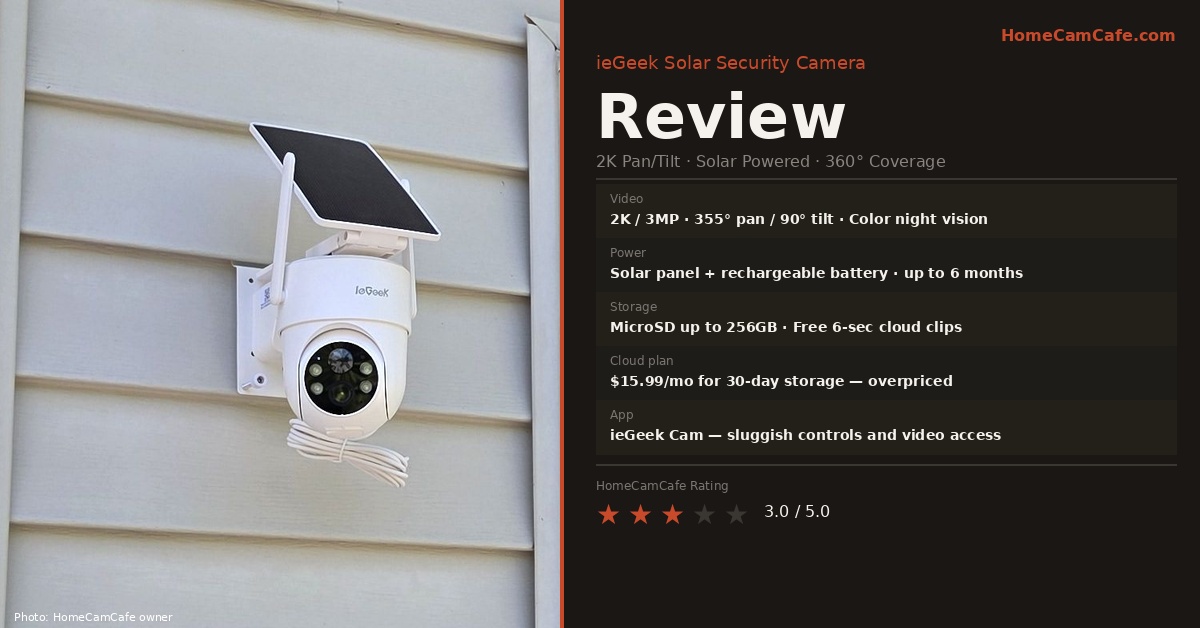
Specs at a Glance
| Spec | Detail |
|---|---|
| Resolution | 2K / 3MP |
| Pan / Tilt | 355° horizontal / 90° vertical |
| Night vision | Color night vision with spotlight |
| Power | Removable/detachable solar panel + rechargeable battery |
| Battery life | Up to 6 months claimed |
| Local storage | MicroSD up to 256GB |
| Free cloud | 6-second clips, 7-day loop — lifetime free |
| Paid cloud | $2.99/mo (3-day) · $4.99/mo (7-day) · $15.99/mo (30-day) |
| Weather rating | IP65 |
| Wi-Fi | 2.4GHz only — no 5GHz |
| Smart home | Alexa compatible |
| App | ieGeek Cam (iOS / Android) |
Design and Build
The ieGeek S5 is a dome-style pan/tilt camera with a detachable solar panel mounted above the camera on a shared bracket. The all-in-one configuration of a camera and panel on the same wall bracket makes installation straightforward: one bracket location, two screws, done. The solar panel cable connects directly to the camera body and the panel can be detached and repositioned up to 6.5 feet away via the included extension cable if the integrated position does not receive adequate sun.
Build quality is acceptable for the price point. The housing feels solid and the IP65 rating covers rain and dust exposure adequately for most outdoor locations. The bracket hardware is basic but functional. The camera arrived with all necessary mounting hardware in the box including screws, wall anchors, and a cable.
The 355° pan and 90° tilt range provides near-complete coverage from a single mounting position — the only blind spot is directly behind the camera body where the bracket attaches to the wall. In terms of hardware the coverage is genuinely useful.
Video Quality
Video quality at 2K/3MP is adequate for a camera in this price range. Daytime footage is clear with good detail at close to mid-range distances. The 130° wide-angle lens captures a broad field without excessive distortion. Color night vision with the spotlight enabled produces usable color footage in total darkness — the spotlight activates automatically on motion detection and illuminates the coverage area at a reasonable distance.
Without the spotlight, the infrared night vision produces standard black-and-white footage at up to about 30 feet. Nothing exceptional here, but nothing below the category average either.
App and Camera Controls — The Main Problem
The ieGeek Cam app is where this camera falls short. Accessing live video after opening the app takes noticeably longer than it should — there is a consistent delay before the stream loads that becomes annoying in day-to-day use. Pan and tilt controls are sluggish. Moving the camera from one position to another involves a lag between the tap and the movement that makes precise aiming difficult. In a category where Tapo, Reolink, and even some lesser-known brands deliver responsive pan/tilt control, the ieGeek’s app performance feels dated.
Additionally, accessing recorded video clips from local storage involves navigating a playback interface that is not intuitive. Finding a specific clip from a specific time requires more taps than competing apps and the timeline scrubbing is imprecise. This is not a dealbreaker for a camera that is primarily monitoring and only occasionally reviewed, but it is a real friction point for anyone who checks footage regularly.
The app runs on the CloudEdge platform which is a white-label backend we have seen before and used by numerous budget camera brands. This means the app is not purpose-built for ieGeek cameras and the experience reflects that lack of polish.
Note on the CloudEdge platform: The ieGeek Cam app runs on the CloudEdge white-label backend, which is shared across dozens of generic camera brands. This is worth knowing because it means ieGeek has limited control over app updates and performance improvements i.e. the backend is not exclusively theirs to optimize.
Solar Power and Battery Life
The solar system works as advertised in adequate sun conditions. The upgraded BC solar cells capture sunlight efficiently and in a location receiving three or more hours of direct sun daily the camera maintains its charge without manual recharging. The detachable panel design with the included 6.5-foot extension cable allows the panel to be repositioned independently of the camera, which is a genuinely useful feature when the optimal camera angle and the optimal sun exposure angle conflict. However when used as part of the included mount system is too long and must be bundled and tucked behind the unit.
In lower sun conditions like partial shade, north-facing walls, cloudy climates the claimed six-month battery life will not be achieved. The battery can be recharged manually via USB cable when solar charging is insufficient.
Local Storage
Local storage via microSD card is a genuine strength. The camera accepts cards up to 256GB and records motion-triggered clips to the card at no ongoing cost. This is more than adequate for most home security use cases and means the camera is fully functional without any subscription. The free cloud tier — 6-second clips stored for a 7-day rolling loop — provides a minimal backup without any cost, which is better than nothing.
Cloud Subscription Pricing — A Significant Problem
The cloud subscription pricing is genuinely difficult to justify. At $15.99 per month — or $160 per year — for 30-day cloud storage on a single camera, ieGeek charges nearly five times what Tapo charges for the same retention window ($33/year). The 7-day plan at $4.99/month ($60/year) is more defensible but still expensive compared to what the category’s better brands offer.
For most users, the local microSD option makes the cloud subscription unnecessary. However, for buyers who want cloud backup — particularly for outdoor cameras where theft means the SD card goes with the camera — the pricing makes ieGeek a poor choice compared to cameras from Tapo, Wyze, or Reolink where cloud plans are a fraction of the cost.
Cloud pricing comparison: ieGeek charges $160/year per camera for 30-day cloud storage. Tapo charges $33/year for the same retention. Wyze Cam Plus is $2.99/month per camera with unlimited event recording. The ieGeek cloud plan is not competitive.
Who Is This Camera For?
The ieGeek S5 makes most sense for a buyer who wants a solar-powered pan/tilt camera, plans to use local microSD storage exclusively, and does not need fast or frequent access to recorded footage. In that narrow scenario the hardware delivers adequate value. For anyone who checks their camera app regularly, needs responsive pan/tilt control, or wants reasonably priced cloud backup, there are better options at a similar or lower price point from more established brands.
Bottom Line — 3.0 / 5.0
The ieGeek S5 gets the hardware right — adequate 2K video, solid solar system, near-360° coverage, and free local storage via microSD. However, the app is sluggish and the pan/tilt controls are slow enough to be genuinely frustrating in day-to-day use. The cloud subscription pricing at $160/year for 30-day storage is among the worst in the category. As a local-storage-only camera in a fixed monitoring position the ieGeek is acceptable. As a camera you interact with regularly or rely on cloud backup for, it falls short of what better-supported brands deliver at similar prices. If you are comparing this to the ieGeek S5 on Amazon, also consider the Tapo C425 or Reolink Argus 3 Pro before committing.
See also: Local vs Cloud Storage Guide · Best Security Cameras Without a Subscription · MicroSD Card Selection Guide
