
A driveway is one of the highest-value locations for a security camera on any property. It covers the approach to your home, captures vehicle activity, and gives you visibility of package deliveries and anyone coming to your door before they reach it. Getting the placement, height, and camera choice right makes the difference between footage that actually identifies people and vehicles and footage that’s too dark, too far, or at the wrong angle to be useful. This guide covers everything you need to set up reliable driveway coverage in 2026.
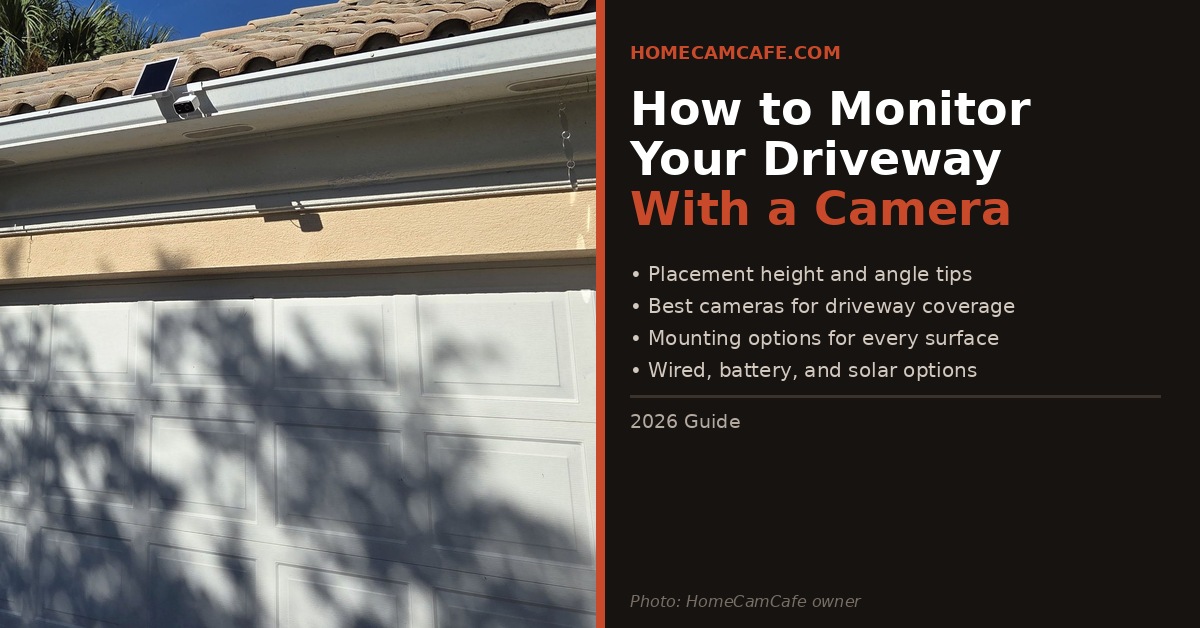
A solar-powered camera mounted on the soffit above a garage door — one of the best driveway installation positions available.
Where to Mount a Driveway Camera
Height is the most important variable. A camera mounted between 8 and 10 feet off the ground gives you the best combination of downward angle, coverage range, and tamper resistance. Too low and the camera is easy to steal or block. Too high and you lose facial detail — people’s faces are harder to identify when the camera is looking straight down at the top of their heads.
The soffit directly above the garage door is the single best mounting position for most homes. It gives you the right height, a natural overhang that protects the camera from rain, and a direct line of sight down the driveway. The photo above shows exactly this setup — a solar camera mounted on the soffit, angled slightly downward to cover the full driveway length and the area directly in front of the garage.
For homes without a usable soffit, the next best positions are a wall mount on the garage face at the 8 to 10 foot height, or a corner mount where the garage meets the house. Corner placement gives you a wider coverage angle that can capture both the driveway and the approach from the street simultaneously.
Angle tip: Aim the camera so the end of the driveway and the street appear in the upper third of the frame, with the garage door area in the lower third. This gives you the best coverage of the full approach while keeping facial detail usable at the near end.
Wired vs Battery vs Solar: Which Power Source Works Best
Power source is the second most important decision after placement. A driveway camera in a high-traffic location records frequently, which drains batteries faster than a side-yard camera that only triggers occasionally. Each power option has distinct tradeoffs for driveway use.
Wired cameras are the most reliable choice for a driveway. Continuous power means 24/7 recording is possible, you never deal with dead batteries, and high-traffic detection doesn’t degrade performance over time. The tradeoff is installation — running cable to the soffit or garage face requires either an existing outdoor outlet nearby or running new wiring, which may need an electrician. For a hardwired floodlight option that covers the driveway with powerful lighting and a camera in one unit, the eufy Floodlight Camera E340 is worth a close look — 360° pan/tilt, dual cameras, and free local storage.
Battery cameras are the easiest to install but require the most maintenance on a busy driveway. A camera that records 20 or 30 motion events per day will drain a battery significantly faster than a camera that sees two or three. If you go battery, choose a camera with a large battery and aggressive motion zone configuration to limit unnecessary recording. The Tapo C425 offers pan/tilt coverage with free local storage and is a strong battery option for driveways where wiring isn’t practical.
Solar cameras are the best of both worlds for the right installation — no cable runs, no battery changes, and effectively unlimited power as long as the panel gets adequate sunlight. The soffit above a south or west-facing garage is often ideal for solar panel placement. The camera in the photo above is a solar model mounted exactly this way. For a solar camera with pan/tilt coverage and free local storage, the Tapo C615F solar floodlight camera combines 800 lumens of floodlight output with 360° coverage and requires no wiring at all.
Best Cameras for Driveway Coverage
The best driveway camera depends on your power situation and whether you want a subscription. Here are the strongest options across different categories in 2026.
| Camera | Power | Resolution | Subscription | Best For |
|---|---|---|---|---|
| Arlo Pro 6 | Battery/Solar | 2K HDR | Required for storage | Premium wireless coverage |
| eufy E340 | Hardwired | 3K dual cam | Not required | Best hardwired value |
| Tapo C615F | Solar | 2K | Not required | Best solar floodlight |
| Tapo C425 | Battery | 2K | Not required | Best no-sub battery cam |
| Blink Outdoor 4 | Battery | 1080p | Optional | Best budget battery cam |
| Ring Floodlight Cam Pro | Hardwired | 2K HDR | Required for storage | Best Alexa integration |
For buyers who want no subscription and free local storage, the eufy E340 and Tapo C615F are the strongest choices. For buyers already in the Arlo or Ring ecosystem, the Arlo Pro 6 and Ring Floodlight Cam Pro are polished options with deep ecosystem integration. For a full comparison of subscription-free options see our best no-subscription security cameras roundup.
Mounting Options for Every Surface
Most cameras come with a basic wall mount that works fine for flat surfaces like siding or a garage face. For more specific situations there are better options.
For soffit mounting — the most common driveway position — a standard wall mount screws directly into the soffit board. Use exterior-grade screws and add silicone around the cable entry point to prevent water intrusion. Most soffit material is thin, so pre-drill carefully and make sure you’re hitting a joist or add a backing plate for solid support.
A no-drill gutter mount is one of the cleanest solutions for soffit and eave installations — exactly the setup shown in the photo above. These mounts clip over the gutter lip without any screws or holes, positioning the camera at the ideal height above the garage door with no damage to the fascia. The Wasserstein No-Drill Gutter Mount is compatible with Ring, Blink, eufy, Arlo, and Wyze cameras and includes 360° adjustment so you can dial in the exact angle without repositioning the mount itself. It’s a particularly good fit for renters or anyone who doesn’t want to put holes in the fascia or soffit.
For cameras with a 1/4-20 threaded screw hole on the base — including most Arlo and Blink models — a flexible articulating arm mount gives you precise angle adjustment that the stock mount doesn’t always provide. This is especially useful when mounting on an overhang or ceiling surface where the camera needs to point at a specific downward angle.
Monitoring the Driveway from Inside the Garage
A garage window is a valid driveway monitoring option — the camera stays indoors and protected from weather, and no exterior mounting is needed. The tradeoff is night vision performance. Most security cameras use infrared night vision, and IR reflects off glass rather than passing through it, which makes nighttime footage useless from behind a window.
To use a camera through a window at night, you need to disable IR night vision in the camera’s app and rely entirely on external lighting to illuminate the scene. A driveway light or motion-activated floodlight pointed down the driveway gives the camera enough light to capture usable color footage after dark. Alternatively, some cameras include a color night vision spotlight that illuminates the scene without IR — these work through glass significantly better than IR-only models.
Field of View and Driveway Length
Most driveway cameras have a field of view between 110° and 160°. For a standard single-car driveway, a 130° lens mounted at the 8 to 10 foot height covers the full width comfortably from above the garage. For wider driveways or long properties where the end of the driveway is 50 feet or more away, a camera with optical zoom or a telephoto lens — like the eufy E340’s dual-camera system — gives you the ability to pull in detail from the far end without losing the wider view.
For very long driveways or properties where the gate or entrance is beyond normal Wi-Fi range, the Blink Outdoor 4 with a Sync Module XR extends reliable connectivity up to 400 feet from the home — covering gate or driveway entrance positions that no standard Wi-Fi camera can reach. See our Blink Sync Module placement guide for more on extended range setup.
Quick Reference
Mount at 8 to 10 feet above ground, ideally on the soffit above the garage door with a slight downward angle. For wired installs the eufy E340 is the strongest no-subscription option. For solar, the Tapo C615F eliminates cable runs entirely. For battery, the Tapo C425 offers pan/tilt coverage without monthly fees. For Arlo or Ring ecosystem users, the Arlo Pro 6 and Ring Floodlight Cam Pro are polished choices. For very long driveways beyond Wi-Fi range, Blink Outdoor 4 with the Sync Module XR extends coverage up to 400 feet.
Frequently Asked Questions
How high should a driveway security camera be mounted?
Between 8 and 10 feet is the recommended height for a driveway camera. This gives you a useful downward angle, makes the camera difficult to tamper with, and keeps facial detail identifiable at typical driveway distances.
What is the best camera for monitoring a driveway?
For hardwired installs without a subscription, the eufy Floodlight Camera E340 is the strongest choice with dual 3K cameras, 360° pan/tilt, and free local storage. For solar and wire-free installs, the Tapo C615F eliminates cable runs entirely. For buyers already in the Arlo ecosystem, the Arlo Pro 6 is the best current wireless option.
Can I use a security camera through a garage window to watch the driveway?
Yes, but disable infrared night vision in the camera app before using it through glass. IR reflects off glass and makes nighttime footage unusable. Rely on external lighting to illuminate the driveway at night, or choose a camera with a color spotlight that doesn’t use IR.
How do I cover a long driveway that is out of Wi-Fi range?
The Blink Outdoor 4 with a Sync Module XR extends reliable connectivity up to 400 feet from the home using a proprietary 900MHz radio. This is the most practical solution for gate or entrance coverage beyond standard Wi-Fi range without running new network cable.
Do I need a subscription for a driveway security camera?
Not necessarily. Cameras from eufy and Tapo store footage locally on a microSD card with no ongoing fees. Arlo and Ring cameras require a paid subscription for any video storage. If avoiding monthly fees is a priority, see our best no-subscription security cameras roundup for the strongest options.
