
Choosing between a PoE vs WiFi camera for your home security setup comes down to one tradeoff: how much reliability and installation effort you are willing to trade for convenience. A PoE camera runs on a single Ethernet cable that carries both power and video, while a WiFi camera connects wirelessly and plugs into an outlet or runs on battery. Both approaches work well, however they solve different problems, and the right one depends on where you are installing the camera and how permanent you want the setup to be.
Quick Answer
Choose PoE for permanent installations where reliability matters most, front entrances, driveways, and anywhere you want subscription-free local recording. Choose WiFi for rentals, flexible placement, or anywhere running an Ethernet cable is not practical. Most homes end up using a mix of both.
How PoE Works
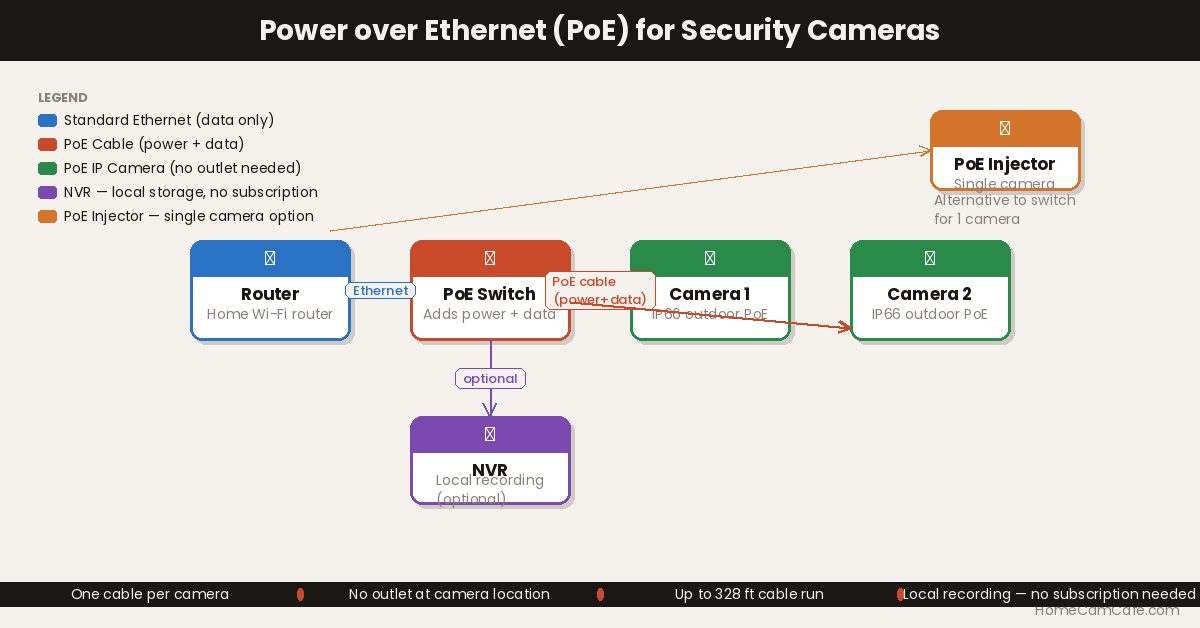
A standard Ethernet cable, Cat5e or Cat6, contains eight wires organized into four pairs. The IEEE 802.3 PoE standard uses some of those wire pairs to carry electrical current alongside the data signal. A PoE switch or injector sends power down the cable from the network side, and the camera receives both power and data through the same connector. From the camera’s perspective, it is simply plugged in, no separate power adapter required.
The maximum cable run for reliable PoE transmission is approximately 100 meters, or 328 feet, which is sufficient for most residential installations. Furthermore, because the camera connects via Ethernet rather than WiFi, the video feed is more stable and less susceptible to interference from other wireless devices on the network. If you decide PoE is the right fit, our PoE injector guide covers the specific hardware needed to power a single camera or a small system.
PoE vs WiFi Camera: Full Comparison
| PoE Camera | WiFi Camera | |
|---|---|---|
| Installation | Requires running Ethernet cable | Wire-free or single power cable |
| Reliability | Very high, wired connection | Dependent on WiFi signal strength |
| Power | Through Ethernet cable, no outlet needed at camera | Wall outlet or battery |
| Subscription | Usually none, local NVR storage | Often required for cloud storage |
| Renter-friendly | No, cable run is usually permanent | Yes, especially battery models |
| Best for | Permanent installs, high-traffic areas, no subscription preference | Renters, easy installs, flexible placement |
When PoE Wins
PoE is the stronger choice for a front entrance, driveway, or any camera you consider a permanent part of the house. Since the connection does not depend on WiFi signal strength, it holds up better in homes with thick walls, detached garages, or WiFi dead zones. In addition, most PoE systems pair with a local NVR, which means footage is stored on-site with no monthly subscription required, a meaningful long-term savings if you are running several cameras.
PoE also tends to be the better choice once you are covering a whole property rather than a single spot. Running Ethernet to four or five locations is more work upfront, however it avoids the WiFi congestion that can occur when several wireless cameras compete for bandwidth on the same network.
When WiFi Wins
WiFi is the better choice when flexibility matters more than raw reliability. Renters cannot run Ethernet cable through walls, so a WiFi or battery camera is often the only realistic option. Similarly, if you are testing a camera location before committing to a permanent installation, a WiFi camera lets you move it without any rewiring.
WiFi also wins for spots where cable is simply impractical, a shed at the back of the yard, a mailbox camera, or anywhere far from your existing network infrastructure. Battery-powered options like the Arlo Pro 6 or Tapo C425 can be mounted almost anywhere with no wiring at all, at the cost of periodic battery charging and a cloud subscription for extended storage.
Cost Over Time: PoE vs WiFi
The upfront cost comparison is not as simple as it looks. A single WiFi camera is usually cheaper to buy and install than a PoE camera plus injector, since there is no cable run or extra hardware involved. However, the ongoing cost picture often flips once you factor in cloud storage subscriptions. A WiFi camera with a monthly cloud plan can cost more over two or three years than a one-time PoE injector and a local NVR, which typically has no recurring fee at all.
The math shifts further once you are covering several cameras. Buying four or five individual WiFi subscriptions adds up quickly, while a single PoE switch and NVR spreads that same hardware cost across every camera on the system. As a result, PoE tends to be cheaper for larger installations even though the individual camera price is often higher, while WiFi stays cheaper for a single camera or two where a switch and cable run would be overkill.
Video Quality and Bandwidth
Both formats can deliver comparable resolution and frame rate on paper, however PoE has a real-world advantage once several cameras are recording simultaneously. A wired Ethernet connection does not compete for bandwidth the way WiFi does, so a PoE system with five cameras streaming 4K footage at once is far less likely to stutter or drop frames than five WiFi cameras on the same router. This becomes especially noticeable during motion-heavy events, when multiple cameras are triggered at the same time and all trying to upload footage over the same wireless channel.
For a single camera watching a low-traffic area, this difference is rarely noticeable. It becomes a real consideration once you are running three or more cameras that all need to record reliably at the same time, particularly if your home WiFi is already handling streaming devices, smart home gear, and multiple phones and laptops.
Rules of Thumb
- If the camera is watching a permanent entry point and you do not mind running cable, choose PoE.
- If you are renting, testing a location, or need to move the camera later, choose WiFi.
- If you already have Ethernet run to a location for another reason, PoE becomes the easier and cheaper option, not the harder one.
- A mixed system, PoE at fixed entry points and WiFi or battery cameras at flexible spots, is common and often the most practical setup.
- Do not choose PoE to save on a subscription alone. A single WiFi camera’s plan is often cheaper than the wiring labor for one hard-to-reach PoE run.
Can WiFi Cameras Be Jammed?
This is a security consideration that a generic tech comparison would not think to raise, but it matters for a camera watching your home. A WiFi camera communicates over a radio signal, and radio signals can be disrupted with an RF jammer, a real tactic that has shown up in home break-ins where the WiFi camera goes offline right before entry. A PoE camera has no such weak point. Since it runs on a physical Ethernet cable rather than a wireless signal, there is no radio frequency to jam, the only way to disable it is to physically cut the cable or the power, which is far harder to do quickly and quietly than triggering a jammer from the street.
This does not mean WiFi cameras are unsafe, most break-in attempts do not involve jamming equipment, however it is a real, if uncommon, gap that PoE closes entirely. If a camera is covering your most critical entry point and you want to remove this risk altogether, that is one more point in favor of running it over PoE rather than WiFi.
Installation Difficulty: What Running Ethernet Actually Involves
The comparison table above says PoE “requires running Ethernet cable,” however it is worth unpacking what that means in practice, since it varies widely by home. If you have an attic or a crawlspace with access near the camera location, running a single Cat5e or Cat6 cable is often a manageable weekend project: drill a small entry point, fish the cable through, and terminate the ends with a crimping tool or pre-made connectors. Many homeowners handle this themselves with basic tools and an afternoon of patience.
It becomes considerably harder in a finished home with no attic access, a slab foundation, or plaster walls, where fishing cable can mean opening drywall or running exterior conduit. In those cases, hiring a low-voltage installer or electrician is often worth the cost, particularly for a permanent front-entrance or driveway camera you plan to keep for years. A WiFi or battery camera sidesteps this entirely, mounting is typically a few screws and a charge cycle, which is exactly why it remains the better choice for rentals, temporary placements, or homes where running cable is simply not practical.
Frequently Asked Questions
Does my home router support PoE?
Most standard home routers do not support PoE on their Ethernet ports. A dedicated PoE switch or PoE injector is needed to add this capability. The router connects to the PoE switch as normal, and the switch handles the power delivery to the cameras independently.
Can PoE cameras work without internet?
Yes, when paired with a local NVR. The NVR records footage to a built-in hard drive on the local network, so no internet connection is required for recording or local playback. Remote access and push notifications do require an internet connection, but local recording continues uninterrupted even if the internet goes down.
What Ethernet cable is needed for PoE?
Cat5e or Cat6 cable is standard for PoE installations. Cat5e is sufficient for most PoE cameras. Cat6 is worth using for new installations since it handles higher bandwidth better and offers more headroom for future upgrades.
Is PoE better than a WiFi camera that plugs into an outlet?
In most cases, yes, for a permanent installation. A traditional wired-but-not-PoE camera still requires both a power cable to an outlet and a separate network connection, while PoE consolidates both into one cable. The tradeoff is that a PoE switch, injector, or NVR is required as part of the setup, so there is more upfront hardware involved.
Bottom Line
Neither format is universally better, they solve different problems. PoE is the more reliable, subscription-free option for permanent camera locations where running cable is realistic. WiFi is the more flexible option for renters, temporary placements, and spots where cable is impractical. Most well-covered homes end up using both, PoE at fixed entry points and WiFi or battery cameras everywhere else.
If you have decided PoE is the right fit, see our PoE injector guide for owner-tested hardware recommendations. For WiFi and battery camera options, see the Arlo Pro 6 review and Tapo C425 review. For more accessory guides, check the accessories hub.
