
Anyone adding a single PoE security camera to a network without a PoE switch needs an injector, and the TP-Link PoE injector line is one of the most common budget-friendly picks for that job. Therefore, we picked up the TP-Link TL-PoE160S, a 30W 802.3at (PoE+) injector, and have been running it as the power source for our Tapo C575D review camera. In addition to covering the setup process, this review walks through power delivery, build quality, and how it compares to the pricier Ubiquiti injector we also run on this site.
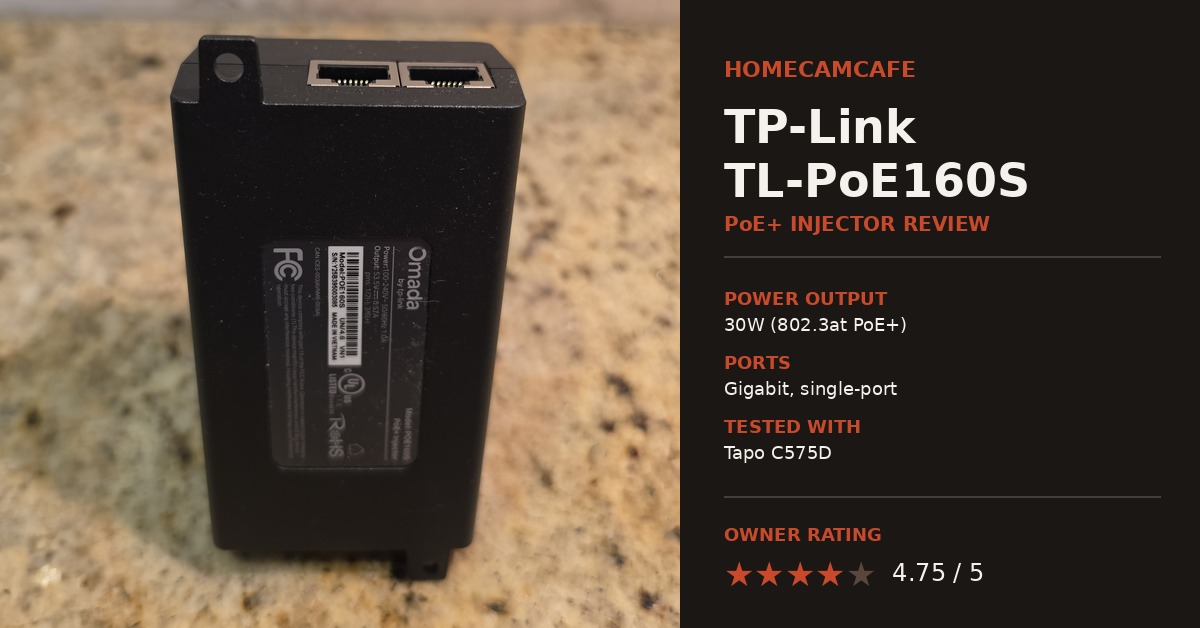
What This TP-Link PoE Injector Is Built For
The TL-PoE160S is a single-port PoE+ injector rated for up to 30 watts, following the IEEE 802.3at standard, with backward compatibility for 802.3af devices at 15.4 watts. In fact, TP-Link positions it as a general-purpose injector for IP cameras, access points, and IP phones rather than tying it to one hardware ecosystem the way Ubiquiti markets the UACC-PoE+-2.5G toward UniFi gear. As a result, it is a straightforward fit for a homeowner running a single PoE camera from a router or switch that does not supply power on its own.
Notably, the injector is a compact black box measuring 4.9 x 2.3 x 1.4 inches, small enough to sit flat on a shelf or mount to a wall. Additionally, two Gigabit RJ45 ports sit on the unit, one marked for data-in and one for power-and-data-out, along with a status LED that confirms normal power supply. In contrast to the Ubiquiti unit, which ships bare with no cables, TP-Link includes an RJ45 cable and a wall-mounting kit in the box, so it is ready to install without a separate trip to grab a cable first.
Real-World Test: Powering a Tapo C575D
Rather than judging this injector on spec sheet alone, we put it to work powering our Tapo C575D, a dual-lens 4K pan/tilt camera. Overall, the pairing has worked great with no issues at all since installation, no dropouts, no reboots, and no loss of connection. Specifically, the 30 watts of PoE+ headroom comfortably covers the C575D’s power draw, including its motorized pan/tilt movement and dual image sensors, and it has been a fully hands-off experience once installed.
Physically, the TL-PoE160S feels a little lighter in hand than the Ubiquiti UACC-PoE+-2.5G, though that is a subjective impression rather than a measured spec difference, and it has had no bearing on how reliably it performs.
What’s in the Box
The injector ships with the PoE160S unit itself, a power cord, an RJ45 Ethernet cable, a wall-mounting kit, and an installation guide. This is a meaningfully more complete box than the Ubiquiti injector, which includes only the unit and a power cable. Consequently, the TL-PoE160S is the easier out-of-box experience for someone who does not already have a spare Ethernet cable or mounting hardware on hand.
Setup and Installation
Installing the TL-PoE160S follows the same two-cable pattern as any injector. Specifically, one Ethernet cable runs from the router or switch into the data-in port, and a second cable runs from the power-and-data-out port to the camera. No app, account, or configuration is required, since the injector simply passes data through while adding power to the outbound cable. Setup with our Tapo C575D took only a few minutes, and the included wall-mounting kit made it easy to tuck the injector near the router instead of leaving it sitting loose on a shelf.
Notably, the status LED stays on when the injector is supplying power normally. If a connected camera does not power on, the most likely causes are a reversed data-in and power-out connection, or a device that exceeds the 30 watt ceiling. In that case, a higher-output injector or a PoE switch would be the better fit. For instance, a camera with a built-in floodlight or heater could draw closer to that ceiling, though our Tapo C575D has stayed well within range throughout testing.
Power Delivery and Reliability
At 30 watts, the TL-PoE160S comfortably covers the power draw of the PoE security cameras we have tested on this site. TP-Link lists built-in surge and overload protection on the TL-PoE160S, which matters for injectors, since the outdoor camera end of the cable is more exposed to voltage spikes than an indoor networking closet. Importantly, during testing we have not seen any dropouts, resets, or performance issues, and the injector has run without any noticeable heat buildup.
Unlike the Ubiquiti UACC-PoE+-2.5G, the TL-PoE160S tops out at standard Gigabit Ethernet rather than 2.5GbE. For a single security camera, that difference is not noticeable in practice, since even a 4K camera stream uses only a fraction of Gigabit bandwidth. However, it does mean this injector has less headroom to be repurposed later on faster networking equipment, which is worth knowing if you like to reuse gear across upgrades.
Compatible Cameras and Use Cases
The TL-PoE160S is best suited to a single PoE camera install where a full PoE switch would be more hardware than the job requires. Generally, most PoE security cameras draw well under 30 watts during normal operation, so compatibility is rarely an issue. That said, cameras with built-in spotlights, sirens, or motorized pan/tilt movement draw more power, and it is worth checking the manufacturer’s stated wattage before assuming any 30W injector will work. Similarly, our Tapo C575D, a dual-lens pan/tilt camera, has run without issue on this injector, matching how the Ubiquiti unit has handled the higher-draw Reolink Duo 3 PoE on this site.
TP-Link TL-PoE160S vs. Ubiquiti UACC-PoE+-2.5G
We now run both of these injectors on active cameras, so a direct comparison is worth including. Specifically, in terms of raw reliability, the two have performed identically well, and neither has dropped a connection or needed a reset since installation. The TL-PoE160S includes an Ethernet cable and wall-mounting kit in the box, which the Ubiquiti unit does not, making it the more complete out-of-box package. The Ubiquiti injector, in turn, offers 2.5GbE support for future-proofing, which the TL-PoE160S does not match. For a single security camera on a standard Gigabit network, either injector is a safe choice, and the decision mostly comes down to price and whether that extra networking headroom matters to you.
For anyone planning two or more PoE cameras, a PoE switch is still the more practical purchase over either single-port injector. Our best PoE injectors guide covers that decision in more detail, including when a PoE switch or an NVR with built-in PoE ports makes more sense than a single injector.
Pros and Cons for this TP-Link PoE Injector
Pros: Simple plug-and-play setup with no configuration required. 30W of PoE+ power handled our Tapo C575D’s pan/tilt movement and dual sensors without a single dropout. Includes an Ethernet cable and wall-mounting kit, unlike some competing injectors. Built-in surge and overload protection. Additionally, the status LED makes troubleshooting straightforward. Lower cost than the Ubiquiti UACC-PoE+-2.5G.
Cons: Single port, so it only supports one camera. Standard Gigabit only, no 2.5GbE headroom for future networking upgrades. No weatherproofing, so it needs to be mounted indoors or in a covered, dry location.
Verdict – 4.75 out of 5 Stars
The TP-Link TL-PoE160S does exactly what a budget-friendly PoE injector is supposed to do. Running it against a real dual-lens pan/tilt camera, rather than just a spec sheet, is what makes this review worth trusting, and it has delivered reliable power with no dropouts since installation. Notably, setup took minutes, the included cable and mounting kit are a nice touch missing from pricier competitors, and the surge protection is a meaningful feature for anything running to an outdoor camera. Overall, it is just as dependable as the Ubiquiti injector we run elsewhere on this site, and the better pick for anyone who does not need 2.5GbE headroom.
Frequently Asked Questions
Can the TP-Link TL-PoE160S power a security camera with pan/tilt movement?
Yes. We have been running ours on a Tapo C575D, a dual-lens pan/tilt camera, without issue, since the injector’s 30 watts comfortably covers the camera’s motorized movement and dual sensors.
Does the TL-PoE160S work with 802.3af (PoE) devices, or only 802.3at (PoE+)?
It supports both. As an 802.3at injector, it is backward compatible with 802.3af devices, since it automatically determines and delivers the power level the connected device requests.
Does the TL-PoE160S include an Ethernet cable?
Yes. Unlike some competing injectors, the box includes an RJ45 Ethernet cable along with a wall-mounting kit, so no separate cable purchase is needed to get started.
Is the TP-Link TL-PoE160S weatherproof?
No. It needs to be installed indoors, in a garage, or in another dry, covered location. Only the Ethernet cable running out to the camera needs to be rated for outdoor or in-wall use, depending on the installation.
For the full hands-on breakdown of this camera and injector pairing, see our Tapo C575D review. For a full comparison of PoE injectors, switches, and NVRs, see our best PoE injectors guide, and for our other owner-tested injector see the Ubiquiti PoE injector review. For the full accessories lineup see our security camera accessories hub.
