
In this hands-on aosu doorbell camera review, we installed the Aosu 5MP Video Doorbell Ultra (model V8S, sold on Amazon as the aosu doorbell camera wireless 5MP Ultra HD) at a front entryway in Florida, directly replacing an existing Blink Video Doorbell on low-voltage hardwired power.
If you want a sharp 5MP aosu doorbell camera with dual-band 2.4 GHz and 5 GHz Wi-Fi, an included indoor chime hub, and built-in local storage with zero monthly subscription fees, the Aosu 5MP Video Doorbell Ultra checks almost every box right out of the box. After unboxing it, pairing it at the desk, hardwiring it onto stucco, and testing live deliveries and night vision side by side, we found a remarkably solid doorbell with two default motion settings you may want to change.
Disclosure: Aosu provided the 5MP Video Doorbell Ultra at no cost for testing. Aosu had no input into this review, and all test results, ratings, and opinions are our own.
Quick Answer (4.3 / 5.0): The Aosu 5MP Video Doorbell Ultra is a substantial build-quality and no-fee storage upgrade over budget plastic doorbells. This wireless and wired aosu doorbell camera pairs a metal-accented housing, 166-degree 4:3 head-to-toe coverage, dual-band Wi-Fi, loud two-way audio, simultaneous hardwired and wireless chime ringing, and 8GB of built-in local storage inside the included aosuBase hub. Just be sure to scan the underside QR code before mounting and toggle off Person Only and Adjust Automatically so package drop-offs record reliably.
Check the Aosu 5MP Video Doorbell Ultra on Amazon →
Aosu Doorbell Camera Review: 5MP Ultra Specifications and Test Benchmarks
Before diving into our aosu doorbell installation notes and daily testing, here is a breakdown of the Aosu Video Doorbell Ultra hardware specifications paired with what we observed during our installation.
| Specification | Aosu 5MP Video Doorbell Ultra (Model V8S) | HomeCamCafe Hands-On Test Notes |
|---|---|---|
| Editorial Score | 4.3 / 5.0 | Strong build, included 8GB storage, dual chime ringing, and loud audio; docked slightly for default package-miss toggles and trickle-charge hardwiring. |
| Video Resolution | 5MP Ultra HD (4:3 aspect ratio) | Strong daytime clarity in default UHD mode; optional Smooth Mode available for weaker Wi-Fi. |
| Field of View | 166 degrees diagonal (head-to-toe) | Wide enough to cover the door, sidelight window, visitors, and porch floor even when mounted flat without the wedge. |
| Power Options | Built-in rechargeable battery (up to 180 days) or 8-24V AC wired | Hardwiring acts as a slow trickle charger (climbed from 91% to 94% over 8 hours and reached 100% by the next day). No continuous 24/7 AC recording mode. |
| Wi-Fi Connectivity | Dual-Band 2.4 GHz and 5 GHz Wi-Fi | Major advantage over 2.4 GHz-only outdoor cameras; connects through the included plug-in aosuBase hub. |
| Chime & Storage Hub | Included Wi-Fi aosuBase chime with 8GB built-in local storage | Rings both our existing indoor hardwired chime and the aosuBase chime simultaneously with 3 tones and separate volume sliders. |
| Motion Detection | Radar + PIR + AI Triple Motion Detection | 5 free Event Type filters (Person, Staying, Anti-Theft Warning, Nearby Event, Low Power) plus customizable Privacy Zones. |
| Night Vision | 850nm Infrared LEDs (no white spotlight) | App offers Black and White Night Vision (default, even IR coverage) or Natural Lights (full color using ambient porch light). |
| Weather Rating | IP66 weather-resistant | Well suited for Florida humidity, rain, and high ambient heat. |
| Smart Home Support | Amazon Alexa and Google Assistant | No Apple Home or HomeKit integration. |
Aosu Doorbell Installation, Unboxing, and Build Quality
The first thing I noticed opening the Aosu 5MP Video Doorbell Ultra box is how much more substantial the hardware feels compared to the Blink Video Doorbell it replaced on our stucco entryway. This aosu doorbell camera is noticeably heavier and integrates metal components into the front faceplate rather than relying on an all-plastic shell. Around the doorbell button sits a clean illuminated blue LED ring that gives the unit a finished look on exterior stucco.
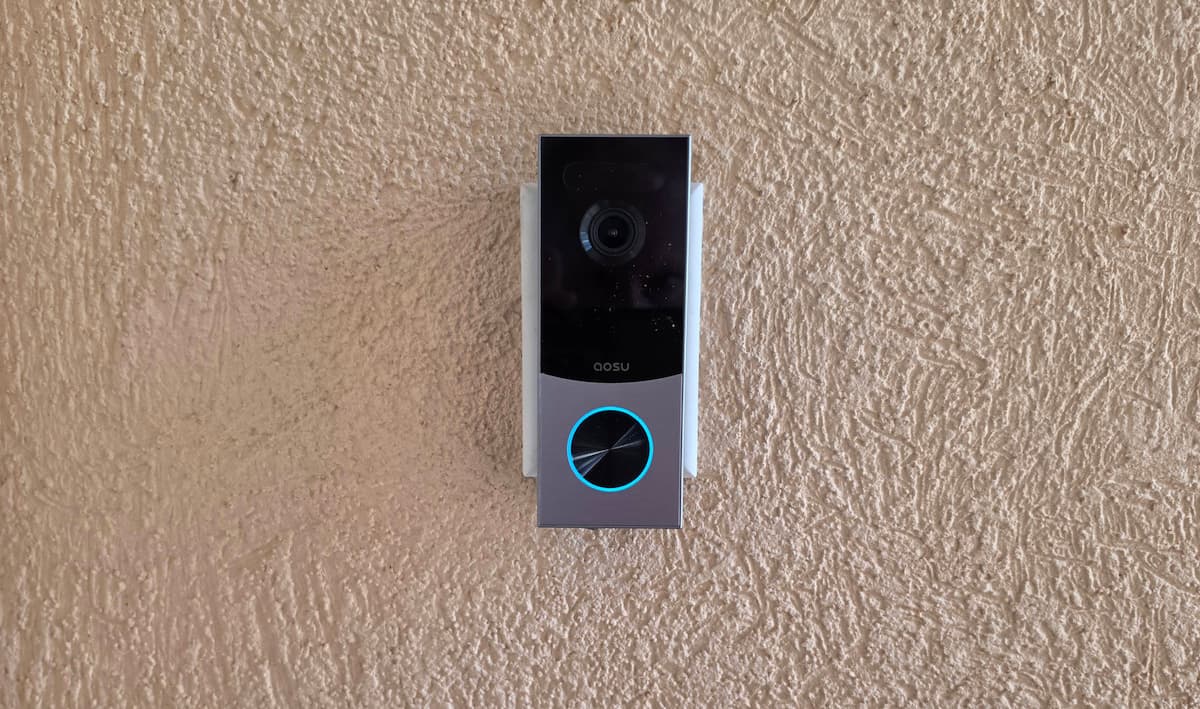
Aosu also deserves credit for what comes in the box. Alongside the doorbell and plug-in aosuBase hub, Aosu includes an angled wedge mount, a screwdriver, the anti-theft unlocking pin, and a set of wire extension pigtails for connecting to recessed doorbell wiring. Having the angled wedge and pigtails included saves a separate trip to the hardware store for most installs.
Important Setup Tip (Pair at Your Desk Before Mounting): Do not mount the Aosu doorbell on the exterior bracket before adding it to the Aosu app. I made that mistake initially, only to find out the app requires scanning a setup QR code printed on the underside of the camera, which is blocked once snapped into the wall plate. Set everything up at your desk first: charge the battery over USB-C, plug in the indoor aosuBase sync module, press the Sync key on top of the hub, and then press the Sync button on the doorbell when prompted.
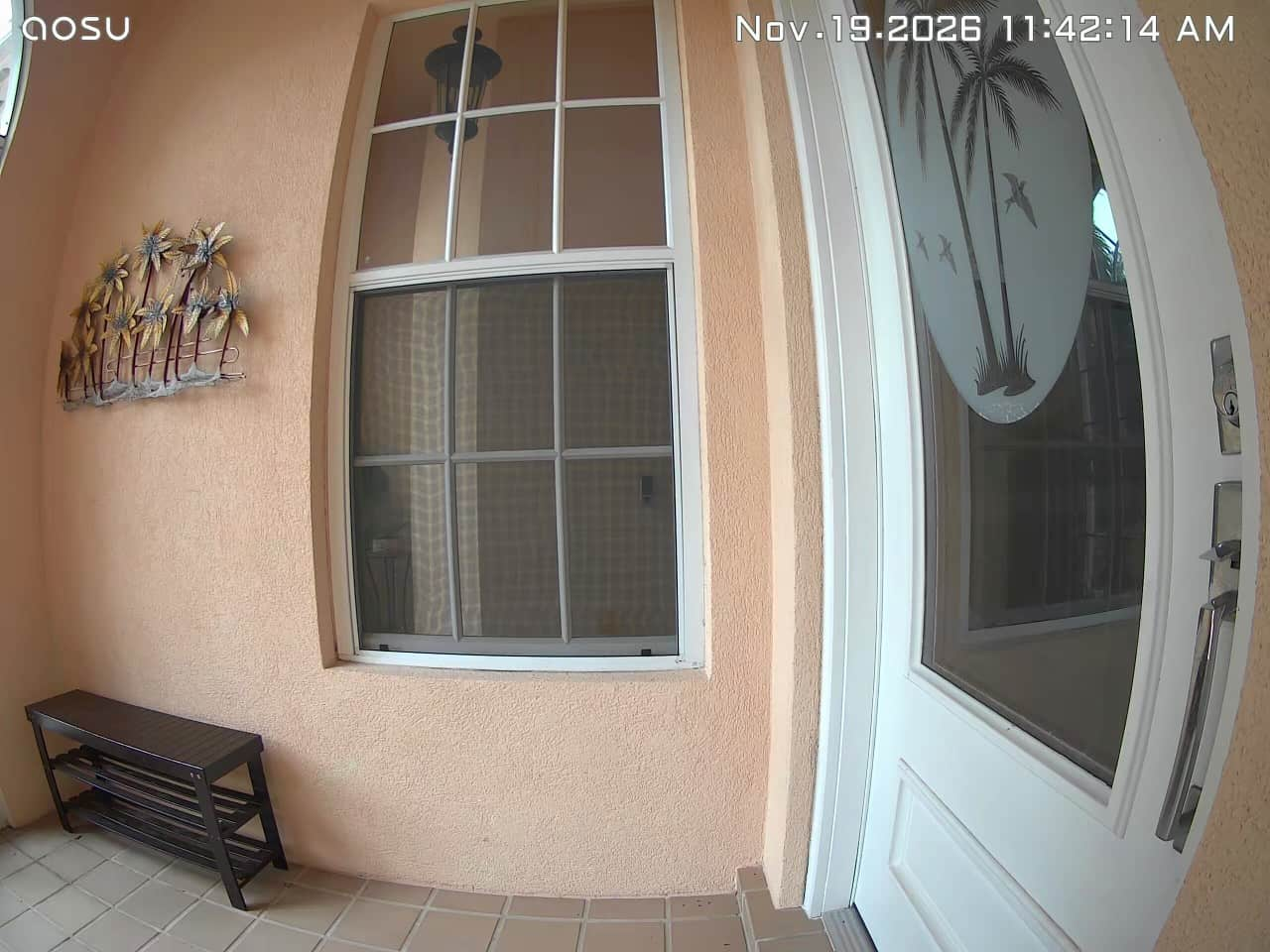
During physical mounting, I originally planned to install the included angled wedge mount behind the standard bracket. In my specific setup, stacking the wedge behind the main mounting plate made the combined assembly too thick for the screws I already had in the wall. Fortunately, mounting the doorbell flat without the wedge was not a problem at all: the wide 166-degree 4:3 lens still captures the entire front door, handle, sidelight window, visitor height, and the porch floor area where packages land.
Aosu Wired Doorbell Setup vs. Battery Mode (Trickle-Charge Architecture)
One detail every buyer researching an aosu wired doorbell should understand before installing this model is how its hardwired power works. Even after wiring the Aosu 5MP doorbell to a powered 8-24V AC doorbell transformer, the Aosu app continues displaying a battery percentage rather than switching to a dedicated “Wired Mode” icon, and there is no physical power switch on the back of the unit.
That is by design: the Aosu 5MP Video Doorbell Ultra is a battery-powered, event-triggered wireless doorbell camera whose rear AC wire terminals act as a slow trickle charger for the internal rechargeable battery. During my desk setup, I charged the doorbell to 91% via USB-C before mounting it onto our powered doorbell wires. Eight hours later on the wall, the app battery indicator had climbed to 94%, and by the next day it was fully charged. Topping the battery up via USB-C at your desk before mounting lets your existing transformer maintain a full charge indefinitely without ever pulling the doorbell off the wall to recharge, though it does not unlock 24/7 continuous recording.
Dual Chime Ringing, Full-Screen Alerts, and Real-World Two-Way Audio
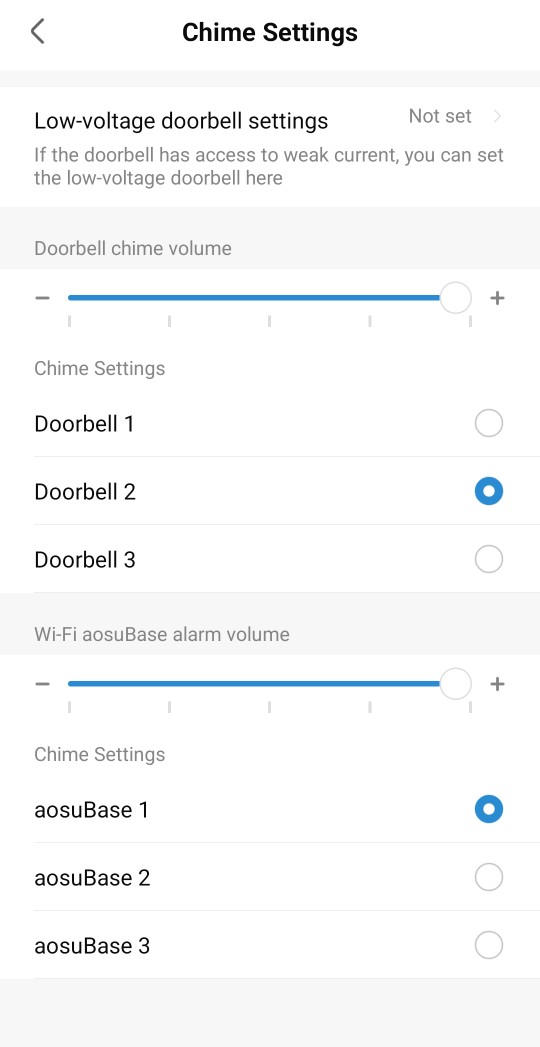
Once hardwired, pressing the doorbell button triggers both our existing indoor hardwired wall chime and the plug-in aosuBase sync module chime simultaneously, with zero extra chime resistor required on our transformer. Inside the Aosu app’s Chime Settings menu, Aosu also provides a dedicated Low-voltage doorbell settings option (labeled for homes with weak transformer current, which we left at Not Set), plus independent volume sliders and three selectable chime tones each for the outdoor doorbell (Doorbell 1, 2, or 3) and the indoor hub (aosuBase 1, 2, or 3).
When someone presses the doorbell, the Aosu app pops up a full-screen incoming-call style alert on your smartphone with an immediate button to answer and start a live conversation. We got an unplanned live test on day one: an Uber Eats driver accidentally delivered my dinner to the neighbor across the street, and my neighbor walked over and rang the Aosu doorbell while I was out in the backyard. I answered the full-screen call alert right from out back, and the doorbell’s outdoor speaker was loud and clear enough for him to understand my instructions to leave the food in the foyer.
5MP Daytime Video Quality and Night Vision Tested Side by Side
In the app’s video quality menu, you can choose between UHD (the default full 5MP stream) and Smooth Mode (a lower-bandwidth fallback for weaker Wi-Fi links). If you have decent Wi-Fi coverage at your front door, leave it on UHD. Daytime image clarity in UHD mode is strong, with crisp exposure and plenty of detail across our enclosed lanai entryway.
After dark, the Aosu 5MP Video Doorbell Ultra does not include a built-in white spotlight. Instead, its Night Vision menu gives you two manual choices: Black and White Night Vision (default, turning on the built-in 850nm infrared LEDs) and Natural Lights (turning off all supporting lights for brightly lit or overexposed porches).
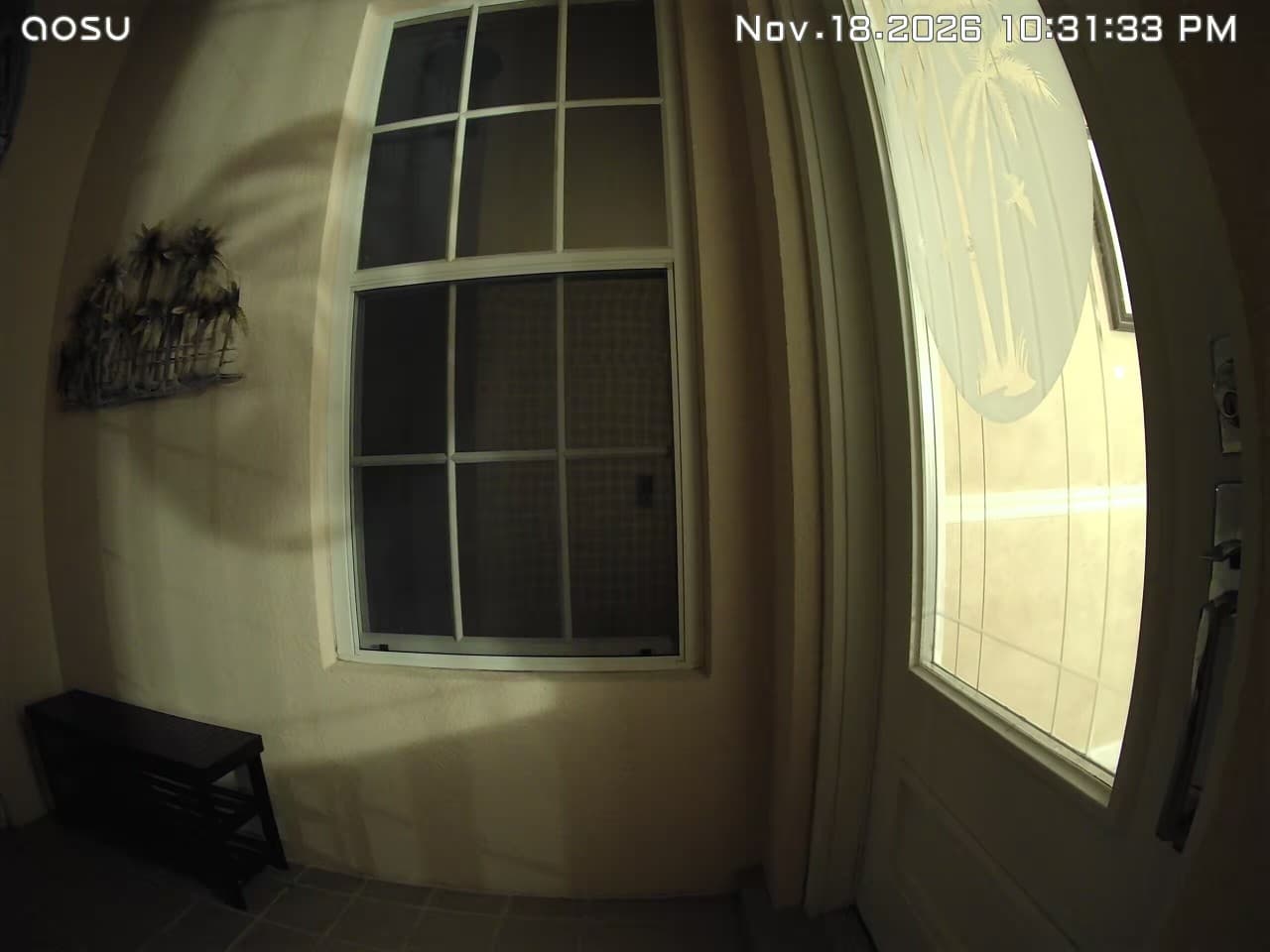
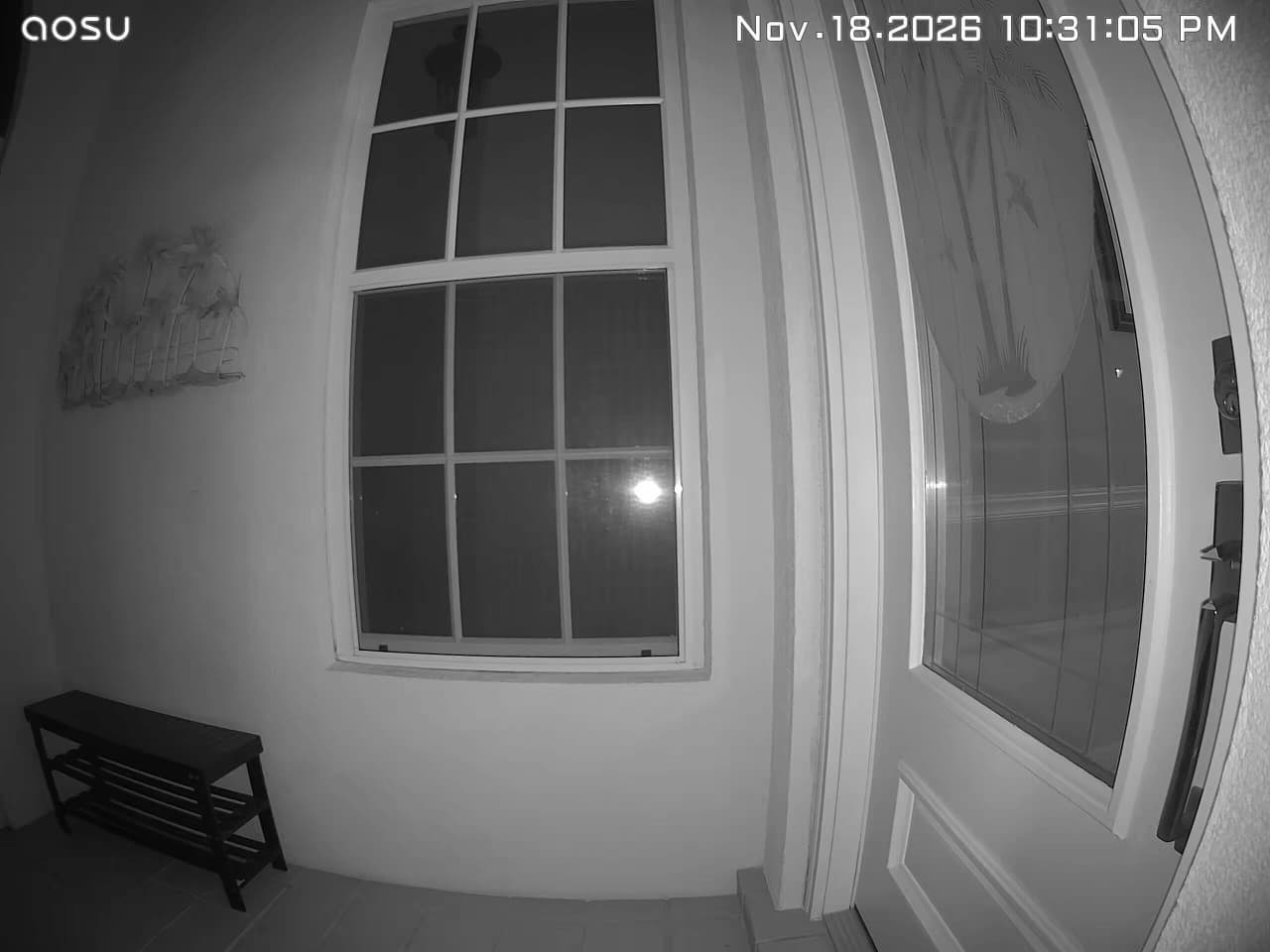
Testing both modes 28 seconds apart at 10:31 PM highlights the trade-off clearly. Black and White Night Vision floods the entire entryway evenly, keeping the floor tile, bench, wall art, and door handle fully visible with only a small, harmless IR reflection dot in the lower window pane. Switching to Natural Lights preserves realistic color from ambient light coming through the glass door, though it introduces deeper shadows in the far corner behind the bench. For porches with steady overnight lighting, Natural Lights looks very good; for darker entryways, stick with the default infrared mode.
Motion Detection Settings: Why Package Drop-Offs Were Missed at First
The single biggest quirk I encountered during testing happened on Aosu’s default motion settings. Out of the box, several package drop-offs in our enclosed lanai went completely unrecorded. Opening the Motion Detection menu revealed why right in Aosu’s own on-screen descriptions.
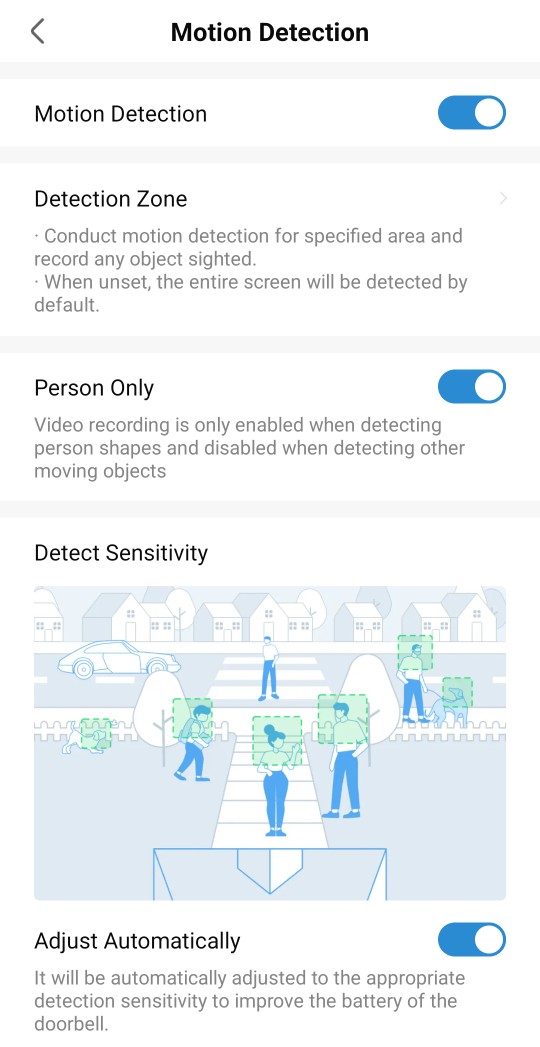
By default, Aosu enables two restrictive toggles at the same time:
- Person Only (ON by default): The app states that video recording is only enabled when detecting person shapes and disabled for other moving objects. If a delivery driver reaches in from the edge of the frame or sets a box down quickly without presenting a clean upright silhouette, it may not get recorded.
- Adjust Automatically (ON by default): Even when the doorbell is hardwired to AC power, this setting stays toggled ON and dynamically dials down detection sensitivity to conserve battery life. If it’s hardwired, this is a low impact change to make.
The Fix That Worked: Switching both Person Only and Adjust Automatically to OFF solved the missed package drop-offs completely in our testing. Because our existing doorbell transformer trickle-charges the battery back to 100%, turning off battery-saving auto-sensitivity carries zero recharging penalty on a hardwired install.
The doorbell also supports customizable Detection Zones and Privacy Zones, which let you black out neighboring doors, windows, or walkways so they are never recorded.
8GB Built-In Storage, Free AI Filters, and Subscription Tiers
One of the strongest selling points of this aosu doorbell camera is that Aosu includes 8GB of built-in local storage right inside the indoor aosuBase chime hub at no extra cost. Almost nobody includes local storage out of the box anymore, so having ready-to-use loop recording without buying a microSD card or signing up for a monthly cloud plan is a clear net positive. For our quieter enclosed lanai entrance, 8GB is plenty of space. However, because that 8GB storage is fixed inside the hub, homeowners on a busy street-facing front door with heavy foot traffic or long archival requirements could fill it much faster.
Under Notification Settings, Aosu’s free default Immediate Mode delivers instant unfiltered push alerts with static snapshot images, along with custom schedules and free Event Type checkboxes. Paying for an optional aosuProtect+ subscription unlocks animated lock-screen Video Preview Alerts (Basic), tiered alert filtering via Intelligent Mode (Pro), and AI scene summaries via Insight Mode (Premium). Most single-doorbell owners can skip the subscription entirely.
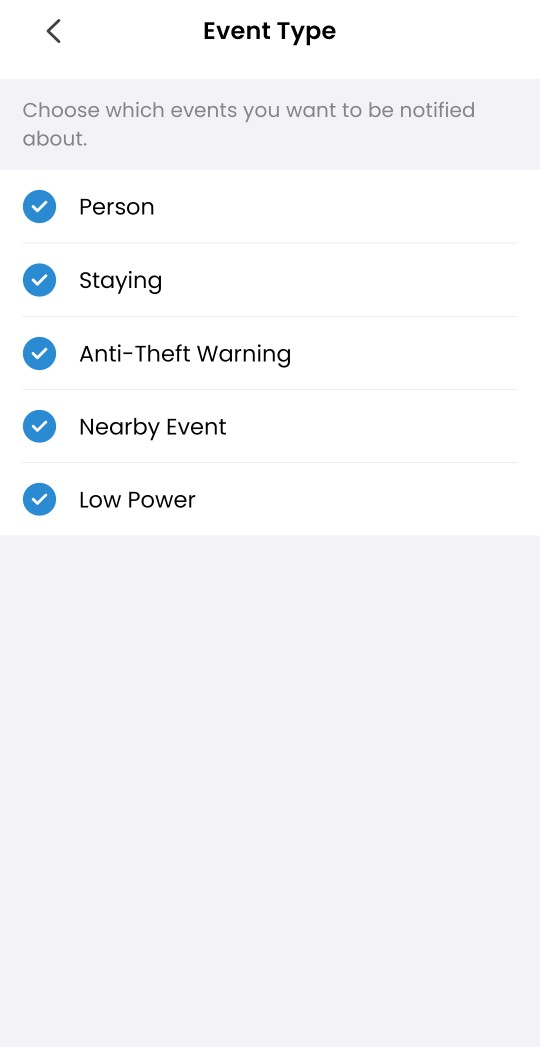
Comparing this doorbell against our recently tested Aosu SolarCam T2 Pro, the doorbell offers a leaner set of free on-device AI triggers. You get five free alert categories (Person, Staying for loitering, Anti-Theft Warning, Nearby Event, and Low Power), whereas the SolarCam T2 Pro packs ten free triggers including Pet, Vehicle, and Automated Parking Guard. Even so, getting free Person, Staying, and Anti-Theft detection without a monthly fee still puts the Aosu 5MP Video Doorbell Ultra well ahead of cloud-locked doorbells.
How the Aosu Doorbell Camera Compares to Other Tested Doorbells
Because we installed the Aosu 5MP Video Doorbell Ultra directly in place of a Blink Video Doorbell and have also tested the TP-Link Tapo D225 on our front door, here is how these three owner-tested video doorbells stack up side by side.
| Feature | Aosu 5MP Video Doorbell Ultra | TP-Link Tapo D225 | Blink Video Doorbell (2nd Gen) |
|---|---|---|---|
| HomeCamCafe Rating | 4.3 / 5.0 | 4.5 / 5.0 (Review) | 4.0 / 5.0 (Review) |
| Resolution & FOV | 5MP Ultra HD, 166 degrees (4:3) | 2K QHD (4MP), 180 degrees | 1440p HD, 150 degrees (1:1) |
| Wi-Fi Bands | Dual-Band 2.4 GHz & 5 GHz | 2.4 GHz only | 2.4 GHz only |
| Local Storage | 8GB built-in (included in hub) | microSD up to 512GB (buy card) | Requires Sync Module 2/XR + drive |
| 24/7 Hardwired Recording | No (event-triggered trickle charge) | Yes (when hardwired + microSD) | No (event-triggered only) |
| Free AI Detection | Person, Staying, Anti-Theft | Person, Package, Vehicle, Pet | None (subscription required) |
| Indoor Chime Included | Yes (aosuBase chime + hardwired) | Yes (plug-in chime included) | No (uses Echo or Blink Mini) |
Compared to our replaced Blink Video Doorbell, the Aosu 5MP Video Doorbell Ultra wins decisively on hardware weight and metal build quality, sharper 5MP video, dual-band 5 GHz Wi-Fi, an included indoor chime with built-in storage, and free person alerts. If you want 24/7 continuous hardwired recording, 4-second pre-roll clips, and expandable 512GB microSD storage for a busy street-facing door, the Tapo D225 remains our top pick in that lane, while the Aosu 5MP doorbell stands out for its slimmer metal-trimmed design, 5 GHz Wi-Fi support, and zero extra accessories needed out of the box.
Pros and Cons
What We Liked
- Solid, Heavy Build With Metal Front Trim: Feels noticeably better built than all-plastic budget doorbells, and ships with a wedge mount, screwdriver, unlocking pin, and wire pigtails in the box.
- 8GB Built-In Local Storage Included: Ready for subscription-free loop recording right out of the box with no microSD card purchase required.
- Simultaneous Hardwired and aosuBase Chime Ringing: Rings both our existing indoor mechanical chime and the included wireless hub chime together, with separate volume and tone controls.
- Loud Two-Way Audio and Full-Screen Call Alerts: Incoming doorbell rings trigger a full-screen answer prompt, and outdoor speaker volume easily handled a live delivery handoff from our backyard.
- Sharp 5MP UHD Video and Dual-Band Wi-Fi: Strong daytime clarity, wide 166-degree framing even without the wedge, clean IR and ambient Natural Lights night vision, Privacy Zones, and 5 GHz Wi-Fi support.
What Could Be Better
- Default Settings Can Miss Packages: Ships with both Person Only and battery-saving Adjust Automatically turned on even when hardwired; both should be disabled right away for reliable delivery capture.
- Hardwired Mode Still Trickle-Charges the Battery: No continuous 24/7 recording mode when wired to AC doorbell power.
- Underside QR Code Setup Gotcha: Mounting the doorbell before pairing forces you to pop it back off the bracket with the unlocking pin to scan the bottom code.
- Non-Expandable 8GB Storage Ceiling: Plenty for a quieter porch or lanai, but high-traffic street-facing doors may outgrow 8GB quickly.
- Leaner Free AI Than Newer Aosu Cameras: Five free Event Type filters (no free Pet or Vehicle triggers), and animated lock-screen Video Preview Alerts sit behind aosuProtect+.
Frequently Asked Questions
Does the Aosu 5MP Video Doorbell Ultra require a monthly subscription?
No. This aosu doorbell camera includes an indoor aosuBase Wi-Fi chime with 8GB of built-in local loop storage, live view, full-screen doorbell call alerts, two-way audio, Privacy Zones, and free Person, Staying, and Anti-Theft notifications with zero monthly fees. Paid aosuProtect+ plans are optional for cloud backup, animated video preview notifications, and advanced AI filtering.
Why does the Aosu 5MP doorbell still show a battery percentage when hardwired?
The doorbell runs off its internal rechargeable battery even when wired as an aosu wired doorbell to 8-24V AC wiring. Your doorbell transformer slowly trickle-charges the battery to keep it topped off (ours climbed from 91% to 94% over eight hours after charging via USB-C at the desk, reaching 100% by the next day), which is why the app still displays a battery percentage and does not switch to 24/7 continuous recording.
Why did my Aosu doorbell miss package deliveries?
Out of the box, Aosu enables both Person Only (which blocks recording for non-human shapes) and Adjust Automatically (which throttles motion sensitivity to save battery, even when hardwired). Turning both settings OFF in the Motion Detection menu resolved missed package drop-offs immediately in our testing.
Does the Aosu doorbell work with my existing indoor doorbell chime?
Yes. When wired into existing low-voltage doorbell wiring, the Aosu 5MP Video Doorbell Ultra rang both our existing hardwired wall chime and the included plug-in aosuBase chime simultaneously without needing extra parts. If your home has a weaker transformer, the Chime Settings menu also includes a Low-voltage doorbell calibration option.
Final Verdict
The Aosu 5MP Video Doorbell Ultra earns a strong 4.3 out of 5 in our hands-on aosu doorbell camera review. Replacing a Blink Video Doorbell with this Aosu model delivered an immediate step up in metal-trimmed build quality, 5MP daytime clarity, wide 166-degree framing, dual-band 5 GHz Wi-Fi, loud backyard-tested two-way audio, and simultaneous indoor chime ringing, all while including 8GB of local storage inside the box with zero monthly fees.
Once you follow two simple day-one rules (pair the underside QR code at your desk before mounting, and switch off Person Only and Adjust Automatically in Motion Detection), this aosu doorbell camera is a dependable, subscription-free front door upgrade. Browse more of our hands-on tests in our Aosu security camera reviews hub or see our full best security cameras with no subscription guide.