
In this hands-on Aosu T2 Pro review, I unboxed, pre-charged, and mounted the Aosu SolarCam T2 Pro (model C9P21-1) between our garage doors to test its top-mounted solar panel, dual 3K lenses, free on-device AI, and real-world driveway motion detection. The Aosu SolarCam T2 Pro gets three major things right: a clever all-in-one solar pedestal that mounts on top of the camera so you only need a single wall bracket, an extensive and accurate suite of 10 free on-device AI triggers (including Automated Parking Guard, Yard Wall, and Lawn Surveillance), and sharp dual-3K daytime video clarity. It earns a strong 4.0 out of 5 in our testing, held back from a higher score only by its 30-foot maximum motion detection range and its lack of 5 GHz Wi-Fi support.
Disclosure: Aosu provided the SolarCam T2 Pro at no cost for testing. Aosu had no editorial input into this review, and all hands-on test results, photos, and opinions are our own.
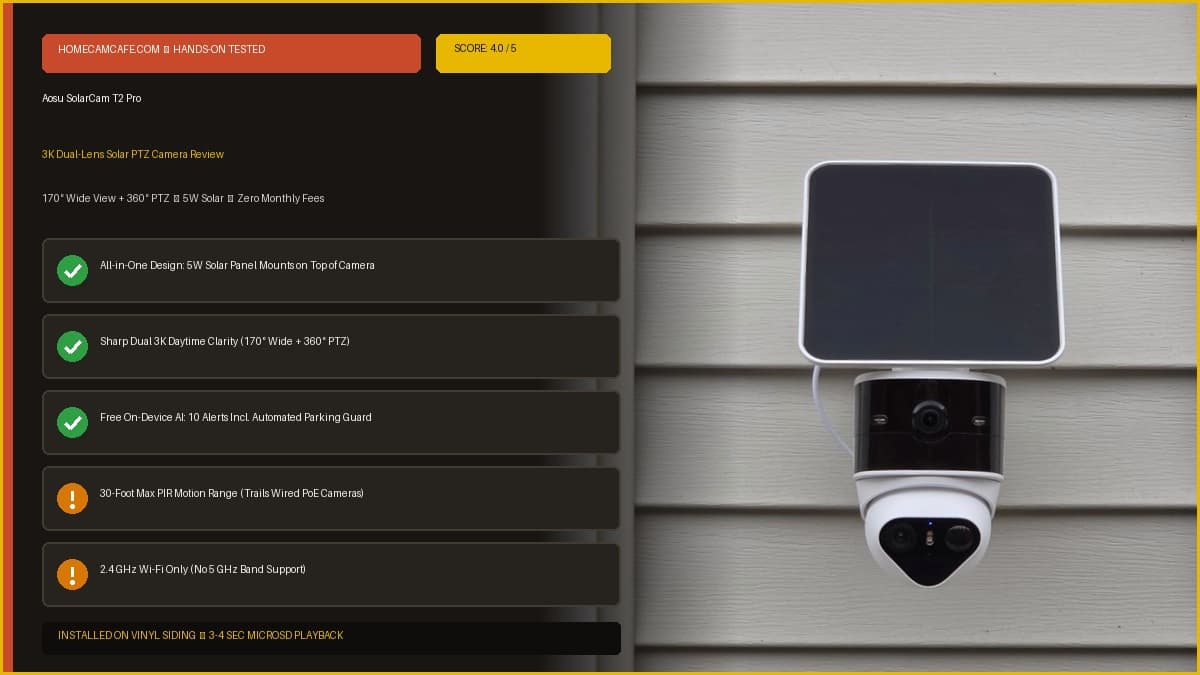
Quick Answer (4.0 / 5.0): The Aosu SolarCam T2 Pro is an easy recommendation for homeowners who want a single-mount wire-free dual-lens 3K camera with crisp daytime video, 3 to 4 second microSD clip retrieval, and rich, subscription-free AI alerts for parked cars, entryways, and yards within 30 feet of the house. Because it sells for significantly less than competing 4K dual-lens solar kits while covering two zones at once with zero monthly fees, it is a standout value as long as you do not need long-range driveway detection beyond 30 feet or 5 GHz Wi-Fi.
View Aosu SolarCam T2 Pro on Amazon →
Aosu T2 Pro Review: SolarCam T2 Pro Specifications and Benchmarks
Before walking through our vinyl siding installation, top-mounted solar assembly, daytime and nighttime image captures, and app settings, the table below compares Aosu’s published specifications for the SolarCam T2 Pro (model C9P21-1) against what we measured on our property.
| Feature | Aosu SolarCam T2 Pro Spec (C9P21-1) | HomeCamCafe Hands-On Test Notes |
|---|---|---|
| Editorial Score | 4.0 / 5.0 | Praised for all-in-one solar mount, free 10-trigger AI, and 3K daytime clarity; docked for 30-ft detection range and 2.4 GHz-only Wi-Fi |
| Optical Layout | Top fixed wide-angle bullet (180-degree manual arm) + bottom motorized PTZ dome | Stacked live view in the Aosu app places the Focus (PTZ) Cam on top and Wide View Cam on the bottom |
| Resolution & Streams | Dual 3K 5MP (2880 x 1620) on both lenses, up to 8x hybrid zoom | App offers UHD(3K+3K) default mode and a Smooth Mode fallback for weaker network locations |
| Field of View & PTZ | 170-degree wide lens + 360-degree pan / 60-to-90-degree tilt Focus Cam | Supports coordinated Dual Cam Detection handoff or independent Focus Cam Detection |
| Solar & Battery Power | 9,200mAh rechargeable battery + 5W detachable USB-C solar panel | Solar panel bolts to the top of the camera or mounts separately using the included weatherproof USB-C extension cable |
| Free On-Device AI | Person, Vehicle, Pet, Staying, Parking Guard, Intrusion, Yard Wall, Lawn | All 10 Event Type notification filters and Automated Parking Guard work locally with zero subscription fees |
| Motion Detection Range | PIR + AI event detection (~32 to 35 ft rated) | Topped out at roughly 30 feet in our driveway test; ideal for 2-car garage aprons and close entryways |
| Night Vision Modes | Infrared LEDs + built-in white spotlights on both lenses | Color night vision is clear, though you must manually choose Black and White, Color, or Natural Lights (no dynamic smart auto mode) |
| Local Storage & Speed | MicroSD slot up to 256GB (card not included) or optional aosuBase | Timed at 3 to 4 seconds to pull up recorded video clips from the microSD card |
| Wi-Fi & Smart Home | 2.4 GHz Wi-Fi only; Amazon Alexa and Google Home | No 5 GHz Wi-Fi support and no Apple Home / HomeKit integration; IP65 weather rating |
All-in-One Top Solar Mount, VOMENC Siding Install, and Two Critical Setup Tips
The first thing you notice when lifting the Aosu SolarCam T2 Pro out of the box is its weight. Housing two 3K camera modules, pan-and-tilt motors, spotlights, and a 9,200mAh battery makes this a noticeably heavy camera. To support that weight, Aosu uses a flat mounting plate with a dual-notch design that relies on the downward weight of the camera and a latch to keep the body seated and secure on the bracket.
Where Aosu deserves props is how it engineered the solar panel integration. Instead of making you drill a second bracket into a wall just for the solar panel, the T2 Pro’s solar panel attaches via a pedestal directly to the top of the camera housing. Threading the tiny screws into the top pedestal takes a few minutes of patience (a magnetic screwdriver really helps here), but I really like the finished design. Once bolted together, the camera and solar panel hang as a clean, unified one-piece assembly.
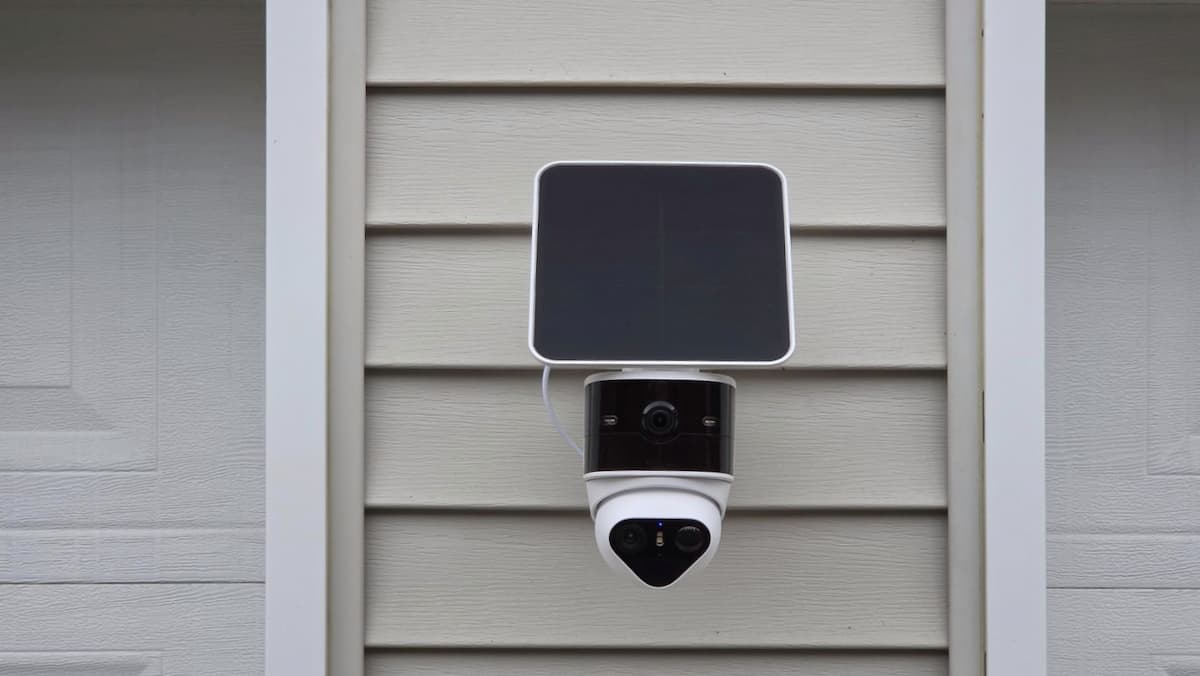
Aosu gives you full flexibility if your mounting spot sits under a deep, shaded soffit without solar access. That exact same pedestal used to bolt the solar panel to the top of the camera can be screwed directly into a wall or fascia board instead. Aosu includes a longer USB-C extension cable with a weatherproof female coupling right in the box so you can mount the solar panel further away in direct sunlight without buying extra parts.
For our installation on the narrow vinyl siding column between our two garage doors, I paired the T2 Pro with the VOMENC Universal Security Camera Vinyl Siding Mount Kit. The pre-drilled holes on the metal VOMENC plate lined up with Aosu’s flat dual-notch bracket, letting us hang the heavy camera and top solar panel on the siding with zero drilling.
View VOMENC Vinyl Siding Mount on Amazon →
Important (Two Hands-On Installation Tips): First, always charge the camera indoors via USB-C for at least 6 hours until it reaches 100% before mounting it outside. The 5W solar panel is designed to maintain a topped-off battery, and it takes forever to bring a partially charged battery up to full capacity out of the box. Second, always run PTZ calibration in the Aosu app after moving the camera to its outdoor mount. Even if you calibrated the camera indoors during setup, moving and hanging the unit shifts its reference position, so recalibrating once it is clipped onto the wall is essential for accurate tracking handoffs.
Dual 3K Daytime Video Clarity and Stacked Live View
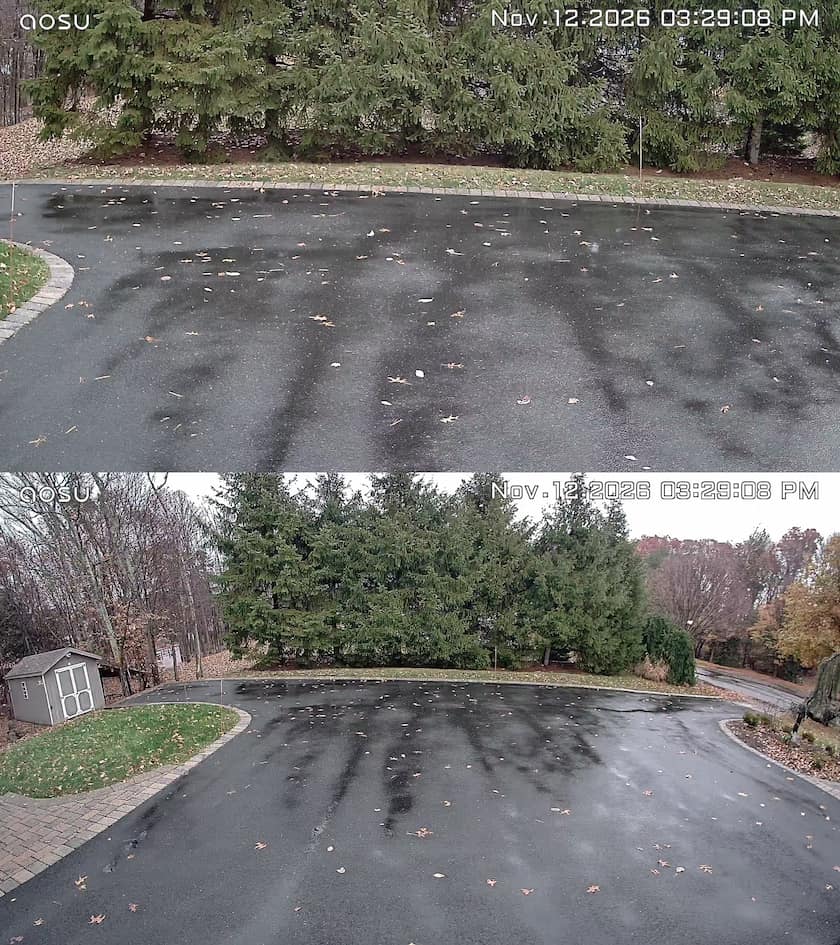
Once mounted and recalibrated above the driveway, the Aosu app presents a simultaneous stacked dual live view. The motorized 360-degree Focus (PTZ) camera sits on top of the phone screen, while the fixed 170-degree Wide View camera sits on the bottom. Because the top wide-angle bullet housing is mounted on a 180-degree manual pivot arm, you can aim the fixed perimeter view down your driveway while letting the lower PTZ dome rotate independently.
Daytime video clarity across both 3K (5MP, 2880 x 1620) lenses is a standout strength of the SolarCam T2 Pro. Putting matching 3K sensors on both the wide spotter lens and the pan-and-tilt tracking lens keeps colors, driveway textures, and vehicle details crisp across both views simultaneously, and you can tap anywhere on the wide-angle view to swing the PTZ camera directly to that spot with up to 8x hybrid zoom.
Real-World Daytime 3K Wildlife & Auto-Tracking Video Test
In the real-world test video below, our mounted Aosu SolarCam T2 Pro demonstrates how its dual 3K lenses and subscription-free on-device AI work together when a deer wanders across our yard. The camera combines a fixed 170-degree 3K wide-angle lens with a motorized 360-degree 3K pan-and-tilt Focus Cam powered by a top-mounted 5W solar panel and 9,200mAh battery. When movement enters the yard, the camera wakes up, classifies the subject using its free built-in AI (which covers 10 alert categories including Person, Vehicle, Pet/Animal, and Automated Parking Guard), and saves the clip locally to a microSD card with zero monthly subscription fees:
What this video shows: Daytime 3K (5MP) backyard wildlife footage captured on our Aosu SolarCam T2 Pro (model C9P21-1), followed by our single-bracket vinyl siding installation with the top-mounted 5W solar panel.
Inside the Video/Audio settings menu, Aosu keeps stream configuration simple with two radio buttons:
- UHD(3K+3K) (Default): Prioritizes image quality by streaming both the Wide View Cam and the Tracking Cam at full 3K resolution simultaneously.
- Smooth Mode: Prioritizes playback smoothness when wireless signal strength is weak, alongside a 5-step volume slider for the built-in Two-way Talk Speaker.
Having that Smooth Mode toggle is useful because the Aosu SolarCam T2 Pro only supports 2.4 GHz Wi-Fi and lacks 5 GHz Wi-Fi support. While 2.4 GHz penetrates exterior garage walls well, pushing two simultaneous 3K streams over a congested 2.4 GHz band is more demanding than dual-band Wi-Fi, which we have seen on indoor Aosu models like our Aosu IndoorCam P1 Pro.
Night Vision Tested: Infrared vs. Spotlight Color (and One Missing Toggle)
After dark, the SolarCam T2 Pro uses infrared LEDs and built-in white spotlights on both camera modules so you can monitor in discreet black-and-white or motion-triggered full color. Opening the Night Vision menu gives you three manual radio buttons:
- Black and White Night Vision (Default): Keeps the infrared LEDs active in low light for standard black-and-white nighttime footage.
- Color Night Vision: Turns on the white spotlight and switches the feed to full color when activity is detected, then shifts back to black-and-white when no motion is present.
- Natural Lights: Disables both the infrared LEDs and white spotlights so the camera relies strictly on ambient porch or street lighting in bright or overexposed scenes.
In our nighttime testing, the Color Night Vision capture was fairly clear and performed right in line with what we expect from a spotlight-assisted 3K solar camera, providing helpful color detail on vehicles and clothing near the garage. Below, you can compare our stacked dual-lens captures in both Black and White Infrared mode and spotlight-assisted Color Night Vision mode side by side:
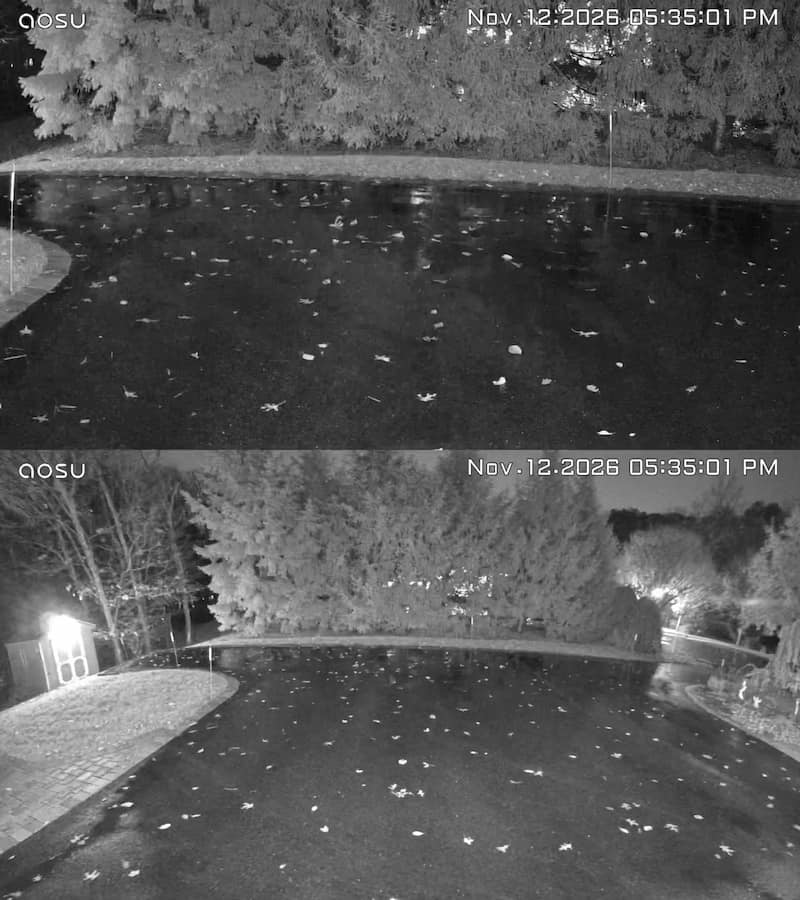
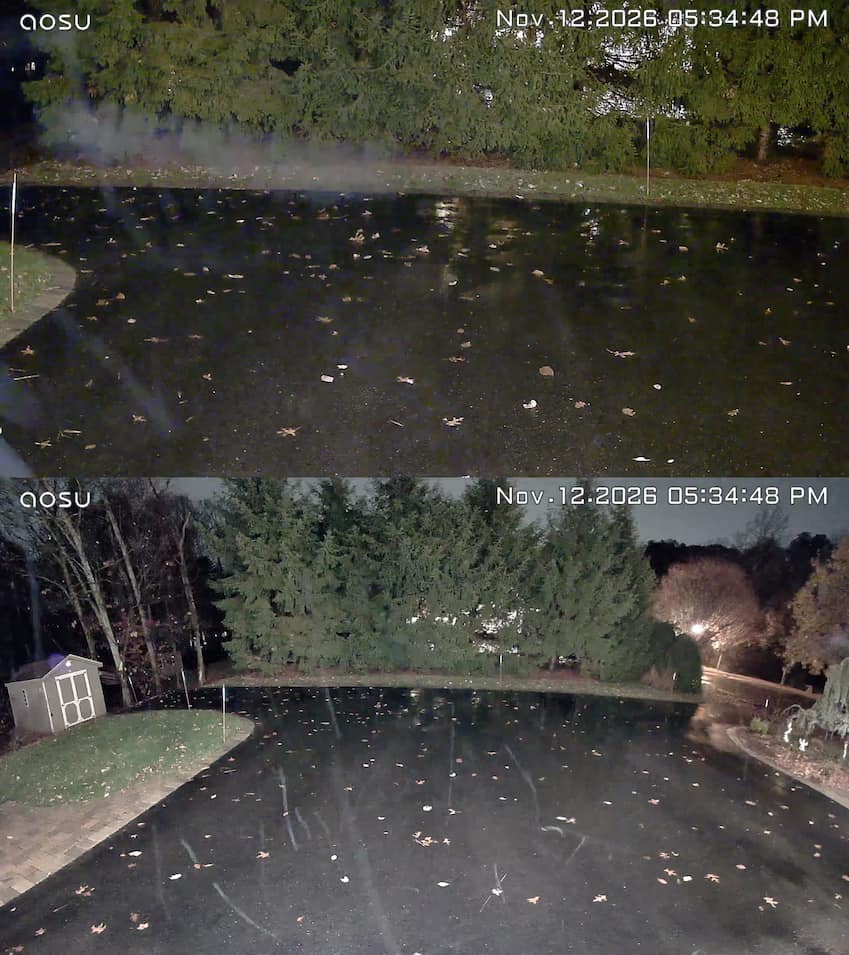
The one limitation in Aosu’s Night Vision menu is that you must manually select either Black and White, Color Night Vision, or Natural Lights. There is no option to let camera intelligence dynamically choose the best lighting mode based on ambient light levels or specific AI object types.
Extensive Free On-Device AI, Automated Parking Guard, and Dual Cam Handoff
If you are tired of camera brands locking basic person or vehicle alerts behind a monthly cloud subscription (like we ran into in our Wyze Bulb Cam review and Blink Outdoor 2K+ review), the Aosu SolarCam T2 Pro is a breath of fresh air. It earns a spot alongside the top picks in our best security cameras with free AI detection guide because Aosu packs a deep suite of accurate, scenario-based AI features right onto the camera hardware at zero monthly cost. In fact, there are more AI choices here than any other camera brand we can recall. Great job by Aosu.
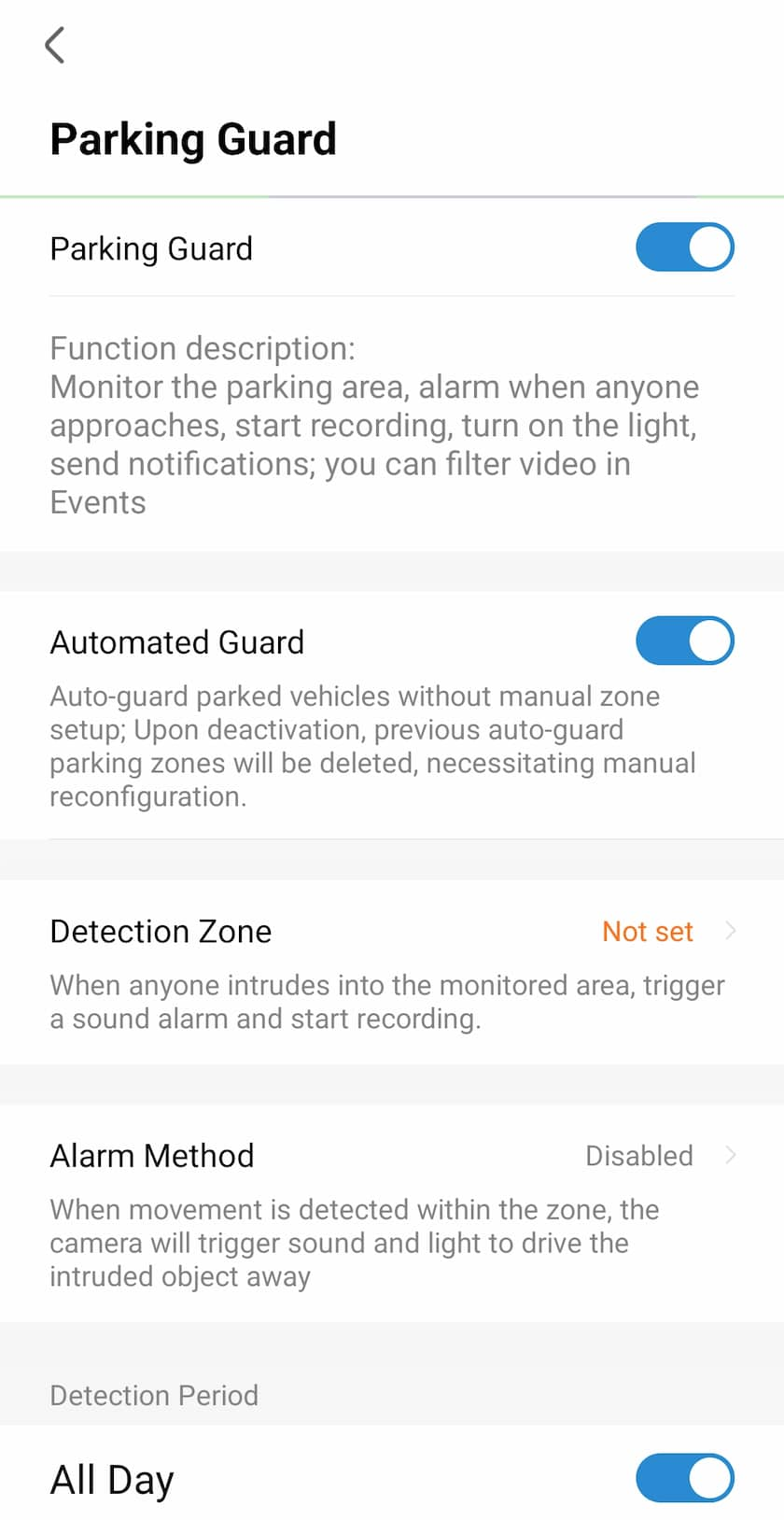
Inside the app, you get standard Person, Vehicle, and Pet recognition alongside four specialized perimeter modes: Parking Guard, Intrusion Monitoring, Intrusion Prevention at Yard Wall, and Lawn Surveillance. Tapping into Parking Guard reveals a clever Automated Guard toggle that automatically detects and monitors parked cars in your driveway without forcing you to draw a manual polygon zone first, plus options to customize the Detection Zone, Alarm Method (light and siren), and Detection Period.
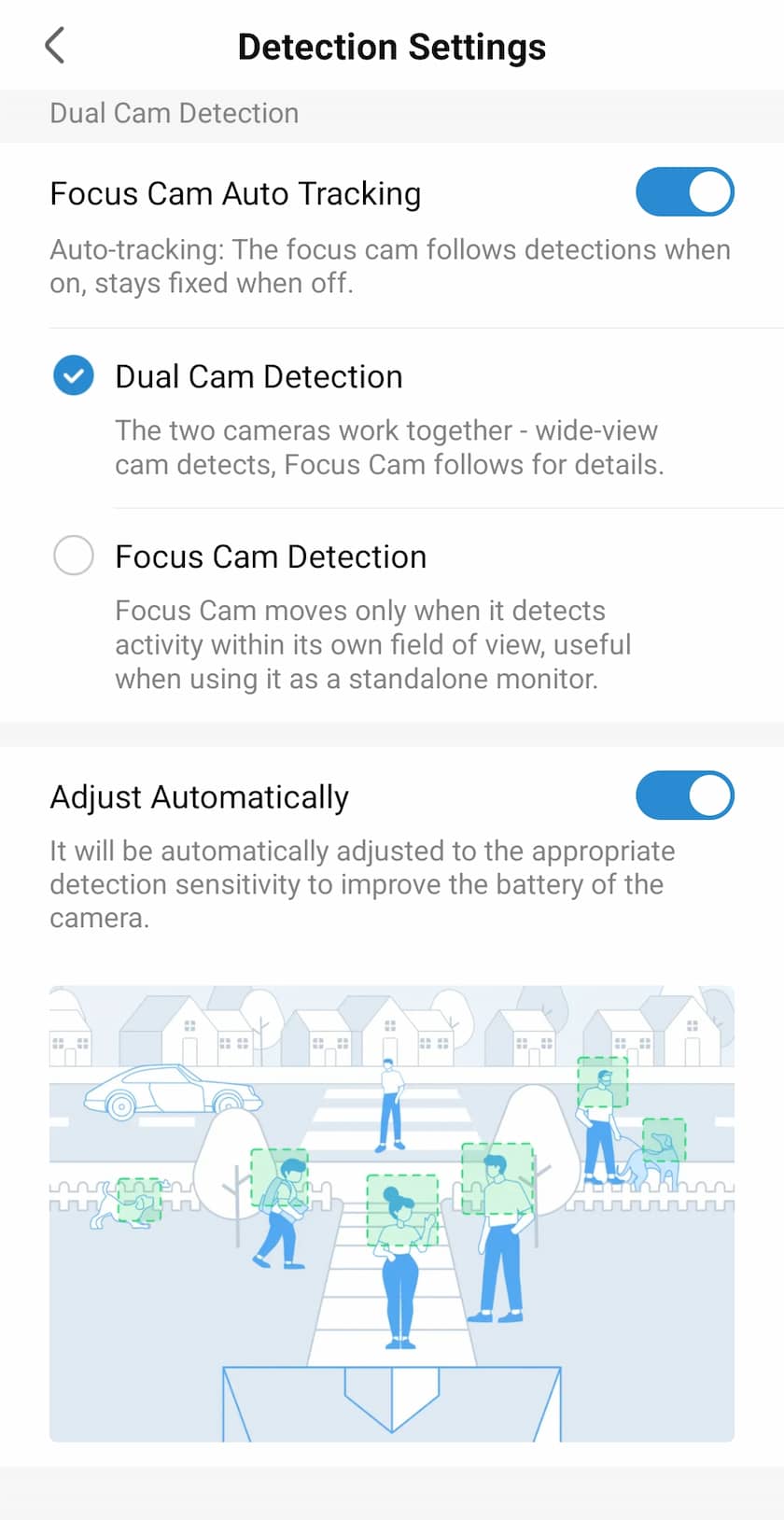
Under Detection Settings, the T2 Pro gives you granular control over how the two lenses coordinate. Alongside the main Focus Cam Auto Tracking toggle and an Adjust Automatically battery-saving sensitivity switch, you can choose between two tracking handoff behaviors:
- Dual Cam Detection (Default): The two cameras work together as spotter and tracker. When the 170-degree wide-view camera detects a person, vehicle, or pet, it hands the target off to the motorized Focus Cam to pan, tilt, and follow the subject for close-up details.
- Focus Cam Detection: The lower PTZ Focus Cam only moves when it detects activity inside its own field of view. This mode is useful when you want the top wide camera watching the driveway while the bottom PTZ camera monitors a separate side walkway or patio without getting whipped away every time a car passes the wide lens.
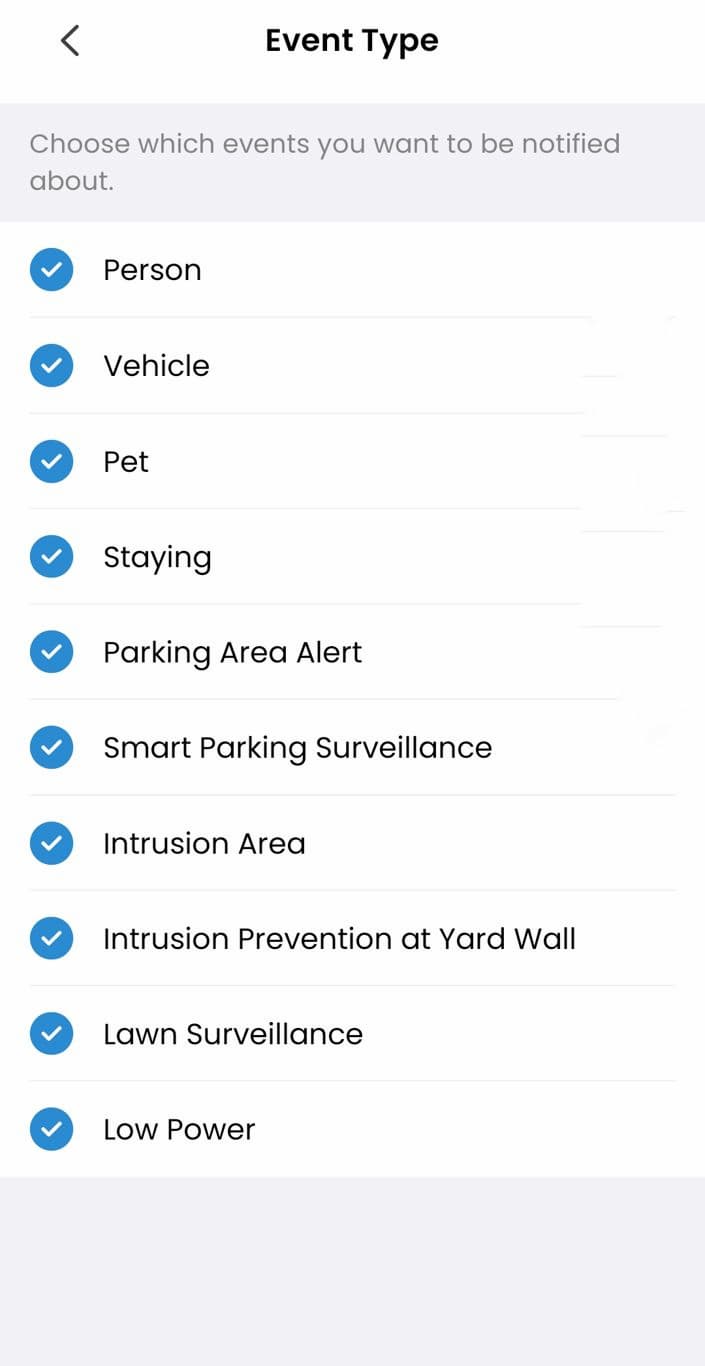
Under Notification Settings, Aosu sets Immediate Mode (“Get instant, unfiltered alerts as events happen”) as the free default. A second option called Intelligent Mode (“Smart algorithms filter routine events by severity and deliver tiered alerts when it matters”) carries a gray Pro badge that requires a paid aosuProtect+ Pro subscription. In daily use, you do not need to pay for Intelligent Mode because Aosu lets you schedule notifications by time of day and filter alerts across 10 individual free Event Type checkboxes: Person, Vehicle, Pet, Staying (loitering), Parking Area Alert, Smart Parking Surveillance, Intrusion Area, Intrusion Prevention at Yard Wall, Lawn Surveillance, and Low Power.
Motion Detection Range Tested: Why It Tops Out at 30 Feet
While the Aosu SolarCam T2 Pro’s AI classification accuracy is impressive once a subject enters its detection zone, motion detection distance is the camera’s main limitation. In our outdoor driveway testing, the T2 Pro detected movement at roughly 30 feet.
There is a clear hardware reason for that 30-foot ceiling. Because the Aosu SolarCam T2 Pro is strictly an event-triggered battery and solar camera with no continuous interval snapshot mode, its dual 3K image sensors stay asleep to conserve battery power until its passive infrared (PIR) heat sensor wakes them up. Standard PIR heat sensors top out around 30 to 35 feet, whereas wired PoE cameras (or solar cameras that use continuous snapshot + radar modes) keep their optical sensors awake to spot movement out to 100 feet. For more on how PIR and pixel-based detection distances work, see our security camera motion detection range guide.
Within 30 feet of our garage doors, the T2 Pro wakes up reliably, classifies people and parked vehicles accurately, and tracks smoothly across the apron. If your goal is guarding cars parked in front of a garage, a front porch, a patio, or a backyard lawn within 30 feet, it performs very well. If you have a long driveway and want an alert the moment a vehicle turns in from the street 60 to 100 feet away, the T2 Pro will not trigger until the subject closes to within 30 feet.
Local MicroSD Playback Speed (Timed), Cloud Upsells, and Smart Home Support
Right after pairing the camera in the Aosu app, you are greeted with a full-screen pitch for aosuProtect+ cloud storage (Basic for 14-day event history or Pro for 30-day history plus Intelligent Mode notifications). Thankfully, unlike the unskippable trial screen we criticized in our Blurams camera review, Aosu places a visible “Try Later” link at the bottom of the screen so you can dismiss the upsell in one tap. For a complete breakdown of Aosu’s per-camera cloud pricing, see our Aosu subscription plans guide.
With a microSD card installed (the T2 Pro supports cards up to 256GB; see our guide on selecting the right microSD card for a home security camera), you do not need a subscription at all. On our older Aosu SolarCam D1 Classic, pulling up recorded clips off the microSD card was sluggish. I timed microSD playback retrieval on the SolarCam T2 Pro, and it takes about 3 to 4 seconds to pull up a recorded video clip off the SD card. Considering the camera has to wake from battery sleep over 2.4 GHz Wi-Fi and fetch dual-3K video, 3 to 4 seconds is a solid improvement.
Two additional app and ecosystem features stood out during our testing:
- “Family Nearby” Local Device Sharing: Under Share Device, you can invite family members via standard email or use Aosu’s Family Nearby tab. When your family member opens their Aosu app and taps Add Family Member’s Device while standing next to you, the app automatically discovers their phone nearby (similar to Apple AirDrop) so you can share camera access without typing out email addresses.
- Alexa and Google Home Support (No Apple HomeKit): The T2 Pro integrates with Amazon Alexa and Google Home for voice viewing on smart displays (see our tutorial on how to watch a security camera on a Google Nest Hub). It does not support Apple Home or HomeKit Secure Video. And if you want to turn off the blue status indicator light on the front of the PTZ dome, follow our guide to turning off the Aosu camera status light.
How the Aosu SolarCam T2 Pro Compares to Pricier Dual-Lens Cameras
To put the Aosu SolarCam T2 Pro in context against the other dual-lens security cameras we have tested on our property, the biggest practical difference comes down to price versus long-range driveway reach. The Aosu SolarCam T2 Pro typically sells for significantly less than the solar TP-Link Tapo C675D KIT and the wired Reolink TrackMix PoE, while also giving you a cleaner single-bracket solar mount and more granular free parking and yard AI triggers than the TP-Link Tapo C575D. If you are looking at Aosu for your front entryway as well, see our hands-on Aosu 5MP Video Doorbell Ultra review for how its dual-band Wi-Fi, built-in 8GB storage, and dual-chime hardwiring compare. You can also browse more solar models in our best solar security cameras guide.
| Feature | Aosu SolarCam T2 Pro | Tapo C675D KIT | Tapo C575D | Reolink TrackMix PoE |
|---|---|---|---|---|
| HomeCamCafe Score | 4.0 / 5.0 | 4.5 / 5.0 | 4.5 / 5.0 | 4.5 / 5.0 |
| Relative Cost | Lowest cost (Best value solar kit) | Higher-priced premium solar kit | Mid-range (requires PoE or AC wiring) | Higher-priced (requires PoE switch/NVR) |
| Power & Wi-Fi | 5W Solar + 9,200mAh (2.4 GHz Wi-Fi only) | 4.5W Solar + 10,000mAh (2.4 / 5 GHz Wi-Fi) | PoE or 12V DC (2.4 / 5 GHz Wi-Fi) | PoE or 12V DC (Wi-Fi version also sold) |
| Dual-Lens Resolution | 3K (5MP) Wide + 3K (5MP) PTZ | 4K (8MP) Wide + 4K (8MP) 6mm PTZ | 4K (8MP) Wide + 4K (8MP) 8mm PTZ | 4K (8MP) Wide + 1080p (2MP) 8mm Telephoto |
| Lens Architecture | Fixed top wide + independent bottom PTZ | Fixed top wide + independent bottom PTZ | Fixed top wide + independent bottom PTZ | Both lenses rotate together in 1 PTZ head |
| Solar / Wall Mounting | Single bracket (panel bolts to top of cam) | Requires 2 separate wall brackets | Single wired wall/soffit bracket | Single wired wall/soffit bracket |
| Tested Motion Range | ~30 feet max (PIR wake-up limited) | ~100 feet (with SD + 24/7 Capture on) | ~100 feet out of the box | Long-range continuous pixel AI |
| Free On-Device AI | 10 types incl. Parking Guard, Staying, Lawn | Person, Vehicle, Pet, Line-Crossing | Person, Vehicle, Pet, Line-Crossing | Person, Vehicle, Animal (Pet) |
| Local Storage & NVR | microSD up to 256GB or aosuBase | microSD up to 512GB or Tapo H500 Hub | microSD up to 512GB, H500, RTSP/ONVIF | microSD up to 512GB, Reolink NVR, RTSP/ONVIF |
The Bottom-Line Trade-Off: If you are monitoring a standard two-car garage apron, front walkway, or patio within 30 feet and do not want to run Ethernet cables or pay the higher price of the Tapo C675D KIT, the Aosu SolarCam T2 Pro saves you money, mounts on a single bracket, and gives you better built-in Parking Guard AI. You only need to spend more on the Tapo or Reolink options if you need 100-foot detection down a long driveway, 5 GHz Wi-Fi, or wired NVR recording.
Pros and Cons
- Pros:
- Costs noticeably less than competing 4K dual-lens solar and PoE cameras while still including the 5W solar panel in the box.
- Clever all-in-one solar integration bolts the 5W solar panel directly to the top of the camera body so the entire unit hangs on a single bracket (plus includes a weatherproof USB-C extension cable for remote wall mounting).
- Extensive, accurate, and 100% free on-device AI with 10 customizable alert categories, including Automated Parking Guard, Staying (loitering), Yard Wall Intrusion, and Lawn Surveillance.
- Sharp dual 3K (5MP + 5MP) daytime video clarity across both the 170-degree wide lens and the 360-degree PTZ tracking lens.
- Coordinated Dual Cam Detection handoff or independent Focus Cam Detection for watching two separate directions at once.
- Dual-notch mounting plate holds the heavy camera securely and lines right up with the VOMENC vinyl siding mount.
- Local microSD playback pulls up recorded video clips in 3 to 4 seconds with zero monthly fees required.
- Built-in Family Nearby local phone discovery makes sharing camera access with household members quick and simple.
- Cons:
- Motion detection tops out at roughly 30 feet in real-world testing due to its PIR wake-up sensor.
- Limited to 2.4 GHz Wi-Fi with no 5 GHz band support.
- Night vision menu forces a manual choice between IR and Color mode with no dynamic camera-intelligence auto-switching.
- Small screws on the solar panel pedestal make initial assembly a bit of an arts and crafts project.
- Requires a full 6+ hour indoor USB-C charge before mounting and a mandatory PTZ recalibration whenever the camera is moved.
Frequently Asked Questions
Does the Aosu SolarCam T2 Pro require a monthly subscription?
No. All 10 on-device AI detection categories (including Person, Vehicle, Pet, Staying, Automated Parking Guard, Yard Wall, and Lawn Surveillance), Dual Cam auto-tracking, Immediate Mode push alerts, and local event recording to a microSD card (up to 256GB) or aosuBase work for free without a subscription. You only pay if you want optional aosuProtect+ cloud storage or Pro Intelligent Mode alert filtering.
How far away can the Aosu SolarCam T2 Pro detect motion?
In our outdoor driveway testing, motion detection on the Aosu SolarCam T2 Pro topped out at roughly 30 feet. Because it relies on a battery-saving passive infrared (PIR) sensor to wake the camera before running AI classification, it works best for 2-car garage aprons, parked cars, patios, and walkways within 30 feet of the mounting location.
Can the Aosu SolarCam T2 Pro solar panel be mounted separately from the camera?
Yes. Out of the box, the solar pedestal attaches directly to the top of the camera housing with small screws for a single-mount installation. If your camera is mounted in the shade, that same pedestal can be screwed directly to a wall in a sunnier spot using the included USB-C extension cable with its weatherproof female coupling.
Does the Aosu SolarCam T2 Pro work on 5 GHz Wi-Fi or Apple HomeKit?
No. The SolarCam T2 Pro connects exclusively to 2.4 GHz Wi-Fi networks and does not support 5 GHz Wi-Fi. For smart home viewing, it integrates with Amazon Alexa and Google Home displays, but does not support Apple Home or HomeKit.
Final Verdict: Should You Buy the Aosu SolarCam T2 Pro?
HomeCamCafe Rating: 4.0 / 5.0
The Aosu SolarCam T2 Pro is a well-built, thoughtfully designed dual-lens solar camera that solves two of the biggest frustrations in the wireless security camera market while costing significantly less than competing 4K dual-lens kits. First, bolting the 5W solar panel directly to the top of the camera body lets you hang the entire dual-lens system on a single bracket or, as we did, a no-drill VOMENC vinyl siding mount. Second, Aosu includes an unusually rich and accurate suite of 10 free on-device AI triggers, highlighted by Automated Parking Guard, alongside sharp dual-3K daytime video and 3 to 4 second microSD clip playback.
While its 30-foot PIR motion detection ceiling and 2.4 GHz-only Wi-Fi keep it from earning a 4.5 or 5.0 for long driveways, its lower price point and all-in-one mount make it an easy 4.0 out of 5 recommendation for homeowners who want maintenance-free solar power and dual-lens 3K coverage for parked cars, front entries, and yards within 30 feet of the house.
For more hands-on reviews and guides, explore our Aosu security camera reviews hub and our best solar security cameras guide.