
This Blink Outdoor 2K+ review is based on hands-on testing both indoors and outdoors, mounted on a shelf watching my parrot before moving it to its permanent spot outside. Combined with years of running the Outdoor 4 and Outdoor 3, that gave a clear picture of where this camera actually improves on its predecessors and where the upgrade matters less than Blink’s marketing suggests.
Check the current price on Amazon
What’s New in the Blink Outdoor 2K+ Compared to the Outdoor 4 and Outdoor 3
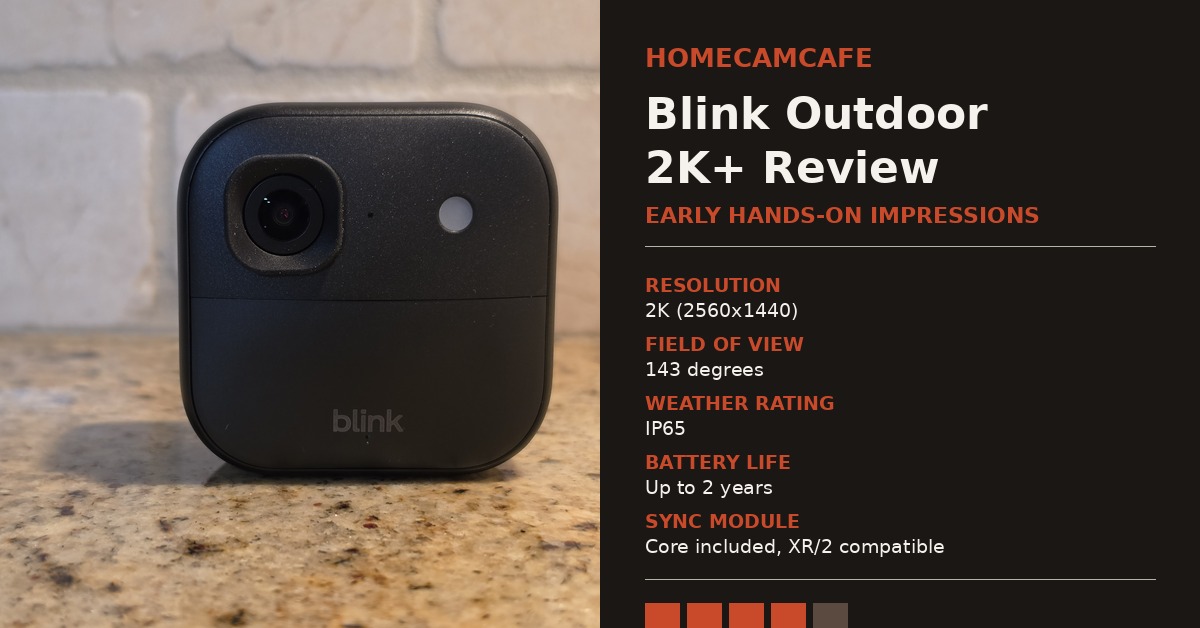
The headline upgrade is right there in the name. The Outdoor 2K+ jumps from the Outdoor 4’s 1080p sensor to a 2560×1440 resolution, with the app offering Best, Standard, and Saver modes that correspond to 2K, 1080p, and 720p, so you can trade some clarity for battery life if you need to stretch it further. The field of view lands at 143 degrees, wide enough to cover most driveway and entryway angles without needing a second camera to fill in the corners. Furthermore, this is not a marginal step up. Compared to both my Outdoor 4 and my older Outdoor 3, the difference in sharpness is noticeable immediately, particularly around fine detail like feathers, text, and edges that used to blur together on the older sensors. If picture quality has been the one thing holding you back from Blink, this is the camera that finally addresses it.
In addition to resolution, Blink added 4x digital zoom and a larger speaker grille for improved two-way audio with noise cancellation. Standard infrared night vision, used whenever ambient light is too low for the color mode, covers the same practical range you would expect from the Outdoor 4, generally enough to identify a person or vehicle a driveway’s length away rather than resolve fine facial detail at distance. As a result, calls through the camera come through clearer than on my Outdoor 4, which is a welcome change for anyone who actually uses the talk-back feature rather than treating it as an afterthought.
Design and Mount Compatibility
Physically, the Outdoor 2K+ is nearly identical to the Outdoor 4. It measures 70mm x 70mm x 41mm and weighs 5.0 ounces, which is a small enough footprint to tuck under an eave or onto a corner post without drawing much attention. The housing is the same matte black plastic Blink has used across its last two generations, with a rounded square shape, the lens and status light on the upper portion, and a horizontal seam that splits the front panel from the lower half where the “blink” logo sits. It carries the same IP65 weatherproof rating as the Outdoor 4, runs on the same two AA lithium batteries, and fits the same mounting hardware, so a Sync Module or camera swap does not mean starting over on hardware.
On the back, a twist-lock cover protects the battery compartment and is secured with a quarter turn of the included right-angle adapter, a coin, or a large screwdriver. Underneath a small silicone plug is a USB-C port used for the optional weather-resistant power adapter, which is worth considering if you would rather skip battery changes altogether. That plug has to stay seated for the camera to remain weather-resistant, so it is one detail worth double-checking during and after any battery swap. Therefore, anyone already invested in Blink’s mount ecosystem, including gutter clips, siding mounts, and the solar panel accessory, can drop this camera in without buying new hardware. For a closer look at compatible mounting options, see our Blink camera mount guide.
What’s in the Box and Setting It Up
The standard kit includes the camera, a Sync Module Core, two AA lithium batteries, a mounting kit with the right-angle adapter, a power adapter and USB-C cable for the Sync Module Core, and a quick start guide. Setup follows the same pattern as previous Blink cameras. You plug in the Sync Module, scan its QR code in the Blink app, then add the camera by scanning the QR code on its back and waiting for it to pick up a firmware update. From there, the app walks through a settings preset and mounting guidance before the camera is live.
Mounting is flexible. The included plate works for flat wall or ceiling placement, while the right-angle adapter lets you angle the camera under an eave or ledge without extra hardware. Blink recommends mounting no higher than about ten feet and angling the camera to catch side-to-side motion rather than motion walking straight toward the lens, since that orientation triggers more reliable alerts. In addition, the camera needs to stay within range of its paired Sync Module, so placement should account for that distance before committing to drilled holes.
Color Vision in Low Light: The Marketing Doesn’t Quite Match Reality
Blink promoted this camera with language that sounds a lot like true color night vision, but the current Amazon listing has quietly walked that back to “Color Vision in low light.” That distinction matters. In practice, the camera can hold color footage only when there is some ambient light present, such as a porch fixture, a streetlight, or daytime brightness. Once it gets fully dark, it switches to standard infrared black and white, just like the Outdoor 4 always has.
After moving the camera to its outdoor mounting spot, footage under porch lighting is a bit clearer than the Outdoor 4 produces in the same conditions, but it is nothing to write home about. It is a real improvement, not a marketing illusion, but do not expect the color-in-low-light feature alone to justify the upgrade. The bigger win with this camera is the 2K resolution during the day and in well-lit conditions, not the nighttime color performance.
App Experience and Motion Alerts
The Blink app experience carries over unchanged from the Outdoor 4, which is mostly a good thing. Activity zones let you draw boundaries around the parts of the frame that should trigger a notification, which is useful for cutting down on alerts from a sidewalk or street that is technically in frame but not actually relevant. Live view, thumbnail previews, and two-way audio all work exactly as they do on older Blink cameras, so there is no relearning curve if you are upgrading within the same ecosystem. However, the sharper 2K feed does make reviewing clips in the app noticeably more useful, since motion events that used to be a blurry smear are now clear enough to actually identify.
Sync Module Core vs. Sync Module 2: A Real Trade-Off to Know About
The standard Outdoor 2K+ kit ships with a new Sync Module Core rather than the Sync Module 2 that has shipped with Blink cameras for years. This is not a small change. The Sync Module Core has no USB port, which means it does not support free local video storage. If you want your footage saved anywhere with the included module, a subscription becomes necessary. For anyone who bought an Outdoor 4 specifically to avoid a monthly fee, that is worth knowing before you buy.
I am running mine on a Sync Module 2 I already owned rather than the included Core, and it paired without any issues. However, if you are starting from scratch and local storage matters to you, factor in the cost of a separate Sync Module 2 rather than relying on the one included in the box. For more detail on how Blink’s storage options compare, see our full Blink subscription plans breakdown.
Sync Module XR Compatibility: What It Does and Doesn’t Do
This is a point of genuine confusion, so it is worth stating plainly. The Outdoor 2K+ is compatible with the Sync Module XR, meaning it will pair and function normally on that hub. However, the extended range mode that makes the XR worth buying in the first place, which pushes camera connectivity well beyond standard Wi-Fi range, is currently limited to the Outdoor 4 only. If you are hoping to combine 2K video with extended range coverage on a large property, you cannot get both from this camera today. You will need to choose one priority or the other until Blink extends XR support further.
Starting Indoors: A Parrot-Watching Trial Run
Before moving it to its permanent outdoor spot, I ran this camera indoors on a shelf watching my parrot, which turned out to be a surprisingly good way to evaluate detail and motion handling at close range. Feather texture and small movements came through with noticeably more clarity than they would on my Outdoor 4 in the same spot. In addition, this highlights something worth mentioning for readers who are not exclusively shopping for outdoor coverage. Even though Blink markets the Outdoor 2K+ for exterior use, the same IP65 housing that protects it from rain also means nothing stops it from working just as well indoors, whether that is watching a pet, a nursery, or a workshop.
Who Should Buy the Outdoor 2K+
This camera makes the most sense for two groups. First, current Outdoor 4 owners who have been satisfied with Blink’s ecosystem but have wanted sharper footage, since the upgrade is a drop-in swap that reuses existing mounts and accessories. Second, new buyers comparing Blink against other battery-powered brands, since 2K resolution now puts Blink on more even footing with competitors that have offered higher resolution for longer. On the other hand, current Outdoor 4 owners who rely on free local USB storage should budget for a separate Sync Module 2 rather than assuming the included Sync Module Core covers that need, and anyone specifically chasing the Sync Module XR’s extended range should stick with the Outdoor 4 until that feature expands to the 2K+.
Final Verdict: 4.0 / 5
The Blink Outdoor 2K+ delivers a real, easily noticeable jump in video quality over both the Outdoor 4 and Outdoor 3, along with better audio and full compatibility with existing Blink mounts. Tested both indoors and in its permanent outdoor spot, the color-in-low-light performance is a modest improvement rather than a standout feature, so do not buy this camera expecting true color night vision. The Sync Module Core swap is the detail most buyers should understand before purchasing, since it removes free local storage from the box unless you already own or add a Sync Module 2. For most Blink owners weighing the upgrade, the sharper video alone makes the difference worthwhile, which is why it earns a 4.0.
Already own a Blink system and just need the camera itself? The Outdoor 2K+ add-on camera skips the sync module entirely. For the full individual review see the Blink Outdoor 4 review, and for a side-by-side look at how Blink stacks up against a competing platform see our Ring vs. Blink comparison. For brand-specific guides see the Blink camera hub.
