
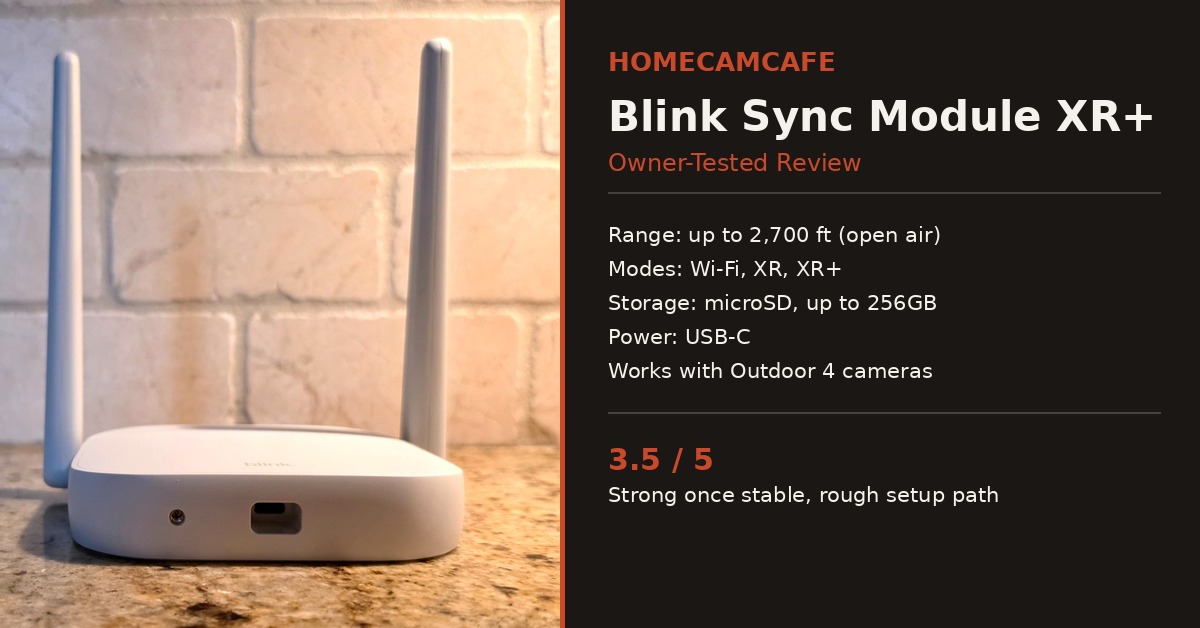
This Blink Sync Module XR+ review comes after several weeks of daily use, a support call that went nowhere, and one deliberately unfair range test. In addition to normal setup and everyday performance, I wanted to see what happens when this hub is pushed past the marketing copy, including a camera mounted about 100 feet away inside a metal mailbox. The short version: once it settled in, it performed well. Getting there, however, was not smooth.
Check the current price on Amazon
Before getting into the setup details, it helps to know what this hub is for in the first place. The Sync Module XR+ is not a camera. It is a system hub that connects your Blink cameras to your Wi-Fi network and, for the Outdoor 4 specifically, unlocks a proprietary long-range radio that reaches well beyond a typical home network. If none of your cameras are the Outdoor 4, most of this hub’s headline feature is wasted on you, since extended range mode only applies to that camera line. For everything else, it functions as a standard hub, similar to the Sync Module 2 it replaces.
Blink Sync Module XR: Setup and Migration
I was moving over from an older Sync Module 2, so the first thing I wanted to know was whether I would have to re-add every camera from scratch. Fortunately, the Blink app handled this cleanly. It detected the existing Sync Module 2 during setup and asked if I wanted to migrate it, then let me select which cameras to move over. No manual re-pairing, no factory resets, no lost settings. If you are coming from an older module, this part of the process deserves real credit, and I cover the full migration steps in more detail in my Sync Module 2 to XR upgrade guide.
In total, the migration took a few minutes, mostly spent waiting for each device to check in with the new hub. Afterward, I unplugged the old Sync Module 2 and kept it as a backup rather than discarding it, since it is small enough to store in a drawer and gives me a fallback if the XR+ ever needs to be swapped out temporarily.
The Missing Power Adapter
Here is where things started to get frustrating. The Sync Module XR+ box did not include a power adapter. It’s supposed to be included but wasn’t in the box. Clearly a lapse on the QA end at Blink. I purchased this over a month ago so could not return it.
I initially reused the adapter from the old Sync Module 2, which was underpowered for the XR+’s needs. As a result, the hub struggled to stay connected. Switching to a generic 60W USB-C PD laptop charger did not solve it either, since PD negotiation does not reliably land on the specific 5V/2A profile the XR+ requires by default. If you are setting one of these up, plan on sourcing a proper 5V/2A USB-C adapter rather than assuming any charger in a drawer will do (or better yet, make sure it’s in the box when you get it).
Quick fix: Confirm your power adapter is rated for 5V/2A specifically. A higher-wattage PD charger is not automatically compatible, since it may not settle on that exact voltage and amperage combination.
The Support Call and the Bandwidth Excuse
Even after sorting out the power issue, the hub kept hanging and going offline. Consequently, I contacted Blink support directly. After hours of back and forth, a technician logged into my system remotely and concluded that my internet connection, 300Mbps down and 21Mbps up, was too slow, and recommended I call my ISP to upgrade. I pointed out that the exact same cameras had run without issue on my old Sync Module 2, on that same connection. Support said someone would call me back with more information. A week later, still waiting for that call.
Meanwhile, and without any changes on my end, the hub stabilized around the same time as that unreturned callback. It has not dropped since. I do not know why. I suspect a silent firmware push, but I have no confirmation of that from Blink, and I was not able to find other owners reporting the same self-resolving pattern. Therefore, I am reporting it as exactly what it was: an unexplained recovery, not a confirmed fix. For what it is worth, my bandwidth was never remotely close to the bottleneck support suggested.
Real-World Range Test: A Metal Mailbox at 100 Feet
For the actual range test, I mounted a Blink Outdoor 4 camera inside a metal mailbox roughly 100 feet from the hub, with several exterior walls in between, and set the camera to XR mode. Metal enclosures are a worst-case scenario for wireless signal, so this was intentionally a tougher test than Blink’s own marketing scenarios. Since the hub stabilized, it has not dropped a single connection to that camera, despite the distance, the walls, and the metal housing working against it. That is a strong result on its own terms, and it is the kind of real-world stress test that spec sheets do not capture.
I’m still amazed this worked. It’s a pretty nice convenience when I’m feeling so lazy that I can’t muster the initiative to make more than one trip to the mailbox 100 feet away each day.
If you are considering a similar setup, an Outdoor 4 add-on camera is the right pick if you already own a hub like the XR+, since it skips the redundant Sync Module Core that comes bundled with standalone kits.
The Resolution and Connectivity Tradeoffs
Extended range is not free. XR mode caps video at 720p, while XR+ mode drops further to 360p and disables two-way audio entirely. In other words, the farther you push a camera from the hub, the more resolution and capabilities you give up. This is worth weighing carefully before choosing a mounting spot purely for maximum distance. So only initiate XR or XR+ mode if you really need it.
It is also worth noting that the Sync Module XR+ has no Ethernet port, so Wi-Fi is your only connection option regardless of camera count or network conditions. I cannot say with certainty that this caused my early stability issues, since Blink never gave a real diagnosis and the fix, whatever it was, remains unconfirmed. Still, if you are running a large camera count, it is a limitation to know now rather than discovering it mid-setup, as I did.
Local Storage and App Experience
Beyond the range test, day-to-day use has been straightforward. I loaded a microSD card into the hub for local storage, which avoids a monthly subscription for basic clip saving. Furthermore, controlling multiple cameras from the Blink app, arming and disarming groups, and checking live view have all worked as expected once the connection issues were behind me. None of this feels different from the experience I had with the older Sync Module 2, aside from the underlying range improvement on the Outdoor 4 camera specifically.
One small but useful detail: the hub can hold up to ten Blink devices at once, so if you are running a mixed setup with indoor cameras, a video doorbell, and outdoor units, everything can sit on a single XR+ without needing a second hub, provided you are not trying to push more than two cameras into extended range mode simultaneously.
How It Compares to the Standard Sync Module XR
If the XR+’s extended range is more than you need, the standard Blink Sync Module XR covers shorter distances at higher resolution, and costs less. For most yards and typical camera placements, the base XR mode alone is plenty. Reserve the XR+’s longer reach for truly difficult placements, such as detached structures, long driveways, or, as in my case, a mailbox at the edge of the property.
Buying tip: Blink periodically bundles the Sync Module XR+ with a single Outdoor 4 camera. If you do not already own the hub, check current pricing on that bundle before buying the hub by itself, since it has at times been priced lower than the standalone hub, even including the extra camera. If you already own a hub and just need another camera, the Outdoor 4 add-on camera linked above skips the redundant hub entirely.
Verdict: 3.5 / 5
Once stable, the Blink Sync Module XR+ delivers on its core promise. It held a rock-solid connection to an Outdoor 4 camera inside a metal mailbox 100 feet away, migration from an older Sync Module 2 was seamless, and local microSD storage works as expected. However, the missing power adapter, the unhelpful support experience, and an unexplained stretch of instability are real marks against it. If you need genuine long-range coverage for Outdoor 4 cameras and can tolerate a potential rocky first day, it earns its keep. If your placements are closer to home, the standard Sync Module XR (or even Core) is the easier, less expensive choice.
Frequently Asked Questions
Does the Sync Module XR+ include a power adapter?
Yes it should. Although mine did not due to what I assume is a QA issue. Use the one in the box or a dedicated 5V/2A USB-C adapter rather than reusing an older Blink adapter or a generic PD charger.
Does the Sync Module XR+ have an Ethernet port?
No. It connects over Wi-Fi only, so a strong 2.4GHz signal near the hub matters more than it would with a wired option available.
What is the difference between XR mode and XR+ mode?
XR mode supports up to 720p video at shorter range, while XR+ mode extends the range further but drops resolution to 360p and disables two-way audio. Choose based on how far your camera needs to reach, not just maximum distance.
Can I migrate from an older Sync Module without losing my camera settings?
Yes. The Blink app offers a guided migration option that moves selected cameras from an existing module automatically, without requiring a factory reset or manual re-pairing.
For the full individual reviews see the Sync Module 2 to XR upgrade guide and the Blink Outdoor 4 review. For brand-specific guides see the Blink camera reviews hub.
