
This Defender Frontier review is based on hands-on outdoor testing of Defender’s solar-powered 4G security camera. The Frontier is built for places where Wi-Fi is unavailable or simply does not reach, combining cellular connectivity, PTZ tracking, AI human detection, local microSD storage and an included solar panel.

Check the Defender Frontier price on Amazon →
Bottom line: Excellent night vision, very accurate human detection, useful PTZ tracking and surprisingly reliable performance on a weak 4G signal make the Frontier a strong option for locations beyond Wi-Fi coverage. The required cellular plan and repeated live-view reconnection delay keep it from scoring higher.
Defender Frontier Review: The Short Version
The Defender Frontier fills a very specific role. If strong Wi-Fi already reaches the location where you want to install a camera, there are less expensive Wi-Fi cameras that avoid an ongoing cellular fee. The Frontier becomes far more interesting when Wi-Fi is the problem, particularly for detached garages, gates, sheds, large properties, seasonal homes, RV locations and construction sites where extending a network or running power would be difficult.
My test location was a good challenge for the cellular side of the camera because signal strength usually bounced between just one and two bars. Despite that weaker connection, the Frontier continued to provide usable live video, responsive PTZ controls and accurate human detection. Its biggest surprise, however, was image quality after dark. Both infrared and color night modes produced excellent results across a fairly large backyard.
Defender Frontier Specifications
| Feature | Defender Frontier |
|---|---|
| Video | 2K+ / 4MP |
| Connection | 4G LTE cellular |
| Wi-Fi Required | No |
| Lens / Field of View | Fixed 4mm focal length / 115° diagonal |
| PTZ | 355° pan / 90° tilt |
| Human Detection | Yes |
| Motion Tracking | Yes |
| Feature Tracking | Live-view digital subject zoom |
| Night Vision | Infrared and color |
| Battery | 9,200mAh rechargeable |
| Solar Panel | 5W included |
| Local Storage | microSD up to 256GB |
| Continuous Recording | No |
| Two-Way Audio | Yes |
| Weather Resistance | IP65 |
Setup Is Easy, But Read the Instructions
Setup was fairly easy, but I would not recommend winging it. The Frontier is different enough from a normal Wi-Fi camera that reading Defender’s setup instructions first saves time, because every camera brand has their own steps.
Defender recommends charging the camera for about four hours before first use. I followed that recommendation and think it is worth doing. Starting at 100% gives the solar panel the much easier job of maintaining a full battery rather than trying to recover a partially discharged camera immediately after installation.
The included camera mount is a relatively small bracket that attaches to the top of the unit. The 5W solar panel mounts separately, which is a better arrangement than integrating the panel into the camera body because the best camera angle and the best solar angle are not necessarily the same.
If you’re mounting the Frontier on siding, see our guide to mounting a security camera on vinyl siding without drilling. I used these vinyl siding mounting clips from Amazon for my installation.

Do the PTZ Calibration
One setup step I consider critical is PTZ calibration, and this is not something I would skip. The camera needs to establish its movement range and reference position before its pan, tilt and tracking behavior can work properly. Once calibrated, manual PTZ control worked well in my testing, and the camera was able to follow movement through the scene without the positioning problems you can get from an uncalibrated PTZ camera.
One manual-control feature I particularly liked is that you can pan and tilt the camera simply by swiping across the live video. It feels much more natural than hunting for directional buttons, especially on a phone, and makes repositioning the camera quick and intuitive.
4G Performance With Only One or Two Bars
The Frontier’s defining feature is its 4G connection. It does not join your home Wi-Fi network, which makes it useful in locations where a conventional connected camera would be impractical. If that’s the problem you’re trying to solve, our guide to using a security camera without internet availability explains the broader options.
My outdoor cellular signal generally fluctuated between one and two bars, yet the camera remained functional throughout testing. Live view opened, PTZ commands worked, human detection continued to trigger and video remained usable. That’s important because a remote camera isn’t always going to be installed in a location with perfect cellular reception.
The Empower app also provides Standard Mode and Flowing Mode. Defender specifically recommends switching to Flowing Mode for smoother video when the 4G connection is unstable. I was able to remain in Standard Mode during testing despite a relatively weak one-to-two-bar signal, so I never needed Flowing Mode as a workaround.
The Encrypted Connection Delay Is Slightly Annoying
There is one aspect of live viewing that became irritating. Each time you open the camera feed, the Empower app pauses while it establishes an encrypted channel with the Frontier. Some connection setup is reasonable on a cellular security camera, but switching to another app and then returning to Defender causes that encrypted channel to be established again.
That repeated delay is noticeable if you’re actively monitoring the camera while also using your phone for something else. I appreciate the secure connection, but I would like to see Defender keep the session alive in the background for a reasonable period instead of forcing a fresh connection every time you return to the feed.
Human Detection and PTZ Tracking Are Strong
Human detection was one of the strongest parts of my Frontier testing. The camera consistently identified people accurately, and I did not experience obvious false human alerts during my initial outdoor use. That matters more than an impressive feature list because frequent false notifications are one of the quickest ways to make a security camera annoying.
The Frontier can also use its motorized pan and tilt mechanism to physically follow movement through the scene. Instead of simply detecting a person and leaving them to walk out of the original field of view, the camera can rotate to keep the subject in frame. Combined with the wide 115-degree diagonal field of view, this gives the Frontier useful coverage for yards, driveways and other open areas.
Feature Tracking Zoom
This feature initially confused me because the live view clearly appeared to zoom in on a detected person. After digging into Defender’s documentation, the explanation is much clearer.
Defender calls it Feature Tracking. When the feature is enabled, the camera automatically identifies the object most likely to be a person and enlarges that subject in the live view. Importantly, Defender states that the zoom effect applies only to live viewing and is not included in the recorded video.
That distinction tells us a lot about how the system works. Defender specifies a fixed 4mm focal length and does not publish an optical zoom range or variable focal-length specification. In other words, this is not a conventional motorized optical zoom lens where glass elements physically change focal length. The camera is capturing the normal wide image and presenting a digitally enlarged view of the subject in the app.
I actually like the feature once you understand what it is. A tighter view makes it easier to watch a person moving around the property on a phone screen, while leaving the recorded footage wide enough to preserve the surrounding context. Just don’t mistake it for an optical-zoom security camera.
Daytime Image Quality
Daytime image quality is good for a 4MP cellular security camera, with enough detail for general property monitoring and identifying people at practical distances. My test scene also gave the camera a difficult exposure problem: much of the yard was shaded while a light-colored shed and parts of the ground were receiving strong direct sunlight.
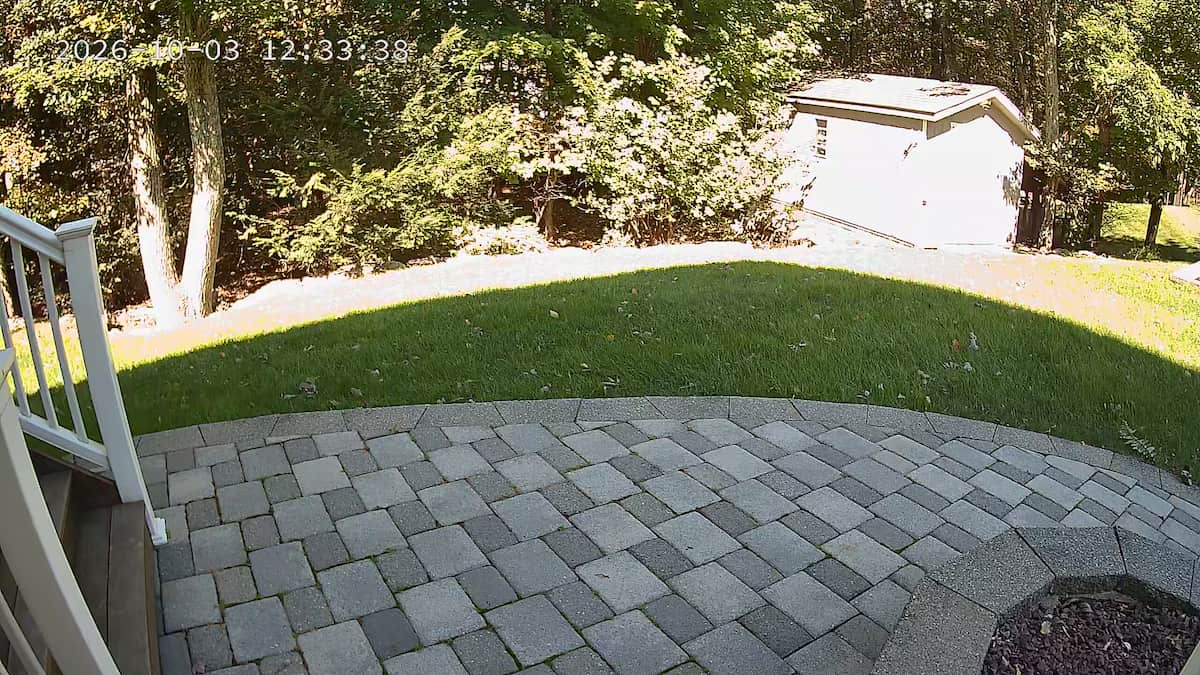
The Frontier retained good detail in the patio, grass and shaded tree areas, although the brightest surfaces on the shed could become overexposed in hard sunlight. Overall, the 2K+ image gives you a useful balance between detail and the bandwidth limitations that come with streaming over 4G.
Night Vision Is Remarkably Good
Night performance was one of the strongest surprises in this review. The Defender Frontier offers both conventional infrared night vision and a full-color mode that uses its built-in spotlights, and both produced genuinely useful images in my backyard test.
Color Night Vision
In Color Light Mode, the built-in spotlights activate when you’re watching live video or when motion triggers a recording. That allows the camera to maintain a full-color image instead of switching to monochrome infrared, and the lights shut back off when they are no longer needed to conserve battery. I actually think this image is stronger than the daytime image.
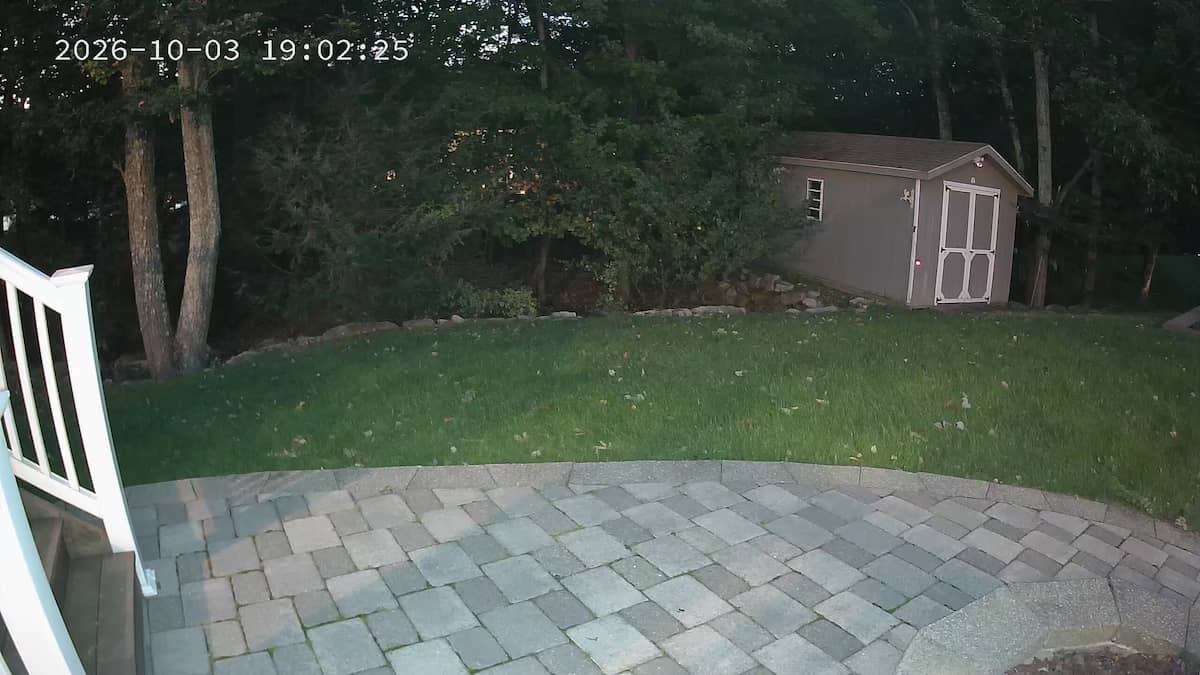
The result was better than I expected from a battery-powered 4G camera. The patio, grass, trees and shed remained clearly visible, while preserving color information that could matter when identifying clothing, vehicles or other details after an event.
Infrared Night Vision
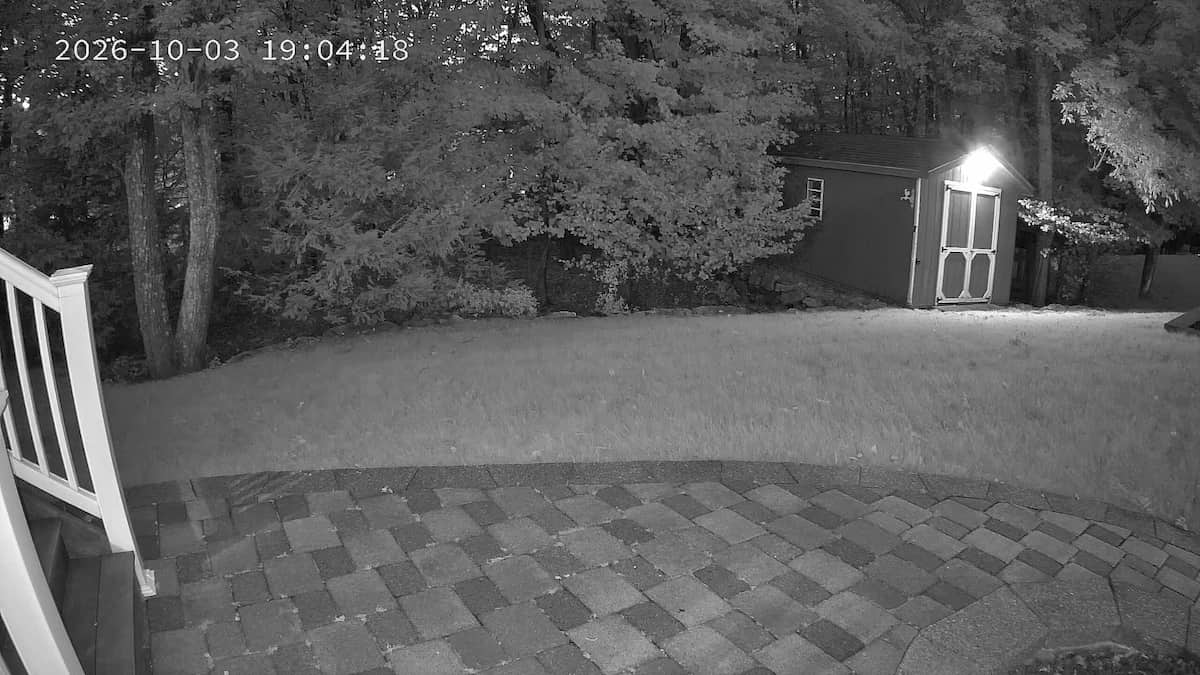
Infrared mode impressed me just as much for a different reason. Illumination was more even across the scene, with the patio, lawn, trees and shed all remaining easy to make out without visible lighting. For normal overnight monitoring, infrared would probably be my default mode, while color night vision is there when retaining color information is worth using the spotlights.
Built-In Lights and Siren
The Frontier has two small spotlights positioned beside the camera lens. They can be turned on manually from the Empower app or incorporated into the camera’s automatic deterrence behavior. Alarm Mode gives you four choices: Off, Light, Siren, or Light & Siren, allowing you to decide whether a detection event should remain silent, trigger visible lighting, sound the siren or use both.
The siren works, but it is not especially loud. From inside my house, I could really only hear it when I was on the same side of the house where the camera was installed. I would therefore describe it as a local deterrent rather than a whole-house alarm. It should be enough to get the attention of someone near the camera, but I would not depend on it to alert someone several rooms away indoors.
The Empower App Has More Control Than I Expected
The Defender Empower app provides a fairly extensive set of controls, including motion tracking, Feature Tracking, motion detection, infrared and color night modes, Standard and Flowing video modes, manual spotlight control, alarm settings, PTZ movement, two-way audio, snapshots, manual video recording and anti-flicker settings.
I particularly liked the low-battery threshold. Defender defaults the warning to 20%, but the threshold can be changed in Power Management Settings. That’s a thoughtful feature on a solar camera because battery conditions can vary dramatically depending on sunlight, temperature, detection frequency and how often you open live view.
The app could still do a better job explaining some of its terminology. Feature Tracking is the perfect example: the name doesn’t tell you that it automatically enlarges a likely human subject in Live View. Once you know what the features do, the app offers a good amount of control, but the learning curve could be smoother.
Snapshots and Manual Video Recording
While watching the Frontier live, you can manually capture a still image or begin recording video directly from the Empower app. Those manually created files are saved to your phone, which makes it convenient to share an interesting event without pulling the microSD card or working through the playback timeline. I used this feature repeatedly while collecting the sample images for this review.
microSD Local Storage
The Frontier supports microSD cards up to 256GB for local event recording. Continuous 24/7 recording is not supported, which makes sense on a battery-powered 4G camera where nonstop recording would place a heavy load on both battery capacity and cellular data. This is fairly typical of battery powered security cameras.
Defender’s setup guide confirms that Local Record must be enabled under Recording Settings after an SD card is installed. Once the card fills, the camera can overwrite older footage automatically rather than simply stopping recording. Event recording duration can also be configured, with Defender allowing recordings of up to 120 seconds per motion event.
Solar Power and Battery
The Frontier combines a 9,200mAh rechargeable battery with an included 5W solar panel. Defender rates battery life at up to three months under relatively light use, but real battery life will depend heavily on how often the camera wakes, how much live viewing you do, how frequently PTZ tracking is triggered and how much direct sunlight reaches the panel.
The separate solar panel is an advantage because surveillance positioning and solar positioning are often different problems. You can aim the camera toward the area that needs coverage while pointing the panel toward stronger sunlight. If you’re comparing different approaches, our Best Solar Security Cameras guide covers the broader solar-camera category.
I began testing at 100% after following Defender’s four-hour initial charging recommendation. I think that’s the right way to install it: let the solar panel maintain a full battery instead of expecting it to recover a partially discharged camera from day one. Long-term solar performance will take more time to judge, but the charging setup worked normally throughout my initial testing.
The Frontier Requires a Defender Cellular Data Plan
The biggest ongoing cost is cellular service. The Frontier does not connect to Wi-Fi and does not provide a conventional SIM slot where you can insert your own AT&T, Verizon or T-Mobile line. Instead, it uses Defender’s cellular service, so the data subscription should be treated as part of the long-term cost of owning the camera rather than an optional cloud-storage add-on.
The Frontier uses its own cellular connection rather than Wi-Fi and requires an active Defender 4G Unlimited Plan for remote operation.
During my testing, the Empower app offered a promotional U.S. unlimited annual plan for $149.99 for 360 days, or roughly $12.50 per 30 days. I would check the current plan pricing before buying because promotional pricing can change.
Who Should Buy the Defender Frontier?
The Frontier makes the most sense when the installation problem is bigger than simply choosing a security camera. If you have a gate, detached garage, shed, construction site, RV location, seasonal property or a distant area of a larger property where neither Wi-Fi nor convenient electrical power is available, the Frontier solves both problems at once.
That’s really its value proposition. The solar panel deals with power while the 4G connection deals with networking, leaving you with a camera that can be mounted in locations where a conventional Wi-Fi model would require substantially more infrastructure.
Defender Frontier Pros and Cons
Pros
- Works without Wi-Fi
- Included 5W solar panel
- Large 9,200mAh battery
- Very accurate human detection in testing
- Useful PTZ motion tracking
- Feature Tracking enlarges detected people in Live View
- Excellent color night vision
- Excellent infrared night vision
- microSD local event storage
- Manual photo and video capture
- Built-in spotlights and siren
- Two-way audio
- Worked well despite only one to two bars of cellular signal
- Flowing Mode available for weaker cellular connections
Cons
- Requires ongoing Defender cellular service
- Cannot use your own cellular SIM or data plan
- No continuous 24/7 recording
- Feature Tracking zoom is Live View only, not recorded footage
- Encrypted live view reconnects after switching apps
- Siren is better suited to local deterrence than indoor alerting
- Some app feature names need better explanation
Defender Frontier Review: Final Verdict
The Defender Frontier impressed me more than I expected because the important parts worked well under less-than-perfect conditions. My cellular signal was frequently only one or two bars, yet live viewing remained usable, human detection was very accurate and PTZ tracking continued to function. Add excellent infrared and color night vision, solar charging and local microSD event storage, and the hardware side of the Frontier is quite strong.
Most of my complaints involve the user experience rather than basic camera performance. Re-establishing the encrypted live-view connection every time I returned to the app became annoying, some settings could be explained more clearly, and the mandatory Defender data plan adds a meaningful recurring cost. Feature Tracking is also worth understanding before buying: it provides a useful automatic close-up in Live View, but it is digital subject enlargement rather than a true recorded optical zoom.
If good Wi-Fi already reaches the installation location, I would probably choose a conventional Wi-Fi security camera and avoid the cellular fee. But if the location is beyond Wi-Fi and getting power or networking there would be difficult, the Frontier becomes considerably more compelling.
At 4.3 out of 5, the Defender Frontier earns a strong recommendation for remote locations where solar power and 4G connectivity solve problems that a normal security camera cannot.
