
Google launched the third-generation Nest Cam Indoor in October 2025 alongside a broader Nest lineup refresh built around Gemini AI. It’s the most significant upgrade to the indoor Nest Cam since the 2021 redesign — the resolution jumps to 2K HDR, the field of view widens to 152°, and the Gemini integration brings genuinely useful AI tools to the camera experience. It’s also one of the more premium indoor cameras in the sub-$100 category. This review covers what you actually get, what requires a subscription, and whether it’s the right pick for your home.
Check the current price on Amazon
What’s New in the 3rd Gen
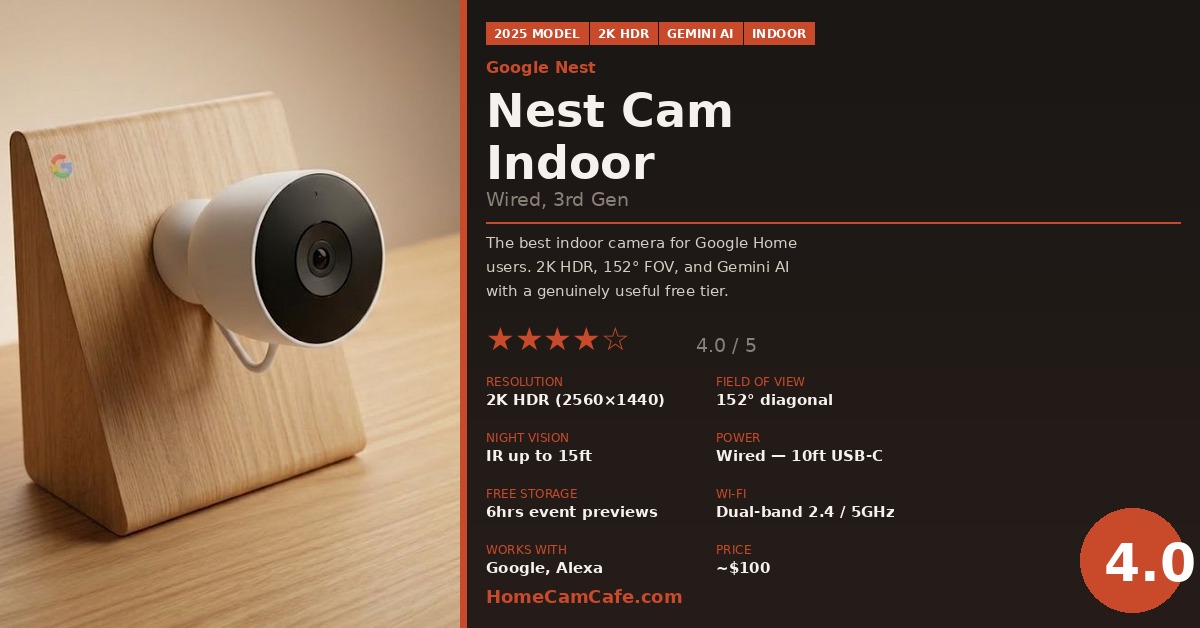
The third-generation Nest Cam Indoor keeps the same compact, hinge-based design as its predecessor but delivers meaningful improvements where it counts. The most notable upgrade is the resolution jump from 1080p to 2K HDR (2560×1440), which provides noticeably sharper footage — DXOMARK ranked it the top indoor camera for image quality among 2026 models. The field of view also expands from the previous generation’s narrower angle to 152° diagonal, which is wide enough to cover most rooms from a single wall or corner placement.
Additionally, the 3rd gen is Google’s first indoor Nest Cam built around the Gemini for Home platform. That means AI-powered features that go well beyond basic motion detection — though as we’ll cover in the subscription section, the most interesting Gemini tools require a paid plan.
New color options are also worth mentioning: alongside the standard Snow (white), Google now offers Hazel (dark green) and Berry (vibrant red) — US exclusives that are a genuine departure from the sea of black and white cameras dominating the market.
Video Quality
The 2K HDR image is excellent for an indoor camera at this price. Colors are accurate and well-balanced, detail holds up well when zooming into a face or reading text in the frame, and the HDR processing handles mixed lighting situations — like a window in the background — better than most cameras in this category. A 6x digital zoom is available in the Google Home app for getting a closer look at specific areas of the frame.
Night vision uses two 850nm infrared LEDs and reaches up to 15 feet. The resulting image is black-and-white IR — clear and detailed, with reviewers consistently noting the ability to identify faces and read details at typical indoor distances with lights off. There is no color night vision option on the indoor wired model.
Video resolution does depend on your Wi-Fi connection quality. Google recommends a minimum connection speed of a few Mbps for reliable 2K streaming. On a strong dual-band connection the image is consistently sharp; on a weaker signal the app will drop to a lower quality setting automatically.
Setup and Hardware
Setup is handled entirely through the Google Home app — the old Nest app is not compatible with 3rd gen devices. The process is straightforward: plug in the camera, open the app, and follow the prompts. Most users are up and running in under ten minutes. The camera is not compatible with the legacy home.nest.com website either, so the Google Home app on iOS or Android is required.
The camera ships with a 10-foot attached USB-C power cable, which is hardwired to the unit — it cannot be removed. A power adapter is included. The 10-foot cable gives reasonable flexibility for placement near an outlet, though cord management will be a consideration depending on where you mount it. The integrated hinge on the base adjusts the angle without tools, and wall mounting hardware is included for those who prefer a permanent installation over tabletop placement.
One practical note: the camera is indoor only with no weatherproofing rating. It is not rated for use outdoors, in garages, or in damp areas. For outdoor monitoring, Google’s Nest Cam Outdoor (wired, 2nd gen) is the appropriate model.
Detection and Alerts
On-device machine learning handles motion detection and basic event classification. Without any subscription, the camera detects people, animals, and vehicles and sends alerts to the Google Home app. A green LED on the camera illuminates when it is processing or streaming, giving a visible indicator of active monitoring.
Activity zones let you define specific areas within the frame where motion should trigger an alert — useful for excluding a window, a busy hallway in the background, or any area that generates frequent false positives. These are available on the free tier.
The Gemini AI layer adds more descriptive event detection — alerts that describe what’s happening in natural language rather than just flagging “motion detected.” However, the most advanced Gemini features, including searchable video history and detailed event summaries, require a Google Home Premium subscription.
Storage and Subscription — What’s Free, What Isn’t
This is the most important section for anyone considering the Nest Cam, because the subscription structure significantly affects the camera’s value depending on how you plan to use it.
Free tier (no subscription):
- Live view at any time from the Google Home app
- 6 hours of event video previews — 10-second clips of the most recent activity
- Person, animal, and vehicle detection alerts
- Activity zones
- Two-way audio
Google Home Premium Standard subscription:
- 30 days of event video history
- Familiar Faces — the camera learns to recognize people in your household and alerts you by name
- More detailed AI event descriptions
- Gemini video history search
Google Home Premium Advanced subscription:
- 60 days of event video history
- 10 days of continuous 24/7 video recording
- Most detailed Gemini AI descriptions and summaries
Google includes one free month of Google Home Premium with the camera purchase, which is worth using to evaluate whether the subscription features justify the ongoing cost before committing.
In addition, it’s worth noting that there is no local microSD storage option on this camera — all video history is cloud-based. If subscription-free local storage is a priority, the Tapo C210 or Wyze Cam v4 are better suited alternatives at lower prices.
💡 Free Tier Reality Check
Six hours of event video previews is more useful than it sounds for day-to-day monitoring. If you simply want to know whether something happened in the last few hours, the free tier covers it. Where it falls short is reviewing anything older than 6 hours — for that, you need a subscription.
Smart Home Integration
The Nest Cam Indoor is deeply integrated with Google Home and Google Assistant. You can pull up the live feed on any Google Nest Hub display, Google TV Streamer, or Pixel Tablet with a voice command. It also works with Amazon Alexa — you can view the feed on an Echo Show — though the Google Home experience is notably more integrated and feature-complete.
Apple HomeKit is not supported. If your smart home is built around Apple Home or Siri, this camera is not compatible.
The camera is also compatible with Matter and Thread for smart home automation, meaning it can trigger routines and interact with other smart home devices in ways that go beyond simple camera monitoring.
What the Nest Cam Indoor Is Missing
- No pan/tilt: Fixed lens only. Position it carefully — what you see at setup is what you get.
- No battery option: Wired only via the attached 10-foot USB-C cable.
- No local storage: All video history requires a cloud subscription beyond the 6-hour free preview window.
- No color night vision: IR night vision only — black-and-white footage in low light.
- No Apple HomeKit: Google and Alexa only.
- Indoor only: No weatherproofing for outdoor or damp area use.
Quick Specs
| Spec | Detail |
|---|---|
| Resolution | 2K HDR (2560×1440), 30fps |
| Field of View | 152° diagonal |
| Night Vision | IR (850nm), up to 15ft |
| Power | Wired only — 10ft attached USB-C cable |
| Wi-Fi | Dual-band 802.11ac (2.4GHz & 5GHz) |
| Free Storage | 6 hours of event video previews |
| Cloud Storage | 30 days (Standard) or 60 days (Advanced) with Google Home Premium |
| Local Storage | None |
| Smart Home | Google Home, Google Assistant, Amazon Alexa |
| Pan / Tilt | No — fixed lens |
| Indoor / Outdoor | Indoor only |
| Colors | Snow, Hazel, Berry |
Our Verdict
Google Nest Cam Indoor (Wired, 3rd Gen) — 4.0 / 5
The 3rd gen Nest Cam Indoor is the best indoor camera for Google Home households — full stop. The 2K HDR image quality is excellent, the free tier is genuinely useful, and the Gemini AI integration adds real value for anyone willing to pay for it. The fixed lens, wired-only power, and cloud-only storage are meaningful limitations, but they’re the same tradeoffs the Nest Cam has always made. If you’re in the Google ecosystem and want the best image quality available at $100, this is the pick. If you want pan/tilt coverage or subscription-free local storage, look elsewhere.
Best for: Google Home users, anyone prioritizing image quality, Alexa households | Skip if: You use Apple HomeKit, need pan/tilt, or want local storage without a subscription
Check the current price for the Google Nest Cam Indoor (wired, 3rd gen) on Amazon →
For more indoor camera options at different price points, see our Best Indoor Security Cameras of 2026 guide. For outdoor monitoring, see our Best Outdoor Security Cameras of 2026 roundup.
