
When TP-Link launched the Tapo line of home security cameras, I didn’t expect much. Budget brands churn out cameras constantly, and most of them feel like it. However, after spending real time with the Tapo C210 pan/tilt camera for this review, I came away impressed, and it’s become one of the cameras I recommend most often to friends asking what to buy first.
In addition, the Tapo C210 sits at an interesting crossroads: it punches well above its price point with features that typically show up on pricier cameras, yet it makes a few tradeoffs you should know about before buying. This review walks through all of it.
Check the current price on Amazon
What Is the Tapo C210?
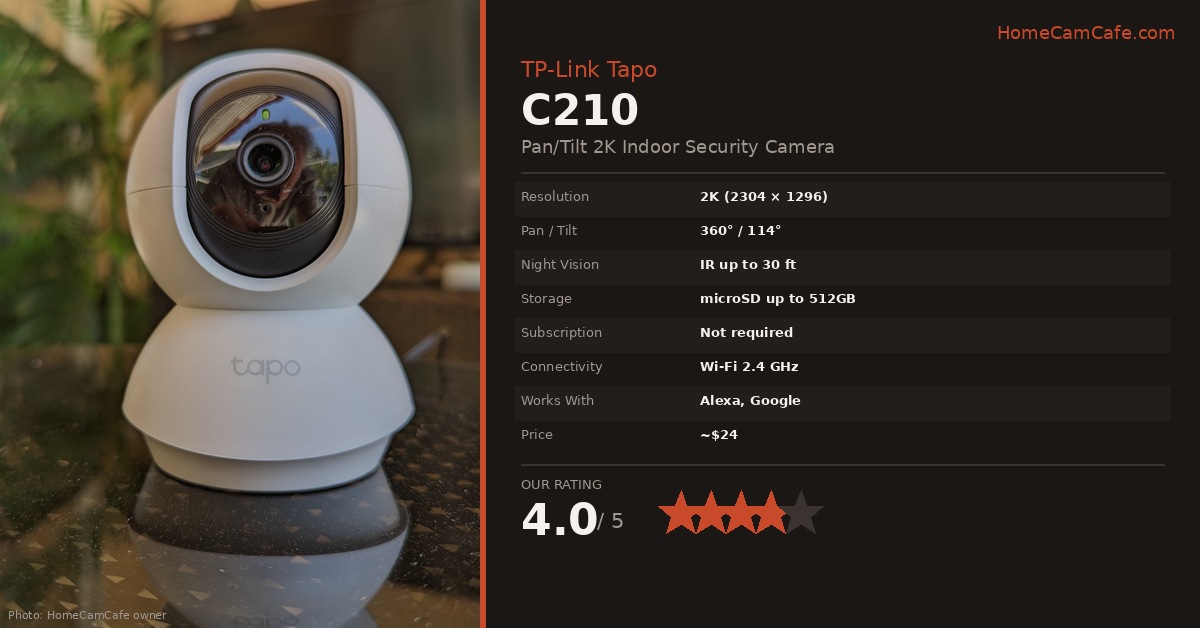
The Tapo C210 is TP-Link’s flagship budget indoor pan/tilt camera. It replaced the older C200 (1080p) with a meaningful upgrade to 2K resolution, 2304 x 1296 pixels, which is a bigger jump than the numbers suggest. Furthermore, unlike many competitors that lock useful features behind a subscription, the C210 makes person detection, activity zones, and motion tracking available for free as long as you’re using a microSD card for storage.
TP-Link is primarily known for routers and networking gear, but their Tapo camera line has grown into one of the largest in the budget segment. The app is mature, the hardware is solid, and the ecosystem is well-supported.
Video Quality
The 2K image is clear and detailed, noticeably sharper than 1080p cameras in this price range. During the day, the footage is detailed enough to read labels on a package or make out a face across a room. Colors are accurate, though slightly flat compared to cameras with HDR processing. That said, for the price, the image quality is exceptional.
Night vision relies on an 850nm infrared LED and reaches up to 30 feet. The result is a sharp black-and-white image in complete darkness. One thing to note: the nighttime image can appear slightly overexposed on bright surfaces close to the camera, but overall clarity, including facial detail, holds up well at the distances most people are monitoring.
The C210 records at 15 frames per second by default, with an option to raise it to 30 fps in the app if you want smoother motion capture. In practice, the default setting is enough for typical motion review, though 30 fps is worth switching to if you’re monitoring anything fast-moving, such as pets or kids.
Pan, Tilt, and Coverage
The C210 pans 360° horizontally and tilts 114° vertically. That combination, especially when placed in a corner, means it can effectively cover an entire room without a blind spot. The pan range is particularly impressive: most pan/tilt cameras cap out around 340° and can’t look directly behind themselves, but the C210 can.
Motion tracking works by having the camera follow a detected subject as it moves through the frame. In practice, this works reasonably well for people walking across a room. It’s not perfectly smooth, since there’s a small delay before the camera starts tracking, but it’s a useful feature at this price point.
Additionally, the app lets you save up to eight preset positions. Tap a preset and the camera snaps to that angle instantly, which is handy if you’re using it to check different areas of a room.
Smart Detection Features
This is where the Tapo C210 stands out from competitors. Most budget cameras offer generic motion detection only; the C210 includes person detection and baby cry detection at no additional cost, with no subscription required.
- Person Detection: AI identifies when a detected motion is a person and flags the alert accordingly. In practice, it reduces notifications from swaying curtains or shifting shadows significantly.
- Activity Zones: Draw custom zones within the camera’s field of view to limit motion detection to specific areas. This is more granular than what many cameras offer; you can carve out a very precise region.
- Baby Cry Detection: The microphone listens for infant crying and sends an alert, included free with no Tapo Care subscription needed. It works well as a basic baby monitor audio alert.
- Camera Tampering Detection: A relatively uncommon feature: the camera alerts you when it detects it’s been covered, blocked, or moved.
As a result of these free features, the Tapo C210 delivers a monitoring experience that feels more premium than its price tag implies.
Storage: No Subscription Required
The C210 stores footage locally on a microSD card, so no cloud subscription is needed. It supports cards up to 512GB and records in a continuous loop, overwriting the oldest footage when the card is full.
For most home users, a 128GB card will store several days of motion-triggered footage with room to spare. Consider a Transcend 128GB SDXC card as a reliable, budget-friendly option; just confirm your card adapter or reader supports microSD if you’re buying a full-size SD card like this one. For more information check our guide on selecting the right micro SD card.
Optionally, Tapo Care cloud storage is available if you want off-device backup. It adds 30-day video history and unlocks some additional AI features. However, for most users, the local microSD storage is perfectly sufficient and keeps your ongoing costs at zero.
💡 Storage Tip
Before purchasing a microSD card, check the TP-Link compatibility list on their support page. Not all cards are verified to work correctly with the C210, and using an incompatible card can cause recording issues.
App and Setup
Setup is handled entirely through the Tapo app (iOS and Android). The process is straightforward: open the app, tap the plus sign, select the C210 from the device list, and follow the prompts. Most users are up and running in under ten minutes.
The app itself is polished for a budget camera ecosystem. Live streaming is responsive, and the layout is intuitive. Notably, the C210 is also compatible with RTSP and ONVIF, meaning it can integrate with third-party NVR software like Blue Iris or Synology Surveillance Station, a feature you rarely find at this price point.
Furthermore, Alexa and Google Assistant support is included. You can say “Alexa, show me the living room camera” to pull up a live stream on an Echo Show, or view it on a Chromecast-enabled screen via Google Home.
There is no native web browser interface, which means you need a smartphone or tablet to manage the camera. For most home users this is not an issue, but it’s worth knowing if you were hoping to access it from a computer. If you want a family member or roommate to have their own access to the camera, Tapo’s Device Sharing feature makes that possible without handing over your login. See our full guide on how to share a Tapo camera for the setup steps and what a shared member can see.
Hardware and Design
The C210 follows the classic pan/tilt shape: a round camera head mounted on a round stationary base. It’s compact and unobtrusive in white, though a black version is available. The design is utilitarian rather than decorative, but it blends into most rooms without being an eyesore.
A few hardware details worth knowing:
- Indoor only: There is no IP weatherproofing rating. Do not install it outdoors or in a damp area.
- Wired power only: The C210 plugs into a standard outlet via the included adapter. There is no battery option.
- Ceiling mounting: Hardware is included for ceiling installation. The app has an image-flip setting to compensate for the inverted orientation.
- microSD slot: Located under the camera lens on the bottom of the head. The reset button is nearby; use that only to factory reset the device.
- Status light: Toggled on or off from within the Tapo app.
- Privacy Mode: A software toggle in the app that disables all recording and streaming without physically unplugging the camera. Useful when you’re home and don’t want it active.
- Two-way audio: A built-in mic and speaker support clear two-way conversations. Audio quality is solid.
- Sound and light alarm: The camera can trigger a siren and flashing light to deter intruders, a feature uncommon at this price.
Connectivity
The Tapo C210 connects via Wi-Fi 802.11 b/g/n on the 2.4GHz band only. As is common with budget indoor cameras, 5GHz is not supported. In most homes this is not a problem, since 2.4GHz has better range and wall penetration than 5GHz. However, if your router is far from the camera or you have a congested 2.4GHz network, keep this in mind.
What the Tapo C210 Is Missing
For the price, the tradeoffs are minor, but they’re worth noting:
- No color night vision: Night footage is black-and-white IR only. Cameras like the Tapo C120 or C425 offer color night vision at a higher price.
- No Apple HomeKit: Works with Alexa and Google Assistant, but not HomeKit.
- 2.4GHz only: No dual-band Wi-Fi.
- No pet or vehicle detection: Person and baby cry detection are included, but pet-specific or vehicle detection are not available. For an indoor camera, this is rarely a problem.
- Motion tracking can lag: The pan/tilt motor takes a beat to respond when tracking a moving subject.
Quick Specs
| Spec | Detail |
|---|---|
| Resolution | 2K (2304 x 1296) |
| Pan / Tilt | 360° / 114° |
| Night Vision | IR, up to 30 ft |
| Frame Rate | 15 fps default, up to 30 fps |
| Storage | microSD up to 512GB (no subscription) |
| Cloud | Tapo Care (optional) |
| Wi-Fi | 802.11 b/g/n (2.4GHz only) |
| Smart Detection | Person, motion, baby cry, tampering |
| Voice Assistants | Amazon Alexa, Google Assistant |
| NVR Compatibility | RTSP / ONVIF |
| Power | Wired (AC adapter included) |
| Indoor / Outdoor | Indoor only (no IP rating) |
Our Verdict
Tapo C210: 4.0 / 5
The Tapo C210 is, simply put, one of the best budget indoor security cameras available right now. It delivers 2K video, full 360° pan/tilt coverage, free person detection, activity zones, and local microSD storage with no ongoing fees. The only real competitors at this price are locked into subscriptions or limited to 1080p. For a first camera, a baby monitor, a pet camera, or an extra room, the C210 is an easy recommendation.
Best for: First-time buyers, budget shoppers, baby monitors, pet cameras | Skip if: You need outdoor use, color night vision, or HomeKit support
Check the current price for the Tapo C210 on Amazon
More Tapo Reviews
- Tapo C660 KIT Review — 4K Solar Pan/Tilt Camera
- Tapo C615F KIT Review — Solar Floodlight Pan/Tilt Camera
- Tapo C425 MagCam Review — Magnetic Mount Battery Camera
- Tapo C400 Review — Wire-Free Outdoor Battery Camera
- Tapo C260 Review — 4K Pan/Tilt Camera
- Tapo D225 Video Doorbell Review — 2K, No Subscription
- Tapo C575D Review — 4K Dual Lens with PoE Connectivity
This review is part of our TP-Link Tapo Security Camera Reviews guide.
