
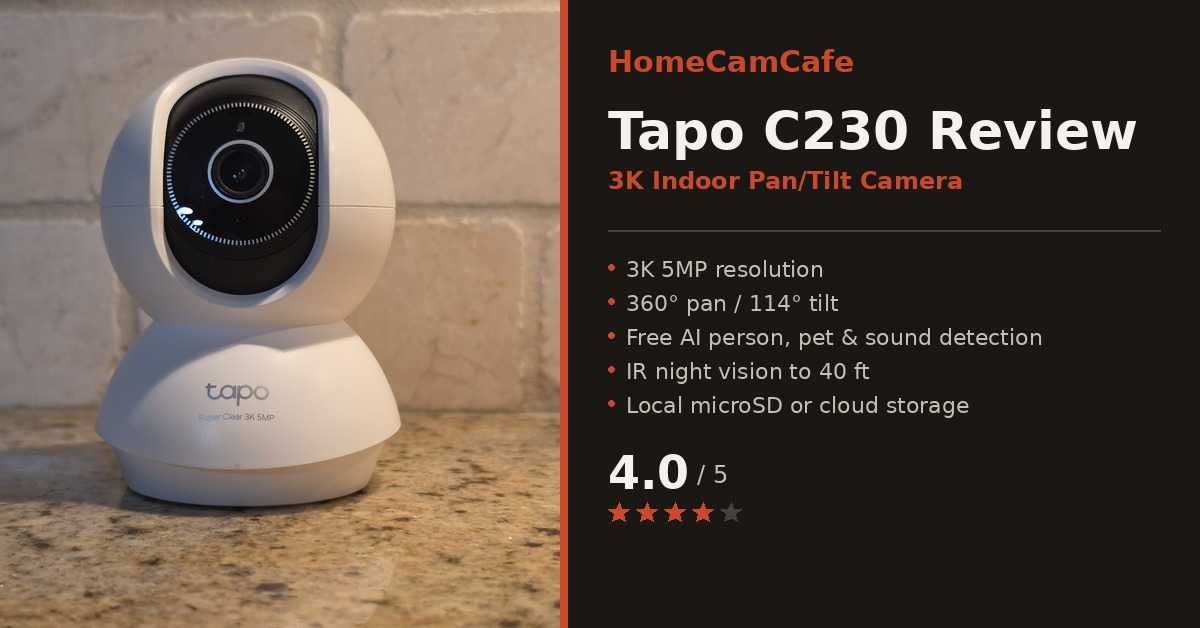
In this Tapo C230 review, I’m covering TP-Link’s newest indoor pan/tilt camera after running it for the past several months. The C230 slots in above the long-running C210 with a bump to 3K 5MP resolution, smarter motion tracking, and a marketing push toward baby and pet monitoring. However, the core formula that made Tapo’s indoor cameras worth recommending is still here: free AI detection, local storage with no subscription required, and a setup process that takes minutes rather than a full evening.
Check the current price for the Tapo C230 on Amazon
What the Tapo C230 Is Built For
TP-Link markets the C230 as a “RoomCam” first and a security camera second, and the feature list reflects that positioning. Most importantly, it is built around 360° horizontal pan and 114° vertical tilt, smart motion tracking that follows a moving subject across the frame, and AI detection tuned for people, pets, and baby crying rather than just generic motion. In addition, the round white housing and swivel base make it look more like a baby monitor than a typical dome camera, which is a deliberate choice for a product meant to sit on a nursery dresser or a living room shelf rather than mount outdoors.
Design and Setup
The C230 has the same general shape as most Tapo pan/tilt cameras: a spherical camera head sitting on a rounded base, with the lens housed behind a wide oval cutout. However, the all-white finish and the “Super Clear 3K 5MP” badge printed on the base are the only real cosmetic differences from the C210 and C216. It’s a compact camera, light enough to reposition on a shelf or counter without any tools, and the base includes a threaded mount on the bottom for wall or ceiling installation if you’d rather not leave it freestanding.
Setup goes through the Tapo app, the same one used across TP-Link’s entire camera lineup. For example, scan the QR code on the camera, connect to 2.4GHz Wi-Fi, and the camera is online within a couple of minutes. If you already run other Tapo cameras, the C230 drops into the same app and the same automations without any extra configuration. That consistency is one of the underrated strengths of the Tapo ecosystem: a household with a C210 in the office and a C230 in the nursery manages both from one interface.
Video Quality
The 3K 5MP resolution is a genuine step up from the 2K sensors in most of Tapo’s indoor lineup, and it shows most clearly when digitally zooming into a clip after the fact. In addition, daytime footage is sharp, colors are accurate, and the wide field of view from the 360° swivel means a single camera placed in a corner can cover most of a room without a fixed blind spot. As a result, the C230 handles a task that a stationary indoor camera often struggles with: keeping a toddler or a pet in frame as they move around rather than out of one narrow field of view.
Night performance relies on IR illumination rated to roughly 40 feet, which produces the expected black-and-white image rather than color night vision. For a nursery or a living room, however, that’s the right tradeoff. Color night vision typically needs a visible spotlight, which is the last thing you want activating repeatedly in a room where a baby is sleeping.
Pan/Tilt and Smart Motion Tracking
Motion tracking is where the C230 earns its higher position in the lineup. When the camera detects a moving subject, the motorized base pans and tilts to keep that subject centered in frame, then returns to its home position once the subject leaves the area. In practice, tracking a cat walking across the room or a toddler moving between furniture works reliably, with less lag than I expected from a camera at this price point. As a result, activity zones let you limit tracking or detection to specific parts of the room, which is useful for filtering out a window with constant outdoor movement or a TV that would otherwise trigger false alerts.
AI Detection and Baby Monitoring
The C230’s AI engine distinguishes between people, pets, and specific sounds, including baby crying, without requiring a subscription. As a result, notifications arrive labeled by what triggered them, which cuts down considerably on the generic “motion detected” alerts that make basic cameras frustrating to use for anything beyond security. For baby monitoring specifically, the crying detection worked consistently in testing, and the two-way audio makes it possible to speak into the room remotely without opening a separate app or device.
Privacy zones are also supported, letting you black out a specific part of the frame, such as a changing table or a bed, so that area is never recorded even though the rest of the room is. In contrast to a fixed-view camera, this is a genuinely useful feature for a camera positioned in a bedroom or nursery rather than a hallway or entryway.
The Tapo App Experience
Everything on the C230 is managed through the same Tapo app that runs TP-Link’s entire camera lineup, and that consistency continues to be one of the more underrated reasons to stay within the Tapo ecosystem. For instance, the live view loads quickly, pan/tilt controls respond with minimal lag, and switching between detection settings, activity zones, and privacy zones doesn’t require digging through nested menus. Furthermore, if you’re already running other Tapo cameras, the C230 shows up in the same camera grid, uses the same notification settings, and shares the same automation rules without any additional setup.
One detail worth noting: the free AI detection tier, which includes person, pet, and sound-specific alerts, is tied to having a microSD card installed. This is consistent across the Tapo lineup, but it’s an important setup step that’s easy to overlook when unboxing a new camera; therefore, checking for a card before mounting the camera saves a return trip later. Without a card, the C230 still works as a live-view camera with basic motion alerts, however you lose the smarter detection categories that make the camera genuinely useful day to day.
Placement and Field of View
Because the C230 relies on 360° pan rather than a fixed wide-angle lens, placement is more flexible than with a stationary indoor camera. For example, a corner shelf, a bookcase, or a dresser all work well, since the camera can rotate to cover the entire room rather than requiring a specific vantage point. In a nursery, mounting the base near the ceiling with the included hardware keeps the camera out of reach while still covering the crib and the rest of the room.
Most importantly, for pet monitoring, placing the camera at a height where it can see the floor level, rather than only eye level, makes a noticeable difference in how reliably it tracks a cat or dog moving around furniture.
As a result, the base includes a standard mounting thread, so wall or ceiling installation is straightforward with the included screws and template. Additionally, because the camera is lightweight, tabletop placement with the included base is a genuinely practical option for anyone who wants to reposition it seasonally or move it between rooms without committing to a permanent mount.
Tapo C230 Review: Specs at a Glance
| Spec | Tapo C230 |
|---|---|
| Resolution | 3K 5MP |
| Pan / Tilt | 360° / 114° |
| Night Vision | IR, up to 40 ft |
| AI Detection | Person, pet, sound (free) |
| Motion Tracking | Smart auto-tracking |
| Storage | microSD up to 512GB or Tapo Care cloud |
| Audio | Two-way audio |
| Connectivity | 2.4GHz Wi-Fi |
| Voice Assistants | Amazon Alexa, Google Assistant |
Storage Options
The C230 supports local microSD storage up to 512GB with no subscription required, which is consistent with the rest of the Tapo lineup and remains one of the strongest arguments for choosing Tapo over Ring or Nest. Therefore, footage records directly to the card and is reviewable through the app’s timeline. Tapo Care cloud subscriptions are available for buyers who want remote backup or extended video history, but for a camera living inside the house on stable Wi-Fi, a good microSD card covers the vast majority of use cases without any ongoing cost.
A high-endurance microSD card is worth the small extra cost for a camera that will be recording motion events continuously. In contrast, cheaper cards tend to wear out faster under that write load, and a failed card means gaps in exactly the footage you’d want later.
How the C230 Compares to the C210
For buyers already familiar with the Tapo C210, the comparison is straightforward. In contrast, the C210 remains the better value for a general-purpose indoor camera at around half the resolution’s price premium. The Tapo C230 makes sense specifically when the higher 3K resolution and the more polished smart tracking justify the upgrade, which is most often the case for baby monitoring or pet monitoring where digital zoom and reliable tracking matter more than they would in a spare room or office.
Who Should Buy the Tapo C230
Best for: baby monitoring, pet cameras, and indoor rooms where smart motion tracking and higher resolution matter more than a rock-bottom price. Skip if: you need outdoor use, color night vision, or you’re covering a room where the base-tier C210 already does the job.
Pros and Cons
Pros
- Sharp 3K 5MP video, a real step up from 2K
- Free AI detection for people, pets, and baby crying, no subscription
- Accurate smart motion tracking with minimal lag
- 360° pan / 114° tilt covers a full room from one mount point
- Two-way audio and privacy zones built in
- Same polished Tapo app used across the whole lineup
Cons
- Free AI detection requires a microSD card installed
- IR night vision only, no color night vision
- Modest upgrade over the C210 outside baby/pet monitoring use cases
- 2.4GHz Wi-Fi only
The Verdict
The Tapo C230 delivers sharp 3K video, dependable AI-driven motion tracking, and free detection with no subscription, which is the same formula that’s made the rest of the Tapo lineup easy to recommend. It’s not a dramatic reinvention of the C210; however, for baby and pet monitoring specifically, the resolution bump and smarter tracking make it worth the step up. Check the current price for the Tapo C230 on Amazon.
This review is part of our TP-Link Tapo Security Camera Reviews hub. For the full individual reviews see the Tapo C260 review, Tapo C210 review and the Tapo C216 review. For brand-specific guides see the Tapo hub.
