
The Wyze Bulb Cam (model WYZECBC) is built for homeowners and renters who want a front porch or garage coach-light camera without drilling through siding, running Ethernet cable, or fishing a USB power cord through a wall. By screwing straight into a standard 120V E26 light socket, it combines an 800-lumen dimmable LED bulb with a 2K wide-angle outdoor camera that can record 24/7 to a microSD card. I installed the Wyze Bulb Cam outside my home to test how well it fits outdoor lantern fixtures, how the lighting and motion settings behave in the Wyze app, and how much functionality you really get without paying for a monthly subscription.
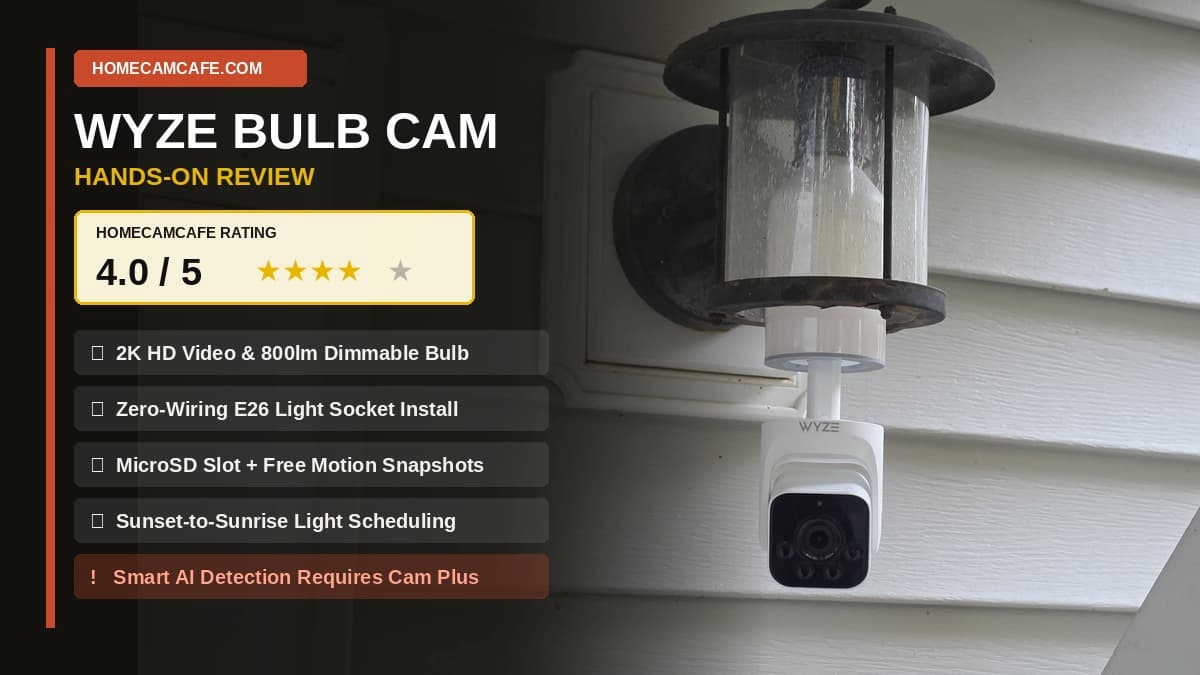
HomeCamCafe Rating: 4.0 / 5 ★★★★☆
Bottom line: Zero-wiring E26 socket installation, pretty good 2K daytime video, sunset-to-sunrise dimming, and free motion snapshots make the Wyze Bulb Cam a clever porch upgrade, provided your lantern fixture is a standard size. However, locking person, pet, vehicle, and package AI detection behind a paid Cam Plus subscription costs it a higher score compared with Tapo and Reolink.
Wyze Bulb Cam Review: The Short Version
As 2K cameras go, the Wyze Bulb Cam gets the physical concept right. Instead of mounting a bracket and hunting for an outdoor outlet, you thread the unit into an existing light fixture, extend the pull-down camera stem so the lens clears the lantern frame, and control both the 800-lumen bulb and the 2K camera from one screen in the Wyze app. Between onboard microSD card support and free cloud motion snapshots, you can use the camera without a monthly bill.
The catch is software restrictions. If Wyze had not hidden smart AI detection behind its Cam Plus paywall, I would have scored this camera higher. Unlike cameras in our TP-Link Tapo camera lineup or our Reolink security cameras, which include free local person and vehicle detection, the Wyze Bulb Cam grays out every smart detection box unless you subscribe.
Wyze Bulb Cam Specifications
Before diving into how the camera fit my porch lantern and performed in the app, here is how Wyze’s published specifications compare with our hands-on observations.
| Specification | Wyze Bulb Cam (WYZECBC) | Hands-On Testing Notes |
|---|---|---|
| Video Resolution & Frame Rate | 2K HD (2304 x 1296); 20 fps day / 15 fps night (Manufacturer spec) | Pretty good 2K daytime image quality in testing |
| Field of View & Sensor | 166° diagonal (144° H / 82.5° V), 1/2.8″ CMOS, f/2.2 (Manufacturer spec) | Wide fixed view with manual pan/tilt collar |
| Light Socket & Bulb Output | Standard E26 base (120V AC, 15W), up to 800 lumens, 3000K warm white | Manual app toggle, dimmable night light, Sunset-to-Sunrise, Always On |
| Dimensions & Extension Stem | 8.27 in retracted to 9.45 in extended (1.18 in / 3 cm pull-down travel) | Cleared a standard lantern; extra-long lantern was too deep for the lens |
| Night Vision | 4x 850nm IR LEDs + low-light color with ambient/bulb light | IR mode sees farther into the dark; bulb-on color mode is clearer up close |
| Storage & Free Snapshots | MicroSD slot (up to 256GB) + free cloud motion event snapshots | Records a snapshot of motion events even without an SD card; supports Time Lapse |
| Free vs. Paid Detection | Free “Other Motion” & Detection Zones; AI requires Cam Plus | Person, Pet, Vehicle, Package, and Friendly Faces are grayed out unless paid |
| Audio & Deterrence | Two-way audio, 95 dB siren (at 4 in), flashing light alarm | Audio is just okay; flashlight-with-siren option included |
| Connectivity & Weather Rating | 2.4 GHz Wi-Fi 6, Bluetooth setup, IP65 camera / UL Damp bulb | Requires indoor wall switch to remain turned on |
Setup Is Easy, But Check Your Lantern Size First
The Wyze Bulb Cam screws right into a standard E26 light socket just like a regular flood or porch bulb. Because outdoor coach lights vary in depth, the camera section at the bottom is built on a telescoping stem that extends downward (up to 1.18 inches per Wyze’s specs, taking total length from 8.27 inches to 9.45 inches) so the camera lens can clear longer lantern housings.
During my installation, lantern size was the first real-world limitation I ran into. I originally tried installing the Wyze Bulb Cam inside an extra-long decorative porch lantern, and that fixture was simply too large and deep for the camera pod to peek out the bottom, even with the lower camera stem pulled down. I had to switch to a standard-sized lantern fixture so the camera had a clear view underneath the housing. Once the bulb is snug in the socket, you rotate and tilt the camera pod by hand to aim it at your walkway or driveway, and leave the indoor wall switch flipped on full-time so the camera stays powered.
In-App Light Controls and Sunset-to-Sunrise Scheduling
Controlling the porch bulb and camera from the same screen in the Wyze app is very convenient. Right beneath the live camera feed, there is a manual toggle button that turns the bulb on or off immediately. You can also dim the 800-lumen, 3000K warm-white bulb through the app, which makes it work nicely as a low-glow outdoor night light.
Inside the light settings menu, I found several useful scheduling options along with a couple of novelty effects:
- Ambient Light and Sunset-to-Sunrise: There are settings for Ambient Light that keep the light on during specific hours, including a Sunset-to-Sunrise setting that automatically turns the bulb on at dusk and off at dawn.
- Always On: You can set the bulb to stay Always On whenever the fixture has power.
- Flashlight With Siren: You can configure the bulb to flash along with the built-in siren when an alarm is triggered.
- Firefly and Breathing Light: The app also has toggles for Firefly light and Breathing light. A note in the app states that Firefly pulses randomly along with other Wyze light bulbs (the unit supports linking up to five Wyze Accessory Bulbs). Breathing light slowly pulses the brightness up and down, though I have zero idea why anyone would want that on a porch security camera.
Smart Detection Is Locked Behind a Cam Plus Subscription
Motion handling is where the Wyze Bulb Cam (sometimes searched by buyers as the Wyze Cam Bulb) shows both helpful free tools and a frustrating paywall. On the positive side, the camera puts a green box around motion-generating objects in the video frame, and you can set custom Detection Zones for free to mask out blowing tree leaves or street traffic and minimize unwanted alerts.
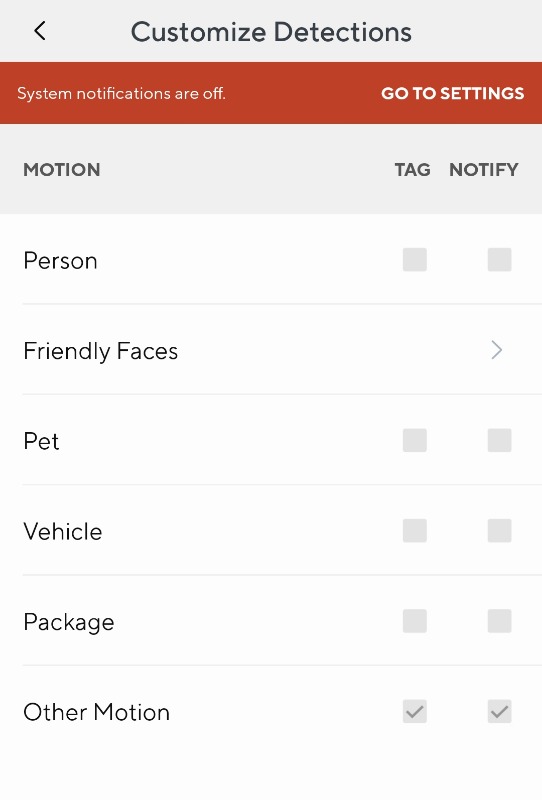
The big downside is that Smart Detection only works with a paid Cam Plus subscription. When you open the Customize Detections screen in the Wyze app without a paid plan, the checkboxes for Person, Pet, Vehicle, and Package (under both Tag and Notify), along with Friendly Faces, are all grayed out. Only the Other Motion checkboxes are active for free.
Hiding person detection behind a paywall is a tough sell when you compare the Wyze Bulb Cam against subscription-free cameras we have tested. Competitors like the Tapo C120, Tapo C500, and our tested Reolink models include person, pet, and vehicle AI detection at zero monthly cost. Even Wyze’s own budget plug-in camera includes basic free person detection, as we noted in our Wyze Cam v4 review. For a closer look at what Wyze charges to unlock those grayed-out boxes, see our guide to Wyze Cam subscription plans explained.
MicroSD Storage and Free Motion Event Snapshots
The Wyze Bulb Cam supports an onboard microSD card (up to 256GB) for local recording, accompanied by the usual in-app push for Wyze’s paid cloud service. With a card installed, the camera can record continuous 24/7 footage or motion clips locally without a monthly fee, and the app also includes a Time Lapse feature. If you set it to continuous recording, use a card built for constant write cycles; see our guide on selecting the right microSD card for a home security camera for recommended options.
One nice and unique free feature I noticed during testing is that without an SD card installed, the camera still records a snapshot of the motion event in the Wyze app’s Events tab. Many competing cameras give you zero event history once a cloud trial ends unless a card is installed. Getting a free cloud snapshot of motion events (subject to Wyze’s standard 5-minute cooldown between free cloud notifications) is a great built-in perk, and adding a microSD card lets you jump from that event snapshot straight to the recorded video on your card.
2K Daytime Video, Night Vision, Smart Focus, and Audio
It is not fair to compare a screw-in 2K light-socket camera against a 4K PoE camera, and as 2K cameras go, the Wyze Bulb Cam’s daytime video quality is pretty good. The 2304 x 1296 sensor and wide 166-degree diagonal field of view capture a clean, broad view of a porch and front walkway. Two-way audio and microphone pickup, by comparison, are just okay. Audio is usable for hearing someone at the door, but nothing standout.
IR Night Vision vs. Bulb-On Color Night Vision
In the camera settings, Night Vision can be set to Auto, On, or Off, which controls the four 850nm infrared (IR) LEDs for black-and-white night viewing when the porch light is off. When the 800-lumen bulb is turned on or dimmed on a sunset-to-sunrise schedule, the camera stays in color mode at night using the bulb’s illumination.
I captured two nighttime comparison photos from the camera to test how infrared-only mode compares with having the porch bulb turned on. Both modes have a distinct strength depending on what you are trying to see in your yard:
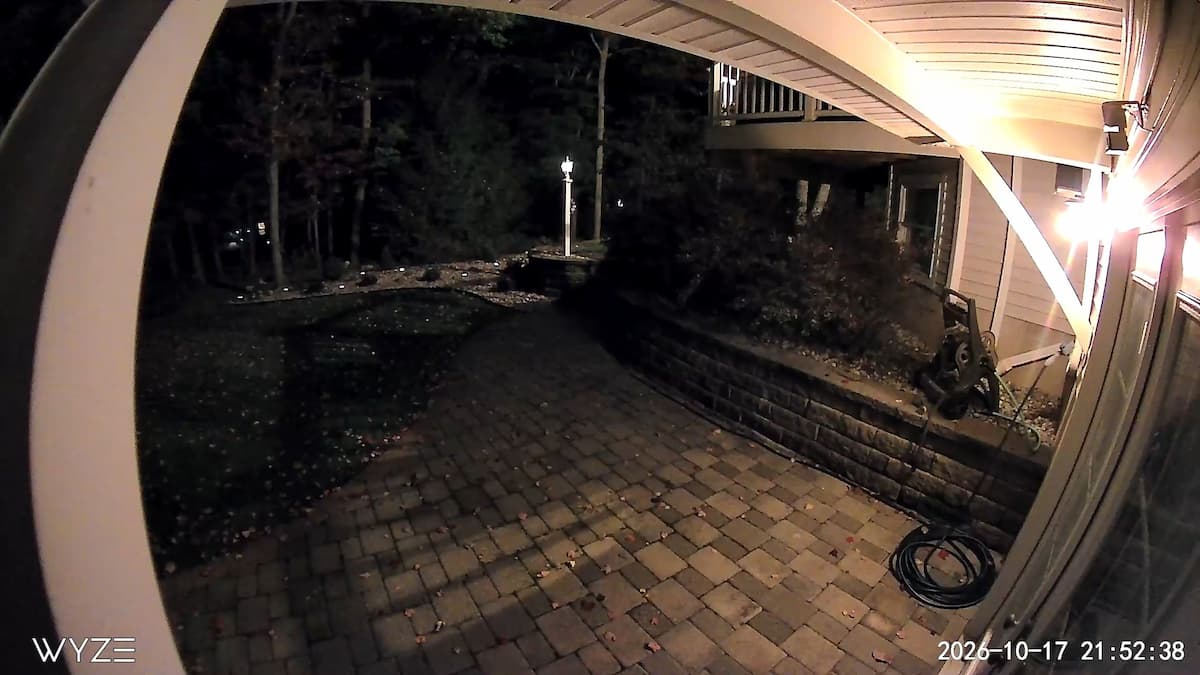
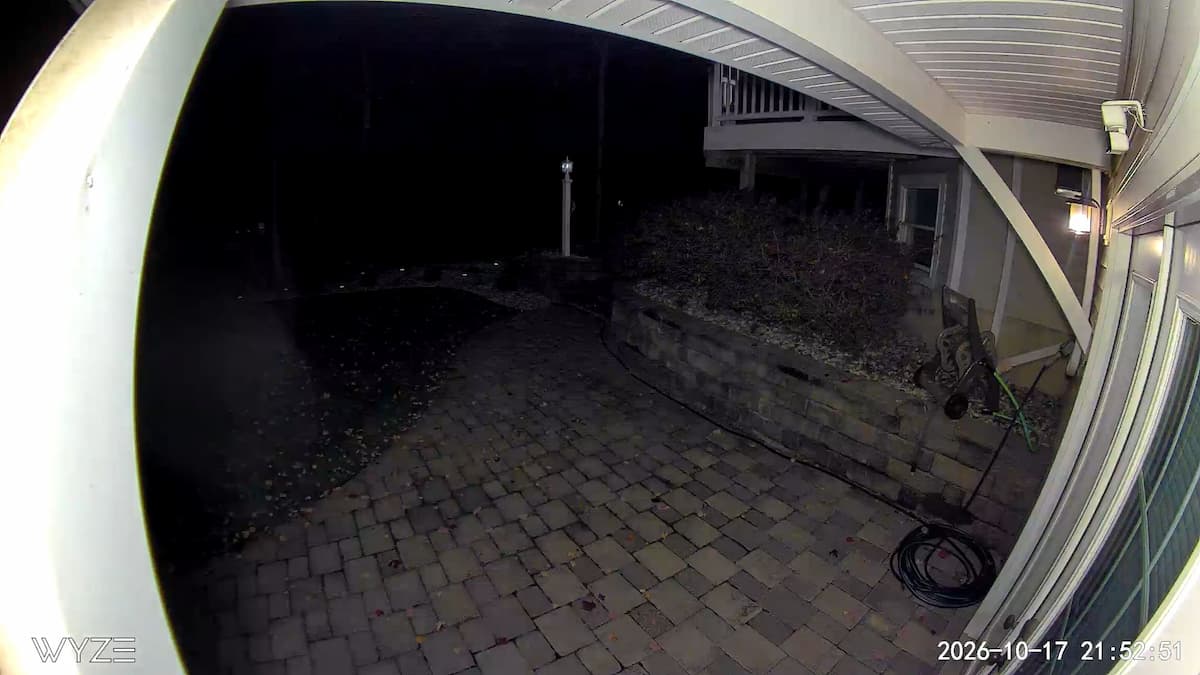
With the LED bulb turned off and the camera running on infrared alone, the black-and-white image sees farther out into the dark yard beyond the porch. When you turn the LED bulb on, the camera switches to color and produces a noticeably clearer, sharper picture in the foreground and mid-range where the 800-lumen bulb illuminates the scene, even though the darkest background areas fall off sooner than they do under IR. If your main goal is identifying someone walking up to your front door or porch steps, running the bulb on a Sunset-to-Sunrise schedule gives you the clearest nighttime image; if you want maximum distance reach across an unlit yard, IR mode reaches farther.
What the Smart Focus Toggle Does
There is also a Smart Focus toggle right on the main live viewing screen of the camera. When you tap it on an empty porch, the app gives you no clue what it does. According to Wyze’s documentation, Smart Focus is a live-view picture-in-picture feature for fixed wide-angle lenses: when a moving subject enters the frame during live viewing, the main window digitally zooms in and follows the movement while a smaller corner window keeps showing the full wide-angle view.
Wyze Bulb Cam vs. Tapo C120 and Wyze Cam v4
If you have an outlet near your porch, a standard plug-in camera gives you better free AI detection than the Wyze Bulb Cam. If your only outdoor power source is a light fixture, the Bulb Cam wins on installation simplicity. You can compare more subscription-free picks in our best security cameras without subscription guide.
| Feature | Wyze Bulb Cam | Tapo C120 | Wyze Cam v4 |
|---|---|---|---|
| Power & Mount | Screws into E26 light socket (120V) | Plug-in USB-C + magnetic base | Plug-in USB + magnetic/screw base |
| Resolution | 2K HD (2304 x 1296) | 2K QHD (2560 x 1440) | 2.5K QHD (2560 x 1440) |
| Built-In Lighting | 800-lumen dimmable E26 porch bulb | Dual mini spotlights | Integrated mini spotlight |
| Free Local Storage | MicroSD up to 256GB + free snapshots | MicroSD up to 512GB | MicroSD up to 512GB |
| Free AI Detection | None (“Other Motion” only; AI requires Cam Plus) | Free Person, Pet, and Vehicle AI | Free Person AI (Vehicle/Package require Cam Plus) |
Wyze Bulb Cam Pros and Cons
- Pros:
- Screws directly into a standard E26 light socket with zero wiring or drilling.
- Extendable camera stem pulls downward to clear standard lantern housings.
- Pretty good 2K daytime video quality across a wide 166-degree view.
- Clear nighttime image with the LED bulb turned on, while infrared-only mode reaches farther into dark areas.
- Convenient in-app bulb controls, including a manual on/off toggle below the live view, dimming for night-light use, Always On, and Sunset-to-Sunrise scheduling.
- Supports microSD cards (up to 256GB) for local recording and Time Lapse, plus free motion event snapshots even without an SD card.
- Free Detection Zones help filter out blowing tree leaves, and green boxes highlight moving objects.
- Cons:
- Smart Detection (Person, Pet, Vehicle, Package, and Friendly Faces) is locked behind a paid Cam Plus subscription, leaving only “Other Motion” for free.
- Too short to peek out of extra-long decorative lantern fixtures even with the stem extended.
- Frequent in-app upsell prompts for Wyze’s paid cloud service.
- Audio quality is just okay, and the Smart Focus toggle lacks in-app explanation.
Frequently Asked Questions
Does the Wyze Bulb Cam work without a subscription?
Yes. Without a subscription, the Wyze Bulb Cam supports live viewing, bulb scheduling and dimming, custom detection zones, free cloud motion snapshots (with a 5-minute cooldown between cloud events), and continuous 24/7 or event-based local recording to a microSD card. However, smart AI notifications for people, pets, vehicles, and packages require a paid Cam Plus subscription.
Will the Wyze Bulb Cam fit inside an enclosed or decorative porch lantern?
It fits standard-sized porch lanterns, and the camera stem extends downward by up to 1.18 inches (3 cm) to help the lens peek out beneath the fixture. In our installation, an extra-long decorative lantern was too large for the camera pod to clear the bottom, so check that the distance from your E26 socket to the bottom rim of your lantern is roughly 8.5 inches or less.
Can I control the light bulb separately from the camera?
Yes. As long as the indoor wall switch stays turned on, you can turn the bulb on or off manually with the toggle right beneath the live camera feed in the Wyze app, dim the brightness for use as a night light, set it to Always On, or run an automated Sunset-to-Sunrise schedule.
Final Verdict
At 4.0 out of 5, the Wyze Bulb Cam earns a solid recommendation for anyone who wants to turn a standard E26 porch lantern into a 2K security camera with zero wiring, 24/7 microSD recording, free motion snapshots, and automated sunset-to-sunrise porch lighting. I would have rated it higher if Wyze had not locked person and vehicle AI detection behind the Cam Plus paywall. As long as your lantern fixture is a standard depth and you use the free detection zones to block out blowing tree leaves, it solves an outdoor power problem that normal plug-in cameras cannot match.
For more subscription-free camera comparisons and tested alternatives, see our best security cameras with free AI detection guide, our Tapo C120 review, and our Wyze security camera reviews and guides.
