
The Tapo C500 is one of those inexpensive security cameras that turned out to be more capable than I expected. After installing it outside my home and testing the pan and tilt controls, person tracking, night vision, motion detection and Tapo app, this little 1080p outdoor camera proved to be an excellent value.

The resolution is only 1080p, the audio is average and there are more advanced Tapo models available. But the C500 gets the important stuff right. It reacts quickly, tracks people well, performs surprisingly well after dark and gives you local microSD storage without forcing you into a subscription.
Check Tapo C500 Price on Amazon →
What Is the Tapo C500?
The Tapo C500 is an outdoor Wi-Fi pan and tilt security camera aimed at buyers who want broad coverage without spending a lot of money. Instead of watching one fixed area, the camera can rotate horizontally and tilt vertically, allowing it to follow movement or let you look around the property from the Tapo app.
Video resolution is 1920 x 1080. That sounds modest beside the growing number of 2K and 4K security cameras on the market, but image quality during my testing was better than I expected from the specification.
| Feature | Tapo C500 |
|---|---|
| Resolution | 1920 x 1080 |
| Pan Coverage | 360 degrees |
| Vertical Coverage | About 130 degrees |
| Night Vision | Infrared and spotlight-assisted color |
| AI Detection | Person detection |
| Additional Detection | Motion and camera tampering |
| Local Storage | microSD up to 512GB |
| Weather Rating | IP65 |
| Wi-Fi | 2.4 GHz |
| RTSP / ONVIF | Supported |
Installing the Tapo C500
The physical installation is flexible. The included mounting bracket can be used on a vertical wall or attached underneath an eave or other horizontal surface.
I mounted my C500 to vinyl siding using siding clips rather than putting screws through the siding. The camera is lightweight enough that this type of installation works well when suitable clips are used.
There is one installation detail worth knowing before attaching the camera to the bracket.
Feed the short white cable coming from the camera through the slot in the rear of the mounting bracket first.
If you attach everything before routing that cable, you are making the job harder than it needs to be.
After the camera is placed onto the bracket, a small retaining screw is inserted to secure the camera to the mount. Once assembled, everything feels solid.
Build Quality
The housing is well made for a camera in this price range. It does not feel fragile or poorly assembled.
At the same time, this is not in the same construction class as something like the much larger Reolink TrackMix. The C500 weighs substantially less and feels like a lighter-duty consumer camera rather than heavy outdoor surveillance hardware.
That distinction matters. Lightweight does not automatically mean poorly built. The C500 feels appropriate for what it is and what it costs.
Why Is Half the Cable Black?
One design decision still puzzles me.
The short cable coming from the white camera is white. That makes sense, particularly when the camera is installed on white siding or soffit.
Then the power cable that plugs into it is black.
On my light-colored siding the black cable stands out considerably more than the camera itself. It has no effect on performance, but it makes the installation look less finished than it could.
For an outdoor camera likely to end up on white or light-colored siding, I would have preferred a white cable from end to end.
Tapo C500 App Setup
Software setup follows the normal Tapo process. During installation the camera creates a temporary Wi-Fi network that your phone uses to complete configuration.
In my case, that temporary network was not discovered automatically.
I had to open the Wi-Fi settings on my phone, manually connect to the network being broadcast by the C500 and then return to the Tapo app. After doing that, setup continued normally.
This was a minor setup annoyance rather than a serious problem.
Connecting the camera to my existing Tapo account and Tapo cloud account worked without any issues.
Live View Loads Very Quickly
One thing I noticed right away is how quickly the camera feed appears in the Tapo app.
When I open the C500, the live image appears almost immediately. There is very little waiting around for the stream to establish itself.
That matters more than it might sound. A security camera is much more useful when you can tap a notification and see what is happening right away instead of staring at a loading screen.
For more articles on the Tapo ecosystem, see our Tapo security camera reviews and guides.
Pan, Tilt and Motion Tracking
Pan and tilt performance is good. I would describe it as capable rather than exceptional, but movement is smooth enough and it gives you far more flexibility than a fixed camera.
The tracking performance impressed me more.
The C500 can follow a person walking across the monitored area and keep that person in view. I tested this during the day and again at night, and the camera was able to continue tracking a walking person after dark.
That is meaningful at this price. Plenty of inexpensive cameras can rotate. The more useful question is whether the software can recognize movement quickly enough and keep the subject in the frame.
The C500 has done a good job of that in my testing.
Person Detection Is Very Good
The smart detection menu is not extensive. On my C500, the main AI classification available is person detection.
I do not see dedicated classifications for vehicles, pets or packages.
That sounds limited compared with some newer cameras, but the person detection itself works very well.
In my installation I have been seeing reliable person detection at roughly 30 feet, which is plenty for the area I am covering.
Motion Detection Reaches Much Farther
General motion detection reaches considerably farther than the person classification range.
At night, approaching cars have triggered the C500 from roughly 60 feet away.
That is an impressive result for an inexpensive outdoor camera.
It is important to separate the two features. The C500 is not identifying those cars as vehicles because I do not have a dedicated vehicle AI category available in the app. Instead, the larger moving object is triggering the camera’s general motion detection.
Even so, being able to react to an approaching vehicle from around 60 feet away after dark gives the C500 useful coverage well beyond the immediate area in front of the lens.
Camera Tampering Detection
The C500 also includes camera tampering detection.
This is designed to recognize when something interferes with the camera’s view. It is a useful security feature because a camera that has been covered, blocked or deliberately moved can be just as useless as one that never detected the person in the first place.
It is a nice addition on a camera that otherwise keeps its AI features fairly simple.
1080p Video Quality
If there is one specification likely to make buyers hesitate, it is the 1080p resolution.
There is no getting around the fact that 1080p is modest by current security-camera standards. Plenty of competing models now offer 2K, 3K and 4K video.
The good news is that the actual C500 image looks pretty decent.
The daytime capture below shows why I was less bothered by the resolution than I expected. The image is not 2K or 4K, but the lawn, landscaping, road and objects across the scene remain clear enough for normal residential surveillance.

Daytime image captured from the Tapo C500 during our outdoor testing.
For monitoring a yard, walkway, entrance, patio or side of a house, I have no problem with the image quality. People are easy to recognize within the normal coverage area, and the live view remains clear and useful.
The limitation becomes more obvious if you need to digitally zoom into distant details. A 2K or 4K camera simply has more pixels available for that job.
For normal surveillance, though, the C500’s real-world picture is better than the 1080p number might suggest.
Tapo C500 Night Vision
Night vision is one of the stronger parts of this camera.
The C500 gives you both standard infrared night vision and color night vision using small built-in spotlights positioned around the camera lens. The two captures below make the difference between the modes easy to see.
Infrared Night Vision
The infrared mode produces the expected black-and-white image, but illumination across my yard is quite good.
The lawn, landscaping and objects farther into the scene remain clearly visible instead of disappearing into a dark background.
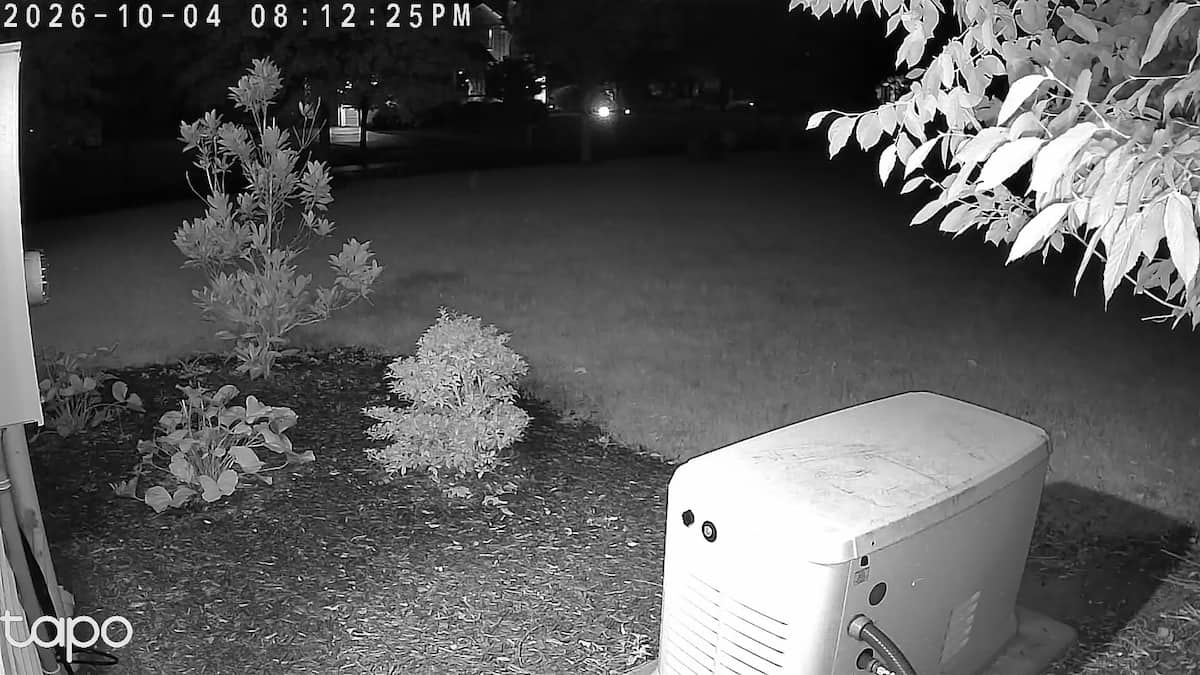
Tapo C500 infrared night vision showing the yard without the built-in spotlights.
IR is also the more discreet option because the camera does not need to illuminate the area with visible light.
Color Night Vision
Color mode activates the small spotlights beside the lens.
Those lights provide enough illumination for the camera to retain color after dark. Objects close to the camera naturally receive more light than areas farther away, but the overall result is quite usable.

Tapo C500 color night vision using the built-in spotlights.
Color mode gives you information that disappears in the infrared image, including clothing, vehicle and object colors. That can be useful if you need to identify exactly what was in the scene rather than simply determine that something moved through it.
Having both modes lets you decide what matters more at a particular installation. Infrared gives you discreet nighttime surveillance, while spotlight-assisted mode preserves useful color information.
The fact that tracking continues to keep up with a walking person at night makes the night performance even more useful.
Audio Quality
The C500 includes two-way audio through its built-in microphone and speaker.
Audio quality is average.
Voices sound a little funny through the camera, but conversation is understandable and the system is usable if you need to speak with someone outside.
I would not consider audio a reason to buy the C500, but it is not bad enough to count as a major weakness either.
microSD Storage and Tapo Care
The C500 supports local recording to a microSD card up to 512GB.
That is important because it means you do not need a cloud subscription simply to retain recorded footage.
For security-camera use I recommend an endurance-rated microSD card because camera recording involves far more repeated writes than typical phone or camera storage.
A good option is the SanDisk MAX Endurance microSD card.
If you are unsure which type or capacity of card to purchase, our guide to choosing a microSD card for a security camera explains endurance ratings, card sizes and the differences that matter for continuous recording.
Tapo Care cloud storage is also available. I connected this C500 to my existing Tapo cloud account without any problems.
The nice part is having the choice. You can use local storage, cloud storage or a combination depending on how you want the camera configured.
For a deeper look at those options, see our Tapo Care vs Tapo Hub vs microSD card guide.
Tapo C500 vs C520WS
The most obvious alternative to the C500 is the Tapo C520WS.
The cameras are very similar in overall appearance and both provide outdoor pan and tilt coverage, but the C520WS is positioned farther up the Tapo lineup.
| Feature | Tapo C500 | Tapo C520WS |
|---|---|---|
| Resolution | 1080p | 2K QHD |
| Outdoor Pan/Tilt | Yes | Yes |
| Person Detection | Yes | Yes |
| Vehicle Detection | No dedicated category seen | Yes |
| Pet Detection | No dedicated category seen | Yes |
| Ethernet | No | Yes |
| microSD Storage | Up to 512GB | Up to 512GB |
The biggest difference is resolution. The C520WS records in 2K QHD instead of 1080p, giving you more usable detail when digitally zooming into recorded footage.
It also offers additional smart detection categories and Ethernet connectivity.
The C520WS is the stronger camera if you want those extra features. But that does not necessarily make it the better purchase for everyone.
If you mainly need pan, tilt, person detection, good night vision and reliable tracking, the C500 delivers those core features for less money.
That is why I consider the C500 such a good value.
Who Should Buy the Tapo C500?
The C500 makes the most sense for someone who wants broad outdoor coverage without paying for features they may never use.
A strong fit if you:
- Want an inexpensive outdoor pan and tilt camera
- Need reliable person detection
- Want the camera to follow a moving person
- Care about good infrared and color night vision
- Want local microSD recording
- Already use other Tapo cameras
- Can live with 1080p resolution
Consider another camera if you:
- Need 2K or 4K resolution
- Want dedicated vehicle, pet or package AI detection
- Need Ethernet connectivity
- Want premium two-way audio
- Need a heavier-duty commercial-style camera housing
The Verdict
Tapo C500 Rating — 4.2 / 5
The Tapo C500 is a bargain in terms of capability. Person detection has been excellent in my testing, tracking can keep up with a walking person even at night, and the live image appears in the Tapo app almost instantly. Infrared night vision covers a useful area, color night vision works well with the built-in spotlights, and general motion detection is sensitive enough to pick up approaching vehicles from roughly 60 feet away at night. Add local microSD recording, cloud compatibility, pan and tilt coverage and a well-made housing, and there is a lot here for the money. The C520WS is the better choice if you need 2K resolution, Ethernet or more AI categories. If those extras are not important, the C500 is very easy to recommend.
Check Tapo C500 Price on Amazon →
Frequently Asked Questions
What resolution is the Tapo C500?
The Tapo C500 records at 1920 x 1080 resolution. While that is lower than newer 2K and 4K cameras, image quality in my testing has still been quite good for general outdoor surveillance.
Does the Tapo C500 detect people?
Yes. Person detection has worked very well during my testing, with useful detection at roughly 30 feet in my installation.
Does the Tapo C500 detect vehicles?
I do not see a dedicated vehicle AI classification in my C500 app. However, general motion detection has picked up approaching vehicles from roughly 60 feet away at night.
Does the Tapo C500 track people?
Yes. The camera can pan and tilt to follow a walking person, and I found that tracking continued to work well after dark.
Does the Tapo C500 have color night vision?
Yes. The camera has small built-in spotlights that provide enough illumination for color nighttime video. Traditional infrared black-and-white night vision is available as well.
Does the Tapo C500 require a subscription?
No. The camera supports local microSD storage, so Tapo Care is optional rather than required.
What size microSD card does the Tapo C500 support?
The C500 supports microSD cards up to 512GB. For security-camera recording, I recommend using an endurance-rated card designed for repeated writes.
For another outdoor Tapo pan/tilt camera see our Tapo C216 review. For storage help see our security camera microSD card guide and Tapo Care vs Tapo Hub vs microSD card guide. For mounting options see our Tapo camera mount guide. For the full brand collection see the Tapo camera hub.
📷
Tapo Hub
Want more Tapo options? Browse our Tapo Security Camera hub for every owner-tested camera, comparison and guide we’ve published.
