
If you are shopping for a budget indoor security camera and have done any research at all, you have almost certainly landed on these two. The Tapo C210 and the Wyze Cam OG are consistently the two most recommended cameras in the under-$40 indoor category — and for good reason. Both work without a subscription, both include free AI detection, and both store footage locally on a microSD card. Having owned and used both, the differences between them are more meaningful than the spec sheets suggest.
The Core Difference in One Sentence
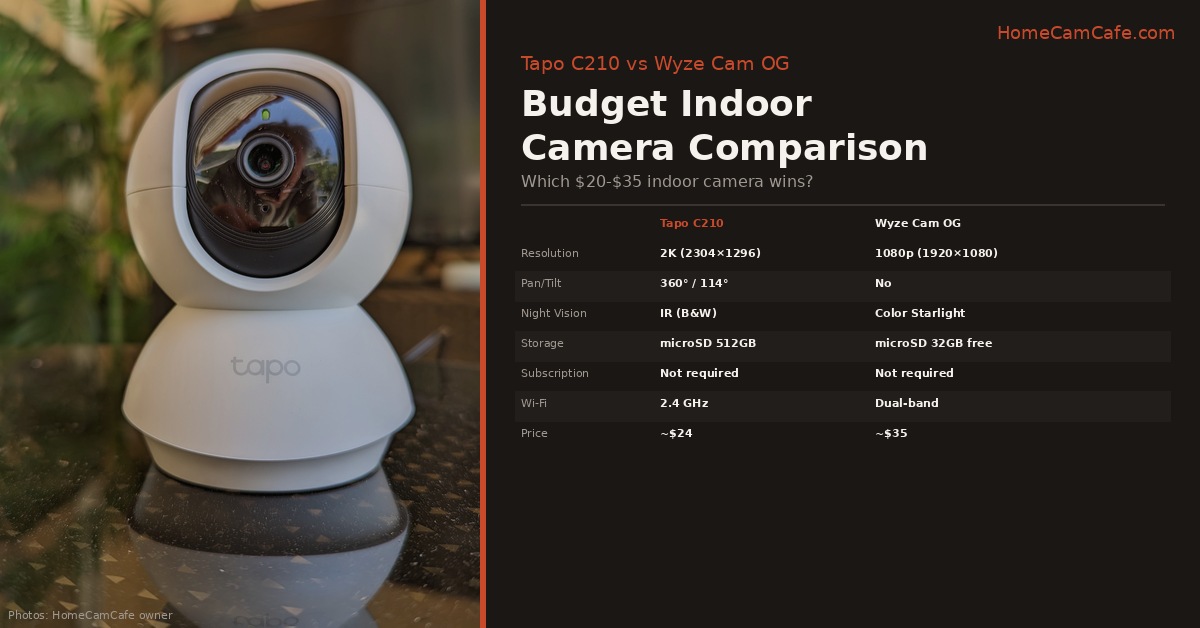
The Tapo C210 gives you 2K resolution and full pan/tilt coverage of an entire room. The Wyze Cam OG gives you color night vision and a fixed wide-angle lens at a slightly higher price. Which one wins depends entirely on what you need the camera to do.
Resolution and Image Quality
The C210 shoots at 2K (2304×1296) — noticeably sharper than the Wyze Cam OG’s 1080p (1920×1080). At typical indoor monitoring distances, the difference is visible: the C210 renders faces and fine details more clearly, and the extra resolution gives more flexibility when zooming into footage after an event. For a camera checking on a baby or monitoring a room where you need to identify faces, the 2K advantage is real.
The Wyze Cam OG counters with a wider 115° field of view versus the C210’s 100° diagonal — a minor difference on a fixed-lens camera but worth noting for wide rooms.
Night Vision: Wyze Wins This One
This is the most significant real-world difference between the two cameras. The Wyze Cam OG uses a Starlight sensor with a color spotlight — it produces full-color footage in low light conditions rather than switching to black-and-white infrared. The C210 relies on traditional IR night vision, which delivers a sharp black-and-white image in complete darkness but loses color entirely once the lights go out.
For most indoor use cases — a living room, a baby’s room, a home office — the color night vision on the Wyze Cam OG is genuinely more useful. Color footage is easier to interpret quickly and provides more detail for identifying what is happening in a dimly lit room. If night vision quality matters for your specific use case, the Wyze OG has the clear advantage here.
Pan/Tilt: C210 Wins Decisively
The C210 pans 360° horizontally and tilts 114° vertically. The Wyze Cam OG is a fixed-lens camera — it points wherever you aim it and does not move. For covering a large room, a living room, or any space where a single fixed angle won’t capture everything, the C210’s pan/tilt is a meaningful advantage. Motion tracking keeps a detected subject in frame as they move through the room, and eight preset positions let you snap between saved angles instantly from the app.
The Wyze Cam OG’s fixed lens is not necessarily a disadvantage for every use case. For a nursery, a front door, a specific corner of a room, or anywhere you want a consistent fixed angle, the simplicity of a fixed lens is actually preferable — there are no motors to wear out and no tracking behavior to configure. But for whole-room coverage, the C210 is the only realistic choice between these two.
Storage and Subscription
Neither camera requires a subscription for local storage. The C210 supports microSD cards up to 512GB. The Wyze Cam OG supports cards up to 32GB — a meaningful limitation if you want to store several days of continuous footage. Wyze includes a free 14-day event history in the cloud with the Wyze Cam OG at no charge, which partially offsets the smaller local storage ceiling. For more detail on what each plan unlocks, the Wyze subscription plans guide and the Tapo Care vs microSD guide cover the full breakdown.
Wi-Fi and Connectivity
The Wyze Cam OG supports dual-band Wi-Fi — both 2.4 GHz and 5 GHz. The C210 is 2.4 GHz only. For indoor cameras placed close to a router this rarely matters, but in homes with congested 2.4 GHz networks the Wyze OG’s dual-band support provides a more stable connection option.
Price
The C210 runs around $24. The Wyze Cam OG runs around $35. For the $11 premium the Wyze OG delivers color night vision and dual-band Wi-Fi. The C210 delivers higher resolution and pan/tilt coverage. Neither is a better value in absolute terms — the right choice depends on which features matter for your installation.
Which One Should You Buy?
Buy the Tapo C210 if you want to cover an entire room with a single camera, need 2K resolution for clearer footage, or are monitoring a large space where a fixed lens would leave blind spots. At a price that is typically less than $25, it is also the better choice if budget is the primary constraint.
Buy the Wyze Cam OG if color night vision is important for your use case — a room that is frequently dim or dark — or if dual-band Wi-Fi connectivity matters for your setup. It is also the better choice for a fixed-angle installation like a nursery or front door where pan/tilt adds no value.
Can’t decide? If the room you’re monitoring is large or has multiple areas to watch, get the C210. If it’s a single focused area that gets dark at night, get the Wyze OG. If you have both use cases, one of each costs less than $60 total.
Bottom Line
The Tapo C210 wins on resolution and pan/tilt coverage. The Wyze Cam OG wins on color night vision and dual-band Wi-Fi. Both are excellent no-subscription indoor cameras at prices that make buying two or three for a whole home genuinely affordable. There is no wrong choice here — just the right choice for your specific room and use case.
For the full individual reviews see the Tapo C210 review and the Wyze Cam OG review.
This comparison is part of our TP-Link Tapo Security Camera Reviews and Wyze Security Camera Reviews guides.
