
Our Reolink E1 Pro review starts with a camera that quietly does more than most indoor pan-tilt models in its class. As a result, it earns a spot among the more capable indoor cameras we have tested on HomeCamCafe. The image is noticeably clear even in mixed indoor lighting, the pan and tilt range covers a full room without dead zones, and the internal microSD option works exactly the way it should.
The E1 Pro includes a feature we rarely see on a plug-in indoor camera: a rear Ethernet port. It is not Power over Ethernet, so the camera still needs its own power adapter, but it lets you run a Cat6 cable to the camera instead of relying on Wi-Fi, which cuts down on the small lag that wireless networking can introduce. Consequently, this review breaks down where the Reolink E1 Pro excels, where the Ethernet option makes sense, and who should consider it over the standard E1.
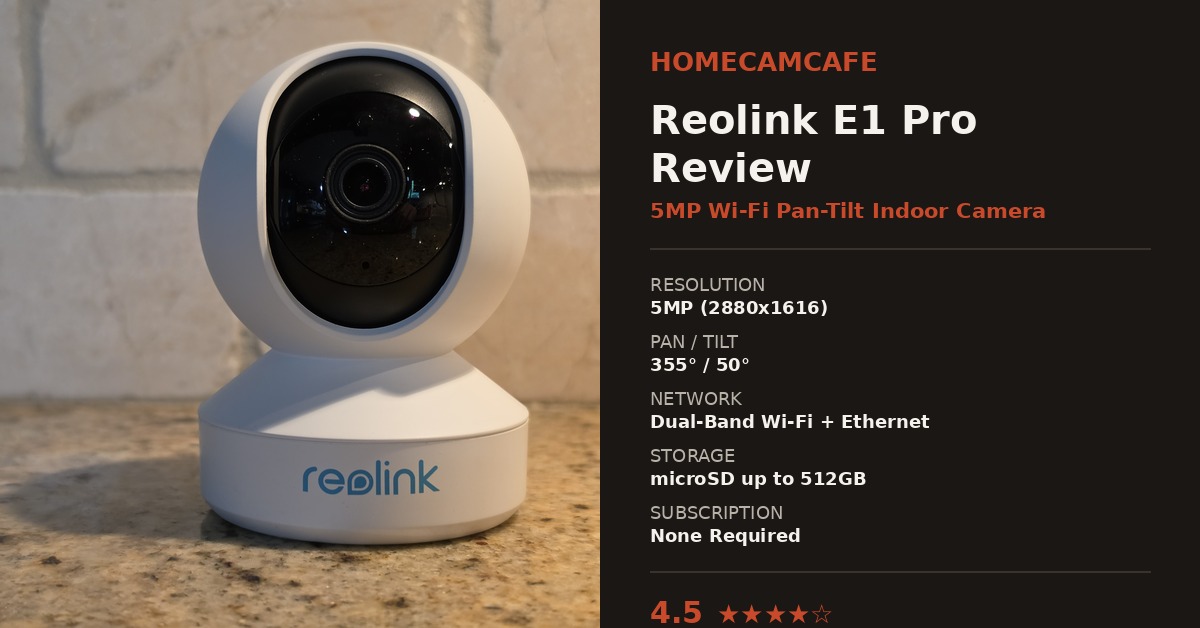
Design and Build
The E1 Pro uses the same rounded dome-on-a-swivel-base design found across Reolink’s indoor pan-tilt line. Consequently, it looks unassuming on a shelf or counter, which is generally a plus for a camera meant to blend into a living room or nursery. The matte white finish and black lens housing feel more substantial than the price point suggests. Furthermore, the base houses the motor for pan and tilt movement, while the lens assembly itself tilts independently for a wide field of coverage.
On the back of the base, you will find the DC power port, a reset button, and the Ethernet port mentioned above. There is no battery here. Therefore, the E1 Pro needs to stay plugged in at all times, which is worth knowing if you were expecting a portable option.
Video Quality
Image clarity is where the E1 Pro stands out. The 5MP sensor paired with an F1.6 aperture lens produces a noticeably brighter and sharper picture than older Reolink indoor models, especially once the light starts to fade. Daytime footage is crisp enough to read small text on packaging from across a room, and in addition, colors stay accurate rather than washed out. Night vision switches over cleanly, and details remain visible out to a reasonable distance for an indoor camera.
Two-way audio is built in, and the microphone picks up conversation clearly enough for the camera to double as a basic intercom. As a result, this is a legitimately useful feature for checking in on a room without opening the app just to look.
Full Pan and Tilt Coverage
The E1 Pro covers 355 degrees of pan and 50 degrees of tilt, which in practice means it can survey nearly an entire room from a single mounting point. Movement in the app is smooth, and preset positions make it easy to jump between a few fixed views instead of manually steering the camera every time. Most importantly, auto-tracking on the pan axis keeps a moving subject in frame, which is a helpful touch for anyone using this as a pet or baby monitor rather than a strict security camera.
The Ethernet Port: A Rare and Welcome Extra
This is the feature that sets the E1 Pro apart from most plug-in indoor cameras. The rear 10/100Mbps RJ45 port lets you connect a standard Cat6 cable directly to your router or switch instead of relying on Wi-Fi. It is important to note this is not PoE. The camera still needs its own DC power adapter plugged in separately, so the Ethernet port only replaces the wireless connection, not the power cable.
That said, the benefit is real. A wired connection avoids the dropouts and small delays that can creep into a busy Wi-Fi network, particularly in a home with several other cameras already competing for bandwidth. For a room within reach of an Ethernet cable, such as a home office or a spot near existing structured wiring, this is a meaningful upgrade over a wireless-only indoor camera.
In practice, we tested the E1 Pro both ways. On Wi-Fi, the live feed loaded quickly and stayed stable, though there was an occasional half-second of buffering when several other devices were streaming at once. Once connected over Ethernet instead, that buffering disappeared entirely, and the live view felt closer to watching a local video file than a network stream. Additionally, a wired connection removes one more device competing for wireless bandwidth, which can help the rest of a smart home network as well. For anyone mounting the camera near a router, a switch, or existing structured wiring, running the cable is worth the extra effort.
Placement and Mounting
The E1 Pro ships with a simple wall mount and the wide base doubles as a stand for a shelf or dresser. Because the swivel base and independently tilting lens already cover most of a room, precise aiming matters less than it does with a fixed camera. For example, mounting it in a corner near the ceiling still gives full coverage of the room below thanks to the 355-degree pan range. In addition, keep the mounting spot within range of a power outlet, and if the Ethernet option is part of the plan, within reach of a wall jack or a run of Cat6 as well.
Storage and Subscription
Just like the rest of the Reolink lineup, the internal microSD option on the E1 Pro works well. The camera supports cards up to 512GB, and recording, playback, and motion event clips all function without a subscription. Cloud storage is available as an option if you want off-site backups, however, it is not required for the camera to work at full capability. Therefore, buyers who want to avoid recurring fees can use the E1 Pro exactly the way Reolink markets it.
App and Setup
Setup goes through the Reolink app, and the process is voice-guided from start to finish. Scanning the QR code on the base pairs the camera in a few minutes, and from there the app handles firmware updates, motion zone editing, and preset position management. In contrast to some competing apps, the interface stays consistent with other Reolink cameras, so anyone already using an Argus or Duo model will feel at home immediately.
Motion zones are drawn directly on a still frame from the camera, which makes it simple to exclude a window, a television, or a doorway that would otherwise trigger constant false alerts. Furthermore, person and pet detection run on the camera itself rather than depending on a cloud subscription, so alerts stay accurate without any recurring cost. Firmware updates have also arrived on a reasonably steady schedule since launch, which is worth noting given how many budget cameras stop receiving updates within a year or two.
For anyone running a smart home setup, the E1 Pro also works with Home Assistant through Reolink’s official integration. However, RTSP and ONVIF are turned off by default, so you will need to enable both under Network settings in the Reolink app before Home Assistant can detect the stream. Once that step is done, the camera behaves like any other Reolink device in the integration, with live view, motion sensors, and recording controls available locally.
Reolink E1 vs. E1 Pro: What Actually Changes
Reolink also sells a plain E1 model, and this leads us to answer the question: what does the Pro version actually add? The answer comes down to lens quality and low-light performance.
The E1 Pro uses a brighter F1.6 aperture lens, while the standard E1 uses a narrower aperture that struggles more once the room dims. Consequently, if most of the camera’s use happens after dark, such as a nursery or a hallway at night, the E1 Pro’s extra clarity is worth the price difference. On the other hand, if the camera will mostly run in a well-lit space during the day, the standard E1 covers the basics for less money. Both models share the same pan and tilt range, the same app, and the same Ethernet port option, so the decision really comes down to how much the room relies on night vision.
Who Should Buy the Reolink E1 Pro
The Reolink E1 Pro makes the most sense for a room that needs full coverage rather than a single fixed angle, such as a nursery, a living room, or a home office. It also suits anyone who has run into Wi-Fi congestion with other indoor cameras and wants the option to plug in a cable instead. On the other hand, buyers who only need to watch one fixed spot, such as a front door or a single hallway, will likely get better value from a stationary camera at a lower price. Similarly, anyone who wants a battery-powered or fully portable camera should look elsewhere, since the E1 Pro depends on constant power.
Reolink E1 Pro Verdict
Rating: 4.5 / 5
The Reolink E1 Pro delivers a clearer image and a wider field of coverage than most indoor pan-tilt cameras in its class. The Ethernet option is a rare and welcome addition for anyone who wants a wired connection without giving up pan and tilt movement, and the no-subscription microSD storage keeps ongoing costs at zero. The only real limitation is that this is a plug-in camera with no battery backup, so it depends entirely on a steady power source. For an indoor room that needs full coverage and dependable video, the E1 Pro is an easy recommendation.
Check the current price on the Reolink E1 Pro on Amazon.
If you want the wired Ethernet option but do not need pan and tilt movement, the Reolink Duo 3 PoE review covers a true Power over Ethernet camera built for wide outdoor coverage. If you need that same pan and tilt tracking outdoors instead of indoors, our Reolink TrackMix review covers a dual-lens PTZ camera built for wide yard coverage. For a full breakdown of every light pattern on this camera, see the Reolink camera light meanings guide. For the full individual reviews of other Reolink cameras, see the Reolink camera reviews hub. For comparisons across brands and buying guides by use case, visit the security camera reviews hub.
