
Anyone adding a single PoE security camera to a network without a PoE switch needs an injector, and the Ubiquiti PoE injector line is one of the most common picks for that job. Therefore, we picked up the Ubiquiti UACC-PoE+-2.5G, a 30W PoE+ injector with 2.5 Gigabit LAN support, and have been running it as the power source for our Reolink Duo 3 PoE review camera. In addition to covering the setup process, this review walks through power delivery, build quality, and where this injector makes sense compared to a PoE switch or an NVR with built-in PoE ports.
What This Ubiquiti PoE Injector Is Built For
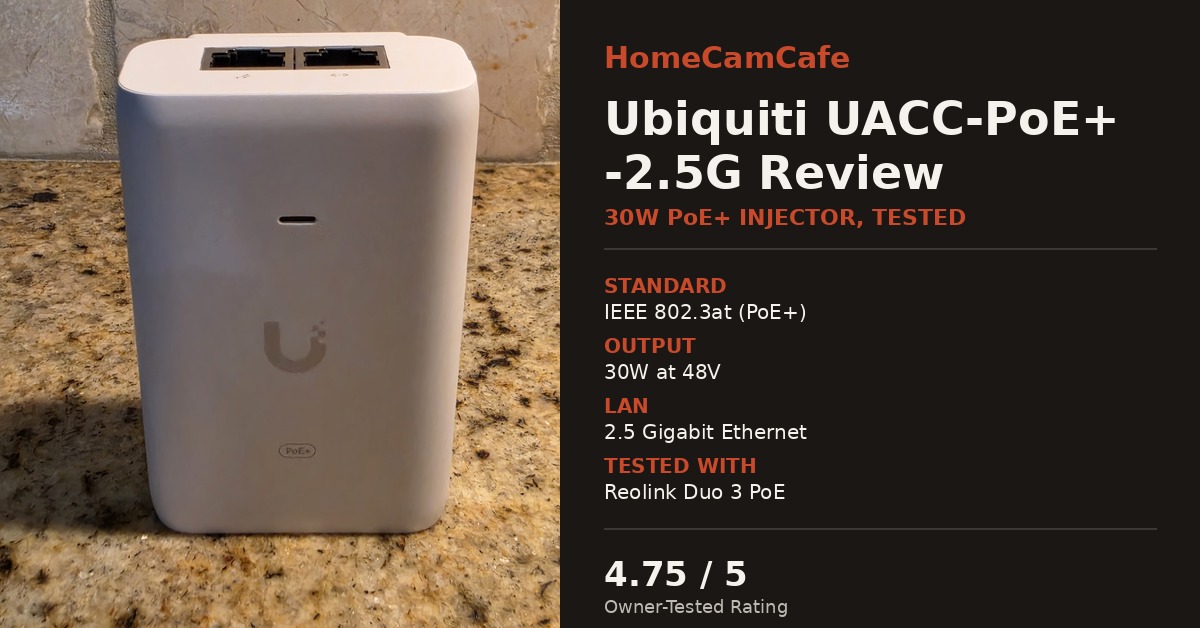
The UACC-PoE+-2.5G is a single-port PoE+ injector rated for up to 30 watts at 48V, following the IEEE 802.3at standard, with the added benefit of 2.5 Gigabit LAN support instead of the standard Gigabit found on most injectors. Ubiquiti designed it primarily to power newer UniFi hardware such as the U7-Pro, U7-Outdoor, and U6-Enterprise-IW access points, all of which can take advantage of the faster LAN connection. However, it also works for any 802.3at or 802.3af PoE device that draws 30 watts or less, which covers most PoE security cameras currently on the market. As a result, it is a reasonable option for a homeowner who has one PoE camera and a router that does not supply power over its Ethernet ports.
Notably, the injector is a compact white block with the Ubiquiti logo on the front and a “PoE+” badge confirming the 802.3at rating. Two Ethernet ports sit on the unit, clearly marked for data-in and PoE-out, and a status LED confirms power and link state. The AC power cord connects on the opposite end. Consequently, there is no external power brick to manage separately, since the AC-to-DC conversion happens inside the housing itself. For example, compared to older passive injectors that ship with a bulky wall-wart transformer, the UACC-PoE+-2.5G is noticeably tidier to mount near a router or in a network closet, and at 93 x 62 x 35mm it is small enough to tuck behind other gear.
Real-World Test: Powering a Reolink Duo 3 PoE
Rather than just testing this injector on the bench, we put it to work powering our Reolink Duo 3 PoE, a dual-lens 16MP camera with two spotlights, a built-in siren, and two-way audio, all of which spike power draw during an alert. Overall, the pairing has run flawlessly. The 30 watts of PoE+ headroom comfortably covers the camera’s baseline draw plus the brief spikes when the spotlights and siren activate together, and we have not seen a single dropout or reboot since installing it. This is the kind of real-world validation that matters more than a spec sheet, since a dual-lens camera with active lighting is a heavier load than the single-lens fixed cameras most injectors are tested against.
What’s in the Box
The injector ships with the UACC-PoE+-2.5G unit itself and an AC power cable with a grounded plug. Notably, no Ethernet cables are included, so a Cat5e or Cat6 cable is needed for both the data-in connection and the run out to the camera. In addition, no mounting hardware is included. Instead, the unit is designed to sit flat near a router or patch panel rather than being wall-mounted, which is worth knowing in advance if the installation plan calls for tucking it into a cabinet or shelf.
Setup and Installation
Installing the UACC-PoE+-2.5G is straightforward. One Ethernet cable runs from the router or switch into the data-in port, and a second cable runs from the PoE-out port to the camera. No configuration, app, or account is required, since the injector simply passes data through while adding power to the outbound cable. As a result, setup took under five minutes with our Duo 3 PoE camera, including running the cable and confirming the status light.
Overall, the status LED is a useful troubleshooting reference. Specifically, it stays lit when the injector has power and a device is drawing from the PoE-out port. If a connected camera does not power on, the two most common causes are a reversed data-in and PoE-out connection, or a camera that requires more than 30 watts. In that case, a higher-output injector or a PoE switch would be the better fit. For instance, some dual-lens PoE cameras with built-in floodlights draw closer to 25 to 30 watts at peak, which puts them right at the edge of what this injector supports, though our Duo 3 PoE has stayed comfortably within range.
Power Delivery and Reliability
At 30 watts, the UACC-PoE+-2.5G comfortably covers the power draw of the PoE security cameras we have tested on this site, including dual-lens models with built-in spotlights and sirens that spike power draw briefly during an alert. Ubiquiti’s official specs list surge, peak pulse, and overcurrent protection, which matters for injectors, since the outdoor camera end of the cable is more exposed to voltage spikes than an indoor networking closet. During testing we did not see any dropouts or resets, and the injector ran without any noticeable heat buildup during extended use.
One note on the 2.5GbE support: for a single security camera, standard Gigabit is already more bandwidth than the camera will use, so the faster LAN port is not a requirement for camera use. That said, it does mean this injector has headroom to be reused later on a UniFi access point or another 2.5GbE device without needing to buy new hardware, which is a reasonable bit of future-proofing for the modest price difference over a Gigabit-only injector.
Compatible Cameras and Use Cases
The UACC-PoE+-2.5G is best suited to a single PoE camera install where running a full PoE switch would be overkill. Generally, most PoE security cameras draw well under 30 watts during normal operation, so compatibility is rarely an issue. However, cameras with built-in spotlights, sirens, or heaters for cold climates draw more power and are worth double-checking against the manufacturer’s stated wattage before buying an injector. Similarly, dual-lens PoE cameras that run two image sensors from a single housing, like the Duo 3 PoE we paired it with, tend to sit on the higher end of the power range, so it is worth confirming the camera’s PoE class before assuming any 30W injector will work.
Ubiquiti UACC-PoE+-2.5G vs. a PoE Switch
An injector like the UACC-PoE+-2.5G only makes sense for a single camera. For anyone planning two or more PoE cameras, a PoE switch is the more practical purchase, since it provides multiple powered ports from one device instead of requiring a separate injector per camera. Furthermore, a PoE switch centralizes power delivery in one place, which simplifies troubleshooting if a camera goes offline. Our best PoE injectors guide covers this decision in more detail, including when a PoE switch or an NVR with built-in PoE ports is the better option instead of a single injector.
Pros and Cons
Pros: Simple plug-and-play setup with no configuration required. 30W of PoE+ power handled our dual-lens Duo 3 PoE with spotlights and siren without a single dropout. 2.5GbE LAN support for future-proofing. Compact design with no separate power brick. Built-in surge and overcurrent protection. Status LED makes troubleshooting straightforward.
Cons: Single port, so it only supports one camera. Officially aimed at UniFi devices, though it worked without issue on our non-UniFi camera. No weatherproofing, so it needs to be mounted indoors or in a covered, dry location.
Verdict – 4.75 out of 5 Stars
The Ubiquiti UACC-PoE+-2.5G does exactly what a PoE injector is supposed to do. Running it against a real dual-lens camera with active spotlights and a siren, rather than just a spec sheet, is what makes this review worth trusting, and it has delivered reliable power with no dropouts since installation. Setup took minutes, the surge protection is a meaningful feature for anything running to an outdoor camera, and the 2.5GbE port is a nice bit of headroom even though a single camera will not use it. Overall, it is the right pick for a single PoE camera install where a full PoE switch is more hardware than the job requires. Anyone planning multiple PoE cameras, in contrast, should look at a PoE switch instead.
Frequently Asked Questions
Can the Ubiquiti UACC-PoE+-2.5G power a security camera that is not made by Ubiquiti?
Yes. We have been running ours on a Reolink Duo 3 PoE camera without issue, since it follows the standard 802.3at negotiation process. That said, Ubiquiti markets this injector primarily for UniFi devices, so always confirm the camera’s power draw is 30 watts or less first.
Does the UACC-PoE+-2.5G work with 802.3af (PoE) devices, or only 802.3at (PoE+)?
It supports both. An 802.3at injector like this one is backward compatible with 802.3af devices, since it simply negotiates down to whatever power level the connected device requests.
Do I need a 2.5GbE router or switch to use this injector?
No. The 2.5GbE port works fine on a standard Gigabit network, since it will simply negotiate down to the highest speed the other end of the connection supports. The 2.5GbE support only matters if the device on the other end can also use it.
Is the Ubiquiti UACC-PoE+-2.5G weatherproof?
No. It needs to be installed indoors, in a garage, or in another dry, covered location. Only the Ethernet cable running out to the camera needs to be rated for outdoor or in-wall use, depending on the installation.
For the full hands-on breakdown of this camera and injector pairing, see our Reolink Duo 3 PoE review. For a full comparison of PoE injectors, switches, and NVRs, see our best PoE injectors guide, and for another PoE injector review see our TP-Link PoE Injector Review.
