
Checking Apple HomeView cameras compatibility with your existing home security setup is the most important step before buying Apple’s seven-inch smart home display (often searched as Apple Home View). Apple HomeView combines a Liquid Retina touchscreen, conversational Siri AI, smart home controls, and HomeKit Secure Video features, with its standout capability for security camera owners being a Home Camera face that streams up to nine live video feeds simultaneously. Whether the cameras already mounted around your property will appear on that screen depends entirely on their native Apple Home integration. Some models support live viewing inside Apple’s Home app, while others act as full HomeKit Secure Video cameras with encrypted event recording and intelligent clip descriptions. Popular brands such as Ring, Blink, Google Nest, Reolink, Tapo, Eufy, Arlo, and Wyze do not all provide the same level of integration, and support can vary considerably from one hardware generation to the next.
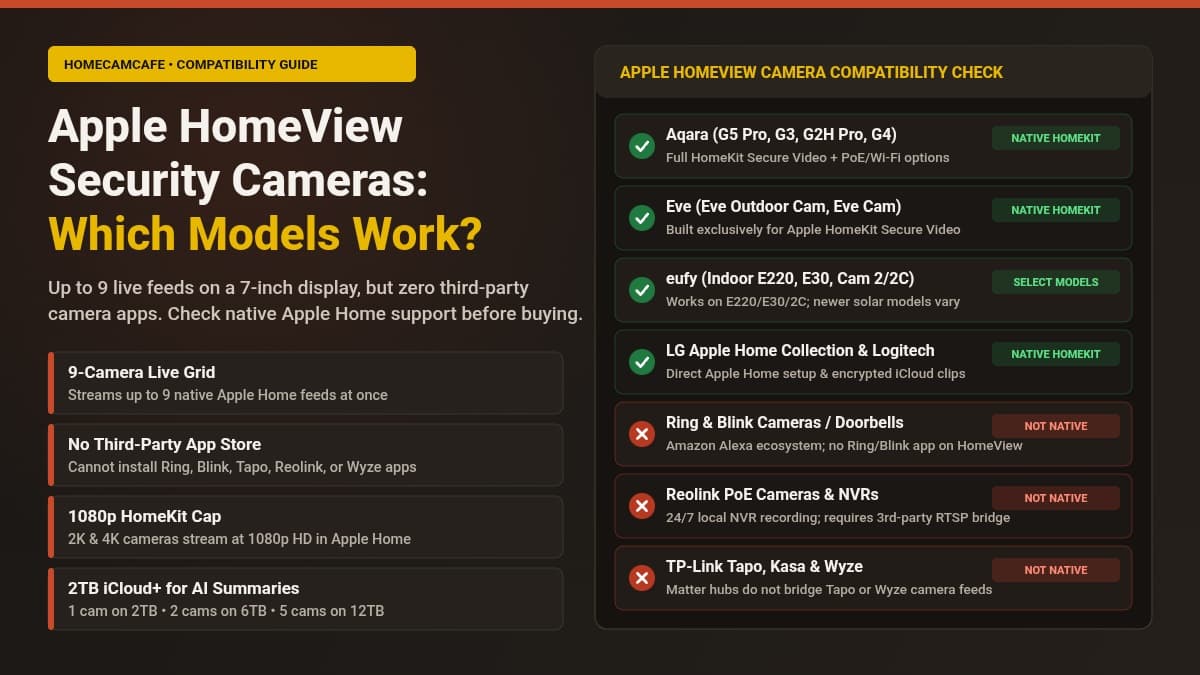
Quick Answer: Apple HomeView (also written as Apple Home View) can display up to nine compatible camera feeds simultaneously, but it is not a universal security camera monitor and cannot run standalone third-party camera apps like an iPad. Cameras built specifically for Apple Home and HomeKit Secure Video (from brands like Aqara, Eve, Eufy on select models, Logitech, select older Arlo Pro/Ultra kits, and LG’s Apple Home Collection) are the safest choices. If you own Ring, Blink, Google Nest, Tapo, Reolink, or Wyze cameras that rely on proprietary mobile apps, they will not appear natively on HomeView.
View Top Outdoor Pick: Aqara G5 Pro on Amazon → View Best Budget Indoor Pick: eufy E220 on Amazon →
What Is Apple HomeView?
Apple HomeView is a dedicated smart home display and Apple home hub designed to bring connected accessories, household monitoring, and everyday information together on a single shared screen. Unlike an iPad running the Apple Home app that gets carried from room to room, HomeView is built to remain in a fixed spot on a kitchen counter, bedside table, or entryway wall where anyone in the house can glance at it throughout the day. Setting up the display requires an iPhone running iOS 27.2 or later (or an iPad with iPadOS 27 or later) signed in as the Resident (Owner) in the Apple Home app.
The hardware runs on Apple’s A18 processor and uses a seven-inch Liquid Retina touchscreen with a 1088 x 1088 resolution that adjusts brightness automatically from 500 nits down to 0.3 nits to match room lighting. The tabletop version places a tilting display above an integrated speaker base and includes a USB-C cable and 30W power adapter in the box, whereas the wall-mounted model requires a separately sold mount and power solution (such as Schneider Home’s USB-C Wall Connector, AC Wired mount, or PoE Wired mount). Beyond camera monitoring, the display handles FaceTime calls via a 12MP Center Stage camera, music playback, calendars, smoke and carbon monoxide alarm sound recognition, and Siri AI, using facial and voice recognition to personalize information for up to six household members.
For security camera owners, the centerpiece of the hardware is the dedicated Home Camera face. This dashboard view is designed to keep multiple live camera streams visible on the screen without forcing you to pull out a phone every time someone approaches the house. Because HomeCamCafe has not yet completed hands-on testing of a retail HomeView unit, this guide evaluates the display based on Apple’s published technical specifications, HomeView software version 27.2 documentation, and official accessory compatibility directory.
Can You Use Third-Party Camera Apps on Apple HomeView?
Before looking at individual camera brands, buyers need to understand Apple HomeView’s biggest software limitation: it is not an iPad and does not run standalone third-party security camera apps. On an iPad or Android tablet, you can open the App Store, download the Ring, Blink, Google Home, TP-Link Tapo, Reolink, Eufy, and Wyze apps side by side, and tap into whichever camera system you own.
According to Apple’s official Apple HomeView software documentation, HomeView runs a dedicated operating system with built-in Apple apps (including Home, FaceTime, Calendar, Safari, and Messages) along with supported media apps, AirPlay streaming, and Handoff from a paired iPhone. Because you cannot open an App Store on HomeView to install a camera manufacturer’s proprietary iOS management app, a security camera must integrate natively with Apple’s Home app to populate a tile on HomeView’s camera dashboard. That single software design choice is why native Apple Home compatibility matters so much before you invest in the display.
Apple HomeView Security Camera Features
Apple has built several camera-specific features into HomeView that separate it from an ordinary smart speaker or wall tablet. Basic live viewing and accessory triggers work through the Apple Home interface, whereas encrypted event recording, familiar-face recognition, and searchable clip summaries require HomeKit Secure Video cameras, a qualifying home hub setup (which HomeView provides out of the box), and an eligible iCloud+ subscription plan.
View Up to Nine Apple HomeView Cameras Simultaneously
The Home Camera face can stream up to nine live camera feeds on the same screen at once, which is appealing for properties with Apple Home security cameras covering the front porch, driveway, garage, side gate, and backyard. Instead of opening one camera view after another on a phone, homeowners with supported cameras can keep those angles consolidated alongside smart lock and lighting controls. One practical limitation to keep in mind is physical screen area: dividing a seven-inch square display into nine tiles leaves each video feed relatively compact, making the nine-camera grid better suited to spotting general movement across the property than reading license plates or fine details across all nine streams at once.
Intelligent Video Descriptions
With Apple Intelligence and HomeKit Secure Video, Apple’s Home platform can generate written summaries of events captured by compatible cameras. Rather than scrubbing through dozens of motion clips manually, users can read a concise description of what happened in a clip and search recorded history using natural language to find specific moments, such as a courier setting down a box on the porch. This is an intelligent analysis of compatible HomeKit Secure Video recordings on qualifying high-tier iCloud+ plans, not a feature that automatically applies to any third-party camera connected to your home Wi-Fi network.
People, Pets, Packages, and Vehicle Recognition
When paired with supported HomeKit Secure Video cameras and an iCloud+ plan, Apple’s Home platform distinguishes between people, familiar faces tagged in your iPhone Photos library, pets, vehicles, and doorstep packages. Those classifications make notifications far more useful than a generic pixel-based motion alert, because a person stepping onto the porch requires different attention than a tree branch moving in the wind. These recognition capabilities depend on HomeKit Secure Video integration rather than the HomeView screen alone.
Apple Home Compatible Cameras: What Cameras Work With Apple HomeView?
Whether you search for Apple HomeView compatible cameras or what cameras work with Apple Home View, the most reliable starting point is Apple’s official Home accessories compatibility directory, which lists every security camera and video doorbell that works with Apple Home and marks the specific models that support HomeKit Secure Video. One important technical detail to know before buying is that HomeKit Secure Video currently caps video streaming and iCloud recording at 1080p HD inside the Apple Home app, even if the camera itself features a 2K or 2.6K sensor for local microSD or manufacturer-app recording.
| Brand | Examples Listed by Apple | What Buyers Should Know |
|---|---|---|
| Aqara | Camera Hub G5 Pro (PoE or Wi-Fi), G3, G2H Pro, Camera E1, Smart Video Doorbell G4 | Broadest current lineup of HomeKit Secure Video cameras; G5 Pro offers outdoor PoE or Wi-Fi with color night vision, while G2H Pro and G3 double as Zigbee 3.0 hubs. |
| Eufy | Indoor Cam E220, Indoor Cam E30, eufyCam 2 and 2C series, select Indoor Cam 2K models | Select models support HomeKit Secure Video (activated via the eufy app). Newer solar and 4K models often omit Apple Home support, so verify the exact model number. |
| Eve | Eve Outdoor Cam, Eve Cam | Built exclusively for Apple HomeKit Secure Video with end-to-end encryption and no separate manufacturer cloud account required. |
| Arlo | Select Arlo Pro 2, Pro 3, Pro 4, and Ultra/Ultra 2 systems (when paired with a compatible Arlo SmartHub/Base Station) | Supports live Apple Home streaming when routed through a compatible Arlo base station (VMB4000, VMB4500, VMB4540, or VMB5000), but does not support HomeKit Secure Video iCloud recording. |
| Logitech | Circle View Camera, Circle View Doorbell | Both support HomeKit Secure Video, though the hardware is an older generation with limited first-party retail stock and requires strong nearby 2.4 GHz Wi-Fi. |
| LG | Apple Home Collection Indoor Cam, Outdoor Cam, Floodlight Cam, Video Doorbell | Co-developed with Apple for direct Apple Home setup and HomeKit Secure Video support, with rollout scheduled to begin in December 2026 and early 2027. |
If you are building or expanding an Apple-centric camera system today, picking a camera explicitly certified for HomeKit Secure Video is the safest route to ensuring it works reliably on the HomeView dashboard. Among currently shipping models on Amazon, the Aqara Camera Hub G5 Pro stands out for outdoor installations because it is available in both Wi-Fi and hardwired PoE versions, while the Aqara Camera Hub G2H Pro and eufy Security Indoor Cam E220 are proven indoor options that also support local microSD cards.
View Aqara G5 Pro Outdoor HomeKit Camera on Amazon →
View Aqara G2H Pro Indoor HomeKit Camera on Amazon →
View Eve Outdoor Cam Floodlight on Amazon →
Does Apple HomeView Work With Ring, Blink, Google Nest, Eufy, Arlo, Tapo, Reolink, and Wyze?
Millions of households rely on Ring, Blink, Google Nest, Eufy, Arlo, TP-Link Tapo, Reolink, and Wyze to monitor their property. Yet having a security camera that functions reliably through its own mobile application does not guarantee that it will connect to Apple’s Home app or stream on the Apple HomeView (or Apple Home View) screen.
Does Apple HomeView Work With Ring or Blink Cameras?
No, Apple HomeView is not natively compatible with Ring or Blink cameras out of the box. Both Ring and Blink belong to Amazon and are built around their own mobile apps, optional cloud subscriptions, and Alexa-enabled smart displays such as the Echo Show. As of Apple’s current accessory directory, neither brand’s standard camera or video doorbell lineup is listed as a native Apple Home integration. Because HomeView cannot install the Ring or Blink iOS apps directly, the display cannot connect to a Ring camera or pull in native Ring or Blink video tiles on its own. Unless Apple or Amazon announces official Apple Home camera support (or you run a third-party Homebridge or Scrypted server on your local network), purchasing HomeView expecting your existing Ring or Blink cameras to show up will lead to disappointment.
Does Apple HomeView Work With Eufy or Arlo Cameras?
Both Eufy and Arlo offer partial Apple Home compatibility that depends entirely on your exact camera model and hub hardware. Apple’s compatibility directory includes several Eufy models with full HomeKit Secure Video support, such as the plug-in Indoor Cam E220, the 4K Indoor Cam E30, select Indoor Cam 2K versions, and the eufyCam 2 and 2C wireless series paired with HomeBase 2. By contrast, many of Eufy’s standalone solar and dual-lens outdoor models do not support HomeKit, as we cover in our eufy security camera reviews and guides. On the Arlo side, select Arlo Pro 2, Pro 3, Pro 4, and Ultra/Ultra 2 cameras can stream live video to Apple Home and Apple HomeView only when paired with a compatible Arlo SmartHub or Base Station (VMB4000, VMB4500, VMB4540, or VMB5000), while standalone Wi-Fi Arlo Essential cameras and HomeKit Secure Video iCloud recording are not supported. You can compare Arlo’s hub requirements in our Arlo camera reviews and guides.
View eufy Indoor Cam E220 (HomeKit Compatible) on Amazon →
Does Apple HomeView Work With Google Nest Cameras?
Google Nest cameras and Nest Doorbells do not integrate natively with Apple Home or HomeKit Secure Video out of the box. While Google supports the Matter smart home standard on newer Nest Thermostats, Google’s security cameras and video doorbells are built around the Google Home app and Google Nest Hub displays rather than Apple’s Home Camera dashboard. To view a Nest Cam on Apple HomeView, a homeowner would need an external smart home bridge such as a Starling Home Hub, since Google does not provide direct plug-and-play Apple Home camera support. For more on how Nest cameras operate natively, see our Google Nest camera reviews and guides.
Does TP-Link Tapo or Kasa Work With Apple Home?
TP-Link sells a wide range of subscription-free security cameras under the Tapo and Kasa names, and compatibility with Apple Home must always be verified by exact model number rather than assumed from the brand. While several TP-Link smart plugs, switches, and sensors support Matter or Apple Home, mainstream outdoor and indoor cameras such as our tested TP-Link Tapo C425 MagCam do not support Apple HomeKit Secure Video. Even when a hub like the TP-Link Tapo H500 Smart HomeBase includes a Matter bridge mode, that bridge exposes sub-GHz smart sensors rather than security camera video feeds. Readers comparing the broader lineup can visit our Tapo security camera reviews and guides for details on how those cameras operate within the Tapo app and local microSD storage ecosystem.
Does Reolink Work With Apple Home?
Reolink’s PoE cameras, Wi-Fi cameras, Home Hubs, and NVRs are not listed as native Apple Home cameras in Apple’s directory. A camera recording 24/7 to a Reolink NVR or streaming over a local network does not automatically expose a native video feed to Apple HomeView. While advanced hobbyists sometimes run third-party software bridges (such as Scrypted or Homebridge on a separate local server) to bring RTSP streams into Apple Home, those workarounds require extra hardware and ongoing maintenance that are not official Apple support. You can explore how Reolink’s own local-storage hardware works natively in our Reolink camera reviews and guides.
Does Wyze Work With Apple Home?
Standard Wyze cameras (including the Wyze Cam v4, Wyze Cam OG, and Wyze Battery Cam Pro) are not listed as native Apple Home compatible cameras in Apple’s directory. A camera may offer local microSD recording, optional cloud storage, or basic Alexa and Google Home routines without functioning as a native Apple Home camera, and having the Wyze app on your iPhone does not mean the camera’s live video stream can populate a tile on Apple HomeView.
Apple Home vs. HomeKit Secure Video Cameras: What’s the Difference?
Shoppers researching Apple camera support frequently run into three different labels: Apple Home compatibility, HomeKit Secure Video, and Matter. Understanding how they differ will save you from buying a camera that only performs half of what you expect on HomeView.
Apple Home compatibility means a supported camera can appear inside Apple’s Home app for live video viewing, basic status notifications, and automation triggers alongside smart lights or door locks. HomeKit Secure Video cameras go a step further by routing supported camera events through your Apple home hub for end-to-end encrypted cloud storage in iCloud+, enabling familiar-face recognition, package classification, ten-day event history, and Apple Intelligence video descriptions.
Buyers also need to be careful with Matter. While the Matter smart home standard helps smart plugs, light switches, thermostats, and door locks talk to Apple Home across brands, the Matter specification still does not bridge live security camera video feeds into Apple HomeView. Rely on explicit Apple Home camera and HomeKit Secure Video listings rather than general Matter badges on a box.
Does Apple HomeView Require an iCloud+ Subscription?
You do not need a paid iCloud+ subscription just to turn on Apple HomeView, control smart home accessories, or view a live stream from a compatible Apple Home camera. Live streaming up to nine compatible cameras on the Home Camera face is completely free once you own the hardware. However, recording encrypted video clips and unlocking Apple Intelligence video summaries follow two different sets of paid iCloud+ rules.
For standard HomeKit Secure Video recording (10-day encrypted event history and person, pet, vehicle, and package detection), Apple ties camera capacity to your iCloud+ storage tier: the 50GB plan supports one camera, the 200GB plan supports up to five cameras, and the 2TB (or larger) plan supports an unlimited number of HomeKit Secure Video cameras without counting recorded clips against your iCloud storage quota.
For Apple Intelligence video descriptions and natural-language video search, Apple’s requirements are much stricter. According to Apple’s Apple Intelligence usage limits documentation, generating AI video summaries requires at least a 2TB iCloud+ plan. More importantly, Apple restricts how many cameras can generate AI video summaries based on your plan tier: up to one camera on the 2TB plan, up to two cameras on the 6TB plan, and up to five cameras on the 12TB plan. While HomeView can livestream up to nine cameras at once, AI-generated clip descriptions are capped to a smaller subset of cameras depending on your iCloud+ tier.
Can HomeView Replace a Security Camera NVR?
For homeowners running a dedicated network video recorder (NVR), Apple HomeView should be viewed as a convenient household status screen rather than a replacement for surveillance recording hardware. An NVR is built for continuous 24/7 local recording across multiple high-bitrate 4K or 12MP cameras, storing weeks of footage on internal hard drives and continuing to record even if your home internet connection drops. HomeView, by contrast, is a countertop or wall-mounted smart home hub focused on 1080p live check-ins, short cloud-stored motion events through HomeKit Secure Video, and everyday voice or touch controls.
| Feature | Apple HomeView | Dedicated PoE Security NVR |
|---|---|---|
| Primary Role | Smart home dashboard and live doorway check-ins | 24/7 surveillance recording, retention, and evidence playback |
| Multi-Camera View | Up to 9 Apple Home feeds on a 7-inch square screen | 8 to 16+ channels via HDMI on a full-size TV or desktop monitor |
| Recording Resolution | Capped at 1080p HD via HomeKit Secure Video | Supports full 4K (8MP), 12MP, and 16MP dual-lens streams |
| Continuous 24/7 Recording | No; records motion-triggered clips to iCloud+ for 10 days | Yes; continuous 24/7 recording to internal SATA hard drives |
| Offline Internet Outage Behavior | Requires internet for iCloud+ clip uploads and AI summaries | Continues recording 24/7 locally even if ISP internet drops |
PoE Hub
Want 24/7 local recording without cloud caps? Browse our PoE Security Cameras hub and our best PoE security cameras guide for every owner-tested camera, NVR, and injector we have reviewed.
Frequently Asked Questions
How many security cameras can Apple HomeView display at once?
The Home Camera face on Apple HomeView (also called Apple Home View) can show up to nine compatible Apple Home camera feeds simultaneously at no monthly fee. Keep in mind that while nine cameras can stream live video at once, Apple Intelligence clip descriptions are limited to one camera on the 2TB iCloud+ plan, two cameras on the 6TB plan, and five cameras on the 12TB plan.
Are camera feeds viewed on Apple HomeView end-to-end encrypted?
Yes. Live video streams viewed inside the Apple Home app on Apple HomeView are encrypted end-to-end between your compatible camera and your Apple devices. When you enable HomeKit Secure Video recording, motion events are analyzed locally on your Apple HomeView hub using on-device intelligence and encrypted before being uploaded to iCloud+, so neither Apple nor third parties can view your camera footage.
Can Apple HomeView connect to a Ring camera or Google Nest camera?
Not natively out of the box. Neither Ring nor Google Nest cameras support direct Apple Home or HomeKit Secure Video pairing. Connecting Ring or Google Nest cameras to Apple HomeView requires a third-party smart home bridge (such as a Starling Home Hub for Nest or a local Scrypted or Homebridge server for Ring).
Why does my 2K or 4K camera only stream in 1080p on Apple HomeView?
Apple’s HomeKit Secure Video architecture currently limits live streams and encrypted iCloud recordings to 1080p HD resolution. If you use a higher-resolution camera such as the 2K eufy Indoor Cam E220 or 2.6K Aqara Camera Hub G5 Pro, it will stream at 1080p on HomeView while retaining full resolution inside the manufacturer’s own app and on its microSD card.
Does Apple HomeView include a power adapter and mount in the box?
The tabletop version of Apple HomeView includes a 1.5-meter USB-C cable and a 30W power adapter in the box. However, the wall-mounted version of HomeView does not include a mount or power supply in the box and requires a separately sold compatible wall mount (such as Schneider Home’s USB-C, AC Wired, or PoE Wired mount).
The HomeCamCafe Verdict
Apple HomeView brings a clean, dedicated dashboard to household security monitoring, pairing a nine-camera live view with smart locks, lighting controls, and searchable Apple Intelligence clip descriptions. Its value comes down entirely to ecosystem fit: if your home already runs on Apple Home and HomeKit Secure Video (or if you plan to outfit your property with compatible Aqara, Eve, Eufy, Logitech, or LG Apple Home Collection cameras), it serves as a highly practical central screen. However, because it cannot run standalone third-party camera apps, households relying on Ring, Blink, Google Nest, Tapo, Wyze, or a wired Reolink NVR cannot natively unify those separate ecosystems onto this display.
For our full individual reviews and buying guides, see our best security cameras without a subscription guide, or browse the PoE Security Cameras hub to compare local-storage systems that do not depend on cloud integration.