
Finding the best budget indoor security camera does not mean settling for poor video or a confusing app. In fact, several cameras under $50 now deliver 2K video, free local storage, and smart detection that would have cost three times as much just a few years ago. However, not every budget camera is created equal. Some lock useful features behind subscriptions, others sacrifice night vision, and a few are simply not worth your money. After testing and reviewing each of the five cameras on this list, we have ranked them honestly so you can find the right pick for your home.
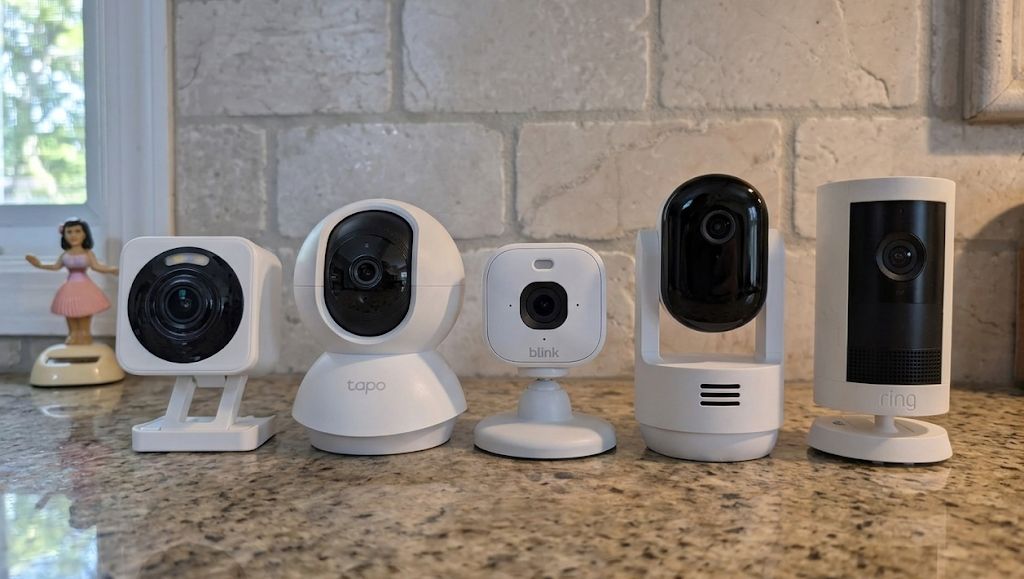
The Five Best Budget Indoor Security Cameras
- Best Overall: Wyze Cam v4
- Best Pan-Tilt Value: Tapo C210
- Best for Alexa Households: Blink Mini 2K+
- Best for Ring Ecosystems: Ring Indoor Cam Plus
- Best Motion Tracking: Arlo Essential Indoor Pan Tilt
1. Wyze Cam v4 — Best Overall Budget Indoor Camera
The Wyze Cam v4 delivers 2.5K video, color night vision, and free local storage with no subscription required. For most people, it is the easiest recommendation in the budget indoor category.
| Spec | Detail |
|---|---|
| Resolution | 2.5K QHD (2560×1440) |
| Field of View | 122° |
| Night Vision | Color + IR |
| Local Storage | microSD (up to 256GB) |
| Subscription Required | No — optional Cam Plus |
| Power | Wired (USB-A) |
The Wyze Cam v4 is the camera we recommend most often to first-time buyers, and for good reason. It delivers 2.5K resolution which is a meaningful step up from the 1080p cameras that dominated the budget space just two years ago. Additionally, Wyze includes color night vision as standard, which means you can actually make out clothing colors and room details in the dark rather than squinting at a grey blur.
Furthermore, the v4 does not require a subscription. Drop in a microSD card and the camera records motion-triggered clips continuously, storing everything locally on the card. Wyze does offer an optional Cam Plus subscription for AI person detection and package alerts, but in contrast to most competitors, the camera remains genuinely useful without it. Motion-activated alerts, live view, and two-way audio all work for free.
The built-in spotlight is a practical touch as it illuminates the room when motion is detected at night, switching the feed from IR black-and-white to full color. Setup is straightforward through the Wyze app, and Wi-Fi 6 support means the connection is more stable than older budget cameras. As a result, the v4 is particularly well suited to anyone who wants a reliable, low-maintenance camera that just works without ongoing costs.
Check the Wyze Cam v4 on Amazon
2. Tapo C210 — Best Budget Pan-Tilt Indoor Camera
The Tapo C210 packs 360° pan, 114° tilt, 2K resolution, and free person detection into a camera. It is the strongest value in the budget pan-tilt category by a considerable margin.
| Spec | Detail |
|---|---|
| Resolution | 2K (2304×1296) |
| Pan / Tilt | 360° / 114° |
| Night Vision | IR (up to 30ft) |
| Local Storage | microSD (up to 512GB) |
| Subscription Required | No — optional Tapo Care |
| Power | Wired (USB-A) |
The Tapo C210 is, most importantly, the camera we called the best budget indoor camera in our hands-on review, it is genuinely difficult to argue against. TP-Link’s Tapo line has matured into one of the most reliable budget ecosystems available, and the C210 represents its strongest indoor offering. The 360° pan combined with 114° tilt means a single camera placed in a corner can cover an entire room without a blind spot.
In addition, the C210 delivers free person detection, activity zones, and motion tracking without requiring a cloud subscription. These features are typically reserved for mid-range cameras or locked behind monthly plans. Therefore, for buyers who want pan-tilt coverage and smart detection at zero ongoing cost, the C210 is the obvious choice.
The 2K image is sharp and detailed in daylight. Night vision is IR-only (black and white), which is a step behind the color night vision on the Wyze v4, but clarity is strong out to 30 feet. The Tapo app is well-designed, and motion tracking while not perfectly smooth works reliably for following people across a room. Eight preset positions let you jump between saved angles instantly, which is a useful touch.
3. Blink Mini 2K+ — Best Budget Indoor Camera for Alexa Households
The newest Blink Mini steps up to 2K video and adds noise-cancelling two-way audio. It integrates tightly with Alexa, and the compact design fits almost anywhere. However, cloud storage requires a paid Blink subscription.
| Spec | Detail |
|---|---|
| Resolution | 2K |
| Field of View | 143° |
| Night Vision | IR |
| Local Storage | Via Sync Module 2 + USB drive (sold separately) |
| Subscription Required | Yes — for cloud clip storage |
| Power | Wired (USB-A) |
The Blink Mini 2K+ is Amazon’s third-generation compact indoor camera, launched in late 2025, and it represents a meaningful step up from the previous Mini 2. The resolution jump to 2K brings noticeably sharper footage, and the improved noise-cancelling two-way audio makes it feel considerably more polished than its predecessor. Furthermore, the 143° field of view is wider than most cameras in this category, which helps compensate for the fixed lens.
For Alexa users in particular, the Mini 2K+ is the smoothest experience available at this price. Live view on Echo Show devices is instant, voice control is reliable, and the Alexa integration goes deeper than what competing cameras offer. As a result, if you already have an Alexa ecosystem in your home, the Mini 2K+ is the natural fit.
However, the subscription dependency is the key weakness to understand before buying. Without a Blink plan, the camera offers live view and motion alerts but does not save clips to the cloud. Local storage is possible, but it requires a separately purchased Sync Module 2 and a USB drive. Therefore, in contrast to the Wyze v4 and Tapo C210, the true cost of ownership is higher if you want to review past footage regularly.
Check the Blink Mini 2K+ on Amazon
4. Ring Indoor Cam Plus — Best for Ring Ecosystem Users
The Ring Indoor Cam integrates seamlessly with Ring doorbells, alarms, and the Ring app. The manual privacy cover is a thoughtful addition. However, like Blink, it depends on a Ring Protect subscription for clip storage.
| Spec | Detail |
|---|---|
| Resolution | 2K (Retinal) |
| Field of View | 115° |
| Night Vision | Color Night Vision |
| Local Storage | No |
| Subscription Required | Yes — Ring Protect for clip storage |
| Power | Wired (USB-C) |
The Ring Indoor Cam Plus is the version of Ring’s indoor camera that should have existed from the start. The jump to Retinal 2K is a meaningful improvement, delivering footage that is noticeably sharper and more detailed than the standard Indoor Cam. Furthermore, Ring’s Low-Light Sight technology produces full color video around the clock rather than switching to black and white in dim conditions, which makes a real difference when you are trying to identify what happened in a poorly lit room at night.
The 4x digital zoom is another practical addition. In addition to the sharper base resolution, being able to zoom in without losing detail makes it considerably easier to check specific areas of a room after a motion event. The flexible swivel mount lets you position the camera on a counter, shelf, or ceiling beam, and the removable manual privacy cover gives you a physical way to block the lens entirely when you do not want the camera active.
As with all Ring cameras, the Indoor Cam Plus makes the most sense for buyers already in the Ring ecosystem. If you have a Ring doorbell, Ring Alarm, or Ring Chime, everything connects under one app with shared motion zones and unified alerts. However, the subscription dependency remains the key limitation. There is no local storage option, which means a Ring Protect plan is required to review past clips. For buyers starting fresh with no existing Ring hardware, therefore, the Wyze v4 or Tapo C210 deliver more value without the ongoing cost.
Check the Ring Indoor Cam Plus on Amazon
5. Arlo Essential Indoor Pan Tilt — Best Motion Tracking at a Budget Price
The Arlo Essential Indoor Pan Tilt offers smooth 360° coverage, 2K video, and a privacy shield that automatically drops the lens when not in use. The design and tracking are best in class here, but most smart features require an Arlo Secure subscription.
| Spec | Detail |
|---|---|
| Resolution | 2K |
| Pan / Tilt | 360° / 180° |
| Night Vision | IR |
| Local Storage | No |
| Subscription Required | Yes — Arlo Secure for most smart features |
| Power | Wired (USB-C) |
Arlo’s reputation is built on premium cameras, so the Essential Indoor Pan Tilt sitting at a budget price point is a genuinely interesting camera. The build quality is noticeably better than anything else on this list as the housing feels solid, the movement is smooth and nearly silent, and the automatic privacy shield (the lens physically tilts down when you disable the camera) is a feature you will not find at this price anywhere else.
The 360° pan and 180° tilt combination is the most comprehensive coverage range on this list, and motion tracking is the smoothest of the five cameras here. Furthermore, 2K resolution delivers clear, detailed footage, and the dual-band Wi-Fi ensures a stable connection regardless of network congestion. The 12x digital zoom is also a practical touch for reviewing specific areas of a room after an event.
However, the subscription dependency is the most significant weakness. In contrast to the Wyze v4 and Tapo C210, most of the Arlo’s smart features like person detection, animated previews, AI alerts, and event history beyond the basics require an Arlo Secure subscription. There is also no local storage option. As a result, buyers who want capable detection without ongoing fees will be better served by the Tapo C210, which delivers free person detection and microSD storage at a lower price.
The Arlo makes most sense for buyers who already pay for an Arlo Secure plan covering other cameras, or those who genuinely prioritise build quality and tracking smoothness above all else and are willing to pay for the subscription to unlock the full feature set.
Check the Arlo Essential Indoor Pan Tilt on Amazon
Side-by-Side Comparison
| Camera | Resolution | Pan/Tilt | Local Storage | Subscription |
|---|---|---|---|---|
| Wyze Cam v4 | 2.5K | No | Yes (microSD) | Optional |
| Tapo C210 | 2K | 360° / 114° | Yes (microSD) | Optional |
| Blink Mini 2K+ | 2K | No | Via Sync Module | Required for cloud |
| Ring Indoor Cam Plus | 2K | No | No | Required for clips |
| Arlo Essential Pan Tilt | 2K | 360° / 180° | No | Required for smart features |
How to Choose the Right Budget Indoor Camera
Subscription or No Subscription?
This is the most important question to answer before buying. The Wyze Cam v4 and Tapo C210 both work fully without a paid plan as local microSD storage handles recording at zero ongoing cost. The Blink Mini 2K+ requires a sync module with local storage. The Ring Indoor Cam Plus and Arlo Essential require subscriptions to unlock clip storage or core smart features. Therefore, if you want to avoid monthly fees entirely, the Wyze and Tapo are the clear starting points.
Fixed Lens or Pan-Tilt?
A fixed camera placed in a corner will cover a room adequately in most cases. However, if you have a large open-plan space, a room with multiple entry points, or you want to actively check different areas from the app, a pan-tilt camera is worth the small additional cost. The Tapo C210 and Arlo Essential Indoor Pan Tilt both offer 360° coverage — the Tapo at a lower price, the Arlo with smoother movement and better build quality.
Are You Already in an Ecosystem?
Ecosystem compatibility matters more than most buyers realise. If you already have Alexa devices throughout your home, the Blink Mini 2K+ will integrate more cleanly than any alternative. Similarly, an existing Ring Protect subscription significantly changes the value of the Ring Indoor Cam Plus. In contrast, if you are starting fresh with no existing smart home products, the Wyze Cam v4 is the easiest, most capable starting point with no strings attached.
Night Vision: Color vs. IR
Color night vision where the camera produces a colour image in low light rather than switching to black and white is very useful for identifying people, clothing, or objects after an event. Of the five cameras here, the Wyze Cam v4 and Ring Indoor Cam Plus offer color night vision. The Tapo C210, Blink Mini 2K+, and Arlo Essential use standard infrared night vision, which is sharp and reliable but produces a monochrome image.
Final Verdict
For most buyers, the Wyze Cam v4 is the right camera. It delivers 2.5K video, color night vision, and free local recording with no subscription. It is the most capable no-strings-attached budget indoor camera available right now.
If you want pan-tilt coverage at a similarly low cost, the Tapo C210 is the pick. Free person detection, 360° pan, and microSD storage make it an exceptional value.
The Blink Mini 2K+ is the right call for Alexa households, the Ring Indoor Cam Plus for existing Ring subscribers, and the Arlo Essential Indoor Pan Tilt for buyers who prioritise smooth tracking and build quality and are willing to pay for a subscription to unlock the full feature set.
Most importantly, all five cameras deliver reliable indoor monitoring at a genuinely budget price. The right choice simply depends on what you already have and what you are willing to pay on an ongoing basis.
For the full individual reviews see the Wyze Cam v4 review and the Tapo C210 review and the Ring Indoor Cam Plus Review and the Blink Mini 2K+ review and the Arlo Essential Indoor Pan Tilt review. For brand-specific guides see the Arlo camera hub.
