
This Reolink Keen review goes back to one of the more unusual security cameras we tested during the early days of battery-powered home cameras. When Reolink sent us the Keen in 2017, it was the first fully wire-free pan-and-tilt camera we had tested. It combined battery power, Wi-Fi connectivity, pan and tilt movement, local microSD recording and a separate wireless PIR motion sensor in one very different package.
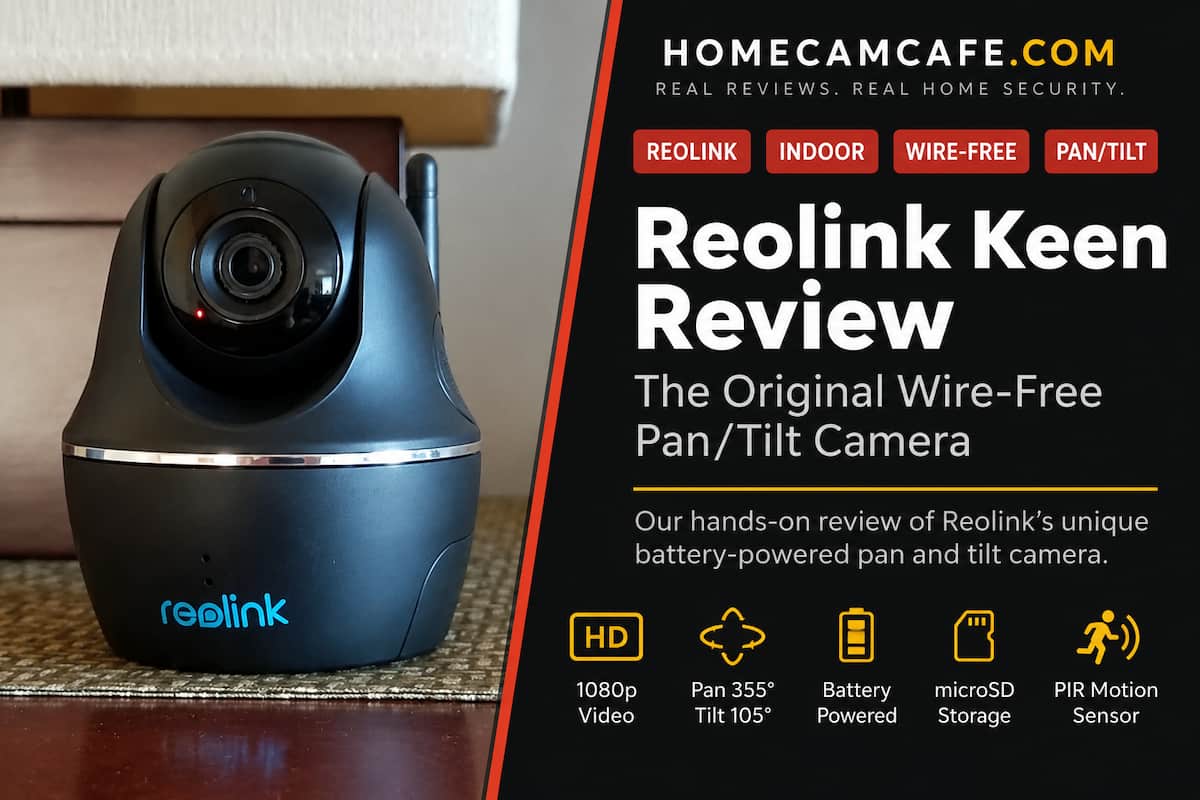
Reolink Keen Review: What Made It Different
Battery-powered security cameras were already available when the Keen arrived. Blink and Arlo had established that a camera did not necessarily need a nearby power outlet.
The Reolink Keen took a different approach.
Instead of being a small fixed camera, the Keen incorporated a motorized lens assembly capable of panning almost completely around a room and tilting from the floor toward the ceiling. Even more unusual, Reolink powered the entire camera with four CR123A lithium batteries.
There was no power cord and no separate hub connected to the router.
For 2017, that combination was unusual enough to get our attention.
Reolink also included a separate wireless PIR motion sensor. That sensor could be positioned away from the camera, allowing motion to be detected from a location that might provide better coverage than the camera itself.
The Keen was clearly designed around flexibility rather than continuous recording.
Setup and the Reolink App
Setup was handled through the Reolink app for iOS or Android.
The process involved scanning the camera’s UID, entering the Wi-Fi password and completing the connection through the app. Multiple Reolink cameras could be managed from the same application.
We found the app reasonably easy to use, although documentation supplied with the camera was minimal.
That was not unusual for Reolink at the time, and documentation remains one of the areas where we occasionally find ourselves figuring things out through testing rather than through the manual.
The pan and tilt controls in particular took a little experimentation.
Once inside the PTZ controls, the camera could be steered by dragging in the direction you wanted the lens to move. The controls worked, although they were not as immediately obvious as we would have preferred.
Reolink support answered the question we had about the controls within about a day.
Pan and Tilt Coverage
The motorized lens was the Keen’s defining feature.
The camera could rotate approximately 355 degrees horizontally and 105 degrees vertically. That allowed a single camera placed on a table, shelf or wall to look across most of a room instead of being locked into one permanent viewing angle.
The lens itself provided roughly a 90-degree horizontal field of view.
That number sounds narrow compared with modern panoramic cameras, but the motorized base changed the equation. Instead of capturing everything simultaneously, you could steer the Keen toward the part of the room you wanted to see.
Today’s cameras have taken this idea substantially further.
For example, our current Reolink TrackMix review covers a dual-lens camera capable of automatically following moving subjects. The Keen required considerably more manual control, but it was an interesting early step toward the pan-and-tilt cameras Reolink sells today.
1080p Video Quality
The Reolink Keen recorded at a maximum resolution of 1920 x 1080.
During our original testing, daytime video was clear and more than adequate for monitoring a room. Reolink allowed the stream quality to be reduced when bandwidth was limited, with the highest quality setting labeled “Clear” in the app.
The camera recorded at up to 15 frames per second.
That is modest by current standards but was acceptable for a battery-operated camera designed primarily around motion events rather than constant video.
Night vision was provided through infrared illumination with a manufacturer-rated range of approximately 40 feet.
Our experience was that night vision was acceptable for indoor surveillance. It was not extraordinary, but it was capable of showing people and activity across a typical room after the lights were turned off.
Modern Reolink cameras offer considerably higher resolution and much stronger low-light performance. The difference is particularly noticeable if you compare the Keen with newer models such as the Reolink Argus 4 Pro.
The Separate PIR Motion Sensor
One of the most interesting parts of the Keen system was not actually inside the camera.
Reolink included a separate wireless PIR motion sensor.
PIR sensors detect changes in infrared energy rather than simply analyzing pixel changes in the video image. This can reduce some false alerts caused by lighting changes or movement such as shadows and blowing objects.
The separate sensor also meant it could be positioned independently from the camera.
For example, the camera might sit on a shelf while the PIR sensor was mounted higher in a corner where it had a better view of someone entering the room.
Reolink rated the sensor for approximately 26 feet of detection with a 120-degree horizontal detection angle.
We thought this was one of the Keen’s most creative features.
Most modern cameras have moved toward built-in PIR sensors combined with onboard person, animal and vehicle recognition, so the separate Keen sensor now feels like an interesting snapshot of how manufacturers were solving motion detection before today’s AI classification became common.
Motion Alerts
Motion events could trigger push notifications, email alerts or an audible alert.
Schedules could also be established so the PIR sensor only generated notifications during selected periods.
The original Keen did not provide the sophisticated motion zones and object detection available on newer cameras.
That distinction matters.
Modern Reolink models can distinguish between people, vehicles and animals and can often exclude portions of the image from detection. The Keen essentially relied on its PIR sensor to decide when something worth recording was happening.
For its time, the system worked reasonably well.
By current standards, it is basic.
Battery Life
The Keen used four CR123A lithium batteries.
That battery arrangement was both one of the camera’s greatest strengths and one of its biggest compromises.
It allowed the camera to operate without any power cable whatsoever. You could place it on a shelf, mount it on a wall or move it between rooms without worrying about where the nearest outlet was located.
The downside was obvious: batteries eventually needed replacement.
Reolink promoted standby life of up to approximately 180 days, but actual battery life depended heavily on how often the camera woke up, recorded video, used night vision or was accessed remotely.
This is important because the Keen was not intended to behave like an always-on wired camera.
Frequent live viewing and heavy recording could dramatically shorten battery life.
Today’s rechargeable battery cameras and solar-assisted outdoor cameras are far more convenient than repeatedly purchasing CR123A cells, but the Keen’s battery design was an effective way to achieve completely wire-free pan and tilt operation at the time.
Local microSD Recording
The Keen included a built-in microSD card slot supporting cards up to 64GB.
That was especially important because the camera originally had no cloud recording service.
Motion-triggered clips could therefore be stored directly on the camera without paying a monthly fee.
Local storage has since become one of Reolink’s strongest selling points.
Modern Reolink cameras support much larger microSD cards, and many can also record to a Reolink NVR or Home Hub. The basic philosophy, however, is recognizable even in this old Keen.
Reolink was already giving users a way to maintain video history without depending on a mandatory cloud subscription.
Wi-Fi Connectivity
The original Reolink Keen connected directly to a wireless router using 2.4GHz 802.11b/g/n Wi-Fi.
There was no 5GHz support.
More importantly, there was no proprietary base station sitting between the camera and your network.
That was one of the things we liked about both the Keen and the original Reolink Argus.
Some competing battery camera systems of that era required their own hub connected to the router. The Keen simply joined your existing Wi-Fi network.
One less box was a welcome advantage.
Two-Way Audio
A built-in microphone and speaker provided two-way audio.
Pressing the microphone control in the Reolink app allowed a conversation with someone near the camera.
We considered voice quality average for a security camera of its generation. It was perfectly usable for a quick conversation or telling someone you could see them, but this was never meant to replace a dedicated communications device.
Indoor Use Only
Despite the wire-free design, the Reolink Keen was not weatherproof.
This was an indoor camera.
That distinction mattered because the battery operation made it tempting to put the camera anywhere. Reolink did not design the Keen housing or the separate PIR sensor for exposure to rain.
For outdoor use, Reolink introduced the original Argus, which we also tested.
Modern shoppers have far more choices. The current Reolink lineup includes battery cameras, solar cameras, PoE cameras, dual-lens cameras and outdoor pan-and-tilt models.
Reolink Keen Quick Specs
| Feature | Reolink Keen |
|---|---|
| Resolution | 1920 x 1080, 2MP |
| Frame Rate | Up to 15fps |
| Horizontal View | 90° |
| Pan Range | 355° |
| Tilt Range | 105° |
| Night Vision | Infrared, approximately 40 ft |
| Power | 4 CR123A batteries |
| Storage | microSD up to 64GB |
| Wi-Fi | 2.4GHz 802.11b/g/n |
| Audio | Two-way audio |
| Motion Detection | Separate wireless PIR sensor |
| Weatherproof | No, indoor use only |
| Current Status | Discontinued |
How the Keen Compares With Modern Reolink Cameras
The Keen is interesting today primarily because it shows how much battery-powered security cameras have changed.
Its 1080p resolution, 15fps video, 2.4GHz-only Wi-Fi and basic PIR alerts look primitive beside current cameras.
What remains impressive is the overall concept.
Reolink managed to combine battery power, direct Wi-Fi connectivity, pan and tilt, local storage, two-way audio and a remote PIR sensor without requiring a hub or subscription.
Several ideas that made the Keen appealing are still central to Reolink’s current lineup.
If you want the modern equivalent of an indoor pan-and-tilt camera, read our Reolink E1 Pro review. The E1 Pro needs continuous power, but it delivers 5MP video, modern detection features, much larger microSD support and both Wi-Fi and Ethernet connectivity.
For a current battery-powered Reolink camera, the Argus lineup is the more relevant place to look.
Should You Buy a Reolink Keen Today?
For most people, no.
The Reolink Keen has been discontinued, and modern cameras provide substantially better resolution, smarter motion detection, rechargeable batteries and broader storage options.
We would not go hunting for one simply because a used Keen appears inexpensive online.
Existing owners are a different story.
If your Keen still works and continues doing what you need, there is no requirement to replace it simply because the model is old. Local microSD recording and direct Wi-Fi access remain useful features.
Just understand that you are working with hardware from a very different generation of security cameras.
Replacement batteries, long-term app compatibility and firmware support become increasingly relevant concerns as discontinued hardware ages.
Reolink Keen Verdict
The Reolink Keen was one of the more creative security cameras we tested in its generation.
Its biggest accomplishment was not 1080p video or night vision. Plenty of cameras had those features.
What made the Keen interesting was the combination of completely wire-free operation and motorized pan and tilt.
Add direct Wi-Fi connectivity, microSD storage and a separate wireless PIR sensor, and Reolink had created something genuinely different for 2017.
We liked the flexibility, the lack of a proprietary hub and the ability to cover most of a room from a single camera. The tradeoffs were disposable batteries, basic motion detection, 2.4GHz-only networking and limited documentation.
Those limitations are much easier to see nearly a decade later.
For current buyers, there are far better Reolink cameras available. For existing Keen owners and anyone interested in the evolution of wire-free cameras, however, the Keen remains an interesting piece of Reolink history.
Shopping for a new camera? See our complete Reolink security camera guide for the current models we have tested.
