
In this hands-on Reolink Lumus Pro review, I unboxed, configured, and mounted Reolink’s compact 4K plug-in Wi-Fi 6 spotlight camera outdoors to see how its image quality, motion detection range, app controls, and mounting hardware hold up in daily use. Unlike budget cameras that lock person and vehicle alerts behind a recurring cloud paywall, this Reolink outdoor WiFi camera includes local person, vehicle, and animal AI detection, customizable bitrate and frame rate settings, and 24/7 continuous microSD or NVR recording with zero monthly fees. In our testing, it reliably picked up motion events more than 50 feet away during both the day and night. While its 4K video clarity, long-range detection, and deep customization earn high marks, a narrower field of view than we expected, a weak built-in siren, and a floppy included ball-and-socket mount bring our final score to 4.0 out of 5.
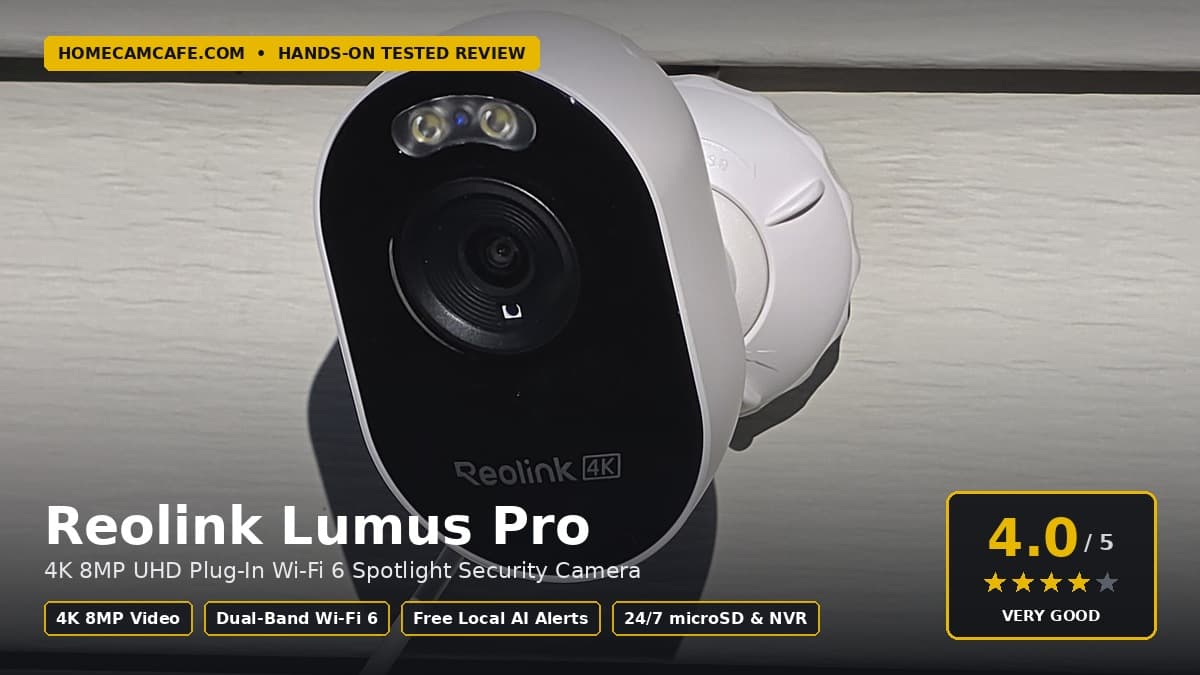
Quick answer (4.0/5): The Reolink Lumus Pro is a strong choice if you want a plug-in Reolink 4K WiFi camera with dual-band Wi-Fi 6, spotlight color night vision, 24/7 local recording, and free person, vehicle, and animal alerts that reach past 50 feet day and night. Just budget a few extra dollars for a sturdier universal 1/4-inch-20 camera bracket, because the included ball-and-socket mount does not stay tight enough to keep the camera from flopping to the side.
Reolink Lumus Pro Specifications at a Glance
Before diving into our setup experience, outdoor day and night image samples, and nighttime wildlife video test, the table below separates Reolink’s published hardware specifications for the Reolink Lumus Pro (model E450) from the settings and behaviors we verified hands-on during testing.
| Feature | Reolink Lumus Pro Specification | Hands-On Testing Notes |
|---|---|---|
| Editorial Rating | 4.0 / 5.0 (Model E450) | Strong 4K image, free AI, and 50+ ft motion reach; docked for the floppy mount, narrow view, and weak siren |
| Resolution & Sensor | 4K 8MP UHD (3840 x 2160), 1/2.7″ CMOS, f/1.6 aperture | Clear / Balanced / Fluent live toggle; crisp 4K daytime clarity tested outdoors |
| Frame Rate & Bitrate | 4 to 20 fps (15 fps default); 2048 to 5120 Kbps (4096 Kbps default) | Confirmed in app: Constant or Auto FPS; Variable or Constant bitrate |
| Field of View | 106° horizontal, 56° vertical (2.8mm lens, advertised) | Noticeably narrower horizontal view than wider cameras we have tested |
| Night Vision | 6x 850nm IR LEDs (up to 33 ft rated) + built-in LED spotlight | IR detects subjects at ~50 ft; spotlight triggers around 35 ft for clear color video |
| Smart AI & Motion Range | Free Person, Vehicle, Animal, and general Motion Detection | Confirmed in app with Non-Detection Zones, Show Motion Boxes, and 50+ ft pickup day and night |
| Local Storage & Recording | microSD slot up to 512GB; Reolink NVR, Home Hub, FTP, RTSP/ONVIF | Supports 24/7 continuous recording, custom schedules, and post-motion duration |
| Wireless Connectivity | Dual-band 2.4 GHz / 5 GHz Wi-Fi 6 (802.11ax) + Bluetooth setup | Required a physical Reset button press during initial onboarding to clear a Wi-Fi error |
| Power & Cabling | DC 5V/1A plug-in power | Molded-in camera pigtail cable connects to a second AC adapter with a long cord |
| Mounting Hardware | Metal-and-plastic ball-and-socket bracket; 1/4″-20 camera thread | Included mount does not stay tight and flops sideways; standard 1/4″-20 thread fits universal mounts |
| Audio, Siren & Weather | Two-way audio, customizable siren, IP65 weatherproof rating | Built-in siren is not very loud in real-world testing |
Unboxing, Power Cabling, and Setup Quirks
Out of the box, the Reolink Lumus Pro is a compact cube-style camera with a short power pigtail cable permanently molded right into the back of the housing. To power it up, you plug a second AC adapter with a long extension cord into that molded pigtail. Having a two-piece cable arrangement makes it easier to route the cord to an indoor or covered outdoor receptacle, though you should make sure the barrel connection between the two cables stays sheltered from direct rain.
As soon as you plug the power adapter into the wall, the camera speaker immediately greets you with a spoken “Welcome to Reolink” prompt instructing you to scan the QR code on the camera, and it repeats that announcement through roughly 10 different languages until you finish pairing. During our setup, I ran into two onboarding quirks that new owners should know about right away:
- Do Not Scan the QR Sticker With Your Phone’s Regular Camera App: If you follow the spoken voice prompt and point your phone’s standard camera app at the QR sticker on the Lumus Pro housing, it will not open an app download link. Instead, it just dumps the camera’s raw 16-character alphanumeric UID string into your notes or text field with zero instructions. You must open the Reolink app first, tap the plus icon, and scan the QR code from inside the Reolink app.
- Press the Physical Reset Button if Initial Wi-Fi Pairing Fails: While I was sorting out the QR scan, the camera sat in its multi-language greeting loop and started throwing Wi-Fi connection failures when I entered our network credentials. Pressing and holding the physical Reset button on the camera cleared the timeout right away, allowing the Lumus Pro to connect to our Wi-Fi without any further trouble.
Mounting Hardware: Why You Will Likely Want a Universal 1/4″-20 Bracket
The included mounting bracket uses an unusual hybrid metal-and-plastic ball-and-socket design that works for either horizontal soffit mounting or vertical wall mounting. To install it on a wall or overhang, you first have to unscrew the base collar to insert the mounting screws into the plate before reassembling the ball joint around the camera stem.
While the metal-and-plastic construction initially looks better than a cheap throwaway bracket, the mount proved disappointing once the camera and its molded power cord were hanging outdoors. No matter how firmly you tighten the collar, the ball-and-socket joint does not stay tight enough, and the camera flops over to the side far too easily. I am going to replace the factory mount on my installation. Fortunately, Reolink uses a standard 1/4-inch-20 threaded screw hole on the camera body, so almost any inexpensive universal security camera mount will thread right in and hold your framing rock steady. For tested wall, gutter, and no-drill siding brackets that fit standard 1/4-inch-20 threads, see our best mounts for Reolink cameras guide.
4K Daytime Video Quality and Field of View
Once mounted and aimed across our front yard and street, this Reolink 4K WiFi camera delivered sharp, colorful 8MP daytime video (3840 x 2160 resolution). As you can see in our unedited daytime sample below, grass textures across the lawn, autumn leaves on the trees, and the houses across the road are rendered cleanly with natural exposure and zero fisheye curving at the edges of the frame.
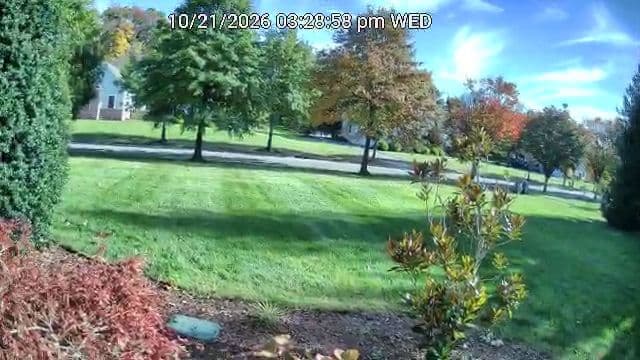
The biggest visual takeaway from our daytime testing is that the field of view is not very wide. Reolink specifies the 2.8mm lens on the Lumus Pro at 106 degrees horizontally and 56 degrees vertically. Compared with ultra-wide single-lens cameras like the 144-degree horizontal view on the Wyze Bulb Cam or the 180-degree panoramic view on our Reolink Duo 3 PoE, the Lumus Pro captures a noticeably narrower corridor of the yard. Packing all eight megapixels into a 106-degree view helps preserve detail on subjects straight ahead, but you need to aim the camera carefully because it will not cover an entire wide front yard from corner to corner.
Night Vision Tested: Infrared vs. Reolink Spotlight Camera Color Mode
Finding the color night vision controls on this Reolink spotlight camera takes a moment because the Reolink app splits its night settings across two completely different menus. If you open Settings > Display > Day and Night first, the screen only shows Auto (“Displays in color during the day and automatically switches to black and white in low light”), Day Color, Night B&W, and a 0 to 100 Day/Night Threshold slider. Looking at that screen alone makes it seem as if the camera does not support spotlight color at night.
To configure the built-in spotlight, you have to back out to the main device settings list and open the separate Light menu. Inside Light, Reolink groups the Status LED toggle, Infrared Lights (Auto), and Spotlight. Tapping into Spotlight unlocks Night Smart Mode, which automatically turns the spotlight on at night when Person, Vehicle, or Animal motion is detected, along with a manual brightness slider.
Infrared Night Vision Sample
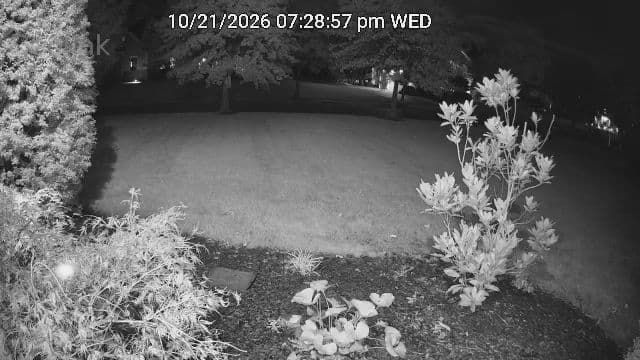
We tested both nighttime modes outdoors after dark, and the real-world trade-off is identical to what we saw during our Wyze Bulb Cam nighttime testing. With the spotlight off and the camera running on its six 850nm infrared LEDs in black-and-white mode, the infrared view sees farther back into the yard, illuminating the distant tree line and deeper background areas that a small onboard LED spotlight cannot reach.
Spotlight Color Night Vision Sample
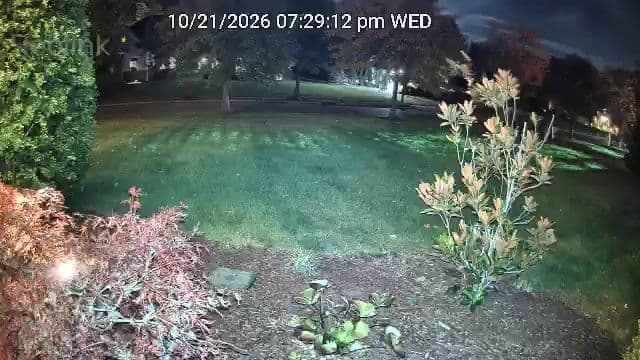
When the camera’s built-in spotlight turns on, the Lumus Pro switches over to full-color night vision. While the visible light falls off sooner in the far background than infrared mode, the spotlight color image is noticeably clearer and sharper in the foreground and mid-range, giving you true color detail on clothing, vehicles, wildlife, or landscaping near the house.
Video Demo: Watching the Camera Switch From IR to Color Night Vision
To see how the Reolink Lumus Pro transitions between infrared and color night vision in real time, watch our nighttime wildlife test clip below. The camera initially detects a deer entering the upper-left corner of our yard in black-and-white infrared mode about 50 feet away. Once the deer walks closer to roughly 35 feet from the lens, Night Smart Mode triggers the onboard spotlight and switches the feed to full-color night vision, producing a stark improvement in foreground and mid-range clarity as the deer grazes across the lawn.
Free Smart AI Detection, 50+ Foot Motion Range, and Deterrence
Smart detection and motion range are where the Reolink Lumus Pro shines brightest against subscription-dependent rivals. Opening the Smart Detection menu in the Reolink app gives you dedicated sensitivity controls for Person, Vehicle, Animal, and general Motion Detection, plus a Non-Detection Zone grid to mask out street traffic or swaying bushes. Every single one of those AI categories runs locally on the camera for free with no monthly cloud fee required.
Once we dialed in the settings and tested the camera across our yard during both the day and night, the Lumus Pro consistently picked up motion events more than 50 feet away, even after dark. As demonstrated in our nighttime deer clip above, the camera spotted the animal in infrared mode at roughly 50 feet out and then triggered the motion spotlight once the deer closed to within about 35 feet. Because the camera uses continuous plug-in power and pixel-based AI classification rather than a short-range battery PIR sensor, it has no trouble spotting movement well past the 30-foot range where typical battery cameras stop triggering.
One important detail to note at the bottom of the Smart Detection screen is that Non-Detection Zones only apply to Person, Vehicle, and Animal detections rather than general pixel motion. To keep headlights, rain, or swaying trees inside a masked zone from triggering false alerts, make sure you uncheck Others (general motion) inside your Push Notification and Camera Recording schedules and leave only Person, Vehicle, and Animal selected. Under Settings > Display, you can also enable Show Motion Boxes (called Motion Mark in the Reolink desktop client), which draws a blue rectangular outline around detected people, vehicles, or animals when viewing or playing back video in Clear stream mode. I always like turning that option on so it is immediately obvious what triggered an alert.
For active deterrence, the Lumus Pro includes two-way audio, motion-triggered spotlight activation, and a built-in siren. In my testing, the built-in siren was not very loud. It will let someone standing right on your porch or driveway know they have been spotted, but it is no substitute for a dedicated exterior alarm siren.
24/7 Continuous Recording, Stream Tuning, and Preset Time Lapse
Because the Lumus Pro runs on continuous plug-in AC power rather than a battery, it supports full 24/7 continuous recording alongside motion-triggered event recording. You can record locally to a microSD card up to 512GB (see our guide to selecting the right microSD card for a home security camera) or pair the camera with a Reolink NVR or Reolink Home Hub over Wi-Fi. As a real-world troubleshooting tip from my testing, make sure you use a healthy, high-endurance card and format it inside the Reolink app: the first 512GB microSD card I inserted was faulty, and that bad card prevented the camera from registering motion events or sending push notifications even when I walked right in front of the lens. Swapping in a working microSD card immediately restored both motion alerts and clip recording. Inside the recording menu, you can also customize your exact daily recording schedule and adjust the post-recording duration so clips continue recording after a subject stops moving.
In typical Reolink fashion, the app also exposes a deep layer of video encoding and image settings beyond the standard Clear / Balanced / Fluent live-view quality toggle:
- Customizable Bitrate and Frame Rate: Under Settings > Display > Stream, you can customize both the Clear (main stream) and Fluent (sub-stream) profiles. Under Max Bitrate (Kbps), you can choose between 2048, 3072, 4096 (Default), and 5120 Kbps, and set the bitrate mode to either Variable or Constant. Under Frame Rate (FPS), you can select 4, 6, 8, 10, 12, 15 (Default), 18, or 20 FPS, and toggle the frame rate mode between Constant and Auto. Bumping the Clear stream from its 15 FPS default up to 20 FPS and 5120 Kbps over 5 GHz Wi-Fi 6 is an easy tweak for smoother motion.
- Granular Image Sliders Most Owners Will Never Touch: Digging into the Settings > Display menu (under Image Settings and Anti-flicker) reveals 0 to 255 sliders (all set to 128 by default) for Brightness, Contrast, Saturation, and Sharpness, plus an Anti-flicker selector for Others, 50Hz, 60Hz, or Off. Power users may appreciate having every knob exposed, though I doubt most homeowners will ever touch them.
- Unique Scene-Based Time Lapse Templates: One standout feature in the app is Reolink’s Time Lapse tool. Instead of forcing you to calculate frame intervals manually, Step 1 lets you pick a ready-made scene template for Event/People/Traffic, Moving Clouds, Sunrise, Sunset, Construction, Blooming, or Customize so you can record clouds, sunrises, construction projects, or blooming flowers straight to your microSD card.
- Multi-User Device Sharing: You can also share access to the camera with other family members through the Reolink app so everyone in the household can view the live feed and alerts on their own phones.
Reolink Lumus Pro vs. Reolink Lumus and Competing Outdoor Cameras
If you are comparing the Reolink Lumus Pro against the standard 2K Reolink Lumus (model E430) or other compact plug-in outdoor cameras we have tested on HomeCamCafe, the main differences come down to 4K resolution, Dual-Band Wi-Fi 6, horizontal field of view, and whether smart AI alerts are included for free. You can also explore more options in our best security cameras without a subscription guide and our best security cameras with free AI detection guide.
| Camera | Resolution | Field of View / Movement | Free Local AI Detection | Local Storage & Wi-Fi |
|---|---|---|---|---|
| Reolink Lumus Pro | 4K 8MP UHD | Fixed 106° H / 56° V | Person, Vehicle, Animal | microSD (up to 512GB), NVR, Dual-Band Wi-Fi 6 |
| Reolink Lumus (2K E430) | 2K 4MP Super HD | Fixed 100° H / 54° V | Person, Vehicle, Pet | microSD (up to 256GB), NVR, 2.4/5 GHz Wi-Fi |
| TP-Link Tapo C120 | 2K QHD (4MP) | Fixed 120° diagonal (magnetic base) | Person, Pet, Vehicle | microSD (up to 512GB), RTSP/ONVIF, 2.4 GHz Wi-Fi |
| TP-Link Tapo C500 | 1080p Full HD | Motorized 360° pan / 130° tilt | Person detection + motion tracking | microSD (up to 512GB), RTSP/ONVIF, 2.4 GHz Wi-Fi |
| Wyze Bulb Cam | 2K HD | Fixed 144° H / 166° D (E26 light socket) | None (requires paid Cam Plus) | microSD (up to 256GB) + free cloud snapshots |
Pros and Cons
- Pros:
- Sharp 4K 8MP daytime video with customizable bitrate (up to 5120 Kbps) and frame rate (up to 20 FPS).
- Free local AI detection for Person, Vehicle, and Animal with zero monthly subscription fees.
- Strong motion detection range that reliably picked up events over 50 feet away during both daytime and nighttime testing.
- Supports 24/7 continuous recording, custom schedules, and adjustable post-recording duration to a microSD card (up to 512GB) or Reolink NVR.
- Dual night vision options: infrared LEDs spot subjects around 50 feet out, while Night Smart Mode activates the spotlight around 35 feet for a stark upgrade in full-color clarity.
- Includes Show Motion Boxes (Motion Mark), Non-Detection Zones, multi-user device sharing, and unique scene-based Time Lapse presets.
- Standard 1/4-inch-20 threaded mounting hole makes it easy to swap in any universal aftermarket bracket.
- Cons:
- The included ball-and-socket mount does not stay tight and allows the camera to flop to the side too easily.
- Horizontal field of view (106 degrees) is narrower than many competing outdoor cameras.
- Built-in siren is not very loud.
- Initial setup quirks: scanning the QR sticker with a regular phone camera outputs a raw UID string, and our unit needed a Reset button press to clear initial Wi-Fi connection errors.
- Night vision and spotlight controls are split across separate Day and Night and Light menus in the app.
Frequently Asked Questions
What is the difference between the Reolink Lumus and the Reolink Lumus Pro?
Reolink has released three generations in the Lumus line: the original 1080p Reolink Lumus (2.4 GHz Wi-Fi with a PIR sensor), the updated Reolink Lumus 2K (model E430 with 4MP video, 2.4/5 GHz Wi-Fi, and AI detection), and the flagship Reolink Lumus Pro (model E450). The Lumus Pro upgrades the image sensor to full 4K 8MP UHD (3840 x 2160) with a brighter f/1.6 aperture, adds Dual-Band Wi-Fi 6 (802.11ax) with Bluetooth setup, and doubles maximum microSD card support from 256GB to 512GB. Unlike battery-powered Reolink Argus cameras that only record motion clips, all plug-in Lumus models support 24/7 continuous recording.
How far away can the Reolink Lumus Pro detect motion?
In our outdoor testing, the Reolink Lumus Pro consistently detected motion events more than 50 feet away during both the day and night. In our nighttime deer video test, the camera detected the deer in infrared mode at roughly 50 feet away and triggered its built-in spotlight for color night vision once the animal approached to about 35 feet.
Does the Reolink Lumus Pro require a monthly subscription?
No. Person, vehicle, and animal AI detection, Non-Detection Zones, live viewing, motion alerts, Time Lapse, and 24/7 or event-triggered local recording to a microSD card or Reolink NVR all work out of the box with zero monthly fees.
Does the Reolink Lumus Pro have color night vision?
Yes, although the Reolink app hides the spotlight controls outside the main Day and Night screen. While the Day and Night menu only mentions switching between daytime color and nighttime black-and-white, opening the separate Light and Spotlight menus lets you enable Night Smart Mode or adjust the built-in spotlight brightness for full-color nighttime video.
What mount fits the Reolink Lumus Pro if the included bracket slips?
The Reolink Lumus Pro uses a standard 1/4-inch-20 female tripod thread on the camera housing. If the factory ball-and-socket mount flops to the side during your installation as it did in ours, any standard 1/4-inch-20 outdoor security camera wall mount will thread directly into the camera.
Why did scanning the Reolink QR code only show a random text string on my phone?
The QR code sticker on the camera body encodes the internal 16-character Reolink UID rather than a website URL. If you scan it with your phone’s standard camera app, it will simply paste that UID text into a note. Open the Reolink app first and use the in-app scanner to add the camera.
Final Verdict: Should You Buy the Reolink Lumus Pro?
Editorial Rating: 4.0 / 5.0
The Reolink Lumus Pro delivers the core performance that matters most in a compact plug-in Reolink outdoor camera: crisp 4K daytime footage, reliable motion detection reaching past 50 feet day and night, dual-band Wi-Fi 6 connectivity, both long-range infrared and close-up spotlight color night vision, 24/7 continuous local recording, and free person, vehicle, and animal AI alerts with no subscription strings attached. It loses a full point in our testing because the included ball-and-socket bracket slips too easily to trust without replacing it, the 106-degree horizontal view is narrower than wider-angle rivals, and the built-in siren is fairly quiet. If you are monitoring a targeted driveway, walkway, or yard near an outlet and do not mind pairing the camera with an inexpensive universal 1/4-inch-20 mount, the Lumus Pro is a capable, subscription-free 4K upgrade.
For more hands-on camera comparisons and buying guides, explore our Reolink security camera reviews, our TP-Link Tapo security camera reviews, and our comparison of wired vs. wireless security cameras.
