
This review of the Ring Pan Tilt Camera follows a couple of weeks of testing the camera on our side table inside our living room. In this case, the promise is simple. An automated indoor camera which is able to move close to 360 degrees so that one camera covers an entire room instead of viewing at one angle. This means that we will be directly competing against static indoor cameras which cost around the same amount but cover just one area of the room. We just wanted to test whether the pan tilt motor and low price can offset the shortcomings of 1080p resolution and subscription model.
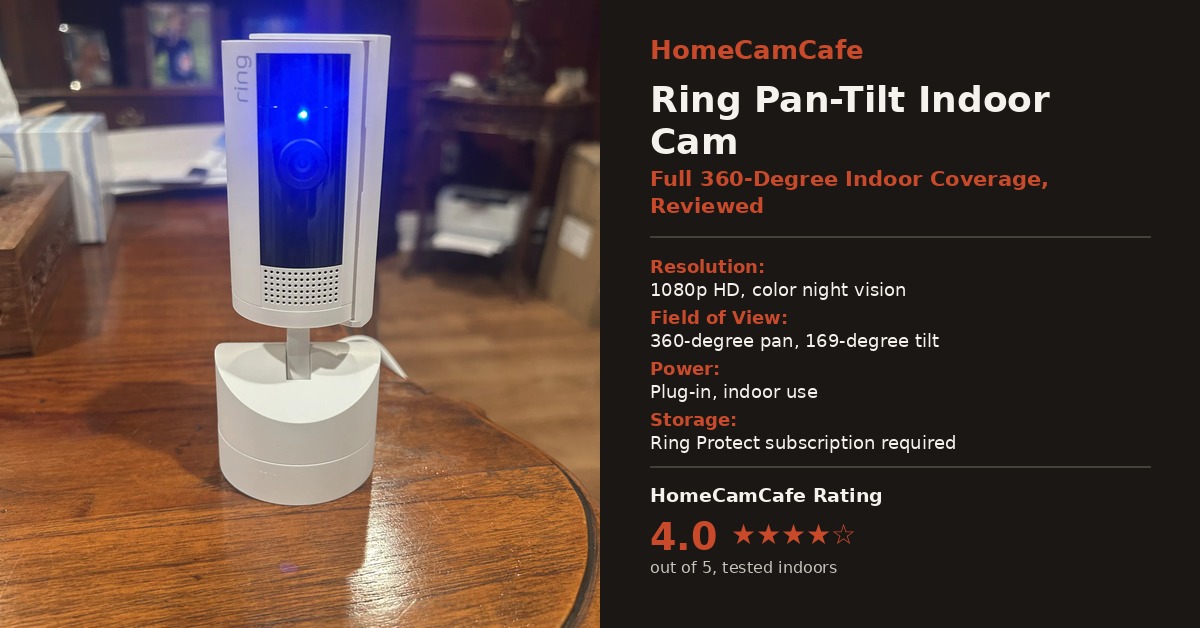
Setup and First Impressions of the Ring Pan Tilt Camera
The process of setup is relatively simple and proceeds in the same way as with most other Ring devices. The camera head attaches securely to the swivel base that is placed on any flat surface. Next, one connects the included USB-C cable and the power adapter, launches the Ring application, and scans the QR code located under the base. During this process, the camera automatically connects to the Wi-Fi network, and our camera was able to find our existing Alexa account right away without any additional setup required. Next, the user goes through a number of steps in the application, such as setting the default resting position for the lens, drawing motion zones, and selecting detection modes. All of these can be edited at any time in the future.
This device doesn’t come with any battery options; it works using electricity only, so placement is limited to the 10-foot cable that comes with it (you could use a longer cable or an extension cord as well). When the device was plugged into the wall socket, it was fairly impressive how the device’s motor was very quiet. Moreover, the swivel base actually makes the camera appear like a small speaker instead of being a security camera.
This is something to be aware of when first setting up the camera: there is a short calibration sequence that the camera performs shortly after it turns on, where it pans and tilts through its entire range all by itself before finally getting into place. This is only done once, but it’s best to make sure that the camera isn’t placed close to the edge of any surface.
Design and Field of View
The camera itself is a compact white cylinder that sits atop a rounded base, and the Ring logo is printed along the side rather than stamped in a way that draws attention. A manual privacy cover slides across the lens by hand, which instantly cuts both video and audio when closed. It is a simple mechanical solution rather than an app-controlled shutter, however that also means privacy does not depend on a software toggle or an internet connection to work. We’ve seen this on other Ring entries, so it’s a unique thing to this manufacturer.
On the movement side, the base delivers 360 degrees of horizontal pan and 169 degrees of vertical tilt, which means the lens can reach nearly every corner of a mid-sized room from a single fixed spot. The lens itself has a fairly standard field of view for a single frame, so the pan-tilt motor is doing the real work of extending coverage rather than a wide lens alone. Furthermore, movement is controlled with directional arrows inside the Ring app, and the response between tapping a direction and seeing the camera move is close to instant on a solid Wi-Fi connection. However, there are limitations to this feature outlined under Motion Detection.
Video Quality
The image is clear and well exposed for anything close to the lens, and color reproduction indoors is accurate under normal household lighting. Color night vision also holds up reasonably well in a room with even a small amount of ambient light, such as a hallway nightlight or a streetlight through a window, though it shifts to black-and-white infrared in a fully dark room the way most cameras at this price do.
That said, this is a 1080p camera, and it shows once you push the view across a larger room. Fine detail softens at distance, and text on a package or a face across a large room will not hold up to zooming in. For an indoor camera, though, this is a smaller issue than it would be outdoors. Most rooms are not large enough for the resolution limit to matter, and the pan-tilt motor means you can simply rotate the lens closer to whatever you want to check on instead of relying on digital zoom, which tends to lose detail fast on any 1080p sensor. Those with larger rooms may want to opt for cameras with a better sensor than the 1080p capability of this camera.
Motion Detection
Motion detection has proven to be reliable during tests. Alarms are fast, and the camera has been able to detect any movement in the room in an instant without any delay between the action and phone notification. This makes the camera feel reactive, and that is what is important in such an indoor camera compared to high-resolution capabilities. In addition, since the camera can pan the view based on your instructions via the app, you do not have to analyze events from an odd angle as it would be with a static camera.
There are some limitations to be aware of; specifically, the camera will not automatically track the subject throughout the room without any effort on your part. Instead, panning needs to be done manually through the app; therefore, do not expect that the camera will automatically swivel and track a subject like some other cameras. The camera will remain fixed unless you manually change its position and pan it. It would be wise to consider the implications of this issue for those intending to monitor pets or toddlers.
Two-Way Talk and Siren
The two-way audio function works great, allowing good microphone and speaker function that is audible throughout a normally sized room. We’ve done this a couple of times as a way of checking in on the room, with little lag time on the voices being transmitted. The camera also has a remotely activated siren that can be accessed via the app, which is helpful in scaring away an unwanted visitor or diffusing a pet situation. This is loud enough to be noticeable but not loud enough to be your alarm system.
Alexa and Smart Home Integration
Since this is a Ring camera, connecting to Alexa does not require any additional configuration and will be added automatically together with other Ring or Echo devices on the account. Using Alexa for showing the live video stream from the Echo Show device works fine, and commanding Alexa to arm or disarm the motion notifications will work the same as for other Ring cameras. There is no support for Apple HomeKit and Google Home natively, which means that users who build their smart home system around one of these two platforms should use the Ring application for control instead of having a dashboard. This is characteristic for all Ring devices and should not be considered a surprise for anybody who knows the company.
How It Compares to the Static Ring Indoor Cam
The obvious comparison is the standard Ring Indoor Cam, which costs less and covers a single fixed angle instead of a full room. For a small space like a mudroom or a nursery closet, the static camera is the more sensible buy since there is no need to pan around. However, in a larger, more open room, the fixed camera’s narrower field of view starts to show its limits, and that is exactly the gap this pan-tilt model is built to close.
In practice, we found ourselves reaching for the pan controls often enough in a living room setup that the extra cost felt justified. Anyone deciding between the two should think about room size and layout first, since that matters more than any other spec difference between the models.
The Subscription Catch
This is the largest trade-off to consider before making a purchase decision. The live feed and alerting system is available without requiring any additional payment, but the video history and smart alerts for detecting people require access to Ring Protect subscription services. If you already have an existing Ring Protect subscription plan for a doorbell or any other camera device, then it will be a non-issue because you get one plan that works on all devices installed at the same location. However, if this is going to be your only Ring camera, plan accordingly. We dive deeper into what each tier includes and whether it is worth paying for in our Ring Protect plan guide.
If avoiding a monthly fee entirely is the priority, this is not the right camera. Ring does not offer local storage on any current model, including this one, so there is no microSD option to fall back on. For readers who want full functionality without an ongoing subscription, our best security cameras with no subscription roundup covers owner-tested cameras that record locally at no ongoing cost.
Of course, if you have no plans to review motion event archives, then this is a moot point.
Where It Fits
Given the nearly 360-degree pan range, this camera makes the most sense in a room where you would otherwise need two fixed cameras to cover both ends. A living room, a home office, or a nursery are all good candidates, provided an outlet is nearby. Meanwhile, if you need to watch something far away or need the sharpest possible detail at distance, opt for a higher resolution camera such as the Ring Indoor Cam Plus. For a wider look at how Ring’s indoor and outdoor lineup compares on video quality and subscription cost, our Ring camera reviews hub breaks down the rest of the current lineup.
Verdict
The Ring Pan Tilt Camera is a solid pick for anyone who wants one camera to watch an entire room instead of a single fixed angle. Setup is simple, video quality is fine for anything close by, motion alerts are quick and consistent, two-way talk works well, and the price is easy to justify. The 1080p resolution limits it at distance, the lack of automatic subject tracking will disappoint anyone expecting the camera to follow movement on its own, and the subscription requirement for recorded footage is worth budgeting for in advance. As a result, we are giving it a rating of 4 out of 5. For the price, it delivers real coverage and dependable alerts, even if it is not the sharpest or most advanced camera on the market.
You can check the Ring Pan Tilt Camera on Amazon for current availability, or view the black color option if it fits your decor better.
If a subscription-free indoor camera is a priority for you, it is worth comparing this camera against options that store footage locally, since that difference has a bigger effect on total cost than the upfront price does. Our best security cameras with no subscription roundup is the place to start, and for a closer look at what a Ring Protect plan actually buys you, our Ring Protect plan guide breaks down each tier. For a brand-level comparison, see our Ring vs Blink guide, and if your Pan-Tilt Indoor Cam’s light starts behaving unexpectedly, our Ring camera light colors guide covers what each pattern means. For the full lineup of tested Ring hardware, visit the Ring camera reviews hub.
