
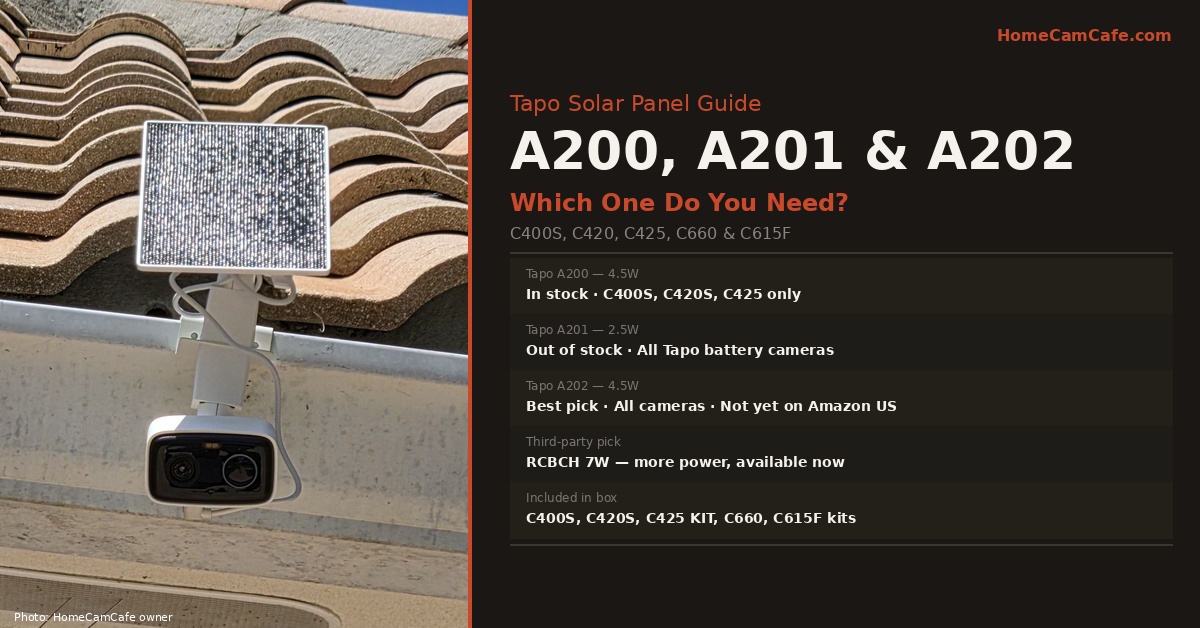
There are three Tapo solar panels called the A200, A201, and A202, and the right choice depends on which camera you own and how much direct sunlight your mounting location receives. The A202 is the newest and most versatile option, pairing 4.5W charging power with universal compatibility across all Tapo battery cameras. The A200 offers the same 4.5W output but only for a narrower set of cameras, while the A201 is the original entry-level panel at 2.5W. Additionally, several Tapo cameras already include a solar panel in the box, which means many buyers do not need to purchase one separately at all. This guide covers what each panel offers, which camera it works with, and how to pick between them.
Do You Already Have a Solar Panel?
Before purchasing a Tapo solar panel, check whether your camera already includes one. The following Tapo cameras come with a solar panel in the box and do not require a separate purchase:
| Camera | Solar Panel Included? | Separate Panel Needed? |
|---|---|---|
| Tapo C400S1 / C400S2 | Yes, included in kit | No |
| Tapo C420S1 / C420S2 | Yes, included in kit | No |
| Tapo C425 KIT | Yes, included in kit | No |
| Tapo C660 KIT | Yes, integrated solar bracket | No |
| Tapo C615F KIT | Yes, integrated solar bracket | No |
| Tapo C675D | Yes, A202 included in box | No |
| Tapo C400 (non-S) | No, camera only | Yes |
| Tapo C420 (non-S) | No, camera only | Yes |
| Tapo C425 (non-KIT) | No, camera only | Yes |
Tapo Solar Panel Comparison: A200, A201, A202
| Spec | Tapo A200 | Tapo A201 | Tapo A202 |
|---|---|---|---|
| Buy on Amazon | Check price | Check price | Check price |
| Max charging power | 4.5W | 2.5W | 4.5W |
| Sunlight required/day | 30 minutes | 45 minutes | 30 minutes |
| Compatibility | C400S, C420S, C425 only | All Tapo battery cameras | All Tapo battery cameras |
| Cable length | 4m / 13ft | 4m / 13ft | 4m / 13ft |
| Weather rating | IP65 | IP65 | IP65 |
| Micro-USB adapter included | Yes | Yes | Yes |
Tapo A200: 4.5W for a Narrower Set of Cameras
The Tapo A200 delivers the same 4.5W charging power as the A202 and requires only 30 minutes of standard sunlight per day to keep a compatible camera charged. The tradeoff is compatibility, since the A200 works only with the C400S1/S2, C420S1/S2, and C425 V1. If you own any of these cameras, the A200 is a solid first-party pick at that wattage.
For the C425 specifically, note that the magnetic base design means the solar panel must be installed in detached mode, since the panel cannot be integrated directly onto the camera body as it can with the C400S and C420S. Both configurations use the same 4m cable and work identically in practice.
Tapo A202: Best Overall Choice
The Tapo A202 is the newest Tapo solar panel and the best overall pick for most buyers. It combines the A200’s 4.5W charging power with the A201’s universal compatibility, working with all Tapo battery cameras rather than just the C400S/C420S/C425 group. For anyone starting from scratch, this is the first-party panel to buy.
The A202 is confirmed to ship with the Tapo C675D, which suggests newer Tapo camera releases will include it going forward.
Tapo A201: Entry-Level Universal Panel
The Tapo A201 is the original entry-level universal panel at 2.5W, needing about 45 minutes of daily sunlight to keep a battery camera charged. It works with all Tapo battery cameras, the same universal compatibility as the A202, but at lower wattage. Since the A202 delivers nearly double the charging power at the same universal compatibility, it is the stronger choice unless the A201 is priced meaningfully lower.
Best Third-Party Option: OuOudoit 6W Solar Panel
If you are working with a tighter budget, a well-reviewed third-party panel is a practical alternative. The OuOudoit 6W solar panel for Tapo C425, C420, and C400 is compatible with the C425, C420, and C400 series and delivers 6W, slightly more than the 4.5W first-party panels, at IP65 weatherproof construction. As with any third-party accessory, confirm the connector on the listing matches your camera’s charging port before ordering, since Tapo has used both USB-C and Micro-USB across different hardware versions.
Note on third-party panels: Third-party panels are not officially supported by TP-Link, and compatibility is limited to cameras with USB charging ports: the C400S, C420S, C400, C420, and C425. They will not work with the C660 or C615F solar bracket systems, which use proprietary connectors. Always verify your camera model is listed in the third-party panel’s compatibility before purchasing.
The Micro-USB Adapter: An Important Gotcha
All three Tapo panels use a USB-C output connector. This works directly with newer Tapo cameras, since the C400S2, C420S2, C425 V2, and most current models use USB-C charging ports. However, first hardware versions of several cameras, specifically the C400 V1, C420 V1, and C425 V1.0/V1.2, use Micro-USB charging ports.
For these older camera versions, connecting a Tapo solar panel requires the Micro-USB adapter included in the box with the A200, A201, and A202. If you are buying a used panel or one that has been repackaged, verify the adapter is included. To confirm which hardware version your camera is, check the label on the camera body, where the hardware version is printed alongside the serial number.
Installing the Tapo Solar Panel
All Tapo solar panels install the same way. The panel includes a mounting bracket, screws and wall anchors, a mounting template, and waterproof gaskets for the cable connection point. Use the mounting template: stick it to the intended surface, mark the three drill holes through the template, and drill before removing it.
The panel bracket allows 360° rotation and full angle adjustment. Tapo recommends a tilt angle of 35° to 45° from horizontal and south-facing placement in the Northern Hemisphere. In practice, aim the panel where the sun is brightest between 10am and 2pm from your specific location. The 4m cable provides significant positioning flexibility, since the panel can be placed up to 13 feet from the camera, which is useful when the best camera angle and the best solar exposure angle are not in the same spot.
Always install the waterproof gasket at the cable connection point where the panel cable plugs into the camera. This seals the USB connection against moisture, and skipping it in an outdoor installation risks water ingress at the charging port over time.
Bottom Line
If your Tapo camera came in a kit, such as C400S, C420S, C425 KIT, C660 KIT, or C615F KIT, a solar panel is already in the box. For standalone cameras needing a panel: the A202 is the best overall pick, combining 4.5W charging with universal compatibility across all Tapo battery cameras. The A200 matches that 4.5W output but only for the C400S, C420S, and C425, and the A201 offers the same universal compatibility as the A202 at a lower 2.5W. If you are on a tighter budget, the OuOudoit 6W third-party panel covers the C425, C420, and C400 series. Whichever panel you choose, install the waterproof gasket at the cable connection and aim the panel south-facing at a 35 to 45 degree tilt for best year-round performance.
This guide is part of our TP-Link Tapo Security Camera Reviews hub. See also: Best Mounts for Tapo Cameras · Tapo Care vs Hub vs MicroSD
