
Using an Arlo camera through a window is a practical alternative to outdoor mounting — no drilling, no weather exposure, and no ladder required. However, glass creates two problems that need to be addressed before the setup works well: glare from reflections and the camera’s infrared night vision LEDs bouncing back off the pane at night. The good news is that both are fixable, and Arlo’s app now gives you the control needed to handle them directly. This guide covers mounting, settings, and night vision for all current Arlo cameras.
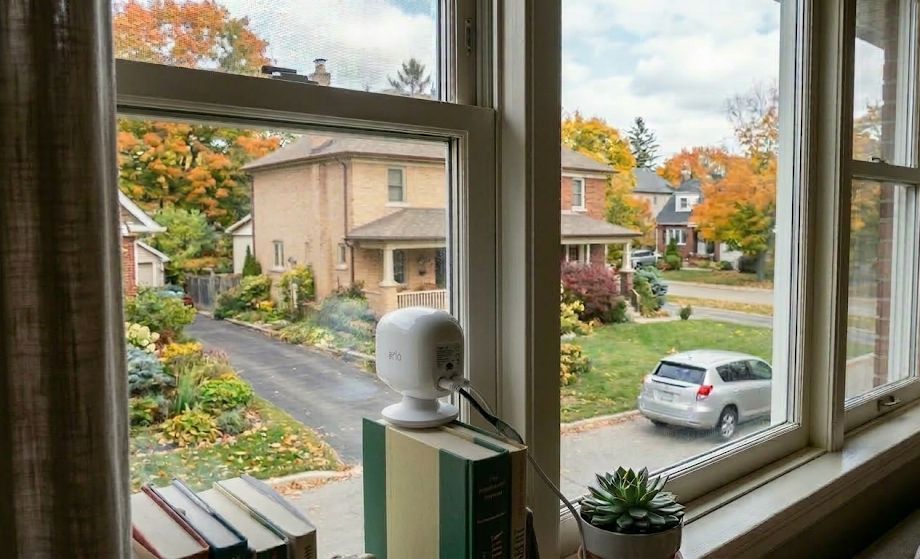
Step 1: Turn Off Night Vision
This is the most important change to make. When night vision is enabled, Arlo’s IR LEDs activate in low light and project infrared light forward. Because glass reflects IR, that light bounces directly back into the lens and produces significant glare — the same problem that affects any IR camera pointed through a window. Arlo’s own support documentation explicitly recommends turning night vision off when a camera faces a reflective surface such as a window.
To disable it, open the Arlo Secure app and go to Settings → My Devices, tap your camera, then tap Video Settings and toggle Night Vision off. The camera will still record at night — it simply won’t activate the IR LEDs. In contrast to what older guides suggested, this feature has been available in the Arlo app for several years and works on all current Arlo cameras including the Arlo Pro 6, Pro 5S, and Essential models.
Note: Turning off night vision disables the IR LEDs entirely. The camera will switch to black-and-white mode in very low light regardless of this setting — that’s automatic exposure behavior, not a separate toggle. If you want color footage at night, the outdoor area needs ambient lighting such as a porch light or streetlight.
Step 2: Get the Lens Against the Glass
The second key step is placement. Pressing the camera lens directly against the window pane eliminates the air gap that allows glare and interior reflections to enter the frame. Even with night vision off, a camera positioned a few inches back from the glass will pick up reflections from drapes, blinds, or the room itself — especially at night. Flush contact with the glass solves this almost entirely.
If the camera can rest on a windowsill and reach the glass cleanly, that’s the simplest setup. The Arlo Pro 6 and most current Arlo cameras can stand flat on a surface using the tripod screw hole on the bottom — no magnetic mount required. However, if there’s no sill or you need to position the camera higher on the glass, a suction cup mount is the right solution.
The flexible gooseneck suction cup mount is a reliable option for window use. It attaches to the glass and connects to the camera via the standard tripod screw hole on the bottom of the unit. The flexible stem can be bent so the camera faces outward and the lens sits flush against the pane. This works well for Arlo cameras that lack a built-in magnetic window solution.
Step 3: Eliminate Indoor Light Sources
Indoor lighting creates a halo effect and ghost reflections in the footage, particularly after dark. Therefore, turn off any lights in the room where the camera is positioned, or close curtains and blinds behind the camera to block ambient light from reaching the glass. The darker the space between the camera and the window pane, the cleaner the outdoor image will be.
During the day this is less of an issue — pressing the lens against the glass is usually sufficient to get a clean image in daylight. Night is where placement and lighting control matter most.
What About Night Image Quality?
With IR night vision off, the camera relies entirely on available ambient light. In areas with streetlights, porch lights, or other outdoor illumination, the Arlo Pro 6 and Pro 5S produce a usable color image at night. In contrast, a completely dark outdoor scene will result in a very dim or unusable image without IR assistance.
If the outdoor area is unlit, an external IR illuminator placed outside — not behind the glass — is the solution. Positioning it outdoors eliminates the reflection problem while giving the camera the infrared light it needs. The Univivi IR Illuminator is a well-regarded option with a wide 90° angle and an included AC cable. Mount it outside or through a separate window, as far from the camera’s pane as practical.
Settings Checklist
| Setting / Action | What to Do |
|---|---|
| Night Vision | Turn off in Arlo Secure app → Settings → Video Settings |
| Camera placement | Press lens directly against the glass |
| Indoor lighting | Turn off or block with curtains behind camera |
| Mounting | Use windowsill or suction cup gooseneck mount via tripod screw hole |
| Dark outdoor scenes | Use external IR illuminator mounted outside |
Bottom Line
Arlo Camera Through a Window
The two things that matter most are turning off IR night vision in the Arlo Secure app and pressing the lens flush against the glass. Do both and daytime image quality is clean. At night, ambient outdoor lighting determines how much useful footage you’ll get — a porch light or streetlight makes a significant difference. For completely dark scenes, an outdoor IR illuminator is the next step.
Frequently Asked Questions
Can you turn off night vision on an Arlo camera?
Yes. Open the Arlo Secure app, go to Settings → My Devices, tap your camera, then tap Video Settings and toggle Night Vision off. Arlo even recommends disabling it when the camera faces a reflective surface like a window.
Will an Arlo camera still record at night with night vision off?
Yes. Turning off night vision disables the IR LEDs but does not disable recording. The camera will capture footage using available ambient light. In very low light with IR off, the image will be dim — an external outdoor light source or IR illuminator helps considerably.
How do I mount an Arlo camera to a window without a magnetic mount?
Use the standard tripod screw hole on the bottom of the camera. A flexible gooseneck suction cup mount attaches to the glass and connects via that screw hole, allowing you to angle the camera outward and position the lens flush against the pane.
Why is my Arlo camera image blurry or washed out through a window?
Most commonly this is caused by IR reflection from the night vision LEDs, or by an air gap between the lens and the glass allowing room reflections into the frame. Turn off night vision and press the lens directly against the glass — both issues clear up significantly with those two changes.
Does this work with all current Arlo cameras?
Yes. The night vision toggle is available on all current Arlo cameras including the Pro 6, Pro 5S 2K, Essential, and Essential XL. The mounting approach via the tripod screw hole also applies to all current models.
