
The Wyze Duo Cam Pan is a dual-lens security camera that puts two independent 2K cameras on a single mount. One lens stays fixed on a priority area while the other pans and tilts to follow movement. The result is coverage that would otherwise require two separate cameras: one device, one app, one power cable. After setting one up and running it through its paces, here is an honest look at what works, what does not, and who should buy it.
Check the current price on Amazon
HomeCamCafe Verdict
Wyze Duo Cam Pan: 4.0 / 5
The Wyze Duo Cam Pan delivers a genuinely useful dual-camera concept at a budget price. Two 2K lenses, solid color night vision, IP65 weather resistance, and free local microSD recording make it a strong value. However, the slow pan speed and the need for a separately purchased outdoor power adapter for outdoor use are worth knowing before you buy.
Best for: buyers who want to cover two areas, or a large space, without running two power cables or managing two cameras in the app.
What Is the Wyze Duo Cam Pan?
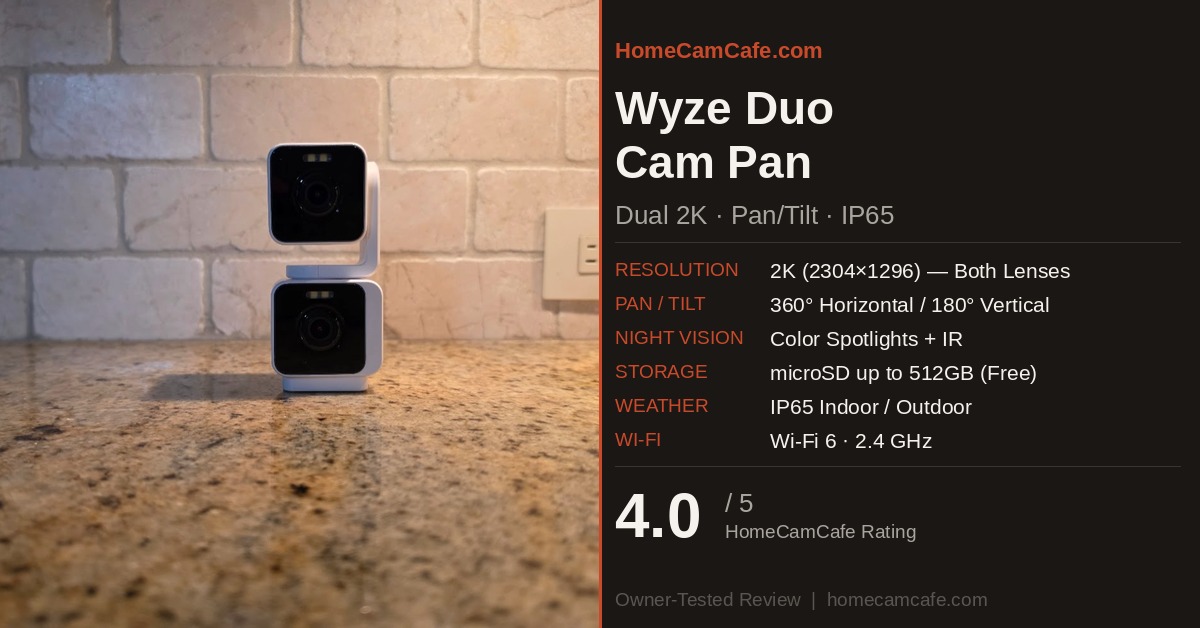
The Duo Cam Pan is a stacked, dual-lens camera. The bottom lens is fixed and always points in one direction. The top lens sits on a motorized mount that pans 360 degrees horizontally and tilts 180 degrees vertically. Both lenses shoot in 2K (2304 x 1296) resolution. Both have color night vision. Both record independently, so when a motion event fires, you get two video files — one from each lens — giving you full context from two angles.
In addition, the camera is IP65-rated for outdoor use, supports microSD cards up to 512GB for free local recording, and connects via USB-C. Setup uses Bluetooth, so there is no QR code to scan. The Wyze app handles both lenses as a single device.
Build and Design
The camera is compact for what it does, measuring 64mm tall by 54.9mm wide by 133.5mm deep. It is heavier than a standard Wyze cam at 10.56 ounces, which is expected given the two-lens design and motorized mount. The finish is textured matte white. It ships in white only, which is worth noting for buyers who need a camera to blend into a darker exterior surface.
The stacked design is visually distinct. The two cube-shaped bodies are joined by the motorized swivel neck, and the result looks like two Wyze Cam OGs stacked on top of each other. In practice, this is a good thing: anyone familiar with Wyze’s existing lineup will recognize the form factor immediately. The footprint is small enough that the camera can sit on a shelf or tabletop, and the base has a standard 1/4-20 thread for wall or ceiling mounting.
The bottom camera body has the speaker, the microphone, and the microSD card slot. The top camera carries the status light. One thing to note: because the bottom lens is fixed, there is no physical privacy shutter. For buyers who want to be able to physically block the camera, this is a limitation worth knowing.
Setup
Setup through the Wyze app is fast. Open the app, tap the plus icon to add a device, select Duo Cam Pan from the camera list, and follow the Bluetooth pairing prompts. The camera connects to your Wi-Fi and appears in the device list in a few minutes. No QR code scanning is required, which is a genuine improvement over older Wyze cameras — particularly for ceiling or wall mounts where holding a phone up to a QR code is awkward.
One important note for outdoor installations: the included power adapter is not outdoor-rated. If you plan to mount the camera outside, you need to purchase the Wyze Universal Outdoor Power Adapter separately. This is not optional for outdoor use — the included adapter cannot be left exposed to weather. Budget for it if outdoor placement is the plan.
Video Quality
Both lenses deliver sharp, clean 2K footage. Faces are clearly legible at typical room distances, and the wide dynamic range handles mixed lighting reasonably well — bright windows alongside darker room interiors do not blow out the highlights as badly as lower-resolution cameras do. License plates and smaller text are readable at meaningful distances under good lighting conditions.
Color accuracy is strong in daylight. The 106-degree horizontal field of view is slightly narrower than some competing cameras, but the combination of a fixed lens and a pan/tilt lens means the overall coverage area is considerably larger than either lens alone could achieve.
One technical note: both lenses use H.264 encoding, which produces noticeable compression artifacts in fast-moving scenes. This is a known trade-off with Wyze’s video pipeline, and it shows up most clearly when something moves quickly across the frame. For typical home security use — monitoring an entry point, watching a room, tracking a pet — the compression is a minor issue. For applications where video quality is the primary concern, higher-end options exist.
Color Night Vision
Night vision on the Duo Cam Pan is one of its stronger points. Each lens has four IR LEDs (850nm) and four white spotlight LEDs rated at 80 lumens per unit. The spotlight activates on motion and delivers genuine color footage in low-light conditions. The camera can reportedly capture usable color video in conditions up to 25 times darker than traditional IR-only cameras, and in testing, the results in moderate low light are impressive for a camera at this price point.
In very dark conditions — true outdoor darkness without ambient light — the camera falls back toward infrared mode, and the color fades. However, in typical indoor or suburban outdoor scenarios, the color night vision holds up well. The spotlights are bright enough to illuminate a room or a short outdoor area without washing out the image.
Pan and Tilt Performance
The pan and tilt mechanism is smooth and whisper-quiet in operation. Manual control through the Wyze app is responsive, with very little lag between input and camera movement. Motion tracking — which lets the top camera automatically follow a person or pet across the frame — works reliably in testing. The camera locks onto movement quickly and tracks smoothly from one side of the view to the other.
However, there is one meaningful limitation here: the pan speed is slow. This is not a subtle issue. Wyze is aware of it — the app ships with pan speed set to maximum by default, which is a tacit acknowledgment that the speed at lower settings is inadequate. In practice, for most monitoring use cases — watching a room, tracking a slow-moving pet, observing an entry point — the speed is sufficient. For applications where rapid tracking of fast-moving subjects matters, the slow pan speed is a real limitation.
Pan Scan is also supported, which lets you define up to four custom waypoints for an automatic patrol route. In testing, waypoints occasionally lose calibration and require resetting in the app. This is a known issue with the camera. Recalibrating through the app’s Advanced Settings resolves it, but it adds a maintenance step that is worth knowing about.
Independent Lenses vs. Coordinated Dual-Lens Systems
One question that comes up frequently with dual-lens cameras is whether the two lenses work together or independently. On the Wyze Duo Cam Pan, the answer is independently. The fixed lens monitors one area and the pan/tilt lens monitors another. Each responds to motion in its own field of view. There is no communication between them, and no handoff from one to the other.
Some higher-end dual-lens cameras use a fundamentally different approach. The Tapo C675D, for example, uses a coordinated spotter-tracker system. The wide-angle fixed lens continuously monitors the full scene. When it detects motion, it signals the pan/tilt telephoto lens to lock onto the subject and zoom in. Both feeds appear simultaneously in the app, so you see the full context shot and the close-up tracking detail at the same time. The two lenses actively work together rather than operating in isolation.
The Wyze design is simpler and considerably more affordable. For buyers who want two independent coverage zones from one mount and one cable, that is exactly what this camera delivers. However, for buyers who want one lens to actively direct the other, the coordinated approach found in cameras like the C675D is a meaningfully different experience worth evaluating separately.
Motion Detection and Smart Features
The free tier on the Duo Cam Pan covers basic motion and sound alerts, local microSD recording, and live view. That is a solid baseline. However, smart detection — person, vehicle, package, and pet recognition — requires a Wyze Cam Plus subscription. Without it, the camera sends generic motion alerts, which means more false triggers from shadows, branches, and passing headlights.
For buyers already on Cam Plus or Cam Unlimited, this is a non-issue. For buyers coming to Wyze fresh, it is worth factoring in. The Cam Plus plan is among the most affordable AI detection subscriptions in the category. The Cam Unlimited plan covers every Wyze camera on an account for a single flat annual fee, which is worth considering for households with multiple Wyze cameras. For a full breakdown, see the Wyze subscription plans guide.
Activity zones are supported and work across both lenses, letting you mask out areas — a tree branch, a street in the background, a neighbor’s yard — that would otherwise generate constant false alerts. For a dual-lens camera where both lenses are recording simultaneously, configuring zones for each lens independently is worth the ten minutes it takes during setup.
The camera also supports smoke and CO alarm sound detection, Alexa, and Google Assistant. Wi-Fi 6 is supported on the 2.4 GHz band only; the 5 GHz band is not supported. In most home networks this is not a practical issue, and the Wi-Fi 6 protocol provides a solid connection. For homes with very congested 2.4 GHz networks, the Wi-Fi 6 compatibility helps, but the single-band limitation is worth noting.
Local Storage
The Duo Cam Pan has a single microSD card slot that records both camera feeds. Because two lenses are recording simultaneously, storage fills roughly twice as fast as a single-lens camera. A 64GB card is a reasonable minimum starting point, and 128GB or larger is a better practical choice for continuous recording. The camera supports cards up to 512GB.
With an SD card installed, the camera records 24/7 continuously and stores footage locally at no recurring cost. This is one of Wyze’s most consistent strengths: local recording is genuinely free, works during internet outages, and requires no subscription of any kind. The footage is accessible through the Wyze app under Playback.
A good option for a reliable, high-endurance card is the Samsung PRO Endurance microSD, which is purpose-built for continuous security camera recording and holds up better than standard cards under the write cycles involved.
Indoor vs Outdoor Use
The IP65 rating means the Duo Cam Pan is fully protected against dust and against water jets from any direction — rain, sprinklers, and garden hose exposure are all covered. It is a legitimate outdoor camera, not just a camera that tolerates light moisture.
For outdoor use, remember the outdoor power adapter requirement noted above. Additionally, the SD card slot should be covered when mounting outside to prevent water intrusion — the slot is on the bottom body and is accessible without removing the camera from its mount. The camera itself handles outdoor temperature ranges well in typical residential conditions.
For indoor use, the camera works as a shelf or tabletop unit straight out of the box. The included stand keeps it stable on a flat surface, and the ball-joint base gives enough tilt adjustment to aim the fixed lens at any angle. Wall mounting uses the standard 1/4-20 thread on the base.
What the Wyze App Shows You
The Wyze app displays both lenses stacked vertically in a single device view. This is intuitive — you always have a live two-up view — but the individual streams are smaller than a single full-screen view. Tapping either stream expands it to full screen. In practice, the dual-stream layout in the app works well for monitoring, though it takes some getting used to compared to a single-camera setup.
Manual pan and tilt control, waypoint configuration, activity zones, motion sensitivity, and detection settings are all accessible from the app. The Wyze app is mature at this point, and the Duo Cam Pan integrates cleanly with existing Wyze setups. The camera does not support RTSP streaming, so third-party NVR integration is not an option.
Who Should Buy the Wyze Duo Cam Pan
The Duo Cam Pan makes the most sense for buyers who want to monitor two distinct areas — or cover a large open space — without running two power cables or managing two separate cameras. A single USB-C cable, one device in the app, and two independent 2K feeds is a genuinely useful package for living rooms, large garages, open-plan indoor spaces, or covered outdoor areas like a carport or porch.
It is also a strong option for existing Wyze users who are already on Cam Unlimited, since the smart detection features come at no additional subscription cost. For first-time Wyze buyers who want smart detection and plan to pay for it, the Cam Plus subscription at $19.99 per year adds full AI detection across both lenses.
It is less suited for buyers who need fast pan tracking, who want RTSP streaming for NVR integration, or who plan to mount it somewhere without a covered weatherproof power connection for the adapter.
A Few Things to Know Before You Buy
The pan speed is slow. Wyze ships with it set to maximum by default for a reason, and for fast-moving subject tracking this is a real limitation. Furthermore, outdoor use requires a separately purchased Wyze Universal Outdoor Power Adapter, as the included adapter is not weather-rated. Finally, smart AI detection for persons, vehicles, and packages requires a Cam Plus or Cam Unlimited subscription. The free tier covers basic motion alerts only.
Spec Summary
| Spec | Details |
|---|---|
| Resolution | 2K (2304 x 1296), both lenses |
| Field of View | 106° H / 56.6° V / 127.5° D |
| Pan / Tilt Range | 360° horizontal / 180° vertical |
| Night Vision | Color (80-lumen spotlights) + IR (850nm) |
| Weather Rating | IP65 |
| Power | USB-C, 6-foot cable included; outdoor adapter sold separately |
| Local Storage | microSD up to 512GB (not included) |
| Wi-Fi | Wi-Fi 6 / 2.4 GHz only (no 5 GHz) |
| Smart Detection | Person, vehicle, pet, package (Cam Plus required) |
| Siren | 100 dB |
| Voice Assistants | Alexa, Google Assistant |
| Dimensions | 64mm H x 54.9mm W x 133.5mm D / 10.56 oz |
The Bottom Line
The Wyze Duo Cam Pan delivers on its core concept. Two 2K cameras, one cable, one app, and free local recording make it one of the better dual-coverage options at a budget price. The slow pan speed is a real trade-off, and the outdoor adapter requirement adds a step that Wyze should make clearer at purchase. For buyers who want to eliminate blind spots without doubling their camera count or their cable runs, this camera earns a recommendation. For existing Wyze users on Cam Unlimited, it is an especially strong value.
For the full pan/tilt lineup, see the Wyze Cam Pan v4 review and the Wyze Cam Pan all versions comparison. For all Wyze coverage, see the Wyze Security Camera Reviews hub.
