
Wyze has released a lot of cameras since its first Cam landed in 2017 and quietly changed what budget home security could look like. If you are trying to figure out how the different Wyze Cam versions compare, or wondering whether it is time to upgrade from an older model, this guide covers every generation, what changed between them, and which one makes sense to buy today.
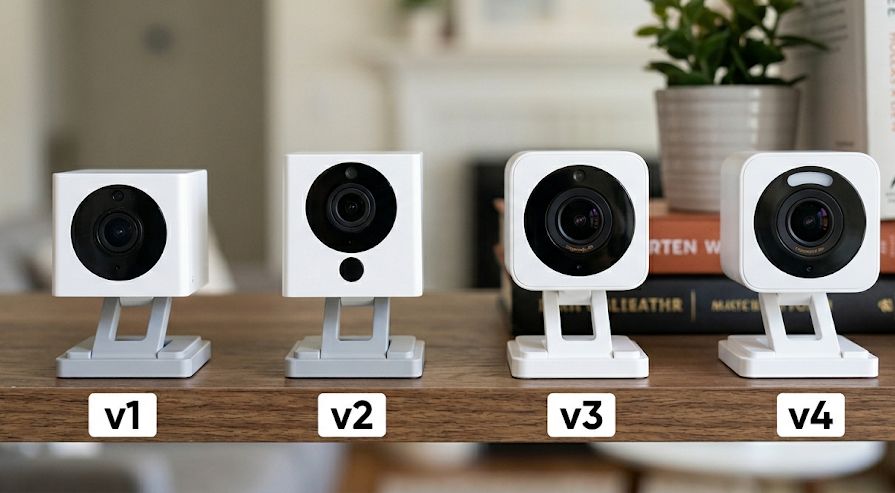
All Wyze Cam Versions at a Glance
The table below covers the main fixed (non-pan) Wyze Cam lineup from v1 through v4. The pan/tilt models are covered separately further down.
| Model | Released | Resolution | Night Vision | Weather Rating | Wi-Fi | Status |
|---|---|---|---|---|---|---|
| Wyze Cam v1 | 2017 | 1080p | IR only | Indoor only | 2.4 GHz | Discontinued (EOL 2022) |
| Wyze Cam v2 | 2018 | 1080p | IR only | Indoor only | 2.4 GHz | Discontinued |
| Wyze Cam v3 | 2020 | 1080p | Color (Starlight) | IP65 | 2.4 GHz | Available |
| Wyze Cam v4 | 2023 | 2.5K QHD | Enhanced Color | IP65 | Wi-Fi 6 (dual-band) | Available |
Wyze Cam v1 (2017): The Camera That Started It All
When Wyze launched the original Cam v1, it forced the entire home security camera industry to rethink its pricing. At a time when basic cameras from Ring and Arlo cost $100 or more, the v1 offered 1080p video, two-way audio, and cloud storage at a price that felt almost unreasonable.
In addition, the v1 included a microSD card slot for local recording, a feature many competitors locked behind paid tiers. However, the camera was indoor-only, relied on basic infrared night vision, and lacked any weather resistance. Furthermore, it never received Wyze’s people detection update, which was later added to the v2.
Important: Wyze officially retired the v1 on February 1, 2022, citing an inability to support a necessary security update. As a result, no further security patches will be issued. Continued use of a v1 camera is not recommended — it represents a genuine security risk on your home network.
Wyze Cam v2 (2018): Refinement, Not Revolution
The v2 arrived less than two years after the original and kept the same price while fixing several of the v1’s shortcomings. Most notably, the v2 eventually received free on-device people detection, a meaningful upgrade that helped cut down on false alerts from passing cars or blowing leaves.
That said, the core hardware was largely similar. The v2 was still indoor-only, still relied on IR night vision, and still shot at 1080p. It remains a functional camera for basic indoor monitoring, and because Wyze sold millions of them, you will find v2s on the secondhand market for next to nothing. However, if you come across a used v2, go in knowing that it will not match anything Wyze sells today in terms of night vision quality or outdoor capability.
The v2 is discontinued from new retail, though Wyze briefly sold refurbished units. There is no pressing security reason to stop using a v2 the way there is with the v1, but replacement parts and firmware support are winding down.
Wyze Cam v3 (2020): The Generation That Changed Everything
The v3 was a genuine leap forward, not just an incremental update. For the first time, Wyze built a camera that could go outdoors, rated IP65 for dust and water resistance, while keeping the price at a level that made competitors uncomfortable. In addition, the v3 introduced a Starlight CMOS sensor that produces color night vision without requiring a spotlight, which was a first for a camera in this price range.
The result was a camera that worked just as well mounted under an eave outside as it did sitting on a bookshelf indoors. The v3 is still sold today and continues to receive firmware updates. For anyone who needs to cover a lot of cameras on a tight budget, the v3 remains a solid choice. However, at higher price points it is hard to justify over the v4, which costs only a few dollars more and offers noticeably better resolution and connectivity.
For a deeper look, see our full Wyze Cam v3 review.
What the v3 does well
- Color night vision (Starlight sensor) without needing a spotlight
- IP65 weather resistance, genuinely usable outdoors
- MicroSD local recording up to 256 GB, no subscription required
- Still receives firmware and security updates from Wyze
- Lowest entry point into the current Wyze ecosystem
Where the v3 falls short
- 1080p resolution limits identification range to roughly 15 to 20 feet
- 2.4 GHz only, more prone to Wi-Fi congestion in busy households
- No motion-activated spotlight (available as a separate mount accessory)
- No on-device AI, smart detection requires a Cam Plus subscription
Wyze Cam v4 (2023): The Best Wyze Has Ever Made
The Wyze Cam v4 is the current flagship of the fixed Wyze Cam line, and it makes a strong case for being one of the best budget cameras available today. It delivers 2.5K QHD resolution (2688×1520), enhanced color night vision, a built-in motion-activated spotlight and siren, and Wi-Fi 6 support with dual-band connectivity.
The resolution jump from the v3 is more meaningful than the numbers suggest. In practice, the v4 can reliably identify faces at 25 to 30 feet, which is roughly double the effective range of the v3’s 1080p image. Furthermore, the Wi-Fi 6 support helps in homes with many connected devices, where older 2.4 GHz cameras often struggle to maintain a stable stream.
Like the v3, the v4 supports microSD cards up to 256 GB for local recording without any subscription. Smart detection features, including person, pet, package, and vehicle, require a Cam Plus plan, but basic motion recording is free out of the box.
For a deeper look, see our full Wyze Cam v4 review.
What the v4 does well
- 2.5K resolution, a meaningful improvement over 1080p in real-world use
- Wi-Fi 6 with dual-band (2.4 GHz and 5 GHz), more reliable connectivity
- Enhanced color night vision with upgraded image processor
- Built-in motion-activated spotlight and siren, no accessory needed
- IP65 rated, works indoors or outdoors
- On-device AI NPU for faster, more accurate motion processing
Where the v4 falls short
- Smart detection still requires a Cam Plus subscription
- No pan/tilt, fixed field of view only
- Outdoor use requires a separate outdoor power adapter
What About the Wyze Cam Pan Models?
Wyze also makes a separate line of pan/tilt cameras that rotate and tilt to track motion across a full room. The line has run from the original 2018 Cam Pan through the current v4, which adds 4K resolution, dual-band Wi-Fi 6, and on-device AI tracking. If pan/tilt coverage is what you need, see our Wyze Cam Pan all versions guide for a full generation-by-generation breakdown and a clear buy recommendation.
Should You Upgrade From an Older Wyze Cam?
The answer depends on which version you are upgrading from and what you are trying to accomplish.
From a v1: Yes, upgrade immediately. The v1 is end-of-life and no longer receives security patches. Beyond the security risk, the camera lacks color night vision, outdoor capability, and people detection. The v4 is dramatically better in every respect.
From a v2: Yes, it is worth upgrading. The v2 is discontinued, has no outdoor rating, and relies on black-and-white IR night vision. The v4 offers color night vision, IP65 weather resistance, and 2.5K resolution for a modest one-time cost. In addition, the v4’s Wi-Fi 6 support is a meaningful reliability improvement over the v2’s 2.4 GHz-only connection.
From a v3: It depends. If your v3 cameras are working well and positioned in lower-priority areas, there is no urgent need to swap them out. The v3 continues to receive firmware updates and remains a capable camera. However, if you are adding new cameras or replacing a v3 covering a critical area like a front door or driveway, the v4’s 2.5K resolution and dual-band Wi-Fi 6 are worth the small price difference.
What to Buy Today
For most people, the recommendation is straightforward: buy the Wyze Cam v4. It is the best all-around camera Wyze makes, it works indoors and out, it does not require a subscription for basic recording, and the price is still among the lowest you will find for a capable security camera.
If you need pan/tilt coverage, see our Wyze Cam Pan all versions guide for the full breakdown. Furthermore, if you are outfitting multiple rooms on a tight budget and resolution is not a top priority, the v3 at its lowest price point is still a reasonable buy.
Finally, do not buy a v1 or v2 secondhand. The savings are not worth the trade-offs. The v1 carries real security risks, and the v2 is limited enough that the gap between it and the v4 is larger than a few dollars on eBay is worth bridging.
Bottom Line
The Wyze Cam v4 is the version to buy in 2026. It improves on every generation before it: better resolution, better night vision, better connectivity. The v3 remains a budget-friendly option for lower-priority spots. The v1 should be retired immediately. The v2 is functionally obsolete. If you need pan/tilt, see our Wyze Cam Pan all versions guide for the current recommendation.
Frequently Asked Questions
Is the Wyze Cam v2 still supported?
The v2 is discontinued from new retail, and active firmware development has wound down. That said, it does not have the same end-of-life security concern as the v1, which Wyze explicitly retired due to an inability to patch a security vulnerability. If you own a v2 it will continue to function, but upgrading to the v4 is a worthwhile improvement.
Can I still use the Wyze Cam v1?
Technically yes, but Wyze officially retired the v1 in February 2022 and stated that continued use is at the owner’s risk because no further security patches will be issued. As a result, using a v1 camera on your home network is not recommended. The v4 is a vastly better camera in every category.
What is the difference between the Wyze Cam v3 and v4?
The main differences are resolution (2.5K on the v4 vs. 1080p on the v3), Wi-Fi connectivity (Wi-Fi 6 dual-band vs. 2.4 GHz only), and the addition of a built-in motion-activated spotlight and siren on the v4. Both cameras offer IP65 weather resistance, color night vision, microSD local storage, and two-way audio. For most new buyers, the v4 is worth the modest price difference.
Do Wyze cameras require a subscription?
No. All current Wyze cameras support local recording to a microSD card with no subscription required. However, smart detection features, including person, pet, vehicle, and package detection, require a Cam Plus plan. See our Wyze subscription plans guide for a full breakdown of current pricing and what each tier includes.
Which Wyze Cam is best for outdoors?
Both the v3 and v4 carry an IP65 weather resistance rating, making them suitable for outdoor use in rain, dust, and temperature extremes. The v4 is the better outdoor choice overall because of its higher resolution and Wi-Fi 6 support. For outdoor use, note that both cameras require the Wyze Outdoor Power Adapter, sold separately, to be properly weatherproofed at the cable connection point.
For the full Wyze Cam v4 review see the Wyze Cam v4 review and the Wyze Cam v3 review. For all Wyze coverage see the Wyze camera hub.
