
Choosing the right Reolink camera mount is simple on most models: the Argus, Go, and Lumus series use a standard 1/4″-20 thread or a magnetic base that pairs with a broad ecosystem of third-party brackets. Every Reolink outdoor camera also ships with a mounting bracket, screws, wall anchors, and a mounting template in the box, which covers standard wall and ceiling installations on most models, though as we found on the Reolink Lumus Pro, a weak factory bracket sometimes makes an aftermarket 1/4″-20 mount worthwhile. However, mount compatibility is not universal across the Reolink lineup. The Argus Track requires a separate adapter for standard mounts, and some newer models should be verified before purchasing third-party hardware. Always confirm your exact model is listed in the mount’s compatibility before buying. This guide covers the best options for gutter mounting, wall mounting, corner mounting, tree mounting, vinyl siding, and solar panel positioning across the Reolink cameras we review on this site.
Reolink Camera Mount Compatibility at a Glance
| Camera Group | Models | Thread Standard | Third-Party Options |
|---|---|---|---|
| Argus battery series | Argus 2, 2E, 3, 3 Pro, 3 Ultra, 4, 4 Pro, Eco, Pro | 1/4″-20 | Yes, wide ecosystem |
| Lumus plug-in series | Lumus, Lumus 2K (E430), Lumus Pro 4K (E450) | 1/4″-20 | Yes, universal mounts (recommended over stock Lumus Pro bracket) |
| Argus PT / pan-tilt | Argus PT, PT 2K, PT Ultra, Go PT, Go PT Plus, Go PT Ultra | 1/4″-20 | Yes, PT-specific mounts |
| Go cellular series | Go, Go Plus, Go Ranger PT | 1/4″-20 | Yes, universal mounts |
| Wired RLC series | RLC-410, 510A, 810A, 820A, 823A, 1212A, Duo series | Proprietary bracket | Limited: included bracket covers most needs |
| Argus Track | Argus Track | Proprietary, adapter required | Yes, with Holicfun 1/4″-20 adapter |
| TrackMix series | TrackMix PoE, TrackMix WiFi | Proprietary bracket | Limited: included bracket covers most needs, no-hole siding clips also compatible |
Best Gutter Mounts for the Reolink Argus Battery Series
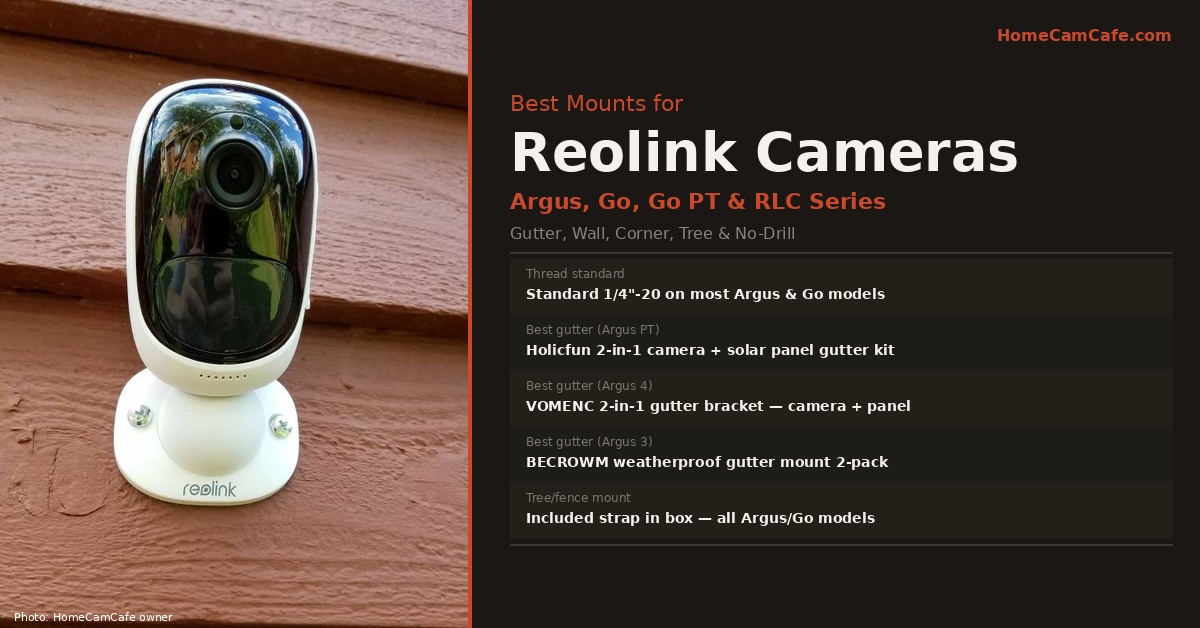
The Reolink Argus battery cameras, including the Argus 2, Argus 3, Argus 3 Pro, Argus 4, and Argus 4 Pro, all use a standard 1/4″-20 thread, which means the same gutter mount works across the entire group. For no-drill gutter installation, the VOMENC 2-in-1 gutter bracket mount for Reolink Argus cameras and solar panel is the top pick. It mounts the camera and solar panel to the gutter in one bracket assembly without drilling, with both attaching at independently adjustable angles, so the panel can face the sun while the camera covers the target area. The standard 1/4″-20 connection works across the Argus battery series, and the no-drill clamp design means it can be repositioned easily if coverage needs change seasonally.
For the Argus 4 and Argus 4 Pro specifically, gutter height is particularly valuable, since the elevated position maximizes the 180° dual-lens coverage advantage of these cameras. A camera at ten to twelve feet on a gutter sees significantly more of a driveway or yard than the same camera at six feet on a wall.
Replacing the Floppy Stock Mount on the Reolink Lumus Pro
While most included Reolink brackets hold their angle once tightened, our hands-on Reolink Lumus Pro review uncovered a frustrating flaw with the factory ball-and-socket bracket on the 4K Lumus Pro (model E450). To install the stock bracket, you unscrew the base collar to drive your mounting screws into the plate and then tighten the collar back down around the ball joint. Once the camera and its molded power pigtail are hanging outdoors, that ball-and-socket collar does not stay tight enough and lets the camera flop over to the side far too easily.
Fortunately, Reolink built a standard 1/4″-20 female tripod thread into the back of the Lumus Pro housing. That means you do not have to live with the stock bracket: any universal 1/4″-20 Reolink camera mount, gutter clamp mount, or pole mount threads directly into the Lumus Pro and locks your framing rock steady. If you are mounting the Lumus Pro on horizontal vinyl siding, you can also pair an aftermarket 1/4″-20 wall bracket with the no-hole vinyl siding clips covered below so you do not have to drill into your siding.
Best Gutter Mounts for the Reolink Argus PT and Go PT Series
The Argus PT, Argus PT Ultra, Go PT, Go PT Plus, and Go PT Ultra are pan-tilt cameras that require mounts specifically designed for their form factor, since the rotating base means the camera body needs a stable platform rather than just a thread connection. The Holicfun gutter mount kit for the Reolink Argus PT and Go PT Ultra includes both a camera gutter mount and a solar panel gutter mount in one kit, specifically designed for this camera group. It is not compatible with the Argus PT Ultra, so confirm your exact model before purchasing.
For the Go PT Ultra specifically, the OkeMeeo gutter mount is an alternative that covers the Argus PT series and Go PT Ultra in one listing. Both the Holicfun and OkeMeeo options attach to the gutter without drilling and include hardware for positioning both the camera and solar panel independently.
Installation tip: Reolink’s own support documentation recommends installing Argus PT and Go PT cameras upside down when mounting on a wall or gutter to prevent water from entering the microphone hole. The image can be flipped 180° in the Reolink app under Device Settings.
Tree and Fence Mounting for Reolink Cameras
Every Reolink Argus and Go series camera ships with a hook-and-loop strap in the box specifically for tree and fence post mounting. The strap threads through slots in the mounting plate and wraps around a tree trunk or fence post without drilling or damaging the surface. This is particularly useful for the Go cellular cameras, since the Go and Go Plus are designed for locations without Wi-Fi or power, where a tree at the edge of a property is often the ideal position.
For fence mounting specifically, the included bracket and strap work well on standard wood fence posts. For metal fence or railing mounting, a pole clamp mount with a 1/4″-20 connection provides a more secure attachment than the included strap on smooth metal surfaces.
Mounting the Reolink Go Cellular Cameras
The Reolink Go and Go Plus are 4G LTE cellular cameras designed for locations without Wi-Fi, such as remote properties, construction sites, and rural perimeter monitoring. Because these cameras operate independently of home Wi-Fi, their mounting position is determined entirely by cellular signal strength and coverage need rather than proximity to a router.
All the standard 1/4″-20 Reolink camera mount options such as wall mounts, gutter mounts, pole mounts, and tree straps work with the Go series. The most important mounting consideration unique to the Go cameras is cellular signal: before committing to a mounting position, confirm the signal strength at that exact location by placing the camera there temporarily and checking signal in the Reolink app. A gutter position on one side of the house may have significantly stronger signal than the other side depending on carrier tower direction.
Mounting the Reolink Wired RLC Series
The wired RLC cameras including the RLC-410, RLC-510A, RLC-810A, RLC-820A, RLC-823A, RLC-1212A, and Duo series use a proprietary bracket system rather than the standard 1/4″-20 thread found on the Argus, Go, and Lumus series. In practice, the included bracket handles most wall and ceiling installations well, and the limited third-party mount ecosystem for wired cameras is less of a limitation since wired cameras are typically installed in fixed positions that rarely need repositioning.
For junction box installations, common when replacing an existing wired camera or security light, Reolink sells a junction box mount accessory for select RLC models through their official store. For pole mounting, the RLC series bracket can be adapted to pole clamp mounts using a flat surface adapter, though this is not a common configuration for wired cameras.
Vinyl Siding Mounts for Reolink Cameras
For homes with vinyl or aluminum siding where drilling is not practical, purpose-built siding clip mounts provide a no-drill installation option for several Reolink camera groups.
For the Argus PT and Go PT series, the Koroao vinyl siding mount for the Reolink Argus PT 3MP through 4K/8MP and Go PT Ultra clips into the siding channel without drilling or adhesive and holds the camera in position with full adjustability. It is constructed from high-quality materials for outdoor durability and is completely reversible, and the clip lifts out without leaving any marks on the siding.
For the Argus Track specifically, the Holicfun siding mount and solar panel gutter mount bundle for the Reolink Argus Track is a two-piece kit including one mount for the camera on the siding and a separate gutter mount for the solar panel. This is the only verified siding mount kit specifically designed for the Argus Track.
The TrackMix series does not yet have a purpose-built siding mount like the Argus PT and Argus Track. In our own install of the Reolink TrackMix, we used a pair of generic no-hole vinyl siding clips instead, attached to the upper two holes of the included bracket and slid under the siding seam. This works because the clips hook under the siding lap rather than needing a purpose-molded channel, so the same approach is worth trying on any Reolink camera whose bracket has standard screw holes, including an aftermarket 1/4″-20 bracket for the Reolink Lumus Pro. The install went about the same as our other Reolink wall mounts, and the clips have held the TrackMix’s added weight without sag so far.
Note: Vinyl siding mounts are designed for horizontal vinyl or aluminum siding only. They are not compatible with wood siding, fiber cement, composite siding, or vertical panels. Confirm your siding type before purchasing.
Solar Panel Mounting Considerations
Reolink sells solar panels for the Argus and Go series, and positioning the solar panel correctly is as important as positioning the camera. The panel needs direct sunlight for at least two hours per day to keep the battery adequately charged. In practice this means south or west-facing placement in most of the US, at an angle that avoids shading from the roofline or trees.
The 2-in-1 gutter mounts covered above handle both camera and panel in one bracket, which is the most practical solution for most installations. For situations where the optimal camera angle and optimal solar panel angle diverge significantly, a separate solar panel gutter mount on the same or an adjacent gutter section allows independent positioning of each.
Bottom Line
Reolink’s standard 1/4″-20 thread across the Argus, Go, and Lumus series makes third-party Reolink camera mount compatibility straightforward, since any universal mount with a 1/4″-20 stud works across the range. That standard thread is especially useful on the Reolink Lumus Pro, where swapping out the floppy stock ball-and-socket bracket for a universal 1/4″-20 mount solves its biggest hardware annoyance. For gutter mounting the Argus 3 and Argus 3 Pro, the BECROWM 2-pack is the top no-drill pick. For the Argus 4 and Argus 4 Pro, the VOMENC 2-in-1 gutter bracket handles both camera and solar panel cleanly. For the Argus PT and Go PT series, the Holicfun gutter kit is specifically designed for the pan-tilt form factor. The wired RLC series uses a proprietary bracket and the included hardware covers most installations. The TrackMix series uses a proprietary bracket too, and no-hole siding clips are a practical no-drill option until a dedicated mount exists. For all Argus and Go cameras, the included strap handles tree and fence mounting without any additional purchase.
This guide is part of our Reolink Camera Reviews hub. See also: Reolink Lumus Pro Review · Reolink Subscription Plans Explained · How to Hide Security Camera Cables · Security Camera Mount Guide
