
The right security camera mount can matter almost as much as the camera itself. Wall brackets work for basic installations, but gutters, soffits, vinyl siding, windows, poles, fences, and existing electrical boxes often need a completely different approach. Compatibility matters too. Some cameras accept the common 1/4″-20 tripod thread, while Blink, Ring, Tapo, and several wired camera families use model-specific mounting systems. This guide explains the major mount types, where each works best, and what to verify before buying one.
Which Security Camera Mount Do You Need?
Start with the surface rather than the camera. Once you know where the camera needs to go, you can narrow the mount options quickly.
| Mounting Location | Best Starting Point | Drilling? |
| Exterior wall | Wall or ball-head bracket | Usually |
| Rain gutter | Clamp-style gutter mount | No |
| Soffit or eave | Adjustable wall/ceiling bracket | Usually |
| Window | Window or suction mount | No |
| Vinyl siding | Siding clip or mounting block | Optional |
| Fence or pole | Band-clamp pole mount | No |
| Existing exterior light | Junction-box camera mount | Uses existing box |
Understanding the 1/4″-20 Camera Mount Standard
The 1/4″-20 thread is the long-established mounting standard used on cameras, tripods, ball heads, and photography accessories. The designation means the threaded stud is one-quarter inch in diameter with 20 threads per inch.
For security cameras, it is extremely useful because a camera with a standard threaded connection can use hundreds of wall brackets, gutter mounts, magnetic bases, pole mounts, articulating arms, and other accessories without needing a brand-specific bracket.
But do not assume every camera uses it. Arlo uses the standard connection across much of its outdoor lineup, and many Wyze cameras also provide a 1/4″-20 connection. Reolink uses it on many Argus and Go battery cameras. Other brands are far more model-specific. Ring primarily uses its own mounting bases, Blink uses model-specific snap-on hardware, and Tapo mixes magnetic bases, proprietary brackets, and standard screw connections depending on the camera.
Compatibility rule: Do not buy a mount based only on the camera brand. Confirm the exact camera model and mounting connection first.
Wall and Soffit Mounts
A wall bracket is still the best choice for most permanent installations. Cameras normally include enough hardware for mounting to a flat wall, but the included bracket may have limited tilt or rotation. That becomes frustrating when the camera is mounted on a garage corner, under an eave, or anywhere the wall does not face the exact direction you need.
For cameras that accept a standard threaded connection, an adjustable metal ball-head bracket gives much more control. The Wasserstein Adjustable Metal Wall Mount is one example with a metal construction and adjustable head. It works especially well for compatible cameras mounted under soffits because the arm gives the camera enough clearance to aim outward instead of almost straight down.
When mounting into wood, fasten into solid framing whenever possible. Drywall needs anchors appropriate for the camera and bracket weight. Brick, block, and concrete require masonry-rated anchors or screws. The quality of the fastener matters just as much as the bracket.
Gutter Security Camera Mounts
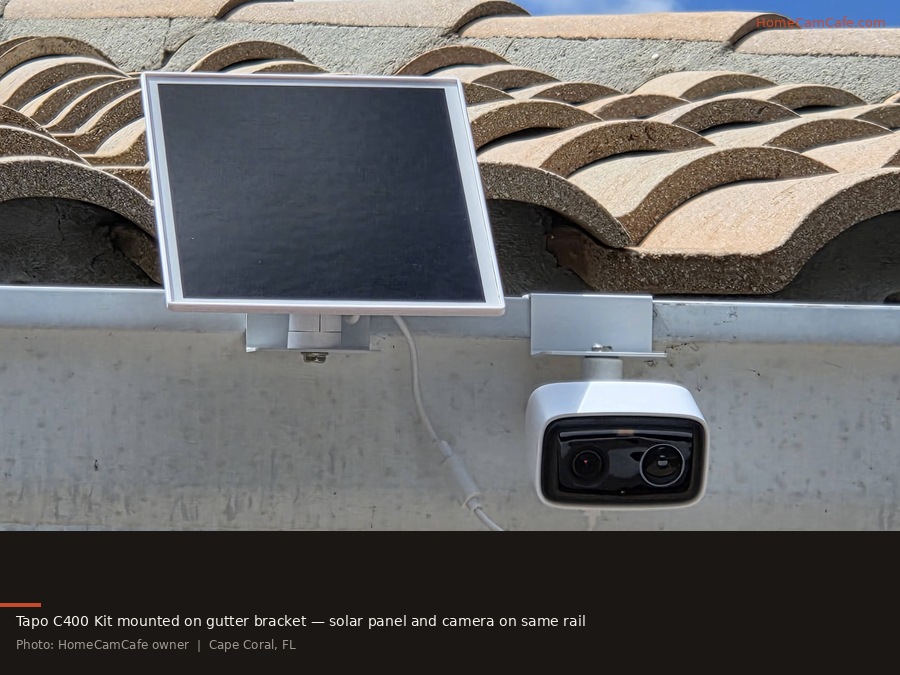
Gutter mounts are one of my favorite ways to install an outdoor camera because they put the camera high enough for a useful view without drilling into the house. A clamp grips the gutter lip and supports an adjustable camera head below or in front of the gutter.
They are especially useful above garages and driveways. You can reposition the camera later without filling screw holes, and a nearby solar panel can often share the same section of gutter.
For a broad-compatibility option, the Wasserstein 2-in-1 Universal Gutter Mount can carry a camera and solar panel together or separately. Its main camera connection uses the standard 1/4″-20 format, and the kit includes adapters for several cameras that do not attach directly through a standard threaded socket. Check the current compatibility list against your exact model before ordering.
The tradeoff is movement. Gutters are thinner and less rigid than structural walls. A light battery camera can shake in strong wind, potentially causing motion alerts or changing the viewing angle. Install the clamp near an existing gutter hanger when possible because that portion of the gutter is better supported.
Junction Box Mounts for Floodlight Cameras
Hardwired floodlight cameras are a different category. Models designed to replace an exterior light generally attach to an electrical junction box rather than a universal camera bracket.
If you already have an exterior floodlight or porch fixture, there may be a suitable electrical box behind it. That can make the location an excellent camera position because both structural support and electrical power are already available. However, verify that the existing box and mounting plate are suitable for the new camera before removing the old fixture.
Hardwired camera installation also involves household electrical wiring. Power should be shut off at the breaker before the fixture is opened. If you are not comfortable identifying the wiring or assessing the electrical box, this is one installation where bringing in an electrician makes sense. If there is no electrical box at the location where you want the camera, see our guide to mounting a floodlight camera without a junction box for the available installation options.
Window and Suction Cup Mounts
Mounting a camera inside a window can provide outdoor coverage without exposing the camera to weather or drilling through siding. A suction mount, adhesive window mount, or compact bracket can hold the lens close to the glass and reduce reflections from the room behind it.
The important night-vision rule is to turn the camera’s built-in infrared LEDs off. Glass reflects infrared light back toward the lens, which can create a bright haze or completely wash out the nighttime image. Pressing the camera close to the window helps reduce ordinary indoor reflections, but it does not make infrared illumination pass cleanly through the glass.
For the best results, place the lens as close to the pane as practical, disable IR illumination, reduce lighting inside the room, and rely on porch lights, streetlights, a camera’s low-light color sensor, or an outdoor light source after dark.
Magnetic Security Camera Mounts
Magnetic mounting is useful anywhere you have a suitable steel surface, including metal shelving, structural posts, some garage components, and steel beams. Several cameras already include magnetic mounting hardware, while a threaded magnetic base can add the same capability to cameras with a standard 1/4″-20 connection.
The ULIBERMAGNET magnetic camera mount combines a rubber-coated magnetic base, adjustable ball head, and 1/4″-20 stud. This style is useful for temporary positioning or installations where drilling into steel is undesirable.
Do not treat a magnetic strength rating as a guarantee that the mount will hold the same load in every installation. Ratings are normally measured against a clean, flat steel surface. Paint, curvature, rust, vibration, and vertical mounting can reduce real-world holding strength. For exposed outdoor locations, check the mount periodically.
Pole, Fence, and Post Mounts
Fence posts, lamp posts, deck supports, trees, and metal poles can provide excellent camera positions when the house itself is too far away. Pole mounts usually use stainless-steel bands or clamps that wrap around the support, eliminating the need to drill into it.
The Holicfun Outdoor Security Camera Pole Mount is a good example of this design. Its band-clamp system accommodates a range of pole sizes, the camera head is adjustable, and adapters are included for certain Blink and Ring cameras in addition to the standard threaded connection.
For chain-link fencing, mount to a vertical post or rigid top rail rather than the mesh itself. The mesh flexes too much to maintain a stable viewing angle. Wood fence posts can usually accept a conventional screwed bracket, while a clamp is preferable when you want the installation to remain reversible.
Mounting Cameras on Vinyl Siding
Vinyl siding moves as temperatures change, so it is not a surface where I like to drive screws through the face without a plan. There are two better approaches.
No-drill siding clips hook into the horizontal siding seam and work well for lightweight battery cameras. They are removable and avoid penetrating the siding completely. Make sure the clip and attached bracket are rated for the weight of your camera.
Mounting blocks are better for heavier or permanent installations. A mounting block provides a flat surface for the camera bracket while allowing the installation to be secured properly into the structure behind the siding instead of relying on the thin vinyl panel for support.
Camera Mount Compatibility by Brand
Brand alone is not enough to determine mount compatibility, but these are the major patterns across the cameras covered on HomeCamCafe.
| Brand | What to Know |
| Arlo Mount Guide | Standard 1/4″-20 mounting is widely supported across the outdoor lineup, although included magnetic and screw mounts vary by generation. |
| Wyze Mount Guide | Many Wyze models use 1/4″-20. Some hide the threaded connection beneath the included base. Check exceptions by model. |
| Blink Mount Guide | Blink Outdoor and Mini families use proprietary mounting interfaces. Third-party mounts usually need to be Blink-specific or include an adapter. |
| Ring Mount Guide | Ring uses model-specific bases and brackets. Stick Up, Spotlight, Indoor, and floodlight cameras should not be treated as one universal mounting system. |
| Tapo Mount Guide | Compatibility varies heavily by model. Tapo uses magnetic bases, proprietary twist-lock and bracket systems, and standard screw connections across different camera families. |
| Reolink Mount Guide | Many Argus and Go battery cameras support standard mounts. Wired RLC, Duo, TrackMix, and other models frequently use dedicated brackets. |
What to Check Before Buying a Security Camera Mount
1. Exact camera model. A mount advertised for one camera from a brand may not fit another camera from the same company.
2. Mounting connection. Determine whether your camera uses 1/4″-20, a proprietary base, a magnetic plate, a junction-box bracket, or another interface.
3. Surface. A gutter clamp, vinyl siding clip, masonry anchor, pole band, and wood screw solve completely different installation problems.
4. Camera weight and wind exposure. Lightweight indoor brackets may fit the thread but still be a poor choice for an exposed outdoor installation.
5. Battery access. A perfect camera position becomes annoying if you need a ladder every few months to remove the battery. For high installations, consider external power or solar where the camera supports it.
6. Cable routing. Plug-in and PoE cameras need a clean path for power or Ethernet. Decide how the cable will enter the building or reach an outlet before drilling mounting holes.
Bottom Line
Choose the mounting location first, then match the hardware to the camera. A standard 1/4″-20 connection gives you the widest selection of third-party mounts, but it is not universal across security camera brands. Wall and soffit brackets remain the best permanent solution, gutter mounts are excellent when you want height without drilling, pole clamps solve remote fence and perimeter installations, and magnetic mounts provide useful flexibility on steel surfaces. Most mounting mistakes happen when someone buys a bracket labeled “universal” without first checking how their exact camera attaches.
