
If you are shopping for a Google Nest solar panel, the first thing worth knowing is that Google does not build one under its own brand. Instead, Nest Cam (Battery) and Nest Doorbell (Battery) owners get their official solar charging hardware through Wasserstein, Google’s certified “Made for Google” accessory partner. Because older wired Nest cameras cannot use solar power at all and current battery models rely on proprietary connectors rather than standard USB-C ports, buying the wrong accessory is a common mistake.
This guide covers which Nest cameras and doorbells support solar charging, how the 2.5W and 3.5W Wasserstein panels compare, how to confirm your panel is charging inside the Google Home app, and whether a budget third-party panel is worth the risk.
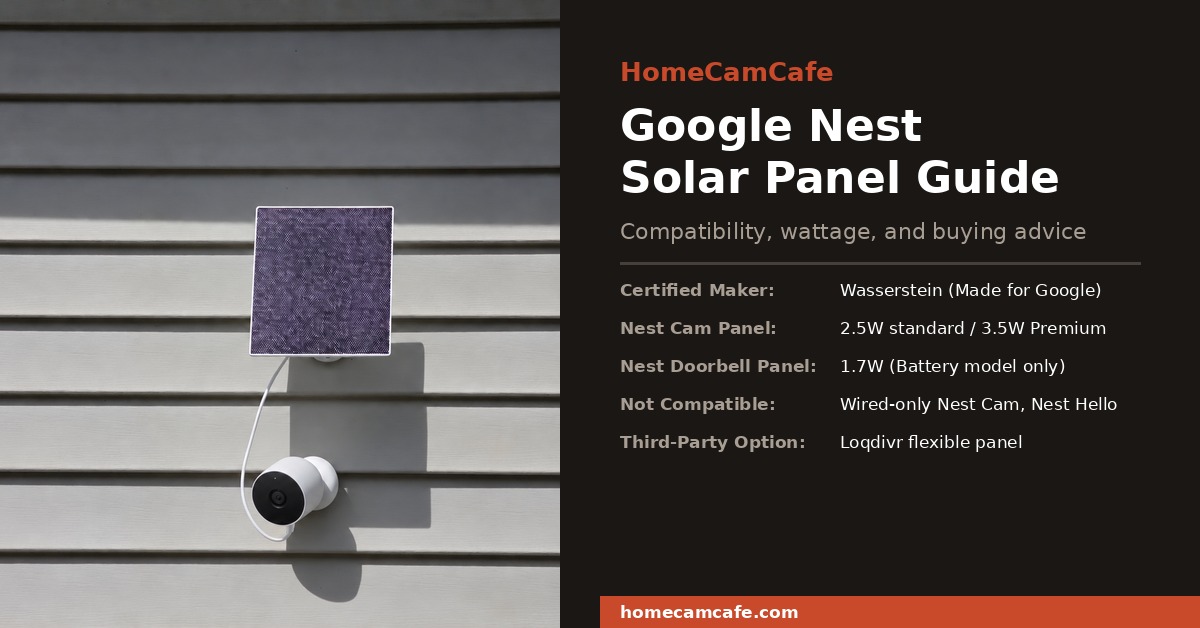
Quick Answer: Only battery-powered Nest devices support solar charging. For the Google Nest Cam (Battery), choose the Made for Google certified Wasserstein 2.5W Solar Panel for sunny locations or step up to the Wasserstein Premium 3.5W Solar Panel for high-traffic driveways and partial shade. For the Nest Doorbell (Battery), you must use the dedicated Wasserstein 1.7W Doorbell Solar Panel, which wires to the rear chime screw terminals rather than the magnetic camera port.
Does Google Make an Official Google Nest Solar Panel?
No. Google has never manufactured a first-party Google Nest solar panel under its own hardware label. Instead, Google partnered with Wasserstein through the official “Made for Google” certification program. That certification means Wasserstein’s solar panels are engineered to Google’s electrical specifications and tested to charge Nest lithium-ion batteries safely without damaging the internal power management circuitry.
Connector design is the main reason certification matters more on Nest hardware than on competing brands. Most wire-free cameras in our best solar security cameras roundup, such as models from TP-Link Tapo, Reolink, Wyze, and eufy, use a recessed USB-C or Micro-USB charging port. On those cameras, almost any weatherproof 5V solar panel with a matching USB plug will trickle-charge the battery. By contrast, the Google Nest Cam (Battery) uses a proprietary magnetic pogo-pin connector on the underside of the camera housing, while the Nest Doorbell (Battery) accepts external solar power through two rear screw terminals. Because those interfaces are unique to Nest, you must buy a panel built specifically for your exact Nest device.
Which Nest Cameras and Doorbells Support Solar Charging?
Solar charging only works on battery-powered Google Nest devices. Wired-only Nest cameras and doorbells do not contain an internal rechargeable battery, which means a low-wattage solar panel has no battery buffer to trickle-charge and cannot supply steady continuous current after sunset. In addition, older first-generation Nest outdoor cameras use permanent power cords that cannot connect to a solar panel at all.
| Google Nest Device Model | Power Architecture | Solar Compatible? | Required Connector Type |
|---|---|---|---|
| Nest Cam (Battery), Outdoor or Indoor | Built-in 6Ah rechargeable battery | Yes | Proprietary magnetic pogo-pin plug |
| Nest Doorbell (Battery) | Built-in 6Ah rechargeable battery | Yes | Two rear U-shaped spade / screw terminals |
| Nest Cam Indoor (Wired, 2nd & 3rd Gen) | Wired AC power only (no battery) | No | Hardwired USB-C / AC power adapter |
| Nest Cam with Floodlight (Wired) | Hardwired 100-240V AC junction box | No | High-voltage household electrical wiring |
| Nest Cam Outdoor / Nest Cam IQ Outdoor (Older) | Wired AC power only (no battery) | No | Legacy wired weatherproof adapter |
| Nest Doorbell (Wired, 2nd Gen) & Nest Hello | Wired 16-24V AC transformer | No | Hardwired low-voltage doorbell transformer |
In short, if your camera or doorbell has “(Battery)” in its official model name, it supports solar charging. If it does not, a solar panel will not work, and you must power the device using its standard AC adapter or low-voltage wiring. You can compare every current camera generation on our Google Nest Cam reviews and guides hub.
Google Nest Solar Panel Comparison at a Glance
Before choosing a panel, verify both the wattage rating and the connector style. Panels built for the Nest Cam (Battery) are physically incompatible with the Nest Doorbell (Battery), and choosing between the 2.5W and 3.5W camera panels comes down to how much direct sun your mounting location receives each day.
| Solar Panel Model | Rated Output | Compatible Device | Cable Length | Made for Google Certified |
|---|---|---|---|---|
| Wasserstein 2.5W Solar Panel | 2.5W | Nest Cam (Battery) | 13 ft (4 m) | Yes |
| Wasserstein Premium 3.5W Solar Panel | 3.5W | Nest Cam (Battery) | 13 ft (4 m) | Yes |
| Wasserstein Doorbell Solar Panel | 1.7W | Nest Doorbell (Battery) | 13 ft (4 m) | Yes |
| Loqdivr Third-Party Solar Panel | Unverified | Nest Cam (Battery) | 13.1 ft (4 m) | No |
Best Wasserstein Solar Panel for Google Nest Cam (Battery)
When shopping for a Wasserstein solar panel for Google Nest Cam, you have two certified wattages to choose from: the standard 2.5W model and the upgraded 3.5W Premium model. Both connect to the camera’s magnetic pogo-pin charging port and work identically on outdoor and indoor installations of the Google Nest Cam (Battery).
1. Wasserstein 2.5W Solar Panel for Google Nest Cam: Best for Sunny Locations
For low-to-moderate traffic areas with clear southern or western exposure, the standard Wasserstein 2.5W Solar Panel is the practical starting point. It ships with a 13-foot (4-meter) weatherproof cable, a 360-degree rotating wall bracket, mounting screws, wall anchors, and official Made for Google certification. On a clear day with five hours of direct sunlight, Wasserstein rates the 2.5W panel to add roughly 2% to 3% back to the camera’s battery reserve, which is enough to offset normal backyard or patio motion events.
View 2.5W Wasserstein Panel on Amazon →
2. Wasserstein Premium 3.5W Solar Panel for Google Nest Cam: Best for High Traffic or Partial Sun
If your camera watches a busy front driveway, triggers frequent night-vision recordings, or sits in a northern climate with shorter winter days, the standard 2.5W panel can fall behind daily battery drain. Stepping up to the Wasserstein Premium 3.5W Solar Panel for Google Nest Cam gives you 40% more rated wattage using higher-efficiency monocrystalline solar cells. Under five hours of direct sun, the 3.5W Premium panel restores roughly 4% to 6% battery capacity, providing a much safer margin during overcast stretches.
For placement ideas beyond the included screw-in bracket, such as clamping both the camera and solar panel onto a rain gutter without drilling holes into your fascia or siding, see our Google Nest Cam mount guide.
View 3.5W Premium Panel on Amazon →
Best Solar Panel for the Google Nest Doorbell (Battery)
The Google Nest Doorbell (Battery) cannot use the magnetic pogo-pin cable designed for the Nest Cam. Instead, its dedicated Wasserstein 1.7W Solar Panel for Google Nest Doorbell (Battery) connects using two fork-style wire leads that fasten directly under the two rear chime screws on the back of the doorbell.
There is no positive or negative polarity on those two terminal screws, so either wire lead can land on either screw. During installation, you route the thin two-wire lead through the opening in the Nest Doorbell’s wall plate or angle wedge, tighten the two terminal screws firmly, and mount the 1.7W panel outside a covered porch overhang where it can catch direct sunlight. Because 1.7W is a modest trickle charge, Wasserstein recommends placing the solar panel in direct sunlight for 8 hours during initial setup, and high-traffic front porches with heavy street motion may still require an occasional indoor USB-C top-off during cloudy winter months.
View Nest Doorbell Solar Panel on Amazon →
Is a Third-Party Nest Solar Panel Worth It?
Uncertified budget alternatives exist on Amazon for buyers outfitting multiple cameras. For example, the Loqdivr Solar Panel for Google Nest Camera is an IP65-rated monocrystalline panel molded with a compatible Nest Cam (Battery) connector, a 13.1-foot cable, and a 360-degree wall mount at a lower per-panel price than Wasserstein.
However, third-party clones lack Google’s “Made for Google” certification. That means there is no independent verification of their actual wattage output, voltage regulation, or weather-seal tolerances around the magnetic pogo pins. While many owners report that uncertified panels trigger the solar mode in the Google Home app, others run into loose magnetic seating, moisture intrusion at the pin contacts, or panels that cause the camera to register as unplugged overnight. Because the Nest Cam (Battery) relies on that proprietary magnetic interface rather than a standard USB-C port, the certified Wasserstein 2.5W or 3.5W panel remains the safer long-term choice, with uncertified panels best treated as a secondary budget experiment.
How to Install and Confirm Your Google Nest Solar Panel Is Charging
Mounting the panel takes only a few minutes, but verifying that the panel is charging your camera properly requires knowing how the Google Home app reports external solar power. Unlike some competing camera apps that display a live solar charging graph, Google Home hides the numeric battery percentage during normal solar operation. Follow these four steps to get a reliable install and confirm the connection:
- Fully charge the camera or doorbell indoors first: Before mounting the panel outside, bring your Nest Cam or Nest Doorbell indoors and charge its internal battery to 100% using the USB-C charging cable that came with the camera. Both Google and Wasserstein emphasize this step because a small solar panel is designed to maintain a charged battery, not recover a depleted battery from 5%. Connecting the indoor cable first also ensures the camera downloads any pending firmware updates needed for solar recognition.
- Mount the panel in an unshaded, south-facing spot: Install the 360-degree bracket within reach of the 13-foot cable without stretching the wire taut. Even partial shade from an eave, tree branch, or gutter lip can cut a small panel’s power output by more than half. In the Northern Hemisphere, angle the panel face toward the south (or southwest) to capture peak midday sunlight.
- Seat the connector firmly and check the Google Home app status:
- On the Nest Cam (Battery): Wipe the magnetic port clean and attach the magnetic pogo connector firmly in the correct orientation. Open the Google Home app, select your camera, and open Settings > Battery. A properly seated solar panel displays “Solar” (along with the infinity symbol
∞on the device screen) and hides the exact battery percentage whenever the battery sits above 20%. If the Nest Cam status shows “Plugged In” instead of “Solar”, unplug the magnetic connector, flip or reseat it flush against the contacts, and check again. - On the Nest Doorbell (Battery): Because the doorbell’s solar panel connects to the rear low-voltage chime screw terminals, the Google Home app recognizes it as external terminal power and displays “Plugged In” with the infinity symbol
∞.
- On the Nest Cam (Battery): Wipe the magnetic port clean and attach the magnetic pogo connector firmly in the correct orientation. Open the Google Home app, select your camera, and open Settings > Battery. A properly seated solar panel displays “Solar” (along with the infinity symbol
- Understand the 70% battery preservation cap: By design, Wasserstein’s certified solar panels charge the Nest Cam (Battery) up to roughly 70% capacity and then pause charging to reduce lithium-ion cell wear. As long as the battery remains between 20% and 70%, the Google Home app simply shows “Solar” without a number. You will only see a numeric percentage again if extended cloudy weather drains the battery below 20% (or if you temporarily unplug the solar cable to read the exact percentage).
Does a Solar Panel Eliminate the Need to Charge the Battery?
In most sunny locations, a properly angled solar panel keeps a Nest Cam (Battery) running year-round without ladder trips, provided you understand three hardware limitations built into Google’s battery platform:
- No 24/7 continuous video recording on solar power: Google restricts 24/7 continuous cloud recording to cameras connected to constant AC outlet power. Because a solar panel only trickle-charges the internal battery, a solar-connected Nest Cam or Nest Doorbell remains in event-based motion recording mode, even if you pay for the top Google Home Premium Advanced plan. For a complete breakdown of free versus paid recording rules, see our guide on whether Google Nest Cam works without a subscription.
- Freezing and extreme-heat charging lockouts (below 32°F and above 104°F): To prevent permanent lithium-ion battery damage, Google Nest devices automatically stop accepting a charge whenever temperatures drop below 32°F (0°C) or climb above 104°F (40°C). During sub-freezing winter spells, the solar panel cannot top off the battery, and the camera runs purely on its stored reserve until daytime temperatures warm back above freezing.
- High motion sensitivity can outpace solar input: If your camera faces a busy sidewalk or swaying trees that trigger dozens of long clips per day, energy drain can exceed what a 2.5W or 3.5W panel collects. If your battery drops below 20% during cloudy weeks, open Settings > Battery in the Google Home app, switch Battery Saver to More Battery Life, shorten maximum event clip length, and set up an Activity Zone to ignore street traffic. For additional fixes when a camera goes offline or fails to charge, visit our Nest Cam troubleshooting guide.
Important Note for Cold-Climate Buyers: Because a solar panel only charges the internal battery rather than powering the camera directly, cold-weather charging lockouts below 32°F affect solar setups just like standalone battery setups. If you live in an area that stays below freezing for weeks at a time and want uninterrupted winter power or 24/7 recording, use Google’s official weatherproof AC power cable instead of a solar panel, or compare purpose-built alternatives in our best outdoor security cameras guide.
Common Google Nest Solar Panel Questions
Can I use one solar panel for both a Nest Cam and a Nest Doorbell?
No. Each device requires its own dedicated solar panel, and the two models are not interchangeable. The Nest Cam (Battery) panel uses a magnetic pogo-pin connector and outputs 2.5W or 3.5W, whereas the Nest Doorbell (Battery) panel uses two fork-style screw terminal leads rated at 1.7W.
Will a solar panel work on an indoor Nest Cam (Battery)?
Yes, because the Nest Cam (Outdoor or Indoor, Battery) is the exact same physical camera whether you place it inside or outside. However, you must either route the 13-foot cable through a window seal to mount the solar panel outdoors in direct sunlight, or place the panel directly against a sunny south-facing window. Because modern Low-E window glass blocks a significant portion of solar radiation, mounting the panel outdoors or stepping up to the 3.5W Premium panel yields much better charging consistency.
Why does my Google Home app hide the battery percentage when the solar panel is connected?
When a Wasserstein solar panel is properly connected to a Nest Cam (Battery) and the battery level sits above 20%, the Google Home app replaces the numeric percentage with a “Solar” status indicator (and maintains the charge near 70% to protect long-term battery health). If you want to check the exact numeric percentage, you can either temporarily unplug the magnetic solar cable from the camera or check the status if cloudy weather causes the battery to dip below 20%.
Does a solar panel void the Google Nest Cam warranty?
No, provided you use a “Made for Google” certified accessory like the Wasserstein 2.5W, 3.5W Premium, or 1.7W Doorbell solar panel. Under US consumer warranty law, using a third-party accessory does not automatically void your camera warranty, but Google’s limited warranty does not cover hardware damage caused by an uncertified charger with faulty voltage regulation or a poorly sealed connector.
Bottom Line
A certified Google Nest solar panel is only available through Google’s official partner, Wasserstein, and works exclusively with battery-powered Nest Cam and Nest Doorbell models. For most Nest Cam (Battery) installations in sunny yards, the Wasserstein 2.5W Solar Panel is dependable and easy to mount, while busy driveways and partially shaded walls should step up to the Wasserstein Premium 3.5W Solar Panel. Nest Doorbell (Battery) owners must use the terminal-wired 1.7W Doorbell Solar Panel, and buyers who want a solar camera with free local microSD storage should compare the purpose-built kits in our solar security camera guide.
For full hands-on and technical camera evaluations, see our Google Nest Doorbell (Battery) review, our Best Solar Security Cameras roundup, and our Best Outdoor Security Cameras guide. For every Nest review, subscription breakdown, and mounting tutorial in one place, visit the Google Nest Cam hub page.
