
Want a hidden Blink camera that still captures useful footage? A Blink camera is easy to place discreetly, but hiding it behind leaves or inside a box can ruin the video you need. The best spot keeps the lens and motion sensor clear, maintains a strong connection, and suits the particular Blink model you own. Here is how to hide a Blink camera indoors or outdoors without sacrificing useful video.
Editorial note: Keep cameras in appropriate areas of your own property. Tell household members and visitors about recording where required, and check local rules before recording audio or monitoring anyone who works in your home.
First, Identify Your Blink Model
The right hiding place depends on whether the camera runs on batteries or needs an outlet. Blink Outdoor 4 and Indoor (3rd Gen) cameras use batteries and a Sync Module, making shelves and sheltered outdoor locations easier. Blink Mini and Mini 2 need continuous USB power. They can work without a Sync Module, but the power cable needs a clean route to an outlet.
Keep an Outdoor camera’s front unobstructed. Foliage, box edges, or a decorative cover can block the lens, the infrared emitter, or the motion sensor. A Mini uses a different motion detection method, but its lens still needs a clear view. Test the actual camera before deciding that a hiding place works.
The distinction matters most when you are using a cover or looking through glass. Battery-powered Outdoor and Indoor cameras generally detect movement with a passive infrared sensor, which responds to changes in heat. A cover that leaves a neat circular opening for the lens may still hide the sensor below it. The Mini family detects changes in the image instead. It may see movement through a window, but reflections, changing daylight, and a poor view can make results inconsistent. Either way, judge the placement by recorded motion clips, not by a still image in the app.
Turn Off Lights That Reveal the Camera
Blue recording light
On Outdoor 4, Indoor and Outdoor (3rd Gen), Mini, and Mini 2, open Device Settings > General Settings > Status LED and choose Always Off. XT and XT2 models have a recording LED switch inside the battery compartment. The first-generation Blink Indoor does not offer the same status-light setting. Our model-by-model Blink status light guide covers the older hardware and app menus.
For an older camera without an off setting, a small piece of black electrical tape may mask a status light. Apply it only over the indicator, never over the lens, motion sensor, microphone, or infrared area. Test a night clip afterward.
Night vision light
This varies by generation. The original first-generation Blink Indoor camera had a white LED illuminator for low-light recording, which can make a concealed camera quite obvious. Later Blink cameras generally use infrared night vision rather than a bright white light; some show a small red glow when infrared is active. The blue status-light setting does not necessarily control night vision. If any light would give away the camera, test it in the room after dark. You can turn Night Vision off if there is enough ordinary lighting, but the resulting footage may be too dark to help.
How to Hide a Blink Camera Indoors
1. A shelf with ordinary decor
Place the camera toward the back of a bookshelf or entryway shelf, among objects already there. A picture frame or bookend can break up its outline without covering the front. Point it across a doorway or room rather than directly into a nearby wall. Run a Live View check, then walk through the area to confirm it records motion where you expect.
2. An artificial plant
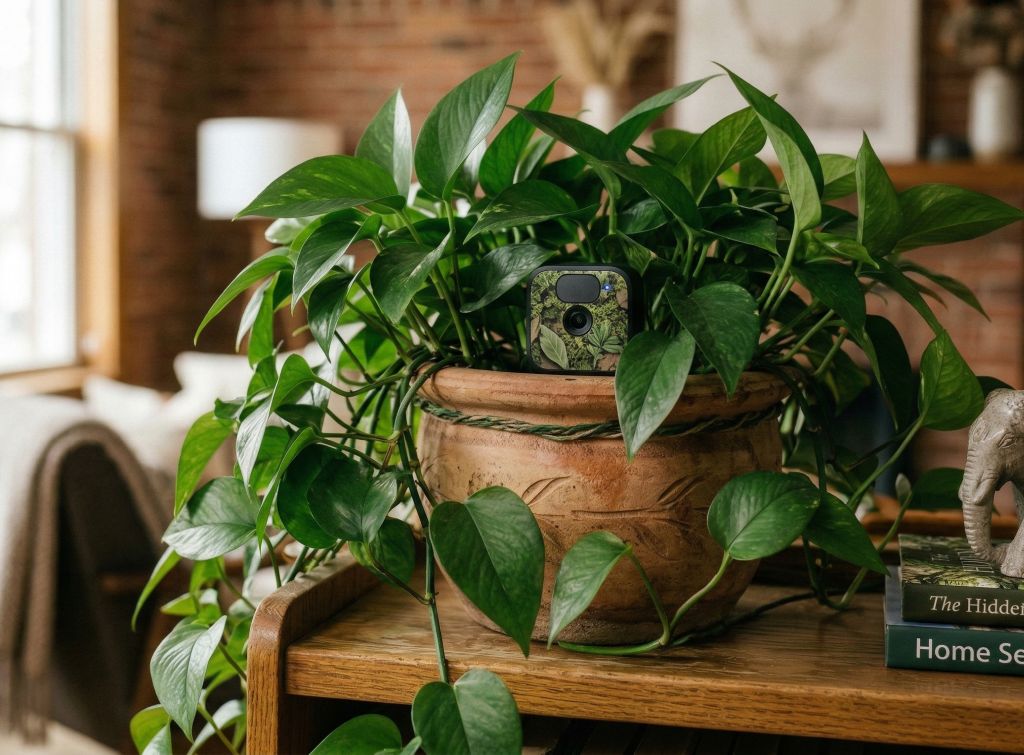
The plant in the photo shows why this can work: leaves draw the eye away from a small black camera. Set the camera near the edge of the foliage, with a clear opening in front. Move leaves away from the lens and the motion detection area, and check the view in daylight and at night. Avoid watering a real plant above a camera or power connection.
3. The underside of a high shelf
A camera mounted beneath a shelf or cabinet sits outside the normal sightline. Use a mount confirmed to fit your particular Blink model. Aim toward the area you need, avoiding a steep downward view that mostly captures the tops of heads. Before installing screws, hold the camera in position and check the image and motion alerts.
If you use adhesive instead of screws, follow the adhesive maker’s surface and weight directions and consider what will happen if it releases. A falling camera can lose its angle, break, or simply stop covering the doorway. Screws into a suitable surface are usually the more dependable choice for a spot you intend to use long term.
4. A stable railing or post mount
Where the included bracket will not fit, a flexible tripod mount can hold a compatible camera on an indoor post or railing. Verify the tripod’s camera attachment fits your Blink model; not every Blink housing has a standard tripod socket. Place it above accidental bumps and keep it clear of walkways.
5. A decorative enclosure with a clear opening
A basket or purpose-made camera cover can blend with room decor, provided it leaves the camera’s front exposed. A closed tissue box is a poor default: it can block motion detection and night vision, and a Blink Mini still needs a power cable. If you try an enclosure, record a daytime and nighttime test clip before relying on it.
How to Hide a Blink Camera Outdoors
Under an eave
An Outdoor model tucked beneath an eave is less prominent from the ground and gets some shelter from direct rain. Keep the lens aimed at the path people take through the scene. Mount it securely and leave enough access to change batteries. If you are choosing a camera for this spot, see our hands-on Blink Outdoor 4 review.
Do not point the camera straight into a bright porch light or at a wall a few inches away. At night, nearby walls can reflect infrared back into the lens and leave the rest of the scene dark. A small change in angle often improves the video more than moving the camera farther out of sight.
Beside a planter, not buried in it
Position an outdoor-rated camera next to a sheltered planter so the container softens its outline. Do not place it behind branches that move in the wind or grow across the frame. Water, soil, and dense foliage can cause more trouble than the concealment is worth.
A birdhouse or decorative housing
A housing can work if the opening is large enough for the entire useful field of view, the motion sensor, and nighttime illumination. Confirm the enclosure does not trap water and that the camera remains accessible for battery changes. Test motion alerts from several approach directions. Do not assume a tiny lens hole is sufficient.
Skip the window shortcut for an Outdoor camera. Glass can interfere with motion detection and reflect infrared light into the lens. A plugged-in Mini may sometimes work through glass in daylight, but Blink says detection is less accurate; you also need to switch off its recording and IR LEDs to reduce glare. Our Blink-through-a-window guide explains that separate setup.
Check the Hiding Spot Before You Rely on It
- Check the frame: Look for leaves, shelf edges, or housing edges in Live View. Recheck after dark with your chosen night vision setting.
- Trigger a real motion clip: Walk through the area from the directions a person would approach. A clear Live View does not prove motion detection is working.
- Check both signals: Battery-powered Blink cameras need a useful connection to Wi-Fi and their Sync Module. The Mini models need Wi-Fi and continuous power, even when used without a Sync Module. Check signal strength in Device Settings after moving a camera. Our Sync Module placement guide can help if one location is weak.
- Check upkeep: Make sure you can reach the camera to change batteries, clean the lens, or adjust the angle without dismantling the hiding place.
Repeat the test when conditions change. Leaves move, a plant grows, and seasonal light can turn a useful view into a silhouette. For an outdoor placement, check a clip after rain and another after sunset. If a camera repeatedly misses people even though the image looks clear, move it where a person crosses the detection area rather than walking directly toward the lens. Then review the camera’s motion sensitivity and activity zones in the Blink app.
Which Blink Camera Is Easiest to Conceal?
For a shelf near an outlet, a compact Blink Mini 2 can blend into indoor decor, although its USB cable needs attention. For a sheltered outdoor position or an indoor location without power, a battery-powered Blink Outdoor 4 system offers more placement freedom. Check the camera and bundle contents before ordering; a Sync Module is needed for Outdoor 4.
The HomeCamCafe Take
Start with a shelf or sheltered eave and make a test recording before adding camouflage. Turn off the model’s status light where possible, then check nighttime footage. The best hidden Blink camera is the one that still catches motion and gives you a clear view.
For more discreet placement ideas, see our guides to hiding an Arlo camera and hiding security camera cables, or browse the Blink camera guides hub.
