
How to hide a Nest Cam starts with choosing a spot that looks ordinary while leaving the camera a clear view. A shelf, a full artificial plant, or a carefully positioned decorative object can make a camera less noticeable without requiring a special enclosure. This guide focuses on the Nest Cam Indoor (wired, 3rd gen) and the Nest Cam (battery), which can also be used indoors.
Before You Pick a Hiding Spot
Check the Status Light
Do not plan around turning the Nest Cam’s status light off while the camera operates. Google Home offers High, Auto, and Low brightness settings, but no off setting for normal recording. In the Google Home app, open your camera’s settings and look for Status light brightness. Low may make the light less prominent, but you should still check how visible it is from across the room, especially at night.
Do not cover the status light with tape or place an object against the camera’s face. Plan the location around the camera as it operates, with the lens and its immediate surroundings unobstructed.
Test Night Vision in the Actual Spot
Nest Cam night vision uses infrared light. Leaves, a shelf edge, the inside of a box, or nearby glass can reflect that light into the lens and wash out the nighttime picture. Check the live view in daylight and again after dark before settling on a location. If the scene has enough ambient light, test whether the camera gives you a usable image with Night Vision turned off. If it does not, prioritize a clear nighttime view over concealment.
Check What the Camera Records
Place the camera around head height or a little higher and angle it toward the area you need to see. A wide field of view helps, but it cannot see around a vase or through dense foliage. Walk through the room while checking the live view and a saved event. This also tells you whether the camera detects activity from your chosen position, which matters particularly with the battery model.
How to Hide a Nest Cam Indoors
Place It on a Shelf Among Everyday Objects
A bookshelf is a good starting point for the wired Nest Cam. Books, picture frames, and small plants make the camera less prominent, while the shelf gives you a stable place to aim it. The Nest Cam Indoor (wired, 3rd gen) has a 152-degree diagonal field of view, so it can cover a broad area when the lens has an open sightline.
Position the camera near the front of the shelf. Objects set too close to the lens may block part of the picture or reflect infrared light at night. If the outlet is visible, a paintable D-Line cable raceway can help the power cord blend into the wall. See our guide to hiding security camera cables for other routing options.
Use a Full Artificial Plant
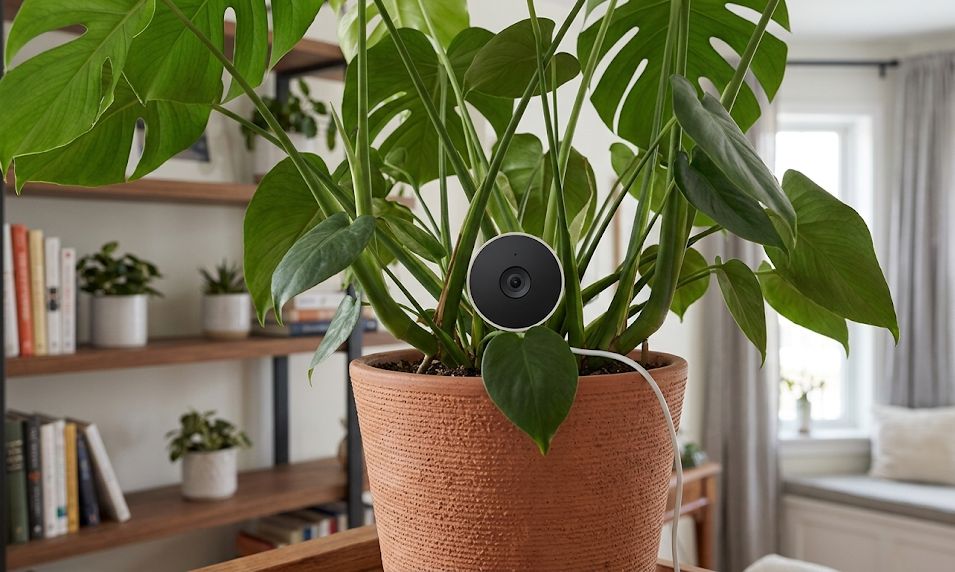
An artificial plant can disguise the camera’s outline without changing the room’s appearance much. Place the camera on a stable surface within or immediately behind the plant, then move individual leaves until the lens has a completely clear view. Check the nighttime picture too: leaves outside the daytime frame can still reflect infrared light back toward the camera.
The battery model avoids a visible power cable, but leave enough access to remove and recharge it. Do not bury either camera in foliage or cover its vents.
Set It Beside a Decorative Object
A vase, framed photo, or sculpture can hide the camera from one approach while leaving its lens pointed across the room. This works best when you want to make the camera less noticeable to someone entering, rather than conceal it from every angle. Keep the object away from the edge of the camera’s view and test whether faces remain visible where people are likely to walk.
Try a Tissue Box Only After Testing It
A tissue box is a possible DIY enclosure for a wired camera, but it takes more care than setting the camera on a shelf. The lens needs a wide, clean opening; a tiny hole can cut off much of the picture. The box also needs room for the camera and cable without pressing against the device or trapping heat. Remove loose paper from around the camera, keep its vents clear, and test the view during the day and at night. If the opening or enclosure compromises the picture, use a shelf instead.
Mounting the Wired and Battery Models
The Nest Cam Indoor (wired, 3rd gen) can sit on furniture or be attached using its integrated wall plate and screws. A wall installation can put it above the usual sightline, but it still needs a power cable. Check an accessory listing for explicit 3rd gen compatibility before buying: mounts sold for the earlier Nest Cam Indoor (wired) should not be assumed to fit.
The Nest Cam (battery) offers more placement freedom because it can operate without a cable. Its supplied magnetic mounting hardware can attach to a suitable metal surface or be installed with the included wall hardware. The battery camera also supports compatible third-party mounts with a 1/4-inch-20 thread. If you want a flexible gooseneck mount, confirm that the specific product lists your Nest Cam battery model and has a secure way to hold it before ordering.
A mounted camera needs to stay firmly in place when someone closes a door, moves a curtain, or brushes against nearby furniture. Google recommends placing the battery camera about 6 to 6.5 feet high for optimal detection. If your mounting position turns the image upside down, the Google Home app has a Rotate image 180 setting.
Which Nest Cam Is Easier to Conceal?
The Nest Cam (battery) is easier to move between locations and has no cable to give away its position. Its larger body can be harder to blend into a small shelf arrangement, and you must be able to reach it for charging. The Nest Cam Indoor (wired, 3rd gen) is easier to leave in one well-tested location, provided you can route its cable neatly.
One recording difference matters when choosing a spot: the Nest Cam (battery) needs continuous power for 24/7 video history with an eligible subscription. On battery power, plan around event recording rather than assuming it captures every moment between events. Our Nest Cam overview covers the models and recording options in more detail.
Privacy and Recording Rules
Before using a camera that others may not notice, check the rules where you live. Ownership of a home does not give you unrestricted permission to record everyone in it. Avoid bathrooms and other places where someone reasonably expects privacy. Bedrooms, guests, household employees, and shared spaces can raise additional consent issues. Audio has its own recording rules, which vary by location and circumstance. If you are unsure whether audio recording is permitted, turn the camera’s microphone off until you have checked the applicable law.
Our Verdict
Start with a shelf and an unobstructed view, then test the camera after dark. An artificial plant can help the Nest Cam blend in, but leaves must stay clear of the lens and infrared lights. Choose the battery model when a cable would be difficult to conceal; choose the wired indoor model when you want a fixed position without recharging. Neither model has a status-light-off setting for normal operation, so check how the finished setup looks with that light on Low.
More Hiding Guides
For other camera placements and cleaner installations, see these related guides:
