
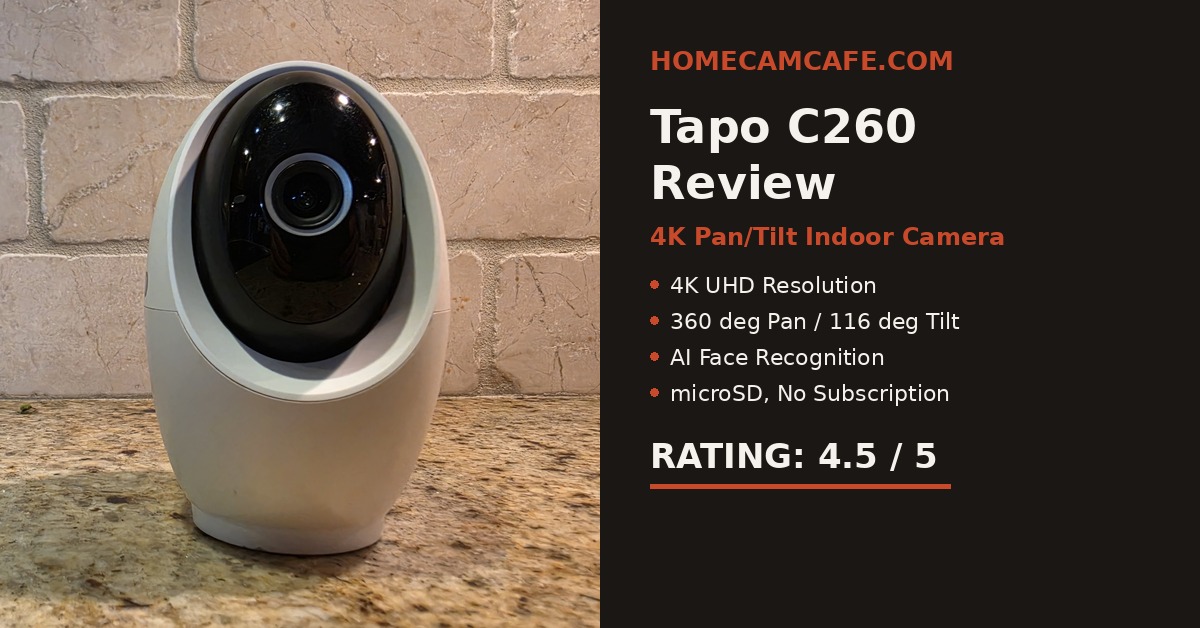
For this Tapo C260 review, we spent several weeks testing TP-Link’s 4K pan-tilt indoor camera in a real kitchen rather than a lab. We focused on the three things that matter most once a camera like this is living day to day in your home: video quality, pan-tilt tracking, and how well the AI detection holds up over time. As one of Tapo’s most capable indoor cameras, the C260 also gave us a chance to see whether its higher-end features make a meaningful difference in everyday use.
Tapo C260 Design and Setup
The Tapo C260 keeps the rounded, dome-on-a-stand shape familiar across Tapo’s higher-end indoor cameras, and it feels solid in hand. The lens housing rotates smoothly on its base without any wobble, which is not always true of pan-tilt cameras in this class.
Setup took noticeably longer than we expected. Most Tapo models pair and update in under five minutes, but the C260 needed several firmware updates back to back before it finished onboarding in the app. The entire process took closer to fifteen minutes on our first attempt. Once the updates finished, the camera behaved normally, making this a one-time setup hurdle rather than an ongoing problem.
Keep the camera close to the router during initial pairing and allow every update to complete. If you are installing several Tapo cameras at once, set up the C260 first and handle the simpler models afterward.
4K Video Quality: Why We Turned Off Auto Selection
Video quality is where the Tapo C260 earns its place at the top of the lineup. Daytime footage is sharp, colors are accurate, and the 4K sensor resolves fine detail, such as small text on packaging, from clear across a room.
In contrast to that strength, we ran into one frustration during testing: by default, the app allows the camera to automatically select video quality based on available bandwidth, and in our case it consistently defaulted to a lower resolution stream instead of the full 4K the hardware supports. Therefore, we went into the stream settings and manually forced 4K to get the quality this camera is capable of delivering. If you buy a C260 specifically for its resolution, do not skip this step, or you may conclude the camera performs worse than it truly does. Once forced to 4K, the difference in fine detail was immediately noticeable, particularly during daytime recordings.
Night Vision
After dark, the C260 produces a clean, low-noise image with enough range to cover a typical kitchen or living room without the grainy look that cheaper night vision tends to produce. The camera’s Starlight sensor is designed to hold onto color detail in low light rather than switching straight to black and white, and an invisible infrared mode is available for rooms such as a nursery or bedroom, where a visible red glow from the standard IR LEDs would otherwise be distracting. As a result, the C260 offers more flexibility after dark than a basic infrared-only camera, since you can choose the night mode that fits the room instead of using the same setting everywhere.
Pan, Tilt, and AI Motion Tracking
Physical movement is another strong point for this camera. The C260 offers a full 360-degree pan range and a wide vertical tilt, and both motors are quiet and precise during operation, even at the far edges of their range.
When a person is detected, the camera’s AI tracking follows movement smoothly across the room instead of jerking from point to point, which is a common complaint with cheaper pan-tilt cameras we have tested in the past. Furthermore, the tracking held on to a subject even when they moved close to the edge of the frame, which is exactly the scenario where budget cameras tend to lose the target and snap back to a fixed position. Most importantly, this smooth tracking held up consistently across dozens of test passes rather than working well only under ideal conditions.
AI Detection: More Impressive Than Expected
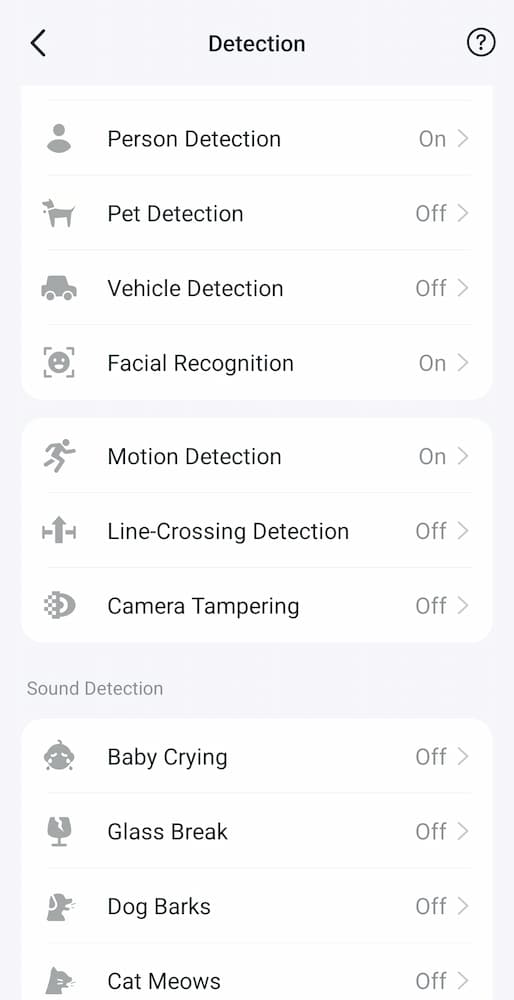
The C260’s detection suite is impressively broad in scope, and most of it performed well during our testing. Specifically, we ran the camera with Person Detection, Facial Recognition, and general Motion Detection enabled, and all three worked reliably with very few false alerts over several weeks. In addition, Pet Detection, Vehicle Detection, Line-Crossing Detection, and Camera Tampering were left off for this particular test since they were not relevant to an indoor kitchen setup, though all four are available and worth enabling if your use case calls for them.
The camera also includes a full sound detection suite, covering Baby Crying, Glass Break, Dog Barks, and Cat Meows, all of which were left off during our testing but are simple to turn on from the same settings screen shown above. For a household that wants a nursery monitor, a pet camera, and a general security camera in a single device, this is one of the more complete AI packages we have tested at this price point. Most importantly, facial recognition correctly distinguished between familiar and unfamiliar faces once we trained it on a handful of photos, which meaningfully cut down on unnecessary notifications within the first few days of use.
If you are already comparing options within the Tapo lineup, our TP-Link Tapo camera hub breaks down how the rest of the family compares on detection accuracy and video quality, so it is worth a look before you decide.
Storage and Subscription
The C260 supports local storage on a separately purchased microSD card up to 512GB. With a card installed, you can keep continuous local recordings without a Tapo Care subscription. Cloud storage remains available for anyone who wants off-site backup, but it is optional rather than a requirement for core features such as AI detection or facial recognition. This storage flexibility remains one of the main reasons the Tapo lineup stays on our list of recommendations for buyers who do not want a recurring bill attached to their security camera.
Two-Way Audio and Privacy Mode
The C260 also includes full-duplex two-way audio and a physical privacy mode, both worth knowing about even though we did not lean on them heavily during this test. Two-way audio works well for quick conversations, such as checking in on a pet or speaking with someone in the room. When activated in the app, Physical Privacy Mode rotates the lens into the camera housing so it is physically blocked and recording stops. The camera also supports defined privacy zones it will not monitor. For anyone placing the C260 in a bedroom or shared living space, physical lens blocking provides more reassurance than an on-screen status indicator alone.
Mounting Options
If you plan to mount the C260 somewhere other than a shelf or countertop, a flexible mount designed specifically for this model makes positioning considerably easier, particularly in a nursery or above a doorway. Consider adding a flexible twist mount built for the C260 as it makes angling the camera into tight spots easier than relying on the included bracket alone. The stock bracket is fine for a simple wall or ceiling mount, so the flexible option is only necessary if you need to tuck the camera into an unusual spot.
Tapo C260 Specs at a Glance
| Feature | Details |
|---|---|
| Resolution | 4K UHD (8MP) |
| Pan / Tilt Range | 360° pan, 116° tilt |
| Night Vision Range | Up to 40 feet, Starlight color and invisible IR modes |
| AI Detection | Person, pet, vehicle, facial recognition, motion, line-crossing, tampering |
| Sound Detection | Baby crying, glass break, dog barks, cat meows |
| Audio and Privacy | Full-duplex two-way audio, physical lens blocking, privacy zones |
| Third-Party Integration | RTSP and ONVIF Profile S support for NVR/NAS/Frigate use |
| Storage | microSD up to 512GB, optional cloud |
| Connectivity | Dual-band 2.4GHz / 5GHz Wi-Fi |
Owner’s Notes After Living With the Tapo C260
- Check the video-quality setting after installation. Our camera repeatedly selected a lower-resolution stream until we manually chose 4K.
- The lengthy setup appears to be a one-time issue. Several firmware updates stretched installation to around fifteen minutes, but the camera behaved normally afterward.
- Facial recognition improves after training. Adding several reference photos helped the camera distinguish familiar people from unfamiliar faces.
- Tracking remained consistent. The C260 followed people smoothly through repeated test passes, including near the edges of the frame.
- Enable only the detection types you need. Leaving irrelevant alerts disabled made the notification list easier to manage.
Who Should Buy the Tapo C260?
The C260 makes the most sense for anyone who wants one camera to cover several jobs at once. For example, a family that needs a baby monitor with cry detection, a way to keep an eye on a pet during the day, and a general indoor security camera at night can reasonably ask one C260 to handle all three roles instead of buying separate devices. Similarly, anyone who already owns other Tapo cameras will appreciate that the C260 fits into the same app and the same subscription-free storage approach as the rest of the lineup.
Who Should Skip the Tapo C260?
On the other hand, skip the C260 if you only need basic motion alerts and do not care about facial recognition or 4K resolution, since a lower-tier Tapo model will save you money without giving up much in daily use. Likewise, it is not the right pick if you need an outdoor-rated or battery-powered camera, since the C260 is a wired, indoor-only model.
Verdict: 4.5 / 5
The Tapo C260 delivers excellent 4K video, smooth 360-degree tracking, and one of the more complete AI detection suites we have tested on an indoor camera, with local recording available without a required Tapo Care subscription. Setup is slower than we expected, and you will want to manually force 4K rather than trust the app’s automatic quality selection. Neither issue is significant enough to change our recommendation. For anyone shopping in the 4K indoor pan-tilt category, the C260 is one of the strongest options available.
For related indoor pan-tilt models, see our Tapo C230 review and Tapo C210 review. For the complete lineup, visit the TP-Link Tapo camera hub.
