Indoor security cameras have gotten remarkably capable in a short time. Features that cost $200 just three years ago — 2K resolution, person detection, color night vision — are now standard on cameras under $40. However, the explosion of options makes choosing harder, not easier. This guide cuts through it: five cameras that are genuinely worth buying in 2026, covering every budget and use case from a $24 nursery monitor to a fully AI-powered smart home camera.
Furthermore, one of the most important decisions you’ll make isn’t which camera to buy — it’s how you’ll store the footage. We’ve flagged the storage situation clearly for each pick, because a camera that locks useful features behind a $10/month subscription is a very different product than one that stores everything locally for free.
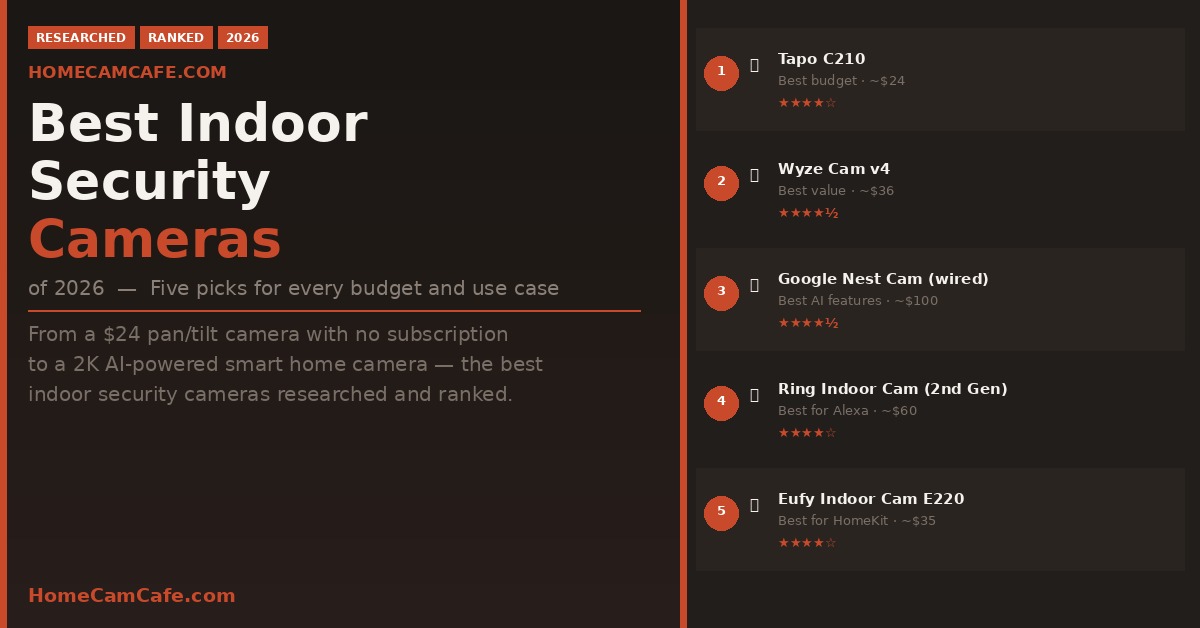
| Camera | Best For | Price | Rating |
|---|---|---|---|
| Tapo C210 | Best budget pick | Budget | ★★★★☆ |
| Wyze Cam v4 | Best value overall | Budget | ★★★★½ |
| Google Nest Cam (wired, 3rd gen) | Best AI & smart features | Premium | ★★★★☆ |
| Ring Indoor Cam (2nd gen) | Best for Alexa households | Moderate | ★★★★☆ |
| Eufy Indoor Cam E220 | Best for HomeKit users | Budget | ★★★★☆ |
How We Chose These Cameras
Indoor cameras serve a specific set of needs: monitoring a room, keeping an eye on pets or children, and detecting activity inside your home. As a result, the criteria are somewhat different from outdoor cameras. We prioritized video quality at typical indoor distances (10–20 feet), the quality of free-tier features versus what requires a subscription, ease of setup, and smart home compatibility. Price-to-value ratio matters especially in this category, where the gap between a $20 camera and a $100 camera is narrower than you’d expect.
1. Tapo C210 — Best Budget Indoor Camera
At a budget price, the Tapo C210 is the easiest recommendation on this list. It delivers 2K (2304 × 1296) resolution, full 360° pan and 114° tilt coverage, free person detection, activity zones, and local microSD storage up to 512GB — all with no subscription required. Most cameras at this price force you into a monthly plan to unlock basic features. The C210 does not. There are a few offline storage options offered with practically all Tapo cameras.
Setup is handled through the Tapo app and takes under ten minutes. The pan/tilt motor covers an entire room from a single corner placement, and the motion tracking feature follows a detected subject across the frame. Baby cry detection is included, making it a capable nursery monitor as well. Two-way audio quality is clear, and the 850nm IR night vision reaches up to 30 feet.
The tradeoffs are minor for the price: 2.4GHz Wi-Fi only, no Apple HomeKit, and no color night vision. Additionally, the motion tracking has a small delay before it starts following a subject. However, for a first indoor camera or a room where budget matters, nothing else at this price comes close.
Tapo C210 — Quick Specs
2K resolution · 360° pan / 114° tilt · IR night vision 30ft · microSD up to 512GB · No subscription required · Alexa & Google Assistant.
Check the Tapo C210 price on Amazon →
2. Wyze Cam v4 — Best Value Overall
The Wyze Cam v4 costs very little and is, in several ways, a better camera than options costing three times as much. It shoots 2.5K QHD resolution with color night vision powered by a starlight sensor — meaning it sees in full color in very low light without needing an IR switch. In addition, it includes a motion-activated spotlight, a built-in siren, and 24/7 local recording to a microSD card (up to 256GB) with no subscription required.
The camera is IP65-rated, meaning it technically works outdoors as well — though outdoor use requires a separately purchased weather-proof adapter. For indoor use, it’s plug-and-play via a 6-foot USB cable. Wi-Fi 6 support gives it a more reliable connection than most budget cameras, though it’s limited to 2.4GHz networks despite the Wi-Fi 6 designation.
The subscription situation is nuanced. Basic motion detection, local recording, and live view are all free. However, person, pet, vehicle, and package detection — as well as AI sound detection — require a Cam Plus subscription at $2.99/month per camera. That’s one of the cheapest subscription tiers in the industry, and if you only need basic motion alerts and local storage, you can skip it entirely. The Wyze Cam v4 works with Alexa and Google Assistant but not Apple HomeKit.
Wyze Cam v4 — Quick Specs
2.5K QHD · Color night vision · IP65 · microSD up to 256GB · 24/7 local recording · Wi-Fi 6 (2.4GHz) · Motion-activated spotlight · Cam Plus from $2.99/mo.
Check the Wyze Cam v4 price on Amazon →
3. Google Nest Cam (Wired, 3rd Gen) — Best AI and Smart Features
If you’re in the Google ecosystem — Google Home, Nest Hub, or Android — the third-generation Nest Cam Indoor wired is the most capable smart indoor camera available. It shoots 2K HDR video through a 152° field of view, which is wide enough to cover most rooms from a single mounting point. More importantly, it offers six hours of free on-device event storage, which means clips continue recording even if your internet goes down.
The free tier is genuinely useful: person detection, customizable activity zones, and six hours of rolling video history are all included without a subscription. That said, Google Home subscribers unlock familiar face alerts (the camera learns to recognize people in your household), vehicle and animal detection, and 30 days of cloud history. Gemini integration is also available for subscribers, enabling conversational queries about camera activity.
Furthermore, the Nest Cam includes dual-band Wi-Fi 6 (both 2.4GHz and 5GHz), which means it maintains a more reliable connection than most cameras in this category. Setup is handled through the Google Home app and takes minutes. It works with Amazon Alexa as well, though the Google Home experience is notably more integrated.
The main knock against it: useful as the free tier is, the full feature set really shines with a Google Home subscription ($6/month for a single camera or $12/month for the home). For users already paying for Google One, the camera tier may be included. Otherwise, it’s the most expensive ongoing cost on this list.
Google Nest Cam Indoor (Wired, 3rd Gen) — Quick Specs
2K HDR · 152° FOV · 6hrs free on-device storage · Dual-band Wi-Fi 6 · Person detection free · Familiar face alerts with subscription · Alexa & Google Home.
Check the Google Nest Cam price on Amazon →
4. Ring Indoor Cam (2nd Gen) — Best for Alexa Households
Ring is Amazon’s premium camera brand, and the second-generation Ring Indoor Cam is a tidy, well-built indoor camera that integrates more deeply with Alexa than any other option on this list. If you already have Echo Show displays, Fire TV, or a Ring Alarm system, the Indoor Cam fits naturally into that ecosystem — you can pull up a live feed with a voice command, get doorbell announcements on the camera’s speaker, and arm or disarm Ring Alarm from the same app.
The camera shoots 1080p HD video with a 115° field of view. That’s below the 2K resolution most competitors now offer at similar prices, which is a meaningful tradeoff. In addition, it includes a manual privacy shutter — a physical lens cover you can close when you don’t want the camera recording. That’s a genuine privacy feature that very few cameras offer, and it’s worth noting for households where that matters.
Motion detection, live view, and two-way audio are all functional without a subscription. However, to save video clips and access event history, a Ring Protect subscription is required at $4.99/month per camera or $10/month for the whole home. That’s on the higher end of subscription costs in this category. Therefore, if subscription-free local storage is a priority, the Ring Indoor Cam is not the right pick — the Tapo C210 or Wyze Cam v4 serve that use case better.
Ring Indoor Cam (2nd Gen) — Quick Specs
1080p HD · 115° FOV · Manual privacy shutter · Ring Protect from $4.99/mo for clip storage · Amazon Alexa · No Google Home / No HomeKit.
Check the Ring Indoor Cam price on Amazon →
5. Eufy Indoor Cam E220 — Best for HomeKit Users
The Eufy Indoor Cam E220 is the standout choice for Apple households. It supports Apple HomeKit, Google Assistant, and Amazon Alexa simultaneously — making it the only camera on this list that works across all three major smart home platforms. For iPhone users who want to view their camera feed directly in the Apple Home app, control it with Siri, or use HomeKit Secure Video, the E220 is the clear pick.
Beyond the ecosystem compatibility, the E220 is a genuinely capable camera. It shoots 2K resolution with 360° horizontal pan and 96° vertical tilt, covering an entire room from a single placement. AI-powered human and pet detection runs on-device, meaning no subscription is required to receive meaningful alerts. Local storage is handled by a microSD card up to 128GB, and the camera records in a continuous loop with no ongoing fees.
There are two things worth knowing before buying. First, resolution drops to 1080p when the camera is used through Apple HomeKit specifically — 2K is only available through the Eufy Security app. Second, HomeKit setup is a two-step process: you add the camera in the Eufy app first, then complete a separate HomeKit activation. It’s not difficult, but it’s less seamless than other platforms. The E220 is also compatible with Eufy HomeBase 3 (sold separately) for hard drive storage if you want to consolidate multiple cameras.
It’s competitively priced and adds pan/tilt coverage that neither the Wyze Cam v4 nor the Ring Indoor Cam offers at a similar price point.
Eufy Indoor Cam E220 — Quick Specs
2K (1080p in HomeKit mode) · 360° pan / 96° tilt · IR night vision · microSD up to 128GB · No subscription required · Apple HomeKit, Google Assistant, Amazon Alexa.
Check the Eufy Indoor Cam E220 price on Amazon →
What to Look For in an Indoor Security Camera
Resolution. 1080p is the bare minimum worth considering, but 2K — which camera brands typically define as 1296p or higher — is the standard worth buying in 2026. The difference is noticeable when identifying faces or reading details in a clip.
Storage. This is the most consequential decision after choosing the camera itself. Local microSD storage costs nothing beyond the card and keeps your footage on your property. Cloud storage is more convenient but adds a monthly cost. Several cameras on this list — Tapo C210, Wyze Cam v4, and Eufy E220 — offer fully functional local storage at no ongoing cost, which is why they rank ahead of cameras that require a subscription to save clips at all.
Smart home compatibility. Most cameras work with Alexa and Google Assistant. Apple HomeKit is rarer — if that matters to you, the Eufy E220 is your best option under $100. None of the budget cameras on this list support HomeKit except the Eufy.
Subscription costs. Always calculate the total cost of ownership over two years, not just the purchase price. A $60 camera with a $10/month subscription costs $300 over two years. A $36 camera with no subscription costs $36. That math changes the ranking quickly.
Pan and tilt. A fixed camera covers one angle; a pan/tilt camera covers an entire room. If you’re monitoring a large open space or want full room coverage from a single unit, the Tapo C210’s 360° pan/tilt is the most cost-effective way to get it.
Our Top Picks
Best Indoor Security Cameras of 2026
Best budget: Tapo C210 — 2K pan/tilt, free person detection, no subscription.
Best value overall: Wyze Cam v4 — 2.5K color night vision, spotlight, local storage.
Best AI features: Google Nest Cam (wired, 3rd gen) — 2K HDR, 6hrs free storage, Wi-Fi 6.
Best for Alexa: Ring Indoor Cam (2nd gen) — manual privacy shutter, deep Alexa integration.
Best for HomeKit: Eufy Indoor Cam E220 — works with Alexa, Google, and Apple HomeKit.
The term “Best Indoor Security Camera” is somewhat subjective and dependent upon what is important to the user. For most people buying their first indoor camera, the Tapo C210 or Wyze Cam v4 will cover everything they need without any ongoing costs. Step up to the Nest Cam if you’re deep in the Google ecosystem and want the best AI feature set. Choose the Eufy E220 if HomeKit matters. And pick the Ring Indoor Cam only if you’re already invested in the Ring/Alexa ecosystem and the manual privacy shutter is important to you.
For outdoor camera recommendations, see our Best Outdoor Security Cameras of 2026 guide.