
This Reolink RLC-510A review covers what it’s actually like to install, configure, and use this 5MP PoE security camera day to day. Rather than relying only on specifications, I’ve used the RLC-510A outdoors, tested its motion detection, watched its night vision performance, and recorded real footage from the camera.
The RLC-510A isn’t Reolink’s newest or highest-resolution camera, but that’s part of its appeal. It’s a relatively simple wired bullet camera with reliable PoE connectivity, local recording, smart detection, and no required subscription.
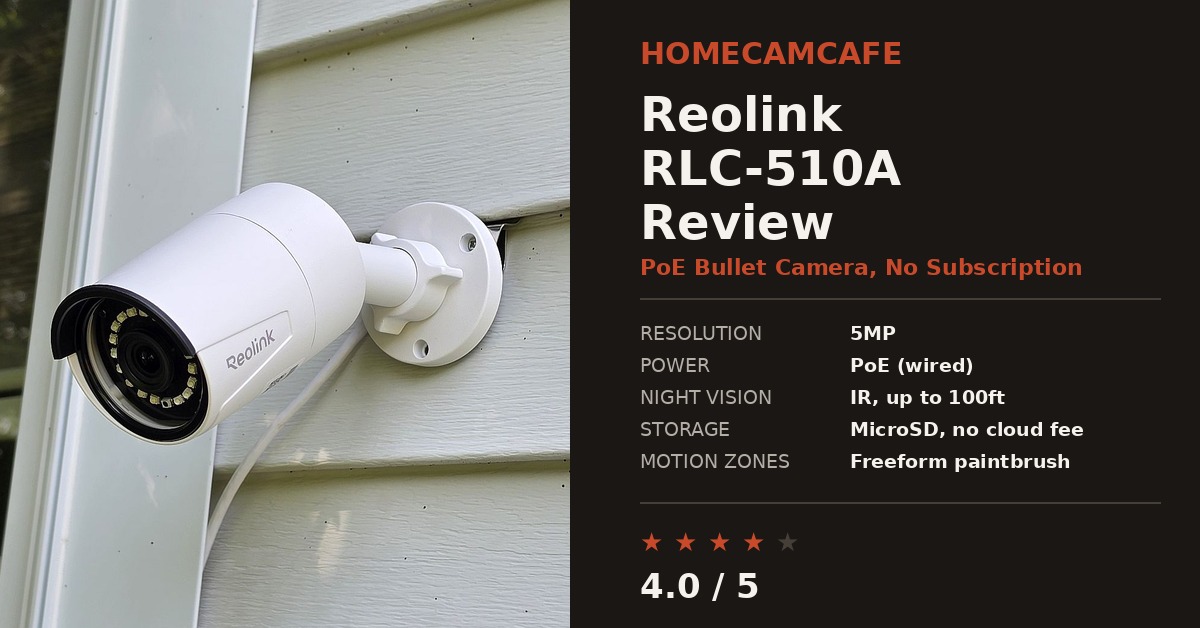
Reolink RLC-510A Setup
Setup on the RLC-510A is about as simple as a wired security camera gets.
Because it uses Power over Ethernet, a single Ethernet cable can provide both network connectivity and power. Connect the camera to a PoE switch, PoE injector, or compatible Reolink NVR and then add it through the Reolink app.
There’s no WiFi pairing process, no battery to charge, and no worrying about whether the mounting location has a strong enough 2.4GHz wireless signal.
That’s one reason I continue to like PoE cameras for permanent installations. Running the Ethernet cable takes more effort initially, but once the camera is installed, the connection is extremely dependable.
For buyers new to Reolink mounting hardware, our Reolink camera mount guide covers the mounting system used by cameras such as the RLC-510A.
Video Quality: 5MP Is Still Plenty for Many Locations
The RLC-510A records at 2560 × 1920 resolution, or 5MP.
There are now plenty of 4K and even 12MP Reolink cameras available, but resolution alone doesn’t determine whether a camera is useful. For areas such as a driveway, side entrance, garage, generator, walkway, or gate, the RLC-510A still produces a clear image with enough detail for ordinary security monitoring.
Its horizontal field of view is approximately 80 degrees. That’s considerably narrower than a panoramic camera such as the Reolink Duo series, so camera placement matters.
The upside is that the RLC-510A works particularly well when you want to monitor one defined area rather than an entire property from a single mounting point.
Real Reolink RLC-510A Video Footage
Here’s something more useful than another manufacturer specification: actual footage recorded by my RLC-510A.
This clip caught pigeons and a chipmunk hanging around on top of my generator. It isn’t a staged resolution chart or promotional clip. It’s the kind of ordinary outdoor activity a security camera sees every day, which makes it a useful example of the RLC-510A’s real-world image quality.
Being able to include footage from the actual camera is especially useful here because it shows the level of detail, color, motion handling, and field of view much better than a specification table can.
RLC-510A Night Vision
Night vision is another strong point.
The RLC-510A uses infrared LEDs rather than the spotlight-based color night vision found on some newer Reolink models. Reolink rates the infrared range at up to 100 feet.
In my testing, the black-and-white infrared image has been sharp and well exposed at normal residential distances. For a driveway, walkway, side yard, or similar installation, I haven’t found night visibility to be a weakness.
There is an important distinction here, though: if your priority is full-color nighttime footage, this isn’t the Reolink model I’d choose. The RLC-510A is built around conventional infrared night vision.
The Motion Zone Tool Is One of Its Best Features
One of my favorite features of the RLC-510A isn’t related to resolution at all.
It’s Reolink’s motion-zone editor.
Instead of forcing you to create a handful of rectangular exclusion boxes, the Reolink app lets you paint over portions of the image that you want the camera to ignore.
That sounds like a minor software feature until you use it.
Suppose a tree branch occupies an irregular section of the picture. With a rectangular motion zone, you may have to exclude part of the driveway along with the branch.
With Reolink’s paintbrush-style exclusion tool, you can trace around the branch much more precisely.
The same approach works well for:
- Tree branches
- Flags
- Busy sidewalks
- Neighboring driveways
- Road traffic at the edge of the image
- Other areas that repeatedly create unwanted alerts
The practical result is fewer unnecessary notifications without having to disable detection in areas you still want monitored.
Person, Vehicle and Animal Detection
The RLC-510A supports smart detection for people, vehicles, and animals.
That’s useful because ordinary pixel-based motion detection tends to alert on practically anything that changes in the frame.
Smart object detection lets you prioritize events that are more likely to matter.
For example, you may want person notifications immediately while being much less interested in every animal wandering through the yard.
The fact that this processing is available without requiring a monthly cloud subscription remains one of Reolink’s biggest advantages over subscription-heavy security camera platforms.
Local Storage Without a Required Subscription
The RLC-510A can record locally to a microSD card, and current versions support cards up to 512GB.
It can also record continuously rather than being limited to short motion clips.
For a single-camera installation, a microSD card may be all you need.
For a larger installation, connecting the camera to a Reolink NVR provides centralized recording and management across multiple cameras.
That’s how cameras like the RLC-510A become particularly attractive for people building a larger PoE security system. You can start with one camera and expand without having to buy a cloud subscription for every additional location.
Using the RLC-510A With an NVR
The RLC-510A works particularly well as part of a Reolink NVR system.
A dedicated NVR provides continuous recording and makes it much easier to manage several cameras from one location.
The camera also supports protocols including RTSP, making it possible to integrate it into some third-party surveillance setups.
If you’re planning a system around Blue Iris, Synology Surveillance Station, or another third-party platform, however, I’d verify support for your exact hardware and firmware combination before buying multiple cameras.
Reolink’s own ecosystem remains the simplest route if plug-and-play NVR compatibility is your priority.
Day-to-Day App Experience
One advantage of the wired connection becomes obvious after you’ve lived with the camera for a while.
Live view loads quickly and consistently.
Unlike a WiFi camera, the RLC-510A isn’t fighting phones, tablets, televisions, smart speakers, and dozens of other devices for wireless airtime.
That doesn’t mean every PoE camera will magically perform perfectly, but eliminating WiFi removes one of the most common weak points in outdoor camera installations.
For a permanently mounted security camera, I consider that a substantial advantage.
Where the RLC-510A Works Best
The RLC-510A makes the most sense when you have a fairly specific area that needs surveillance.
Good locations include:
- Driveways
- Garage entrances
- Side gates
- Walkways
- Equipment or generator areas
- Narrow side yards
- Front or rear entrances
Its relatively narrow 80-degree horizontal view makes it less suitable for monitoring a very wide backyard or large open area from one camera.
That’s where a dual-lens camera such as the Reolink Duo series becomes much more compelling.
How the RLC-510A Compares With Other Reolink PoE Cameras
Reolink has expanded its PoE lineup considerably, so the RLC-510A now sits toward the simpler end of the range.
The RLC-520A provides similar 5MP resolution in a turret-style housing.
The RLC-810A steps up to 4K resolution.
For buyers who want significantly more resolution while staying with a conventional single-lens PoE camera, our Reolink RLC-1212A review looks at the 12MP alternative.
And for very wide coverage, Reolink’s Duo cameras use two lenses to provide a panoramic image that a conventional bullet camera can’t match.
That doesn’t make the RLC-510A obsolete.
It simply gives it a more specific role: a reliable and inexpensive PoE camera for monitoring one defined area.
Reolink RLC-510A Specs
| Spec | Detail |
|---|---|
| Camera Type | Wired PoE bullet camera |
| Resolution | 2560 × 1920 / 5MP |
| Horizontal Field of View | 80 degrees |
| Night Vision | Infrared, rated up to 100 feet |
| Storage | microSD up to 512GB, Reolink NVR or FTP |
| Recording | Motion, scheduled or 24/7 recording |
| Detection | Person, vehicle and animal detection |
| Motion Zones | Freeform paintbrush exclusion tool |
| Power | IEEE 802.3af PoE or 12V DC |
| Audio | Built-in microphone |
| Weather Resistance | IP67 |
| Streaming | RTSP support |
Reolink RLC-510A Review: Final Verdict
Verdict: 4 out of 5
The Reolink RLC-510A is still a very capable camera if you want reliable PoE connectivity, local recording, smart detection, and good infrared night vision without paying for features you don’t need.
Its biggest limitation is its relatively narrow field of view. If you’re trying to cover an entire backyard from one mounting point, I’d move up to one of Reolink’s panoramic options.
But for a driveway, walkway, side entrance, garage, gate, or other clearly defined area, the RLC-510A does its job extremely well.
The freeform motion-zone editor remains one of my favorite Reolink features, PoE eliminates the wireless reliability issues that plague many outdoor cameras, and the ability to store footage locally without a required monthly subscription keeps ownership costs down.
For more help with Reolink cameras, see our guide to Reolink camera light meanings, our walkthrough on turning off the Reolink status light, and the Reolink camera mount guide.
You can also browse our Reolink camera reviews hub for additional camera reviews and comparisons.
