
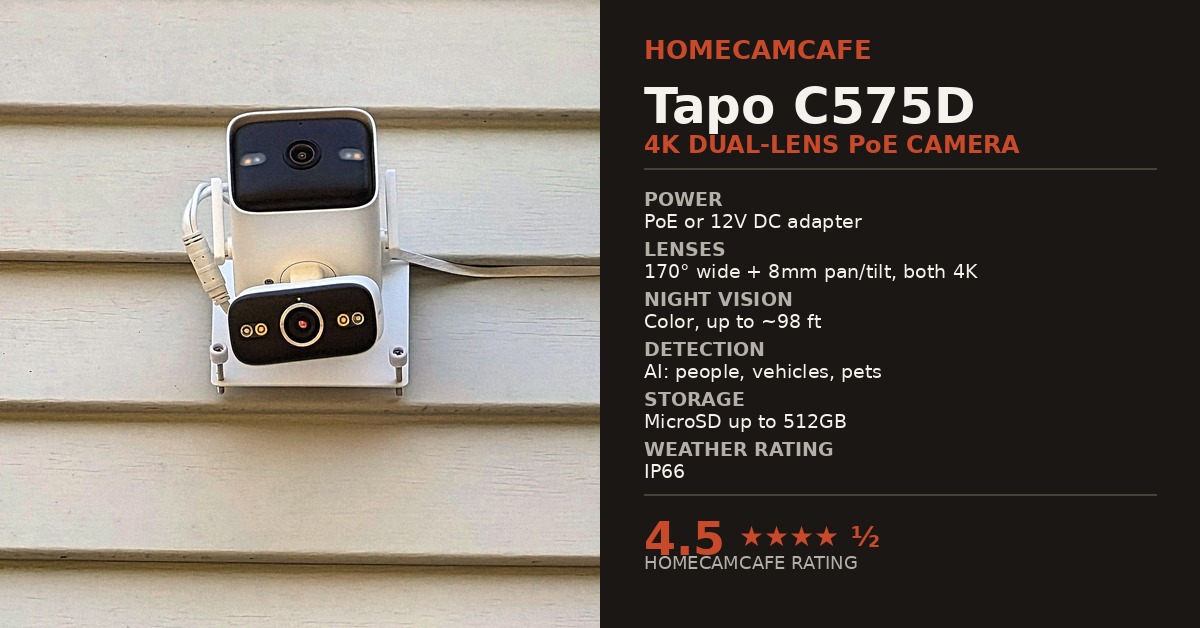
The Tapo C575D (TP-Link Tapo C575D) takes the dual 4K lens system we praised in our Tapo C675D review and moves it to a wired platform. Instead of a battery and solar panel, the Tapo C575D runs on Power over Ethernet (PoE) or a standard 12V DC adapter. After installing it above the garage and running it exclusively on PoE, the takeaway from our testing is simple: everything that made this dual-lens security camera excellent in its solar form carries over here, and the wired connection improves on it in several meaningful ways.
Tapo C575D Review: The Short Version
HomeCamCafe Rating: 4.5 / 5.0
Bottom line: The Tapo C575D is TP-Link’s best wired outdoor camera and a standout dual-lens 4K PoE security camera. Running over PoE, live views load noticeably faster and pan/tilt commands respond more briskly than on the solar-powered C675D. Better yet, it mounts on a single bracket instead of two, hits roughly 100 feet of real-world motion detection right out of the box without special battery-saving modes, and includes both PoE and 12V DC/Wi-Fi power paths plus RTSP/ONVIF support.
Tapo C575D Specifications at a Glance
| Spec | Detail |
|---|---|
| Lens 1 (fixed) | 4K 8MP · 170° wide-angle field of view |
| Lens 2 (pan/tilt) | 4K 8MP · 8mm telephoto · 360° pan / 120° tilt coverage |
| Digital zoom | 18x on both lenses |
| Night vision | Color and infrared, up to roughly 98 ft |
| AI detection | People, vehicles, pets, line-crossing · free, no subscription |
| Power | PoE (802.3af/at) or included 12V DC adapter |
| Local & NVR storage | MicroSD up to 512GB (sold separately) · RTSP & ONVIF Profile S |
| Weather rating | IP66 weatherproof |
| Wi-Fi (DC power mode) | Dual-band 2.4GHz and 5GHz |
| Smart home | Alexa, Google Assistant, Samsung SmartThings |
| App | Tapo (iOS / Android) |
Design, Single-Bracket Mounting, and Dual Power Flexibility
Physically, the Tapo C575D shares the same dual-lens layout as the C675D: a fixed wide-angle lens on top and a pan/tilt telephoto lens below, both housed in a single IP66-rated shell. However, there is no solar panel or second mounting bracket to deal with here, since this is a wired camera through and through. As a result, installation requires a single bracket, a single set of drill holes in your siding, and one cable run, which is a welcome improvement over the two-bracket setup the C675D requires.
The PoE side of the camera is thoughtfully executed. The Ethernet port sits behind a weatherproof cap, and the included cable seal keeps water out of the connection point once everything is buttoned up. In addition, TP-Link includes a 12V DC power jack as a fallback, so the same camera works over dual-band Wi-Fi and standard outlet power if you ever move it to a spot without Ethernet access.
That dual power path is worth calling out on its own, since it effectively makes the C575D two cameras in one. Run it over PoE, as we did above the garage, and you get the snappier response and rock-solid wired connection described below.
However, if a given mounting location does not have Ethernet access yet, or you are not ready to run network cable, the same camera drops onto 2.4GHz or 5GHz Wi-Fi using the included 12V DC adapter with no compromise to the video or AI detection features. This matters most for anyone still deciding whether to wire a property for PoE. There is no need to wait: the C575D can go up on Wi-Fi today and switch to PoE later if an Ethernet run gets added down the line, without buying a different camera.
Overall build quality feels consistent with what we have come to expect from the higher-end Tapo lineup. The housing is solid, the lens covers show no distortion at the seams, and the mounting bracket allows for a practical range of tilt adjustment once it is screwed into place. Furthermore, the weatherproof cable attachments included in the box make it easy to route the Ethernet cable in whatever direction makes the most sense for your mounting spot, whether that is straight down from a soffit or along the surface of horizontal siding toward a nearby entry point.
Installation note: Our garage mounting point ended up being an easy PoE candidate because it sits close to one of the mesh router nodes in the house. A short run of low-profile flat Cat6 cable tucked under the window sill was all it took to reach that node, without the bulk of round cable or a drilled exterior wall penetration. If a mesh node or network switch already lives near the spot where you want to mount a camera, that proximity alone can make PoE simpler than you might expect.
PoE Power Performance: Snappier Than the Wi-Fi C675D
Powering the Tapo C575D over PoE instead of Wi-Fi produces a noticeably snappier camera. App load times are quicker, live view starts with less delay, and manual pan/tilt commands respond a beat faster than they do on the wireless C675D. This lines up with what you would expect from a wired architecture: an Ethernet connection removes Wi-Fi congestion as a variable and eliminates the wireless wake-up handshake before every action.
To power the camera over a single Cat6 line, we used a TP-Link PoE injector for this install, which we cover in detail in our TP-Link PoE Injector review. Setup was just as smooth as it was with a Ubiquiti PoE+ injector on a previous PoE camera installation, and in both cases the process amounted to plugging in two patch cables and confirming a link light.
For a single-camera installation using standard 802.3af or 802.3at PoE, we found no meaningful performance difference between the budget-friendly TP-Link injector and the pricier Ubiquiti unit. Most of the extra cost with premium injectors goes toward industrial build quality, warranty length, and rack/ecosystem integration rather than faster camera response. As a result, an affordable PoE injector is a sensible place to start for a single-camera garage install like this one, and that has held true across multiple PoE cameras tested on this property.
Once the injector was plugged in, pairing the C575D with the Tapo app took only a couple of minutes. The app detected the wired Ethernet connection automatically and skipped the Wi-Fi password step entirely, which is a welcome shortcut compared to setting up a wireless battery camera from scratch. Additionally, because the camera draws continuous power over the Ethernet cable, there is no battery percentage to monitor and no seasonal concern about winter sunlight keeping a solar panel topped off.
Dual 4K Video Quality and Coordinated Tracking
Video quality mirrors the C675D closely, since both cameras share TP-Link’s dual 4K 8MP sensor pairing. As a 4K Tapo PoE camera, the C575D benefits from the stable bandwidth of a wired connection when streaming two high-resolution feeds simultaneously, avoiding the occasional compression artifacts a Wi-Fi camera can introduce on a busy home network.
The fixed wide-angle lens on top covers the full scene at 170°, while the 8mm telephoto pan/tilt lens below handles close-up detail across a 360° pan and 120° tilt range, automatically locking onto and tracking whatever the wide lens flags as motion. Both lenses display simultaneously in the Tapo app, giving you the full-scene context shot and the zoomed-in tracking shot at the same time from a single mount.
Color night vision and infrared night vision reach up to roughly 98 feet, and 18x digital zoom is available on both lenses for reviewing recorded footage after the fact. If you have read our C675D coverage, this imaging performance will look familiar. TP-Link built one flagship dual-lens optical system and offered it across both a battery-solar model and a wired PoE model.
In daily use, the continuous power supply helps the recording pipeline even further. Because the camera is never managing battery drain in the background, it supports true 24/7 continuous video recording to a microSD card or a third-party NVR via RTSP and ONVIF Profile S without any concern about overcast weather or battery depletion.
Motion Detection at 100 Feet (No Special Settings Required)
Mounted above the garage, our Tapo C575D reliably picks up motion at roughly 100 feet down the driveway, matching the real-world distance we saw from the C675D. However, it achieves that reach much more simply. On the battery-powered C675D, unlocking extended detection range requires enabling 24/7 Continuous Capture—a low-power interval snapshot mode built specifically for battery cameras—which in turn requires a local microSD card or Tapo Hub storage because TapoCare cloud storage does not support snapshot mode.
The wired Tapo C575D does not even have a 24/7 Continuous Capture menu option in the Tapo app. Because the camera runs on constant PoE or DC power instead of a battery, its image sensors and onboard AI are always awake, eliminating the need for a battery-saving snapshot workaround.
Our test unit is running on TapoCare cloud storage without a microSD card installed and with its motion detection settings left at their factory defaults, yet it still hits that same 100-foot detection range that the C675D needed a specific local-storage configuration to reach. For more on how wired and wireless detection systems compare, see our security camera motion detection range guide.
In practice, 100 feet of detection reach is more than enough to flag a vehicle turning into the driveway or a person walking up from the street well before they reach the garage door. Because our camera is mounted above the garage looking down the length of the driveway, the upper wide-angle lens catches the entire approach while the lower 8mm telephoto lens locks onto whatever triggered the alert.
A fox crossing the driveway late at night gave us a clear demonstration of both lenses working together in infrared night vision. In the clip below, the upper wide-angle camera keeps the tree line and driveway entrance in view while the lower zoom-and-pan camera locks onto the fox at the top of the asphalt, pans smoothly as it trots onto the lawn and along the paver border, and follows it all the way down past the garage gutter line (followed at the 0:38 mark by a daylight look at the C575D mounted on our garage siding):
Who the Tapo C575D Is For
The Tapo C575D makes the most sense for anyone who already has, or is willing to run, an Ethernet cable (or 12V DC power) to the mounting location. An attached garage with a nearby mesh node, an eave near an existing network drop, or a home wired with Cat6 are all natural candidates. In contrast, a detached shed, a fence post, or a far corner of a yard with no nearby cabling is still better served by a solar camera like the Tapo C675D KIT or single-lens Tapo C660 KIT, simply because trenching or running a long Ethernet drop is a bigger project than most homeowners want to take on for one camera.
For anyone leaning toward a wired setup, however, the C575D is an easy recommendation as a PoE outdoor camera. It combines the same dual-lens 4K video and long-range detection performance as its solar sibling with the speed and reliability of a wired security camera, all on a clean single-bracket mount.
Tapo C575D Pros and Cons
Pros
- Dual 4K 8MP lenses pair a 170° wide view with an 8mm telephoto pan/tilt tracker in one housing
- Noticeably snappier live-view loading and pan/tilt response over PoE compared to Wi-Fi solar cameras
- Reaches roughly 100 feet of real-world motion detection out of the box without needing special snapshot modes
- Single-bracket installation avoids the two-bracket footprint of the solar C675D
- Dual power flexibility: runs on 802.3af/at PoE or 2.4/5GHz Wi-Fi with the included 12V DC adapter
- Free person, vehicle, and pet AI detection plus microSD (up to 512GB) and RTSP/ONVIF support
Cons
- Requires running an Ethernet cable (with a PoE switch/injector) or plugging into a nearby 12V outlet
- Larger vertical housing than a standard single-lens PoE bullet or turret camera
- Some dual-view controls work best in the native Tapo app compared to third-party ONVIF NVR software
How the Tapo C575D Compares to the Tapo C675D
Because we have installed and tested both TP-Link dual-lens 4K cameras on the same property, here is how the wired Tapo C575D stacks up directly against the solar-powered Tapo C675D KIT (if you are also cross-shopping Reolink’s wired dual-lens cameras, see our Reolink TrackMix PoE review):
| Category | Tapo C575D (Tested) | Tapo C675D KIT (Tested) |
|---|---|---|
| Power | PoE (802.3af/at) or 12V DC adapter | 10,000mAh battery with included solar panel |
| Mounting | Single bracket | Separate camera and solar panel brackets |
| Responsiveness | Faster live view and pan/tilt over PoE | Solid, but Wi-Fi wake-up introduces a small lag |
| 100-Ft Detection Setup | Works out of the box (cloud or microSD) | Requires microSD card + 24/7 Continuous Capture mode |
| Video and lenses | Dual 4K (170° fixed + 8mm pan/tilt) | Dual 4K (169° fixed + 6mm pan/tilt) |
| Best for | Garages and eaves with Ethernet or outlet access | Locations without power or data runs |
App Experience, NVR Support, and Smart Home
The Tapo app experience is identical to the C675D, which is a good thing. Both 4K feeds display at once, switching between them is instant, and free AI detection filters (people, vehicles, pets, and line-crossing) can be set independently per lens. Activity zones work on both lenses, and the camera integrates with Amazon Alexa, Google Assistant, and Samsung SmartThings for anyone building out a broader smart home setup. Because the C575D is a wired camera, it also supports RTSP and ONVIF Profile S for recording to compatible third-party NVRs or NAS systems, though managing the coordinated dual-lens tracking is cleanest inside the native Tapo app.
Local Storage and Subscription Options
Our garage test unit is running on TapoCare cloud storage rather than a local microSD card, which made initial setup fast: no card to format, and dual-lens event clips are available from the app timeline right away. Local microSD storage remains built in for anyone who prefers zero monthly fees, with support for cards up to 512GB, and the C575D supports both local and cloud storage regardless of whether you power it via PoE or the 12V DC adapter. You can compare all three storage routes in our Tapo Care vs. Tapo Hub vs. microSD guide.
Storage tip: If you would rather skip a subscription, a microSD card enables continuous or motion-triggered local recording with no ongoing fee. The Lexar E-Series 128GB 2-Pack is a solid value option and includes two cards, or see our guide to selecting the right microSD card for a home security camera.
Frequently Asked Questions
Does the Tapo C575D require PoE, or can it work on Wi-Fi?
It supports both. You can power and connect the Tapo C575D over a single Ethernet cable using 802.3af/at PoE (via a PoE switch or injector), or plug it into a standard outlet with the included 12V DC power adapter and connect over 2.4GHz or 5GHz Wi-Fi.
Does the Tapo C575D require a monthly subscription?
No. On-device AI detection for people, vehicles, pets, and line-crossing, dual 4K live viewing, automatic pan/tilt tracking, and local recording to a microSD card (up to 512GB) or ONVIF/RTSP recorder all work without a subscription.
Why doesn’t the Tapo C575D have the 24/7 Continuous Capture setting found on the C675D?
On Tapo battery cameras like the C675D and C660, 24/7 Continuous Capture is a battery-saving interval snapshot mode. Because the wired C575D has constant PoE or DC power, it stays awake continuously for full-time motion detection (reaching roughly 100 feet in our testing on default settings) and supports true 24/7 continuous video recording to a microSD card.
Is a PoE injector included in the box with the Tapo C575D?
TP-Link includes a 12V DC power adapter and weatherproof Ethernet cable seals in the box, but if you want to run power and data over a single Ethernet cable, you will need an 802.3af/at PoE switch or a standalone PoE injector such as the TP-Link PoE injector we used for our garage install.
Bottom Line: 4.5 / 5.0
The Tapo C575D delivers everything that made the C675D one of the best dual-lens cameras we have tested, and then improves on it by removing the split solar bracket entirely. Response over PoE is noticeably snappier than Wi-Fi, the weatherproofing around the Ethernet connection is well executed, and motion detection reaches roughly 100 feet right out of the box without needing a special battery-saving snapshot configuration. The only tradeoff is that you need Ethernet or outlet access at the mounting location. For anyone who already has that, or can tuck a flat Cat6 cable to a nearby mesh node or switch, the C575D is the easier camera to live with day to day.
For more hands-on comparisons and wired setup guides, explore our TP-Link Tapo Security Camera Reviews hub, our PoE Security Cameras hub, and our PoE vs. Wi-Fi Security Camera Guide.
