
This hands-on Aosu indoor camera review puts the Aosu IndoorCam P1 Pro (also known as the Aosu Indoor Cam P1 Pro) through daily home testing. We started our Aosu camera review process for this indoor unit with fairly modest expectations, since budget pan-and-tilt cameras often cut corners on motion alerts or app speed. Instead, the P1 Pro delivered across nearly every category we tested, from accurate people detection to fast clip retrieval, while fixing several software frustrations we ran into on earlier Aosu outdoor hardware.
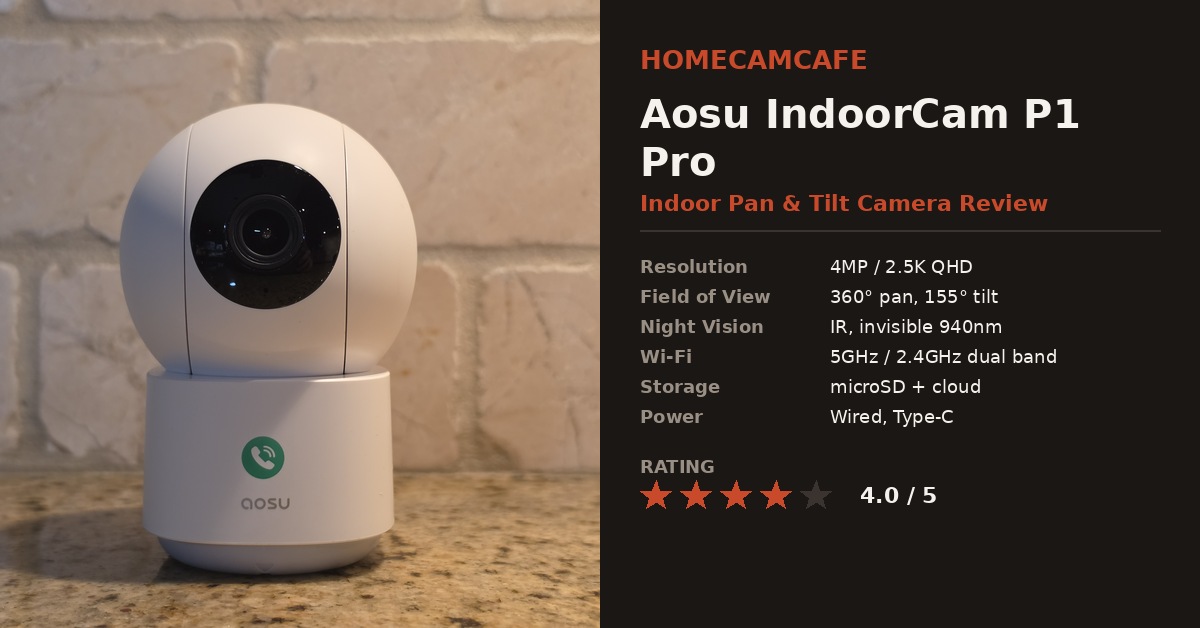
HomeCamCafe Rating: 4.0 / 5.0
Quick Answer: The Aosu IndoorCam P1 Pro (4MP / 2.5K) is the best Aosu indoor camera you can buy, combining 360-degree pan and 155-degree tilt coverage, dual-band 2.4GHz and 5GHz Wi-Fi, invisible 940nm infrared night vision, a physical one-touch call button, and subscription-free microSD recording up to 128GB. Aside from a slight downward angle during active motion tracking and a few cloud trial prompts during setup, it is a fast, reliable plug-in camera for living rooms, nurseries, and pet monitoring.
View the Aosu IndoorCam P1 Pro (1-Pack) on Amazon → View the 4MP 2-Pack Bundle on Amazon →
What Is the Aosu IndoorCam P1 Pro (Aosu Indoor Camera Lineup Explained)?
If you have searched Amazon for an Aosu indoor camera, you have probably noticed that Aosu rarely puts the model name in the product title. On Aosu’s own website and retail packaging, this camera is labeled as the Aosu IndoorCam P1 Pro or Aosu Indoor Cam P1 Pro (part numbers C2P2BH11 and C2P2CH11, series C2P / C2E). On Amazon, however, the single unit and 2-pack bundle are listed simply as the Aosu 4MP Security Camera Indoor, 2.5K Baby Monitor Pet Camera 360-Degree.
The Aosu IndoorCam P1 Pro is the upgraded 4MP (2560 x 1440 QHD) follow-up to the original 2K Aosu Indoor Cam P1. It keeps the same 360-degree horizontal pan and 155-degree vertical tilt range that made the first version popular, while stepping up video clarity and guaranteeing dual-band 5GHz and 2.4GHz Wi-Fi support across all hardware revisions. Because Aosu builds it as a continuous plug-in indoor camera rather than a battery unit, it is best suited for a fixed shelf, dresser, or tabletop near an electrical outlet.
Aosu Indoor Camera Specifications: IndoorCam P1 Pro (4MP 2.5K)
Before diving into our hands-on setup and motion testing, the table below pairs the official hardware specifications of this Aosu indoor camera with what we verified during daily use.
| Specification | Official Rating | Our Hands-On Testing Notes |
|---|---|---|
| Model Name & Part Numbers | Aosu IndoorCam P1 Pro (C2P2BH11 / C2P2CH11 / C2P / C2E) | Sold on Amazon as the Aosu 4MP 2.5K Indoor Baby & Pet Camera (1-Pack & 2-Pack) |
| Video Resolution | 4MP / 2.5K QHD (2560 x 1440 at 15fps) | Crisp indoor detail; noticeably sharper than 1080p and standard 2K |
| Pan & Tilt Range | 360-degree horizontal pan / 155-degree vertical tilt | Covers an entire room corner to corner, including floor level |
| Wi-Fi Connectivity | Dual-Band 2.4GHz and 5GHz Wi-Fi | Paired on the first attempt with zero dropped connections |
| Night Vision | 8 infrared LEDs (940nm invisible IR) | No visible red glow in dark rooms; ideal for nurseries and bedrooms |
| Smart Detection & Tracking | Person and pet detection, auto motion tracking, activity zones | Very few false alerts; active tracking tilts slightly downward |
| Two-Way Audio & Calling | Built-in mic/speaker + physical One-Touch Call button | Base button rings the paired phone directly; includes quick-reply presets |
| Privacy Mode | Motorized lens sleep mode + custom sleep schedule | Rotates the lens housing downward on command to block the camera view |
| Local & Cloud Storage | microSD card (8GB to 128GB, Class 10 / A1) or optional aosuProtect+ cloud | Tested with a 128GB microSD card under the lens; no subscription needed |
| Power Source | Plug-in USB Type-C cable and power adapter | Requires continuous outlet power; no internal battery |
| Smart Home & Sharing | Amazon Alexa, Google Assistant, up to 5 simultaneous viewers | Live stream loads in 1 to 2 seconds over home Wi-Fi (mobile app only; no PC app) |
Setup, Dual-Band Wi-Fi, and Onboarding Upsells
Setup was quick from unboxing to a live video feed. The Aosu app walked through Wi-Fi pairing without any of the dropped handshakes we have encountered on other budget indoor cameras. Because the P1 Pro supports both 5GHz and 2.4GHz networks, you do not have to split your router bands or force your phone onto a 2.4GHz guest network just to complete pairing.
That said, Aosu pushes its paid aosuProtect+ cloud subscription fairly hard during onboarding. The prompts are not aggressive enough to call a dealbreaker, like the mandatory trial screens we ran into with the Blurams Dome Lite 2, but new owners should expect to tap past a few cloud upsell screens before reaching the main live view. Overall, the entire installation took under ten minutes, which is faster than several competing indoor pan-and-tilt cameras we have tested.
Tabletop Placement and Mounting Considerations
Because the P1 Pro requires constant USB Type-C power, placement comes down to choosing a spot near an outlet with an unobstructed view of the room. The circular base sits flat and stable on a bookshelf, mantel, or nursery dresser, which is the cleanest installation route for most households and the setup we used throughout our testing.
If you prefer a high wall or ceiling corner angle, plan ahead before ordering. You will need to route the USB Type-C power cable down the wall yourself, and Aosu does not include a dedicated wall-mounting bracket in the box. Thanks to the tall 155-degree vertical tilt range, however, this Aosu indoor camera can look both upward and downward from a standard waist-high or chest-high shelf without needing ceiling installation.
People Detection, Activity Zones, and the Motion Tracking Quirk
Intelligent detection is one of the strongest reasons to buy this camera. During our testing window, the P1 Pro reliably identified human movement rather than firing off alerts for shifting curtains, passing shadows, or sunlight changes. False notifications were rare, which is a huge relief for a camera watching a busy living room, hallway, or baby nursery.
Smart motion tracking is also built in and rotates the camera head horizontally and vertically to follow a moving person or pet around the room. In daily use, however, we noticed one consistent quirk: the tracking motor tends to angle slightly downward while following motion, which can crop the top of a standing person’s head out of the frame when they walk close to the camera. It is a minor framing quirk rather than a dealbreaker, and static detection alerts do not show this behavior at all since the lens stays at your chosen preset angle.
Testing Tip: Use the built-in Detection Zones setting in the Aosu app to mask out TV screens, windows facing the street, or high-traffic doorways. Having customizable activity zones on an affordable indoor camera cuts down unwanted phone alerts and keeps the camera focused on cribs, pet beds, or entry doors.
Fast Video Retrieval and App Responsiveness
Video retrieval and timeline scrubbing were fast and responsive throughout our testing. That stood in sharp contrast to our experience with the outdoor Aosu SolarCam D1 Classic, where pulling recorded clips from local storage felt sluggish and occasionally frustrating.
Because the IndoorCam P1 Pro stays plugged into wall power and connects over 5GHz Wi-Fi, the Aosu app loads recorded events within a second or two. Scrubbing through event history, filtering clips by event type, using the 360-degree round-look preset view, and tapping fast-forward or rewind controls all worked smoothly with zero lag between rooms. Up to five family members can also view the live feed at the same time in the app.
Subscription-Free Local MicroSD Storage
The Aosu IndoorCam P1 Pro accepts a microSD card (from 8GB up to 128GB, Class 10 / A1) in a recessed slot located directly underneath the lens housing. Rotate the camera lens upward to expose the slot, insert the card, and format it inside the app. We tested the camera with a 128GB card and experienced zero formatting errors or missed recordings.
Best of all, Aosu does not lock person detection, pet detection, motion tracking, or event playback behind a monthly fee. You can skip the cloud plan entirely and rely on local microSD recording (including 24/7 continuous loop recording or event-only clips), making this a strong contender alongside the picks in our best security cameras without a subscription guide and our cheap home security cameras roundup. If you want a card built to handle constant overwriting, check our guide on selecting the right microSD card for a security camera.
Two-Way Audio, One-Touch Call Button, and 940nm Night Vision
Beyond standard two-way talk through the app, Aosu includes a physical One-Touch Call button on the front base of the camera. Pressing that button rings the paired smartphone directly without requiring the person in the room to open an app or own a phone. It is a thoughtful feature for households checking in on school-age kids after school or elderly relatives, and the app includes quick-reply voice presets if you are too busy to answer live.
For nighttime monitoring, the P1 Pro uses eight separated infrared LEDs operating at an invisible 940nm wavelength. Most budget indoor cameras use 850nm LEDs that emit a faint red glow in the dark. Because 940nm infrared is completely invisible to the human eye, this Aosu indoor camera illuminates a dark bedroom or nursery without distracting a sleeping baby or pet. You can also activate Privacy Mode in the app to rotate the lens housing downward whenever you are home, or see our guide on how to turn off the Aosu camera status light so the front status LED stays dark at night.
Need invisible 940nm night vision for your vehicle’s backseat as well? See our roundup of the best baby car monitors and rear-facing car seat cameras that run without Wi-Fi or monthly fees.
Aosu Indoor Cam P1 Pro vs. Aosu Indoor Cam P1 (2K) and TP-Link Tapo Alternatives
Shoppers comparing Aosu’s indoor lineup usually have two questions: is the 4MP Aosu Indoor Cam P1 Pro worth it over the original 2K Aosu Indoor Cam P1, and how does this Aosu indoor camera stack up against our top-rated pan-and-tilt picks from TP-Link Tapo and Reolink? Compared to the original 2K Aosu Indoor Cam P1, the P1 Pro steps up from 3MP (2K) to 4MP (2.5K) resolution and guarantees dual-band 5GHz and 2.4GHz Wi-Fi support across all retail units, while keeping the same 360-degree by 155-degree pan-and-tilt body and one-touch call button.
If you do not specifically need the physical one-touch call button, compare it against the TP-Link Tapo C210 (our favorite ultra-budget 2K pan-and-tilt camera) and the TP-Link Tapo C260 (which upgrades to 4K 8MP resolution, selectable 940nm invisible IR, and free local facial recognition). Both Tapo models include ceiling mounting hardware in the box and support RTSP/ONVIF streaming, while the Reolink E1 Pro adds a rear Ethernet port and a free Windows and Mac desktop app for continuous computer viewing.
| Feature | Aosu IndoorCam P1 Pro | Aosu Indoor Cam P1 (2K) | TP-Link Tapo C210 | TP-Link Tapo C260 |
|---|---|---|---|---|
| Max Resolution | 4MP (2.5K QHD) | 3MP (2K QHD) | 3MP (2K QHD) | 8MP (4K UHD) |
| Pan / Tilt Coverage | 360° pan / 155° tilt | 360° pan / 155° tilt | 360° pan / 114° tilt | 360° pan / 116° tilt |
| Wi-Fi Support | 2.4GHz & 5GHz | 2.4GHz (5GHz on newer revisions) | 2.4GHz only | 2.4GHz & 5GHz |
| Max microSD Capacity | Up to 128GB | Up to 128GB | Up to 512GB (256GB on v1) | Up to 512GB |
| Night Vision Type | 940nm Invisible IR | 940nm Invisible IR | 850nm Standard IR | Starlight Color + 850nm/940nm IR |
| Standout Feature | One-Touch Call Button on Base | Lower-Cost 2K Entry Option | Baby Cry Detection & Ceiling Mount | 4K Detail & Free Facial Recognition |
Pros and Cons of the Aosu Indoor Camera (P1 Pro)
Pros:
- Accurate people and pet detection: Reliably flags human and pet activity with very few false alerts from shadows or room lighting changes.
- Fast clip playback over 5GHz Wi-Fi: Timeline scrubbing and event retrieval in the Aosu app are snappy and responsive.
- Custom detection zones: Lets you block out TVs, windows, and busy doorways at no monthly cost.
- Invisible 940nm night vision: Eight infrared LEDs illuminate dark rooms without a distracting red light in a nursery or bedroom.
- One-touch call button: Allows kids or elderly family members to ring your phone directly from the camera base.
- Subscription-free microSD recording: Works with up to a 128GB card under the lens with no core detection features paywalled.
Cons:
- Downward tracking tilt: Active motion tracking tends to angle slightly downward, which can crop the top of a standing person’s head at close range.
- Onboarding cloud upsells: The Aosu app displays several cloud subscription trial screens during initial setup.
- Tabletop-focused design and mobile-only app: Requires continuous USB-C outlet power, omits a wall bracket in the box, and does not include a native PC/Mac desktop app.
Frequently Asked Questions
Does the Aosu indoor camera (IndoorCam P1 Pro) need a monthly subscription?
No. Local event recording and 24/7 loop recording work without a subscription on this Aosu indoor camera by inserting a microSD card (8GB to 128GB) into the slot underneath the lens. Person detection, pet detection, motion tracking, and activity zones are all included for free, though the app does promote the optional aosuProtect+ cloud plan during initial setup.
Does the Aosu IndoorCam P1 Pro work on battery power?
No. The P1 Pro is a wired plug-in indoor camera powered through a USB Type-C cable and wall adapter. It does not have an internal battery, so you will need to place it within reach of a standard electrical outlet.
Does the smart motion tracking follow people accurately?
Yes, with one minor framing quirk. The motorized base smoothly follows people and pets across the room, but it tends to angle slightly downward while tracking, which can crop the top of a subject’s head at close range. Static detection zone alerts do not have this issue since the camera remains at your fixed viewing angle.
What size microSD card does the Aosu IndoorCam P1 Pro support?
Aosu rates the IndoorCam P1 Pro (and the 2K Aosu Indoor Cam P1) for microSD cards from 8GB to 128GB with a Class 10 or A1 rating. We tested our unit with a 128GB microSD card in the slot under the lens housing, and it formatted and recorded clips without any issues.
How is the Aosu Indoor Cam P1 Pro different from the original Aosu Indoor Cam P1?
The Aosu Indoor Cam P1 Pro (models C2P2BH11 / C2P2CH11) upgrades video resolution from 2K (3MP) to 4MP (2.5K QHD, 2560 x 1440) and includes dual-band 5GHz and 2.4GHz Wi-Fi support across all units. Both the P1 Pro and the original Aosu Indoor Cam P1 share the same 360-degree pan, 155-degree tilt, physical one-touch call button, and invisible 940nm infrared night vision.
Final Verdict: Our Aosu Indoor Camera Review Score
Final Rating: 4.0 / 5.0
The Aosu IndoorCam P1 Pro outperformed our expectations for an affordable indoor pan-and-tilt camera. Accurate people detection, fast 5GHz video retrieval, custom activity zones, a one-touch call button, and invisible 940nm night vision make it a dependable everyday monitor for a nursery, pet room, or main living area. While the slight downward angle during active motion tracking and the setup cloud prompts keep it from a perfect score, it is easily the best Aosu indoor camera in the brand’s lineup and a strong subscription-free pick.
Check the Aosu IndoorCam P1 Pro (1-Pack) on Amazon → Check the Aosu 4MP 2-Pack on Amazon →
For more hands-on Aosu coverage and indoor camera comparisons, see our Aosu security camera reviews hub, our Aosu vs. Eufy comparison, our best indoor security cameras guide, and our best pan-and-tilt security cameras roundup.