
When comparing Reolink Home Hub vs NVR for subscription-free local video recording, the right choice comes down to how your cameras are powered and whether you plan to run Ethernet cable. After testing Reolink hardware across battery, solar, plug-in Wi-Fi, floodlight, and PoE categories on our property, including running our own Reolink RLN8-410 8-channel PoE NVR, we broke down every real-world difference between the standard Reolink Home Hub, the hard-drive-equipped Reolink Home Hub Pro, and traditional Reolink PoE NVRs so you can pick the right centralized recorder the first time.
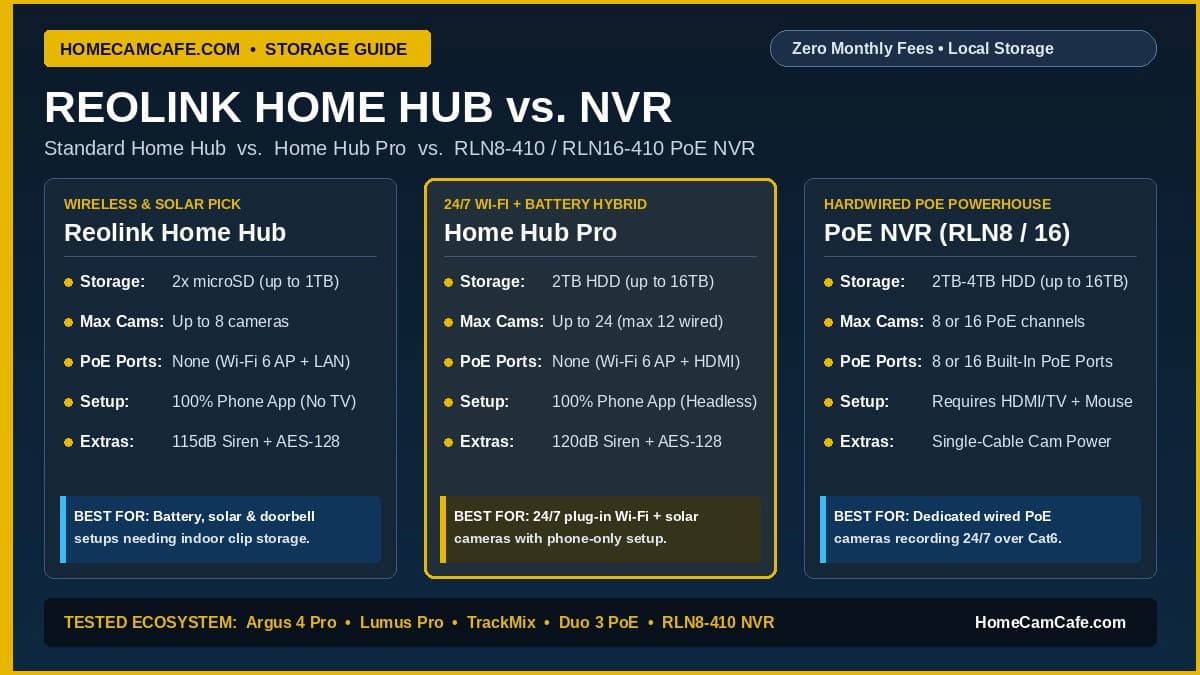
Quick Answer: Choose a traditional Reolink PoE NVR (RLN8-410 or RLN16-410) if you are installing wired PoE cameras and want single-cable power and 24/7 continuous recording straight from the back of the unit without buying a separate PoE switch. Choose the Reolink Home Hub or Reolink Home Hub Pro if your setup relies primarily on battery, solar, or plug-in Wi-Fi cameras and you want 100% phone-only setup (no monitor or USB mouse required), AES-128 encrypted off-camera storage, a built-in indoor alarm siren, and a dedicated Wi-Fi 6 hub network.
View Reolink Home Hub Pro on Amazon →
View Reolink RLN8-410 PoE NVR on Amazon →
Reolink Home Hub vs NVR: Quick Specifications Comparison
Reolink now sells two distinct families of centralized local storage hardware: the desktop Reolink hub lineup (Home Hub, Home Hub Pro, Home Hub 2, and Home Hub Mini) and traditional rack-style Reolink NVR recorders (RLN8-410, RLN16-410, RLN36, and the wireless RLN12W). While every model stores video locally inside your house with zero monthly fees, their internal storage bays, rear ports, setup requirements, and camera power delivery differ significantly.
| Feature | Reolink Home Hub | Reolink Home Hub Pro | Reolink RLN8-410 NVR | Reolink RLN16-410 NVR |
|---|---|---|---|---|
| Storage Type | 2x microSD slots (64GB card included) | Internal SATA HDD bay (2TB HDD included or diskless SKU) | 1x Internal 3.5-inch SATA HDD (2TB included) + eSATA | 2x Internal 3.5-inch SATA HDDs (4TB included) |
| Maximum Storage | Up to 1TB total (2x 512GB microSD) | Up to 16TB SATA HDD | Up to 12TB to 16TB total (internal + eSATA) | Up to 16TB total (2x 8TB internal drives) |
| Max Camera Channels | Up to 8 cameras (wired, Wi-Fi, or battery) | Up to 24 cameras (max 12 wired PoE/Wi-Fi + 12 battery) | 8 wired PoE/Wi-Fi channels (plus up to 4 battery cams on newer hardware) | 16 wired PoE/Wi-Fi channels (up to 24 total with battery cams) |
| Built-In PoE Camera Ports | None (requires separate PoE switch/injector) | None (requires separate PoE switch/injector) | 8 built-in IEEE 802.3af/at PoE ports | 16 built-in IEEE 802.3af/at PoE ports |
| Built-In Wi-Fi AP | Dual-Band Wi-Fi 6 (2.4 GHz & 5 GHz) | Dual-Band Wi-Fi 6 (2.4 GHz & 5 GHz) | None (uses your home router Wi-Fi over LAN) | None (uses your home router Wi-Fi over LAN) |
| Initial Setup Method | 100% Headless (Reolink phone/PC app) | 100% Headless (Reolink app; also has HDMI) | Requires HDMI/VGA monitor and USB mouse for initial setup | Requires HDMI/VGA monitor and USB mouse for initial setup |
| HDMI / VGA Monitor Port | No (app and desktop client viewing only) | Yes (1x HDMI port) | Yes (1x HDMI + 1x VGA port) | Yes (1x HDMI + 1x VGA port) |
| Built-In Siren & Chime | Yes (up to 115 dB siren + 11 chime tones) | Yes (up to 120 dB siren + custom voice alerts) | Internal warning buzzer only | Internal warning buzzer only |
| Storage Encryption | AES-128 anti-theft card encryption | AES-128 anti-theft drive encryption | Standard NVR account password lock | Standard NVR account password lock |
Why Reolink Created the Home Hub Series Alongside Its NVRs
For years, Reolink’s local storage answer was simple: wireless and battery cameras recorded motion clips onto an in-camera microSD card, while wired PoE cameras recorded 24/7 continuous streams onto a traditional Reolink PoE NVR. That split worked well for wired installations, but it left wireless, solar, and battery camera owners with two nagging problems.
First, storing footage strictly on a microSD card inside an outdoor camera creates a physical theft risk. If an intruder knocks a low-mounted camera off the wall or steals a battery video doorbell off the porch, they walk away with the memory card and the recorded evidence. Second, traditional Reolink NVRs like our RLN8-410 were designed like commercial CCTV appliances. To initialize a traditional NVR out of the box, you have to connect it to a television or desktop monitor with an HDMI cable and plug in a wired USB mouse to click through the on-screen setup wizard.
Reolink launched the Reolink Home Hub and Reolink Home Hub Pro to solve both issues for modern smart-home buyers. Instead of a metal rack box that demands a monitor and mouse, a Reolink hub sits upright on a shelf next to your router, pairs straight through the Reolink smartphone app in two minutes, broadcasts its own dedicated dual-band Wi-Fi 6 network for your wireless cameras, doubles as a loud indoor doorbell chime and security siren, and locks your recordings safely inside the house with AES-128 anti-theft encryption.
How the Reolink Home Hub and Home Hub Pro Work
Before deciding between a Reolink hub and a traditional NVR, it helps to understand the hardware differences inside the Home Hub family itself, particularly the jump from the standard microSD-based Home Hub to the hard-drive-based Home Hub Pro.
Standard Reolink Home Hub (Hub 1): Best for Battery and Solar Cameras
The standard Reolink Home Hub is a compact vertical tower built primarily for households running up to eight battery-powered, solar-powered, or light-duty Wi-Fi cameras, such as the Reolink Argus 4 Pro or Reolink Battery Video Doorbell. Instead of a spinning hard drive, it houses two microSD card slots on the back (supporting up to two 512GB cards for 1TB of total capacity, and typically shipping with a 64GB card in the box).
Because it uses solid-state microSD storage rather than a mechanical hard drive, the standard Home Hub runs completely silent and draws very little power. However, even with two 512GB high-endurance cards installed, 1TB of total storage fills up quickly if you try to record 24/7 continuous 4K streams from multiple wired cameras. It has no HDMI port for a television monitor, making it strictly an app-managed and PC-client-managed hub for motion-clip recording and small camera fleets.
View Standard Reolink Home Hub on Amazon →
Reolink Home Hub Pro vs NVR: The Hybrid Middle Ground
The most common question we see from buyers is Reolink Home Hub Pro vs NVR, because the Home Hub Pro blurs the line between a wireless smart hub and a full network video recorder. Unlike the standard Home Hub, the Reolink Home Hub Pro includes an internal SATA hard drive bay inside its base (shipping with a pre-installed 2TB 3.5-inch hard drive on the standard retail kit, expandable up to 16TB) plus a full-size HDMI port on the back for connecting a monitor or television.
With its 2TB to 16TB hard drive capacity, the Home Hub Pro easily handles 24/7 continuous 4K recording from plug-in Wi-Fi cameras like our Reolink Lumus Pro, Reolink TrackMix WiFi, and Reolink Elite Floodlight WiFi right alongside motion events from solar and battery cameras.
Important Note on the Two Home Hub Pro Amazon Listings: Reolink now sells two versions of the Home Hub Pro on Amazon. The original flagship model comes with a 2TB HDD pre-installed and supports up to 24 cameras total (up to 12 wired PoE or plug-in Wi-Fi cameras plus 12 battery Wi-Fi cameras). Reolink also introduced a lower-cost No-HDD (diskless) Home Hub Pro version where you supply your own hard drive and camera capacity is capped at 12 cameras total. Always check whether the listing includes the 2TB hard drive before ordering.
Reolink has also begun rolling out the Reolink Home Hub 2 (which combines a 2.5-inch SATA drive bay up to 16TB with a 1TB microSD slot and local AI keyword search for up to 8 cameras) and the budget Home Hub Mini (a single-slot microSD hub for up to 8 Wi-Fi cameras).
View Reolink Home Hub Pro (2TB HDD) on Amazon →
View Reolink Home Hub Pro (No-HDD Version) on Amazon →
How a Traditional Reolink PoE NVR Works (RLN8-410 and RLN16-410)
If your primary goal is building a permanent, hardwired Power over Ethernet (PoE) camera system, a traditional Reolink NVR like the 8-channel RLN8-410 (with a 2TB hard drive pre-installed) or the 16-channel RLN16-410 (with a 4TB hard drive pre-installed and two internal drive bays) remains the most direct, plug-and-play backbone available.
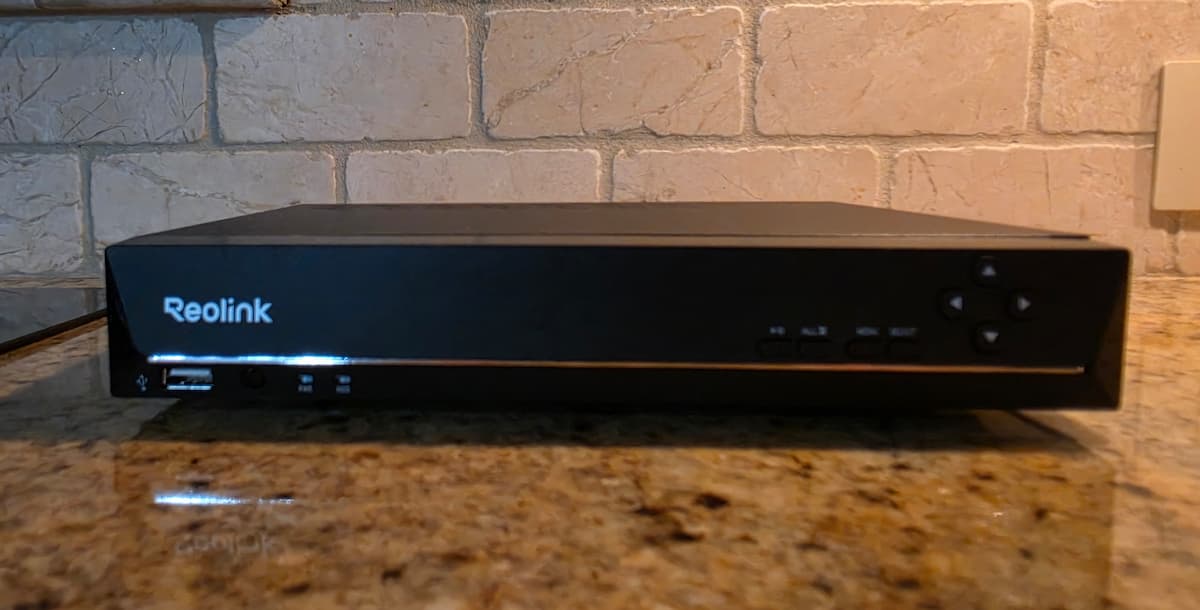
On the back of the RLN8-410, you get eight dedicated IEEE 802.3af/at PoE Ethernet ports (and 16 PoE ports on the RLN16-410). When we tested PoE cameras like the 16MP Reolink Duo 3 PoE, the 12MP Reolink RLC-1212A, and the 5MP Reolink RLC-510A on our RLN8-410 NVR, a single Cat6 cable from the NVR to each camera handled both electrical power and high-bitrate 24/7 video transmission with zero Wi-Fi congestion.
Just as important, as we showed in our hands-on guide on how to add a camera to a Reolink NVR, a Reolink PoE NVR is not limited strictly to cameras plugged directly into its rear PoE ports. As long as the NVR’s LAN port is plugged into your home router, it automatically discovers and records Reolink plug-in Wi-Fi cameras (like the Lumus Pro, E1 Pro, or Elite Floodlight WiFi) and even PoE cameras powered by a separate network switch elsewhere on your local network. Current hardware revisions of the RLN8-410 and RLN16-410 (such as N7MB01 and N6MB01) with updated firmware can also pair compatible Reolink battery Wi-Fi cameras over your home network.
View Reolink RLN8-410 (8-Ch PoE NVR) on Amazon →
View Reolink RLN16-410 (16-Ch PoE NVR) on Amazon →
6 Key Differences in the Reolink Home Hub vs NVR Matchup
When you put the Reolink Home Hub, Home Hub Pro, and PoE NVR side by side, six practical operational differences determine which unit will be easier to live with in your house.
1. Built-In PoE Power Ports vs Buying a Separate PoE Switch
Neither the Reolink Home Hub nor the Reolink Home Hub Pro has built-in PoE ports. Each hub only includes a single Gigabit Ethernet LAN port to connect the hub to your home router. While both hubs can record Reolink PoE cameras over your local network, you must power those PoE cameras yourself using either a separate multi-port PoE switch or individual PoE injectors (covered in our PoE Security Cameras hub).
By contrast, the RLN8-410 and RLN16-410 have an 8-port or 16-port PoE switch built directly into the back of the chassis. If you are running four to 16 home-run Ethernet cables back to a central closet, a Reolink PoE NVR powers every camera out of the box with one power cord on the wall.
2. Headless Phone Setup vs Mandatory Monitor and USB Mouse
As we noted in our RLN8-410 testing, a traditional Reolink NVR cannot be set up for the first time from your smartphone alone. You must plug an HDMI or VGA monitor and a USB mouse directly into the NVR to create your local administrator password, initialize the hard drive, and access certain deep system menus like rebooting, channel management, and HyBridge network modes.
Both the Reolink Home Hub and Home Hub Pro are 100% headless right out of the box. You plug the hub into power and your router, scan the QR code inside the Reolink mobile app, and complete every single setup, storage format, camera pairing, and firmware update step from your phone. If you plan to tuck your recorder on a high closet shelf or next to a router where no TV or monitor is nearby, the Home Hub series is far more convenient.
3. Dedicated Wi-Fi 6 Hub Network vs Home Router Wi-Fi
Standard Reolink PoE NVRs have no internal Wi-Fi radio at all. When you record a wireless camera like the Lumus Pro or Elite Floodlight WiFi to an RLN8-410, the camera streams its video over your existing home Wi-Fi router, which then passes the data over Ethernet to the NVR.
The Reolink Home Hub and Home Hub Pro include a built-in dual-band 2.4 GHz and 5 GHz Wi-Fi 6 access point. Your wireless Reolink cameras can connect directly to the hub’s private Wi-Fi 6 radio (or communicate over your existing home mesh network via LAN). If you have a basic ISP router that struggles when multiple 4K wireless cameras stream at once, letting the Home Hub carry that wireless camera traffic on its own dedicated Wi-Fi 6 channel keeps your main network uncluttered.
4. AES-128 Anti-Theft Encryption and Exclusive Camera Binding
Because the Home Hub series was engineered with privacy and physical security in mind, all recordings written to a Home Hub microSD card or Home Hub Pro hard drive are locked with AES-128 encryption. If someone unplugs your Home Hub microSD card or removes the hard drive and connects it to a computer, the video files are completely unreadable without your encrypted account credentials.
However, there is a major trade-off to know before binding your cameras to a Reolink Home Hub: once you add a camera to a Home Hub or Home Hub Pro, the hub takes exclusive management control of that camera. In the Reolink app, the camera moves inside the Hub group rather than functioning as a standalone device on the main screen, and unless you unbind it from the hub, you cannot access the camera’s internal microSD card independently the way you can with standalone cameras recording to a PoE NVR (especially on newer RLN16-410 units supporting Reolink’s HyBridge mode).
5. App Event Summary Dashboard and Built-In Indoor Siren
In day-to-day use, the Reolink app interface for the Home Hub series feels more modern than the classic NVR timeline. Opening a Home Hub or Home Hub Pro in the Reolink app presents a unified Event History dashboard with daily, weekly, and monthly statistical rollups of Person, Vehicle, Animal, and Package detections across all connected cameras at once, making it easy to filter every motion clip from the whole property on one screen.
Additionally, the Home Hub (115 dB) and Home Hub Pro (120 dB) feature a loud built-in speaker that acts as both an indoor security siren when an outdoor camera detects an intruder and an indoor chime when someone presses a Reolink Video Doorbell. A traditional RLN8-410 or RLN16-410 NVR only has a tiny internal piezoelectric motherboard buzzer meant for hard-drive error beeps.
6. Smart Home Integration: Google Nest Hub, Alexa, and Home Assistant
Buyers searching for Reolink Google Nest Hub or Reolink SmartThings compatibility should know how hubs and NVRs expose camera feeds to voice assistants and smart displays. While Reolink does not offer a native Samsung SmartThings video integration, both the Reolink Home Hub series and Reolink NVRs work with Google Home / Google Nest Hub smart displays and Amazon Alexa Echo Show screens so you can say, “Hey Google, show the driveway camera” (see our Google Nest Hub security camera guide for how live voice streaming works).
Even better for advanced smart-home users, the Reolink Home Hub and Home Hub Pro act as a local bridge for Home Assistant, allowing Reolink battery-powered cameras and the 2nd-Gen Battery Video Doorbell to expose alerts and streams locally without draining their batteries through constant polling.
Which Reolink Storage Option Fits Your Cameras?
Because we have tested nearly every Reolink camera style on our own property, here is how we recommend matching specific cameras from our Reolink Camera Reviews hub to the right storage unit:
- All-Battery or Solar Camera Setups (2 to 8 Cameras): If your property uses wire-free solar cameras like the 4K dual-lens Reolink Argus 4 Pro plus a Reolink Video Doorbell, get the standard Reolink Home Hub and drop in a pair of high-endurance microSD cards (see our security camera microSD card guide). Since battery cameras only record motion clips rather than 24/7 streams, up to 1TB of encrypted microSD space holds months of events indoors while giving you a loud indoor doorbell chime and freeing you from Reolink Cloud subscription plans.
- Plug-In Wi-Fi or Mixed Battery + Wired Setups (24/7 Recording Without Running PoE): If you are installing plug-in Wi-Fi cameras that record 24/7 (such as the Reolink Lumus Pro, Reolink TrackMix WiFi, Reolink Elite Floodlight WiFi, or indoor Reolink E1 Pro) mixed with a few solar Argus cameras, get the Reolink Home Hub Pro (2TB HDD version). You get full hard-drive retention for 24/7 continuous recording, a dedicated Wi-Fi 6 hub network, and headless phone setup without needing a monitor or mouse.
- Dedicated Wired PoE Camera Systems (4 to 16 Wired Cameras): If you are running Ethernet cables for hardwired PoE models like the Reolink Duo 3 PoE, Reolink RLC-1212A, Reolink RLC-510A, or TrackMix PoE, get the Reolink RLN8-410 (or RLN16-410). The built-in rear PoE ports power every camera directly, and the NVR allows standalone camera microSD cards to act as a redundant backup alongside 24/7 NVR hard drive recording.
Comparing Reolink’s Hub Against TP-Link Tapo or eufy? Unlike the TP-Link Tapo H500 Smart HomeBase or eufy HomeBase S380 (which add hub-processed facial recognition to connected cameras), the Reolink Home Hub and Home Hub Pro are storage, network, and alarm centers rather than AI upgrade boxes. They rely on the person, vehicle, and animal AI already built into your Reolink cameras. For a broader ecosystem comparison, see our Reolink vs eufy comparison.
Pros and Cons of Each Reolink Local Storage Option
Reolink Home Hub & Home Hub Pro: Pros and Cons
- Pros: 100% headless setup and management through the Reolink phone app (no monitor or USB mouse needed); built-in Wi-Fi 6 access point offloads wireless camera traffic from your home router; AES-128 anti-theft storage encryption; built-in 115 dB to 120 dB indoor alarm siren and doorbell chime; unified multi-camera Event History summary view in the app; native battery/solar camera support for Home Assistant.
- Cons: Zero built-in PoE ports (PoE cameras require a separate PoE switch or injector); cameras bound to a Home Hub lose standalone independent app access; standard Home Hub maxes out at two 512GB microSD cards and lacks an HDMI port; does not add facial recognition AI to cameras.
Reolink PoE NVR (RLN8-410 & RLN16-410): Pros and Cons
- Pros: Built-in 8 or 16 PoE ports deliver power and video over a single Cat6 cable; built from the ground up for heavy 24/7 continuous multi-camera 4K, 12MP, and 16MP recording; allows cameras on a PoE switch or HyBridge mode to keep independent standalone microSD recording alongside NVR recording; includes both HDMI and VGA monitor outputs.
- Cons: Requires connecting a physical monitor/TV and USB mouse for initial out-of-the-box setup and certain system menus; no built-in Wi-Fi access point and no loud indoor chime/siren speaker; cooling fan inside the metal chassis is slightly more audible than a silent microSD hub.
Frequently Asked Questions
Can a Reolink PoE NVR record Reolink battery and Wi-Fi cameras?
Yes. Any Reolink plug-in Wi-Fi camera on the same local network as your Reolink NVR can be added and recorded over LAN. Additionally, newer hardware versions of the RLN8-410 (such as N7MB01) and RLN16-410 (such as N6MB01) running current firmware can also record compatible Reolink battery and solar Wi-Fi cameras over your home network.
Can I connect Reolink PoE cameras to a Reolink Home Hub or Home Hub Pro?
Yes, both the standard Reolink Home Hub (up to 8 cameras) and the Reolink Home Hub Pro (up to 12 wired cameras) support Reolink PoE cameras. However, because neither hub has built-in PoE ports on the back, you must power your PoE cameras using a separate PoE switch or PoE injector plugged into your network.
Do I need a monitor and mouse to set up the Reolink Home Hub Pro?
No. Unlike the RLN8-410 and RLN16-410 NVRs, which require a wired monitor and USB mouse for initial setup, both the standard Home Hub and the Home Hub Pro can be initialized, formatted, and managed entirely from the Reolink smartphone app. The HDMI port on the back of the Home Hub Pro is strictly optional if you want to view cameras on a TV or monitor.
Does a dual-lens Reolink camera like the Duo 3 or TrackMix use two channels on a Home Hub or NVR?
No. Unlike some competing brands where dual-lens cameras consume two hub channels, Reolink dual-lens cameras such as the Argus 4 Pro, Duo 3 PoE, Elite Floodlight WiFi, and TrackMix only take up a single camera channel on a Reolink Home Hub, Home Hub Pro, or Reolink PoE NVR.
Can I use a Reolink Home Hub and a Reolink NVR at the same time?
They operate as separate systems inside the Reolink app. Because binding a camera to a Reolink Home Hub locks that camera to the hub’s encrypted management protocol, a camera paired to a Home Hub cannot simultaneously record its stream to a separate Reolink NVR.
Bottom Line: Which One Should You Buy?
If you are wiring your home with Cat6 cable for PoE cameras, skip the hubs and buy the Reolink RLN8-410 or RLN16-410 PoE NVR so every camera gets single-cable power and 24/7 continuous hard-drive recording right out of the box. If your property runs on solar or battery cameras (like the Argus 4 Pro) and you want theft-safe indoor clip storage plus a doorbell chime, grab the standard Reolink Home Hub. And if you want 24/7 continuous hard-drive recording for plug-in Wi-Fi cameras (like the Lumus Pro or TrackMix WiFi) alongside battery cameras without ever hooking up a monitor or mouse, the Reolink Home Hub Pro (2TB HDD version) is the clear sweet spot.
Check Reolink Home Hub Pro on Amazon →
Check Reolink RLN8-410 PoE NVR on Amazon →
For more hands-on camera testing and storage guides, explore our Reolink Security Camera Reviews hub, our Best PoE Security Cameras roundup, and our Best Security Cameras Without a Subscription guide.
